

JVCL Components: what changed
Revision 2 to 3. Removed lines have a minus sign; added lines have a plus sign.
| Old | New | Line | |
|---|---|---|---|
| 1 | 1 | ## About | |
| 2 | 2 | ||
| 3 | - | ||
| 3 | + | JVCL is a library of more than 600 Delphi visual and non-visual components (<https://github.com/project-jedi/jvcl>). Although heavily Windows-centered, some of them have been ported to Lazarus. This page intends to give a summary of the JVCL components available for Lazarus. Some of the info snippets were taken from <http://wiki.delphi-jedi.org/wiki/JVCL_Component_Overview>. | |
| 4 | 4 | ||
| 5 | 5 | ## Packages | |
| 6 | 6 | ||
| 7 | - | ||
| 7 | + | Due to the large number of components the original Delphi version is split into a variety of packages. The Lazarus port follows this convention because the user can install only the functionality needed. | |
| 8 | 8 | ||
| 9 | - | ||
| 9 | + | For each package, a runtime and designtime version is available. Runtime packages can be identified with an appended R, designtime packages with an appended D. In the requirements for a project always use the runtime package. | |
| 10 | 10 | ||
| 11 | 11 | ### JvCore | |
| 12 | 12 | ||
| 13 | - | ||
| 13 | + | Provides basic functionality needed by all other packages. | |
| 14 | 14 | ||
| 15 | 15 | ### JvStdCtrls | |
| 16 | 16 | ||
| 17 | - | ||
| 18 | - | ||
| 17 | + | Depends on package _JvCore_. | |
| 18 | + | Enhanced standard controls | |
| 19 | 19 | ||
| 20 | - | ||
| 21 | - | ||
| 22 | - | ||
| 20 | + | * **TJvCheckbox** : Has a property `LinkedControls`. Linked controls can be enabled/disabled according to the `Checked` state of the Checkbox. | |
| 21 | + | * **TJvPanel** : an extended panel with hot-tracking effects and automatic placement of child components (similar to LCL's `ChildSizing` property). Can be dragged and resize at runtime. See example project _JvPanelDemo_. | |
| 22 | + | * **JvCalcEdit** : a numeric edit control which opens a calculator dialog. | |
| 23 | 23 | ||
| 24 | 24 | ### JvCtrls | |
| 25 | 25 | ||
| 26 | - | ||
| 27 | - | ||
| 26 | + | Depends on packages _JvCore_ and _JvStdCtrls_. | |
| 27 | + | Visual controls | |
| 28 | 28 | ||
| 29 | - | ||
| 30 | - | ||
| 31 | - | ||
| 32 | - | ||
| 33 | - | ||
| 34 | - | ||
| 35 | - | ||
| 29 | + | * **TJvBehaviorLabel** : a label with special display effects: Blinking, bouncing, scrolling, typing, appearing, "special", "code breaker". See demo _examples/JvBehaviorLabel_. | |
| 30 | + | * [](</File:tjvmovablebevel.png>) **TJvMovableBevel** : a bevel which can be dragged and resized at runtime | |
| 31 | + | * [](</File:tjvmovablepanel.png>) **TJvMovablePanel** : the same, but now for a panel. Note that this component does not belong to JVCL, it is a simple adaption of TJvMovableBevel to the panel case. | |
| 32 | + | * [](</File:tjvruler.png>) **TJvRuler** : a ruler to indicate distances in centimeters, inches or pixels | |
| 33 | + | * [](</File:tjvgroupheader.png>) **TJvGroupHeader** : header with attached bevelled line. | |
| 34 | + | * [](</File:tjvrollout.png>) **TJvRollOut** : expandable panel with headerline. | |
| 35 | + | * [](</File:tjvhint.png>) [](</File:tjvhtlabel.png>) [](</File:tjvhtlistbox.png>) [](</File:tjvhtcombobox.png>) **TJvHtLabel** , **TJvHTCombobox** , **TJvHTListbox** and **TJvHint** : a set of controls which can display HTML text | |
| 36 | 36 | ||
| 37 | - | ||
| 37 | + | [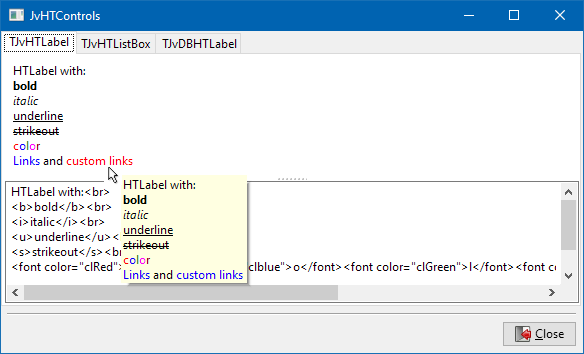](</File:JvHTCcontrols.png>) | |
| 38 | 38 | ||
| 39 | - | ||
| 40 | - | ||
| 39 | + | * **TJvComboListBox** : a listbox which can display a combobox overlaying the selected listbox item. Assign a TPopupMenu to the DropdownMenu property and it will be shown when the combo button is clicked. You can also handle the OnDropDown event for custom handling when the button is clicked, or example, displaying a drop down form. These features are demonstrated in the _JvComboListBox_ example project. | |
| 40 | + | * **TJvOfficeColorPanel** : a panel for color selection designed like the one used by Office 97. | |
| 41 | 41 | ||
| 42 | - | ||
| 42 | + | [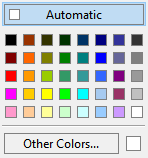](</File:TJvOfficeColorPanel.png>) | |
| 43 | 43 | ||
| 44 | - | ||
| 44 | + | * **TJvLookupAutoComplete** : adds autocompletion of TEdit by ListBox or StringList items. (In the original JVCL, this component is in the Core package.) | |
| 45 | 45 | ||
| 46 | 46 | ### JvCustom | |
| 47 | 47 | ||
| 48 | - | ||
| 49 | - | ||
| 48 | + | Depends on package _JvCore_ | |
| 49 | + | Custom components | |
| 50 | 50 | ||
| 51 | - | ||
| 52 | - | ||
| 53 | - | ||
| 54 | - | ||
| 55 | - | ||
| 56 | - | ||
| 57 | - | ||
| 58 | - | ||
| 59 | - | ||
| 51 | + | * [](</File:tjvvalidateedit.png>) **TJvValidateEdit** : General purpose edit control for text and numbers (integer, float, currency). MaxValue, MinValue, HasMaxValue, HasMinValue - Value is corrected when Edit loses focus. See demo in _JvValidateEdit_. | |
| 52 | + | * [](</File:tjvtimeline.png>) **TJvTimeLine** : a one-dimensional calendar ("time-line") which can display various events and tasks. See demo _JvTimeLine_. | |
| 53 | + | * [](</File:tjvtmtimeline.png>) **TJvTMTimeLine** : another timeline component. See demo _JvTMTimeLine_. | |
| 54 | + | * [](</File:tjvgammapanel.png>) **TJvGammaPanel** : advanced color selection tool for foreground and background colors. See demo _JvGammaPanel_. | |
| 55 | + | * [](</File:tjvthumbview.png>) **TJvThumbView** : displays a list of images as thumbnails | |
| 56 | + | * [](</File:tjvoutlookbar.png>) **TJvOutlookBar** : an accordeon-like bar of containers for other controls as used by Outlook 97. | |
| 57 | + | * [](</File:tjvimagesviewer.png>) **TJvImagesViewer** : displays a list of images as thumbnails, similar to TJvThumbView. See _JvItemViewer_ demo. | |
| 58 | + | * [](</File:tjvimagelistviewer.png>) **TJvImageListViewer** : dispays all images of a TImageList. See _JvItemViewer_ demo. | |
| 59 | + | * [](</File:tjvownerdrawviewer_palette.png>) **TJvOwnerDrawViewer** : presents arbitrary information in a grid-like view. See _JvItemViewer_ demo. | |
| 60 | 60 | ||
| 61 | - | ||
| 61 | + | [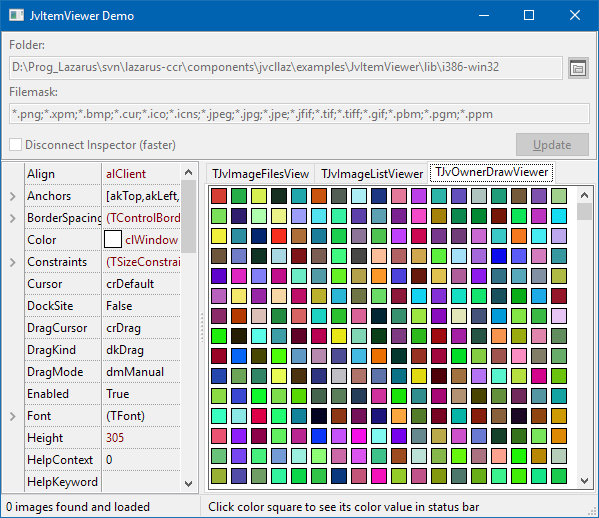](</File:tjvownerdrawviewer.png>) | |
| 62 | 62 | ||
| 63 | - | ||
| 63 | + | * **TJvChart** : ~~component for drawing time-series charts. Some bugs... See _JvChartDemo_ project.~~ Removed: Incomplete, too many bugs. | |
| 64 | 64 | ||
| 65 | 65 | ### JvCmp | |
| 66 | 66 | ||
| 67 | - | ||
| 68 | - | ||
| 67 | + | Depends on package _JvCore_. | |
| 68 | + | Non-visual components | |
| 69 | 69 | ||
| 70 | - | ||
| 71 | - | ||
| 70 | + | * **TJvStrHolder** , **TJvMultiStringHolder** : a wrapper component making it easier to work with TStrings and TStringList at design time. Using TStrHolder component you can set TStrings properties and event handlers in form designer and hold a number of strings in your forms. | |
| 71 | + | * **TJvSpellChecker** : a spell-checker class with sample dictionaries for English and Dutch. See demo in folder _examples/JvSpellChecker_ of the JVCL installation. | |
| 72 | 72 | ||
| 73 | - | ||
| 73 | + | [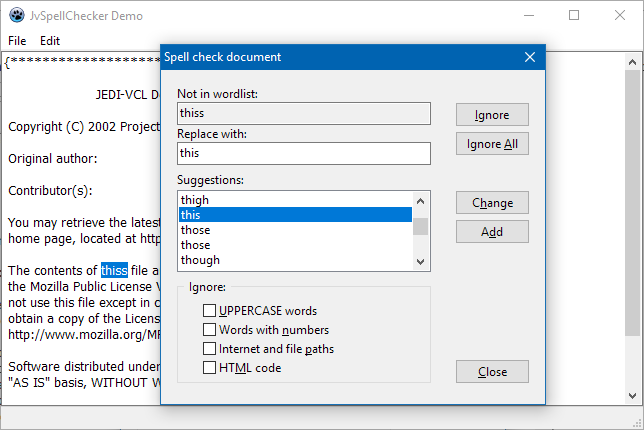](</File:JvSpellChecker.png>) | |
| 74 | 74 | ||
| 75 | - | ||
| 75 | + | * **TJvProfiler** : --- to be written --- | |
| 76 | 76 | ||
| 77 | 77 | ### JvDB | |
| 78 | 78 | ||
| 79 | - | ||
| 80 | - | ||
| 79 | + | Depends on packages _JvCore_ , _JvStdCtrls_ , and _JvCtrls_ | |
| 80 | + | Data-aware controls | |
| 81 | 81 | ||
| 82 | - | ||
| 83 | - | ||
| 84 | - | ||
| 85 | - | ||
| 86 | - | ||
| 87 | - | ||
| 88 | - | ||
| 82 | + | * **TJvSearchEdit** : a TEdit with incremental search capabilities within a field of a dataset. | |
| 83 | + | * **TJvDBLookupList** and **TJbDBLookupCombo** : lookup controls with additional features: | |
| 84 | + | * can display more than one column (the LookupDisplay property can contain a list of columns separated by a semicolon, the column width is calculated based on Field.DisplayWidth) | |
| 85 | + | * can display pictures (OnGetImage/OnGetImageIndex events) | |
| 86 | + | * configurable empty value (DisplayEmpty,EmptyItemColor,EmptyStrIsNull,EmptyValue) | |
| 87 | + | * **TJvDBTreeView** : a treeview constructed from database records. Link the unique ID field to "MasterField", the ID field of the parent node to "DetailField", and the field with the node text to "ItemField". Optionally, the field "IconField" provides the image index for the ImageList. "StartMasterValue" is the beginning level to start building the TreeView, 0 = start from the root items, 1 = start from the second level, and so on. | |
| 88 | + | * **TJvDBCalcEdit** : a numeric edit box which opens a calculator dialog. | |
| 89 | 89 | ||
| 90 | - | ||
| 90 | + |  **Note:** The packages _JvStdCtrlsLazR_ and _JvCtrlsLazR_ must have been compiled before this package can be installed. | |
| 91 | 91 | ||
| 92 | 92 | ### JvAppFrm | |
| 93 | 93 | ||
| 94 | - | ||
| 95 | - | ||
| 94 | + | Depends on package _JvCore_ | |
| 95 | + | Components for applications and forms | |
| 96 | 96 | ||
| 97 | - | ||
| 98 | - | ||
| 99 | - | ||
| 97 | + | * **JvAppAnimatedIcon** and **JvFormAnimatedIcon** : display an animated icon (created from an imagelist) in the taskbar and in the form's title bar, respectively. | |
| 98 | + | * **JvAnimTitle** : provides an animated form title | |
| 99 | + | * **JvFormWallpaper** : tiles the background of a form with an image. | |
| 100 | 100 | ||
| 101 | 101 | ### JvHMI | |
| 102 | 102 | ||
| 103 | - | ||
| 104 | - | ||
| 103 | + | Depends on package _JVCore_. | |
| 104 | + | The packages JvHDMILazR (run time) and JvHDMILazD (design time) provide some components for designing a "human-machine-interface" (HMI). | |
| 105 | 105 | ||
| 106 | - | ||
| 107 | - | ||
| 106 | + | * **JvLED** : an LED indicator. See demo _examples/JvLED_. | |
| 107 | + | * **JvDialButton** : a rotatory knob. See demo _examples/JvDialButton_. | |
| 108 | 108 | ||
| 109 | 109 | ### JvJans | |
| 110 | 110 | ||
| 111 | - | ||
| 112 | - | ||
| 111 | + | Depends on package _JvCore_. | |
| 112 | + | Named after the original author, Jan Verhoeven, who donated these components to the JEDI project. The following components have been ported: | |
| 113 | 113 | ||
| 114 | - | ||
| 115 | - | ||
| 116 | - | ||
| 117 | - | ||
| 118 | - | ||
| 119 | - | ||
| 114 | + | * [[JvSIM components|**TJvSIM components**]]: a set of components for simulation of digital and analog electronics. | |
| 115 | + | * [](</File:tjvjanled.png>) **JvJanLED** : an LED indicator component (not contained in original JVCL, ported from Jan Verhoeven's own repository). | |
| 116 | + | * [](</File:tjvjantoggle.png>) **JvJanToggle** : a toggle button with an on and off area (not contained in original JVCL, ported from Jan Verhoeven's own repository). | |
| 117 | + | * [](</File:tjvmarkupviewer.png>) **JvMarkupViewer** and [](</File:tjvmarkuplabel.png>) **JvMarkupLabel** : display simple HTML-formatted text (font-related tags only). Similar to JvHTControls. | |
| 118 | + | * [](</File:tjvgridfilter.png>) **TvGridFilter** : a component for filtering rows in a column-oriented stringgrid. Call `Filter(condition)` to hide all rows meeting the specified condition string, e.g. `[Business]="Music"` removes all rows in which the strings in the column titled `Business` are equal to `Music`. Allowed operators are `=`, `<>`, `<`, `>`, or `like`. See demo in folder _JvGridFilterDemo_. | |
| 119 | + | * [](</File:tjvyeargrid.png>) **JvYearGrid** : a year-calendar | |
| 120 | 120 | ||
| 121 | - | ||
| 121 | + | [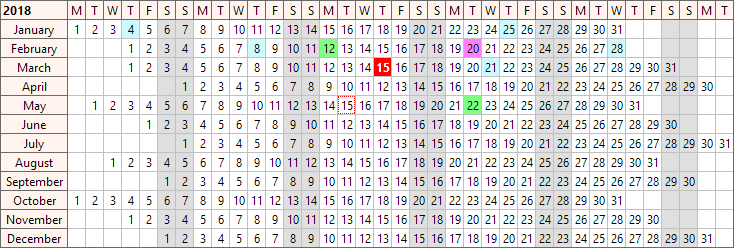](</File:TJvYearGrid.png>) | |
| 122 | 122 | ||
| 123 | 123 | ### JvMM | |
| 124 | 124 | ||
| 125 | - | ||
| 126 | - | ||
| 125 | + | Depends on package _JvCore_. | |
| 126 | + | The original JVCL package for Delphi contains a set of multimedia components, image and some general-purpose components. | |
| 127 | 127 | ||
| 128 | - | ||
| 129 | - | ||
| 130 | - | ||
| 131 | - | ||
| 132 | - | ||
| 133 | - | ||
| 134 | - | ||
| 135 | - | ||
| 136 | - | ||
| 137 | - | ||
| 138 | - | ||
| 128 | + | * [](</File:tjvid3v1.png>) **JvID3v1** : a non-visual component for displaying and editing of ID3v1 tags of mp3 files. See demo _examples/JvID3v1_. | |
| 129 | + | * [](</File:tjvid3v2.png>) **JvID3v2** : a non-visual component for displaying and editing of ID3v2 tags of mp3 files. See demo _examples/JvID3v2_. | |
| 130 | + | * [](</File:tjvanimatedimage.png>) **JvAnimatedImage** : animates a series of images take from a glyph containing all images in a horizontal or vertical stripe. | |
| 131 | + | * [](</File:tjvbmpanimator.png>) **JvBmpAnimator** : animates a series of images taken from a TImagelist. Unlike suggested by its name, it works with other image types as well in Lazarus. See demo _examples/JvBmpAnimator_. Similar to JvAnimatedImage. | |
| 132 | + | * [](</File:tjvimagetransform.png>) **JvImageTransform** : image transition effects like in a simple slide show. See demo _examples/JvImageTransform_. | |
| 133 | + | * [](</File:tjvspecialimage.png>) **JvSpecialImage** : an advanced image component with simple built-in image manipulation capabilities (flip, mirror, invert, fade-in, fade-out, brightness). Note that the Brightness property has been modified from the Delphi version to cover a more convenient scale from -100 to 100 (instead of 0 to 200). See demo _examples/JvSpecialImage_. | |
| 134 | + | * [](</File:tjvspecialprogress.png>) **JvSpecialProgress** : an advanced progress bar with gradient and text display. See demo _examples/JvSpecialProgress_. | |
| 135 | + | * [](</File:tjvgradient.png>) **JvGradient** : draws several kinds of gradients (horizontal, vertical, elliptic, pyramidic). | |
| 136 | + | * [](</File:tjvgradientheaderpanel.png>) **JvGradientHeaderPanel** : a header bar with a gradient background (drawn by JvGradient). | |
| 137 | + | * [](</File:tjvfullcolorlabel.png>) **JvFullColorLabel** : a label with attached color sample | |
| 138 | + | * [](</File:tjvfullcolordialog.png>) **JvFullColorDialog** and [](</File:tjvfullcolorcircledialog.png>) **JvFullColorCircleDialog** : dialogs for color selection based on several color models. Use the [](</File:tjvfullcolortrackbar.png>) **JvFullColorTrackbar** for one-dimensional, and a [](</File:tjvfullcolorpanel.png>) **JvFullColorPanel** and a [](</File:tjvfullcolorcircle.png>) **JvFullColorCircle** for two-dimensional color selection. There is also a swatch-like [](</File:tjvfullcolorgroup.png>) **JvFullColorGroup**. See demos _examples/JvFullColorDialog_ and _examples/JvFullColorCircleDialog_. Similar to [[mbColorLib]], however, several color models are combined within the same control. | |
| 139 | 139 | ||
| 140 | - | ||
| 140 | + | [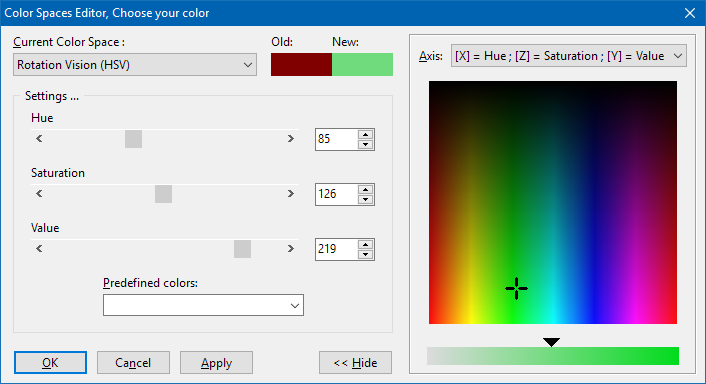](</File:TJvFullColorDialog.png>) | |
| 141 | 141 | ||
| 142 | - | ||
| 142 | + | * [](</File:tjvpicclip.png>) **JvPicClip** : similar to TImageList. Splices a large bitmap to a grid of `Cols x Rows` smaller images which can be retrieved as `Cells[ACol, ARow]` | |
| 143 | 143 | ||
| 144 | 144 | ### JvPageComps | |
| 145 | 145 | ||
| 146 | - | ||
| 147 | - | ||
| 146 | + | Depends on packages _JvCore_ and _JvStdCtrls_ | |
| 148 | 147 | ||
| 149 | - | ||
| 150 | - | ||
| 151 | - | ||
| 148 | + | * **TJvTabBar** : a panel of tabs like in a TTabControl. Fully configurable. Drawing is delegated to separate painter components, **TJvModernTabBarPainter** (used by default) and **TJvTabBarXPPainter**. See demo in folder _examples/JvTabBar_. | |
| 149 | + | * **TJvPageList** : a stack of pages like a TNotebook. Designed to cooperate with TJvTabBar and TJvPageListTreeView. See demo in folder _examples/JvTabBar_PageList_. | |
| 150 | + | * **TJvNotebookPageList** : a TNotebook descendant designed to cooperate with TJvTabBar. See demo in folder _examples/JvTabBar_NotebookPages_. Note that this component is not contained in the original Delphi JVCL collection. | |
| 151 | + | * **TJvNavigationPane** : a navigation panel similar to MS Outlook. See demo in the folder _examples/JvNavigationPane_ of the Lazarus JVCL installation. | |
| 152 | 152 | ||
| 153 | - | ||
| 153 | + | [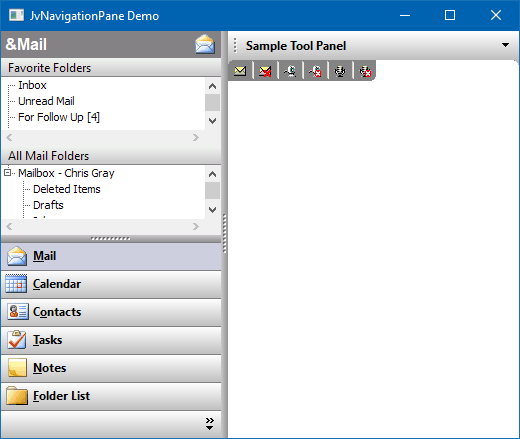](</File:JvNavigationPane_demo.png>) | |
| 154 | 154 | ||
| 155 | 155 | ### JvPascalInterpreter | |
| 156 | 156 | ||
| 157 | - | ||
| 157 | + | Scripting engine for Pascal. Depends on package _JvCore_. | |
| 158 | 158 | ||
| 159 | - | ||
| 159 | + | * **TJvInterpreterProgram** : Non-visual component interpreting Pascal code. Add code to the `Pas` Strings, execute if by the `Run` method and get the result from the `VResult` variant. See the tutorials in folder _example/JvInterpreterDemos_. There is also a (German) tutorial at [[1]](<https://wiki.delphigl.com/index.php/Tutorial_Scripting_mit_JvInterpreterProgram>). | |
| 160 | 160 | ||
| 161 | 161 | ### JvRuntimeDesign | |
| 162 | 162 | ||
| 163 | - | ||
| 163 | + | Depends on package _JvCore_. | |
| 164 | 164 | ||
| 165 | - | ||
| 165 | + | * A runtime **form designer**. See demo in folder _example/JvDesigner_ of the JVCL installation. Note that the designer is not limited to the components shown on the demo's toolbar. Following the instructions in the header of the demo's main unit it is easy to register any other component. | |
| 166 | 166 | ||
| 167 | - | ||
| 167 | + | [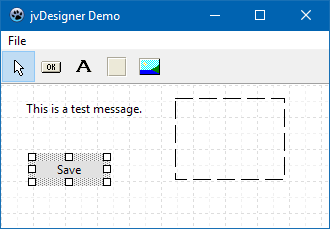](</File:JvDesignerDemo.png>). | |
| 168 | 168 | ||
| 169 | 169 | ### JvTimeFramework | |
| 170 | 170 | ||
| 171 | - | ||
| 171 | + | Depends on package _JvCore_. Calendars and schedule planner, similar to [[Turbopower Visual PlanIt|TvPlanIt]]. Can compare schedules of several persons. | |
| 172 | 172 | ||
| 173 | - | ||
| 174 | - | ||
| 175 | - | ||
| 176 | - | ||
| 173 | + | * **TJvTFScheduleManager** : administration of data, access to database via events. | |
| 174 | + | * **TJvTFDays** , **TJvTFWeeks** or **TJvTFMonths** are day, week or month calendars, respectively, to display appointments. | |
| 175 | + | * **TJvTFDaysPrinter** : prints the appointments shown by TJvTFDays | |
| 176 | + | * **TJvTFGlanceTextViewer** : viewing parameters for TJvTFWeeks and TJvTFMonths | |
| 177 | 177 | ||
| 178 | - | ||
| 178 | + | See extended demo in _examples/JvTimeFramework_ | |
| 179 | 179 | ||
| 180 | - | ||
| 180 | + | [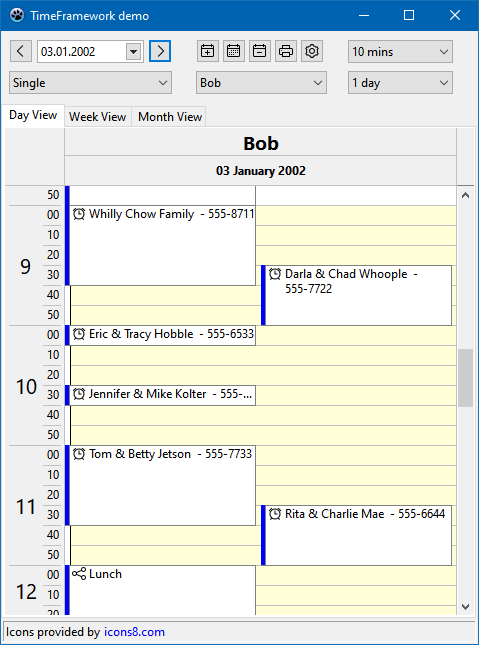](</File:JvTimeFrameworkDemo.png>) | |
| 181 | 181 | ||
| 182 | 182 | ### JvValidators | |
| 183 | 183 | ||
| 184 | - | ||
| 185 | - | ||
| 184 | + | Depends on package _JvCore_. | |
| 185 | + | Various validator classes for input validataion. See demo in the folder _examples/JvValidators_ of the Lazarus JVCL installation | |
| 186 | 186 | ||
| 187 | - | ||
| 187 | + | [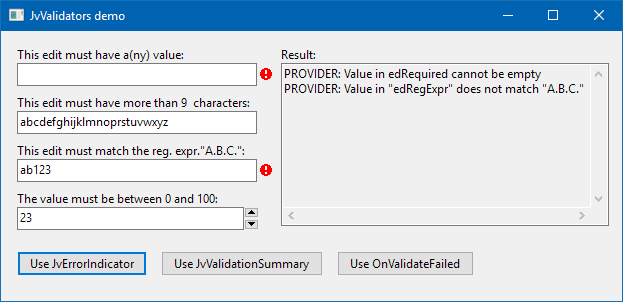](</File:JvValidationDemo.png>) | |
| 188 | 188 | ||
| 189 | - | ||
| 190 | - | ||
| 189 | + | * **TJvErrorIndicator** : Shows error indicators next to edit-fields etc. similar to "missing fields" indicators in web forumlars. | |
| 190 | + | * **TJvValidators** : To validate user input. Rightclick on Field editor to define validation rules. Checks are performed when method "Validate" is called. | |
| 191 | 191 | ||
| 192 | 192 | ### JvWizard | |
| 193 | 193 | ||
| 194 | - | ||
| 195 | - | ||
| 194 | + | Depends on package _JvCore_. | |
| 196 | 195 | ||
| 196 | + | * A multiplage dialog as used, e.g., for installation programs. Use the component editor to add pages with title, subtitle, images etc. at designtime ("welcome page", "interior page"). Buttons to navigate to other pages are automatically added. Additional navigation tools can be provided by adding a `TJvWizardRouteMapSteps`, `TJvWizardRouteMapNodes`, or `TJvWizardRouteMapList` component. See demo _JvWizard_. | |
| 197 | + | ||
| 198 | + | [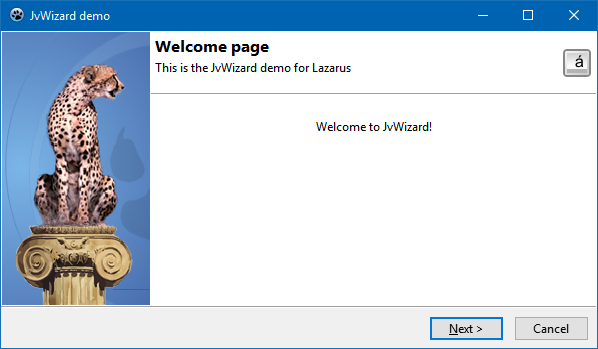](</File:JvWizardDemo.png>) | |
| 199 | + | ||
| 197 | 200 | ### JvXPCtrls | |
| 198 | 201 | ||
| 199 | - | ||
| 200 | - | ||
| 202 | + | Depends on package _JvCore_ and _JvStdCtrls_. | |
| 203 | + | Several controls imitating the look and feel of Windows XP. | |
| 201 | 204 | ||
| 202 | - | ||
| 203 | - | ||
| 204 | - | ||
| 205 | + | * **JvXPButton** and **JvXPCheckbox** : a button and a checkbox in XP-style | |
| 206 | + | * **TJvXPProgressBar** : Draws a progressbar in XP-style. The color of the the background and of the blocks is configurable. Doesn't support Marquee-style. | |
| 207 | + | * **[[JvXPBar]]** : a container side-bar with collapsable panels. Similar to TJvRollOut-Panel, but with string items instead of controls. Collapsing/Expanding happens smooth and nicely animated. | |
| 205 | 208 | ||
| 206 | - | ||
| 209 | + | [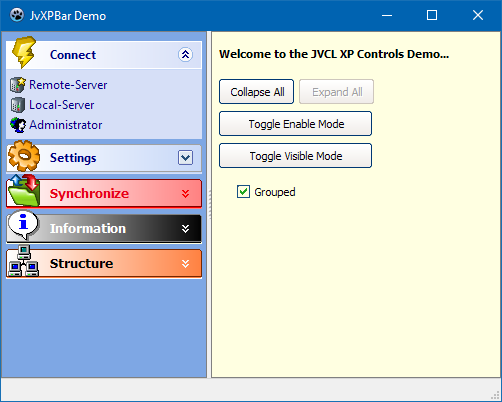](</File:JvXPBarDemo.png>) | |
| 207 | 210 | ||
| 208 | 211 | ## Download and installation | |
| 209 | 212 | ||
| 210 | 213 | ### Download | |
| 211 | 214 | ||
| 212 | - | ||
| 215 | + | The developers version of the Lazarus port is available via svn from <https://sourceforge.net/p/lazarus-ccr/svn/HEAD/tree/components/jvcllaz/>. The current release version can be downloaded from <https://sourceforge.net/projects/lazarus-ccr/files/jvcllaz/>; it is also offered by the Lazarus Online Package Manager. | |
| 213 | 216 | ||
| 214 | 217 | ### Installation | |
| 215 | 218 | ||
| 216 | - | ||
| 217 | - | ||
| 218 | - | ||
| 219 | - | ||
| 219 | + | * **Released version** distributed by the Online Package Manager: check the "jvcllaz" item in the Online Package manager, click the _"Install"_ button and follow the instructions. | |
| 220 | + | * **Development version** on Lazarus CCR (svn): | |
| 221 | + | * If you want to install **all JVCL packages** , load the package **jvcl_all.lpk** and select "Use" > "Install". In older Lazarus versions, there will be a warning _"The package jvcl_all does not have any "Register" procedure which typically means it does not provide any IDE addon. Installing it will probably only increase the size of the IDE and may even make it unstable."_. You can ignore this and click on _"Install it, I like the fat"_. | |
| 222 | + | * If you want to install **only a few packages** , you must find out in above summary which other packages are needed. Compile the needed runtime packages (having an appended "R" at the package name). Then "Use" > "Install" the required designtime packages (having an appended "D" as the package name). It is required to rebuild the IDE only after the last package. | |
| 220 | 223 | ||
| 221 | 224 | --- | |
| 222 | - | ||
| 225 | + | *From the Free Pascal wiki, page "JVCL Components", as the Internet Archive kept it on 2025-03-23, last changed on 2025-03-02. Copyright stays with the author who wrote it, according to the old wiki's [[Licensing]] page. If you have concerns about this material, [message the admin](/wiki-contact).* |