

JCSV (Jans CSV Components): what changed
Revision 0 to 1. Removed lines have a minus sign; added lines have a plus sign.
Title: JCSV (Jans CSV Components)
| Old | New | Line | |
|---|---|---|---|
| 1 | + | ### About | |
| 2 | + | ||
| 3 | + | *JCSV (Jans Freeware CSV Database Components* is a set of components for using a CSV Database | |
| 4 | + | ||
| 5 | + | The download contains the component, an installation package. | |
| 6 | + | ||
| 7 | + | ### Author | |
| 8 | + | ||
| 9 | + | Jan Verhoeven Email jan1.verhoeven at wxs.nl Modified by David Stewart Email davesimplewear at yahoo dot com | |
| 10 | + | ||
| 11 | + | ### License | |
| 12 | + | ||
| 13 | + | [modified](http://svn.freepascal.org/svn/lazarus/trunk/COPYING.modifiedLGPL) [LGPL](http://svn.freepascal.org/svn/lazarus/trunk/COPYING.LGPL) (same as the FPC RTL and the Lazarus LCL). You can contact the author if the modified LGPL doesn't work with your project licensing. | |
| 14 | + | ||
| 15 | + | ### Download | |
| 16 | + | ||
| 17 | + | The latest stable release can be found on [the lazarus-ccr sf download location](http://sourceforge.net/projects/lazarus-ccr/files/JCSV/). Also from [David's Freeware](http://www.users.on.net/~dave.stewart/index.html). | |
| 18 | + | ||
| 19 | + | ### Example Program | |
| 20 | + | ||
| 21 | + | To create the example first create your csv database, using your text editor type the field names you wish to use, as in the image below. | |
| 22 | + | ||
| 23 | + | 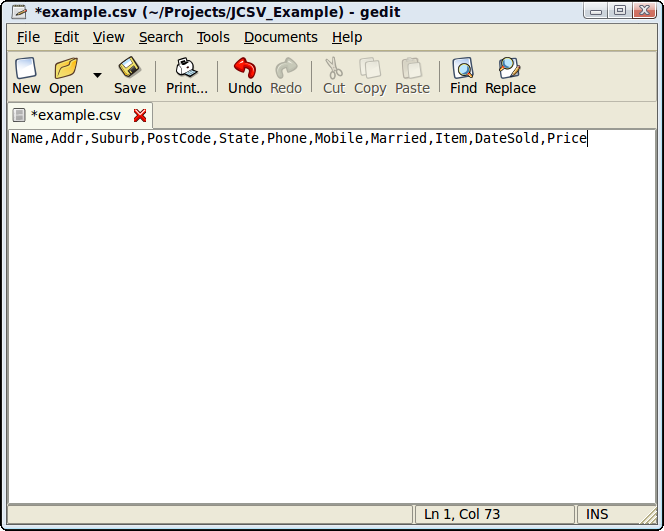 | |
| 24 | + | ||
| 25 | + | You can search on any field by using the search button in the navigator. as shown in the images below. | |
| 26 | + | ||
| 27 | + | <figure> | |
| 28 | + | <img src="Csv.png" title="Csv.png" /> | |
| 29 | + | <figcaption>Csv.png</figcaption> | |
| 30 | + | </figure> | |
| 31 | + | ||
| 32 | + | <figure> | |
| 33 | + | <img src="Csv1.png" title="Csv1.png" /> | |
| 34 | + | <figcaption>Csv1.png</figcaption> | |
| 35 | + | </figure> | |
| 36 | + | ||
| 37 | + | <figure> | |
| 38 | + | <img src="Csv2.png" title="Csv2.png" /> | |
| 39 | + | <figcaption>Csv2.png</figcaption> | |
| 40 | + | </figure> | |
| 41 | + | ||
| 42 | + | The example code is listed below also. | |
| 43 | + | ||
| 44 | + | ``` pascal | |
| 45 | + | uses | |
| 46 | + | Classes, SysUtils, FileUtil, LResources, Forms, Controls, Graphics, Dialogs, | |
| 47 | + | StdCtrls, jvCSVBase; | |
| 48 | + | ||
| 49 | + | type | |
| 50 | + | ||
| 51 | + | { TForm1 } | |
| 52 | + | ||
| 53 | + | TForm1 = class(TForm) | |
| 54 | + | Button1: TButton; | |
| 55 | + | CSVBase: TjvCSVBase; | |
| 56 | + | jvCSVCheckBox1: TjvCSVCheckBox; | |
| 57 | + | jvCSVComboBox1: TjvCSVComboBox; | |
| 58 | + | jvCSVEdit1: TjvCSVEdit; | |
| 59 | + | jvCSVEdit2: TjvCSVEdit; | |
| 60 | + | jvCSVEdit3: TjvCSVEdit; | |
| 61 | + | jvCSVEdit4: TjvCSVEdit; | |
| 62 | + | jvCSVEdit5: TjvCSVEdit; | |
| 63 | + | jvCSVEdit6: TjvCSVEdit; | |
| 64 | + | jvCSVEdit7: TjvCSVEdit; | |
| 65 | + | jvCSVEdit8: TjvCSVEdit; | |
| 66 | + | jvCSVEdit9: TjvCSVEdit; | |
| 67 | + | jvCSVLabel1: TjvCSVLabel; | |
| 68 | + | jvCSVNavigator1: TjvCSVNavigator; | |
| 69 | + | Label1: TLabel; | |
| 70 | + | Label2: TLabel; | |
| 71 | + | Label3: TLabel; | |
| 72 | + | Label4: TLabel; | |
| 73 | + | procedure Button1Click(Sender: TObject); | |
| 74 | + | procedure FormShow(Sender: TObject); | |
| 75 | + | private | |
| 76 | + | { private declarations } | |
| 77 | + | public | |
| 78 | + | { public declarations } | |
| 79 | + | end; | |
| 80 | + | ||
| 81 | + | var | |
| 82 | + | Form1: TForm1; | |
| 83 | + | ||
| 84 | + | implementation | |
| 85 | + | ||
| 86 | + | { TForm1 } | |
| 87 | + | ||
| 88 | + | procedure TForm1.FormShow(Sender: TObject); | |
| 89 | + | begin | |
| 90 | + | CSVbase.DataBaseOpen(ExtractFilePath(ParamStr(0))+'example.csv'); | |
| 91 | + | end; | |
| 92 | + | ||
| 93 | + | procedure TForm1.Button1Click(Sender: TObject); | |
| 94 | + | begin | |
| 95 | + | jvCSVEdit8.Caption:= FormatDateTime('dd/mm/yy',now); | |
| 96 | + | end; | |
| 97 | + | ||
| 98 | + | initialization | |
| 99 | + | {$I Unit1.lrs} | |
| 100 | + | ||
| 101 | + | end. | |
| 102 | + | ``` | |
| 103 | + | ||
| 104 | + | ### Change Log | |
| 105 | + | ||
| 106 | + | - Version 1.0 *date* | |
| 107 | + | ||
| 108 | + | ### Dependencies / System Requirements | |
| 109 | + | ||
| 110 | + | - None | |
| 111 | + | ||
| 112 | + | Status: *Stable / Alpha* | |
| 113 | + | ||
| 114 | + | Issues: | |
| 115 | + | ||
| 116 | + | ### Installation | |
| 117 | + | ||
| 118 | + | - Use *.lpk file to install | |
| 119 | + | ||
| 120 | + | ### See Also | |
| 121 | + | ||
| 122 | + | - [[CsvDocument]] | |
| 123 | + | - [[CSV]] | |
| 124 | + | - [[ZMSQL]] | |
| 125 | + | ||
| 126 | + | --- | |
| 127 | + | *From the Free Pascal wiki, page "JCSV (Jans CSV Components)", as it stood on 2020-02-10 after a change by Andry, out of the wiki's dump of 2024-05-26. Copyright stays with the author who wrote it, according to the old wiki's [[Licensing]] page. If you have concerns about this material, [message the admin](/wiki-contact).* | |
| 128 | + | Category: Components | |
| 129 | + | Category: Data import and export |