

Introduction to platform-sensitive development/zh CN: what changed
Revision 0 to 1. Removed lines have a minus sign; added lines have a plus sign.
Title: Introduction to platform-sensitive development/zh CN
| Old | New | Line | |
|---|---|---|---|
| 1 | + | 简介平台敏感型开发 | |
| 2 | + | ||
| 3 | + | [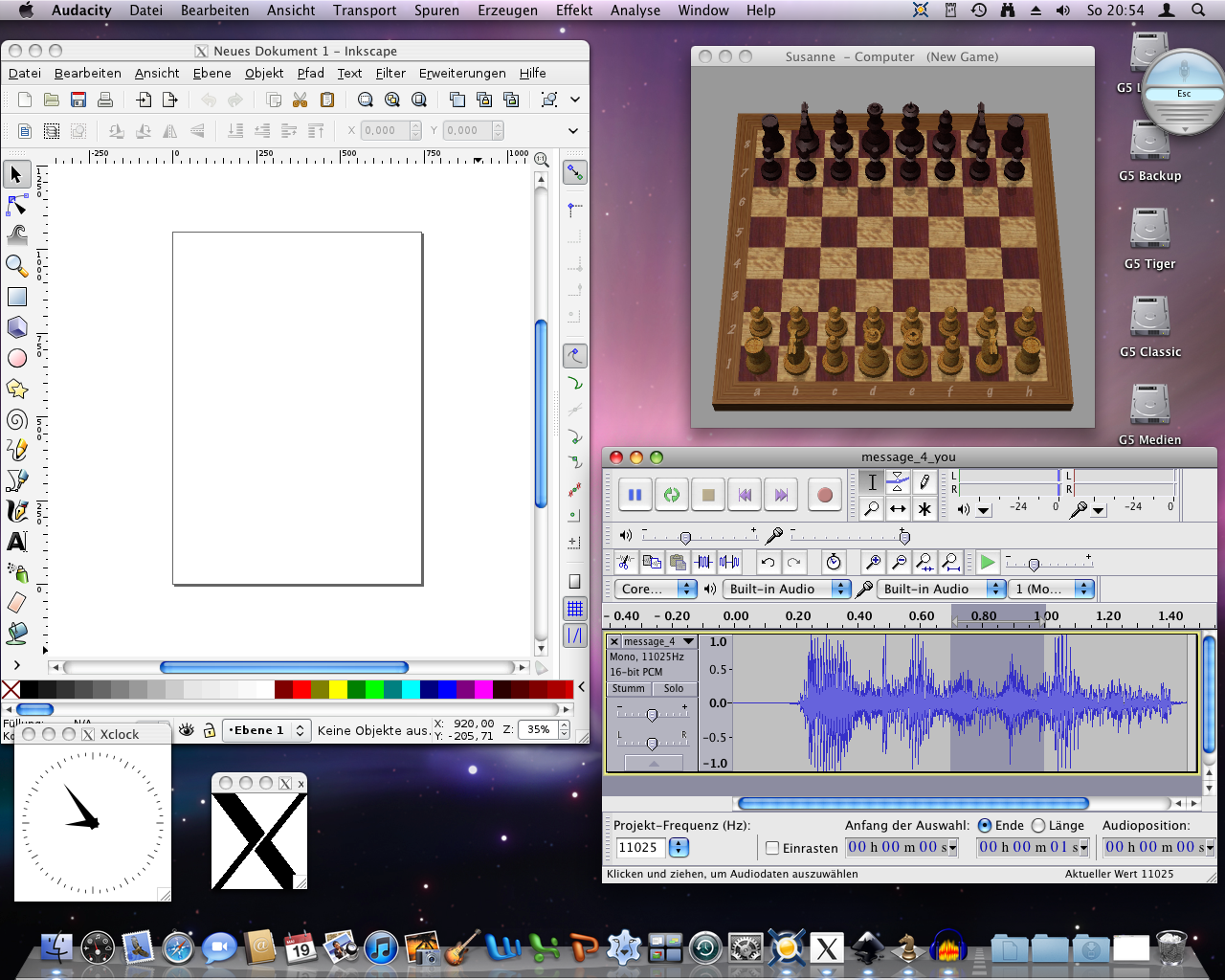](</File:platform-independent_vs._platform-sensitive_applications.png>) | |
| 4 | + | ||
| 5 | + | [](</File:platform-independent_vs._platform-sensitive_applications.png> "放大") | |
| 6 | + | ||
| 7 | + | Mac Leopard 中平台无关与平台依赖的应用对比。图示的所有应用都是平台无关的,但只有右半部分的程序是平台依赖的。请注意,左半部分平台不敏感的 X Window 程序外观令人陌生。这种非常规的操作方式和含糊的界面元素(如双菜单栏),往往会给用户造成困惑。 | |
| 8 | + | ||
| 9 | + | **平台敏感型开发** 是[[Multiplatform Programming Guide|跨平台编程指南]]的后继。通过实现平台特有的功能,遵循平台特有的用户界面风格,可为应用程序移植锦上添花。 | |
| 10 | + | ||
| 11 | + | 有赖于 Lazarus 和 Free Pascal 的“[[Write once compile anywhere|一次编写 - 随处编译]]”原则,非常容易开发一个能在多平台开箱即用的程序。但要让已完工的应用程序符合对应的 GUI 风格规范(甚至会是应用商店的强制要求),需要进行额外的操作。 | |
| 12 | + | ||
| 13 | + | 平台敏感型开发不仅是要遵循用户界面风格规范,还要解决内存管理、文件处理和进程间通信等各种问题。 | |
| 14 | + | ||
| 15 | + | 本文给出了平台敏感型开发的基本信息和一些技巧。 | |
| 16 | + | ||
| 17 | + | 大多数与平台相关的代码调整都是由 [[LCL]]、[[FCL]]、[[RTL]] 和相应的[[Widgetset|组件]]自动进行的。通常只需进行少量修改即可完成应用程序的创建。利用[编译器指令](</Category:Compiler_directives> "Category:Compiler directives")进行条件编译,对于保持代码的可移植性很有用。 | |
| 18 | + | ||
| 19 | + | 以下是条件编译技术的示例。过程 `AdaptMenus` 会根据目标平台对显示的菜单栏进行调整。这很有必要,因为菜单“About”和“Preferences”在 macOS 中的位置和 Windows、Linux、FreeBSD 不同。此外,macOS 中的菜单快捷键由 Command 键触发(LCL 称为 Meta 键),而在大多数其他操作系统中则由 Control 键触发。 | |
| 20 | + | ||
| 21 | + | 这里的主菜单包含一些平台特有的菜单项, `WinAboutItem`(打开一个消息对话框) 和`WinPreferencesItem` (用于设置程序参数)用于非 macOS 操作系统。另一方面还包含一个适用于 macOS 的 Apple 菜单。根据目标平台的不同,这里的代码会隐藏不需要的菜单项(及相应的菜单分隔线),并显示平台用户期望看到的菜单项。 | |
| 22 | + | ``` | |
| 23 | + | uses | |
| 24 | + | LCLType; | |
| 25 | + | ||
| 26 | + | procedure AdaptMenus; | |
| 27 | + | { Adapts Menus and Shortcuts to the interface style guidelines | |
| 28 | + | of the respective operating system } | |
| 29 | + | var | |
| 30 | + | modifierKey: TShiftState; | |
| 31 | + | begin | |
| 32 | + | {$IFDEF Darwin} | |
| 33 | + | MainForm.WinAboutItem.Visible := False; | |
| 34 | + | MainForm.Divider_5_1.Visible := False; | |
| 35 | + | MainForm.Divider_2_2.Visible := False; | |
| 36 | + | MainForm.WinPreferencesItem.Visible := False; | |
| 37 | + | MainForm.AppleMenu.Visible := True; | |
| 38 | + | {$ELSE} | |
| 39 | + | MainForm.WinAboutItem.Visible := True; | |
| 40 | + | MainForm.Divider_5_1.Visible := True; | |
| 41 | + | MainForm.Divider_2_2.Visible := True; | |
| 42 | + | MainForm.WinPreferencesItem.Visible := True; | |
| 43 | + | MainForm.AppleMenu.Visible := False; | |
| 44 | + | {$ENDIF} | |
| 45 | + | MainForm.NewMenuItem.ShortCut := ShortCut(VK_N, ssModifier); //ssModifier equals ssMeta on Mac, ssCtrl on other platforms | |
| 46 | + | MainForm.OpenMenuItem.ShortCut := ShortCut(VK_O, ssModifier); | |
| 47 | + | MainForm.CloseMenuItem.ShortCut := ShortCut(VK_W, ssModifier); | |
| 48 | + | MainForm.SaveItem.ShortCut := ShortCut(VK_S, ssModifier); | |
| 49 | + | MainForm.PrintItem.ShortCut := ShortCut(VK_P, ssModifier); | |
| 50 | + | MainForm.QuitMenuItem.ShortCut := ShortCut(VK_Q, ssModifier); | |
| 51 | + | MainForm.UndoMenuItem.ShortCut := ShortCut(VK_Z, ssModifier); | |
| 52 | + | MainForm.CutMenuItem.ShortCut := ShortCut(VK_X, ssModifier); | |
| 53 | + | MainForm.CopyMenuItem.ShortCut := ShortCut(VK_C, ssModifier); | |
| 54 | + | MainForm.PasteMenuItem.ShortCut := ShortCut(VK_V, ssModifier); | |
| 55 | + | MainForm.SelectAllMenuItem.ShortCut := ShortCut(VK_A, ssModifier); | |
| 56 | + | end; | |
| 57 | + | ``` | |
| 58 | + | ||
| 59 | + | 旧版 Lazarus(1.0 之前)不支持 ssModifier。以下代码虽比上述示例复杂,但可以兼容 Lazarus 0.9.x: | |
| 60 | + | ``` | |
| 61 | + | uses | |
| 62 | + | LCLType; | |
| 63 | + | ||
| 64 | + | procedure AdaptMenus; | |
| 65 | + | { Adapts Menus and Shortcuts to the interface style guidelines | |
| 66 | + | of the respective operating system } | |
| 67 | + | var | |
| 68 | + | modifierKey: TShiftState; | |
| 69 | + | begin | |
| 70 | + | {$IFDEF LCLcarbon} | |
| 71 | + | modifierKey := [ssMeta]; | |
| 72 | + | MainForm.WinAboutItem.Visible := False; | |
| 73 | + | MainForm.Divider_5_1.Visible := False; | |
| 74 | + | MainForm.Divider_2_2.Visible := False; | |
| 75 | + | MainForm.WinPreferencesItem.Visible := False; | |
| 76 | + | MainForm.AppleMenu.Visible := True; | |
| 77 | + | {$ELSE} | |
| 78 | + | modifierKey := [ssCtrl]; | |
| 79 | + | MainForm.WinAboutItem.Visible := True; | |
| 80 | + | MainForm.Divider_5_1.Visible := True; | |
| 81 | + | MainForm.Divider_2_2.Visible := True; | |
| 82 | + | MainForm.WinPreferencesItem.Visible := True; | |
| 83 | + | MainForm.AppleMenu.Visible := False; | |
| 84 | + | {$ENDIF} | |
| 85 | + | MainForm.NewMenuItem.ShortCut := ShortCut(VK_N, modifierKey); | |
| 86 | + | MainForm.OpenMenuItem.ShortCut := ShortCut(VK_O, modifierKey); | |
| 87 | + | MainForm.CloseMenuItem.ShortCut := ShortCut(VK_W, modifierKey); | |
| 88 | + | MainForm.SaveItem.ShortCut := ShortCut(VK_S, modifierKey); | |
| 89 | + | MainForm.PrintItem.ShortCut := ShortCut(VK_P, modifierKey); | |
| 90 | + | MainForm.QuitMenuItem.ShortCut := ShortCut(VK_Q, modifierKey); | |
| 91 | + | MainForm.UndoMenuItem.ShortCut := ShortCut(VK_Z, modifierKey); | |
| 92 | + | MainForm.CutMenuItem.ShortCut := ShortCut(VK_X, modifierKey); | |
| 93 | + | MainForm.CopyMenuItem.ShortCut := ShortCut(VK_C, modifierKey); | |
| 94 | + | MainForm.PasteMenuItem.ShortCut := ShortCut(VK_V, modifierKey); | |
| 95 | + | MainForm.SelectAllMenuItem.ShortCut := ShortCut(VK_A, modifierKey); | |
| 96 | + | end; | |
| 97 | + | ``` | |
| 98 | + | ||
| 99 | + |  **Note:** 若要查看组件是否支持某 LCL 功能,可以用限制浏览器(视图/限制浏览菜单) | |
| 100 | + | ||
| 101 | + | ## 各平台相关提示 | |
| 102 | + | ||
| 103 | + | ### Android | |
| 104 | + | ||
| 105 | + | Android 是非经典的 Linux 版本,因此 Linux 发行版的很多注意事项通常都不适用。此外,Android 开发还面临以下挑战:软件环境碎片化分布于大量不同版本的系统中,并且支持的设备存在相当大的硬件差异。 | |
| 106 | + | ||
| 107 | + | #### 参阅 | |
| 108 | + | ||
| 109 | + | * [[Android Interface/Native Android GUI|Android 接口/Android 原生 GUI]] | |
| 110 | + | * [[Portal:Android|Android 门户]] | |
| 111 | + | ||
| 112 | + | #### 外部链接 | |
| 113 | + | ||
| 114 | + | * [Android 设计](<http://developer.android.com/design/index.html>) | |
| 115 | + | * [Android 用户界面规范](<http://developer.android.com/guide/practices/ui_guidelines/index.html>) | |
| 116 | + | ||
| 117 | + | ### FreeBSD | |
| 118 | + | ||
| 119 | + | [FreeBSD](<https://www.freebsd.org>) 操作系统适用于多种平台,专注于功能、速度和稳定性。FreeBSD 源自 BSD,一种加州大学伯克利分校开发的 UNIX® 版本。FreeBSD 由一个大型社区开发和维护,应用于现代服务器、台式机和嵌入式平台。其大型社区已持续开发了 30 多年。它具备先进的网络、安全性和存储功能,很多最繁忙的网站、最流行的嵌入式网络和存储设备都首选采用。 | |
| 120 | + | ||
| 121 | + | #### 参阅 | |
| 122 | + | ||
| 123 | + | * [[Portal:FreeBSD|FreeBSD 门户]] 完整罗列了 FreeBSD 开发技术、编程提示、程序创建技巧的链接。 | |
| 124 | + | ||
| 125 | + | #### 外部链接 | |
| 126 | + | ||
| 127 | + | * [FreeBSD 开发手册](<https://www.freebsd.org/doc/en_US.ISO8859-1/books/developers-handbook/>). | |
| 128 | + | * [FreeBSD 软件包源维护手册](<https://www.freebsd.org/doc/en_US.ISO8859-1/books/porters-handbook/>). | |
| 129 | + | * [FreeBSD 手册](<https://www.freebsd.org/doc/en_US.ISO8859-1/books/handbook/>). | |
| 130 | + | ||
| 131 | + | ### iOS | |
| 132 | + | ||
| 133 | + | iOS 是 macOS 针对移动设备的简化版。Lazarus 环境的最新功能有助于用 iOS 版 [[Free Pascal]] 开发应用程序。iOS 开发在某些方面不同于其他平台,不过幸亏有 iOS Designer 可用于 GUI 的图形化设计。为了能够向 Apple 的 App Store 提交应用,必须实现 iOS 人机交互指南。 | |
| 134 | + | ||
| 135 | + | #### 参阅 | |
| 136 | + | ||
| 137 | + | * [[Portal:iOS|iOS 门户]] | |
| 138 | + | ||
| 139 | + | #### 外部链接 | |
| 140 | + | ||
| 141 | + | * [Apple iOS 人机界面指南](<http://developer.apple.com/library/ios/#documentation/UserExperience/Conceptual/MobileHIG/Introduction/Introduction.html>) | |
| 142 | + | * [Apple 风格指南](<https://help.apple.com/asg/mac/>) | |
| 143 | + | * [App 发布指南](<https://developer.apple.com/library/mac/#documentation/IDEs/Conceptual/AppDistributionGuide/Introduction/Introduction.html#//apple_ref/doc/uid/TP40012582>)] | |
| 144 | + | * [macOS 高分辨率开发指南](<https://developer.apple.com/library/mac/#documentation/GraphicsAnimation/Conceptual/HighResolutionOSX/Introduction/Introduction.html#//apple_ref/doc/uid/TP40012302>) | |
| 145 | + | ||
| 146 | + | ### Linux | |
| 147 | + | ||
| 148 | + | Linux 的标准化程度要低于其他操作系统。一是因为发行版的异构性,二是因为 Linux 没有“标准”的桌面环境。GNOME、KDE、LXDE 和其他桌面环境对 GUI 设计的建议各不相同。 | |
| 149 | + | ||
| 150 | + | #### 参阅 | |
| 151 | + | ||
| 152 | + | * [[Portal:Linux|Linux 门户]] | |
| 153 | + | ||
| 154 | + | #### 外部链接 | |
| 155 | + | ||
| 156 | + | * [GNOME 人机交互指南](<https://developer.gnome.org/hig-book/stable/>) | |
| 157 | + | * [KDE human interface 指南](<http://techbase.kde.org/Projects/Usability/HIG>) | |
| 158 | + | * [Canonical Ubuntu 应用设计指南](<http://design.ubuntu.com/apps>) | |
| 159 | + | * [LXDE 软件设计指南](<http://wiki.lxde.org/en/Design_Principles>) | |
| 160 | + | ||
| 161 | + | ### macOS | |
| 162 | + | ||
| 163 | + | 在所有操作系统中,Mac 系统的 GUI 历史最为厚重。它的历史可以追溯到 1984 年的经典 Mac OS 及其不太成功的前身 Lisa OS (1983)、Xerox Star (1981)和 Xerox Alto (1973)。很多人认为 Mac 的 GUI 提供的用户体验最好。但这也意味着更复杂的开发过程。 | |
| 164 | + | ||
| 165 | + | 与其他操作系统相比,有很多地方在 Mac 计算机上采用不同的实现方式。包括菜单栏的设计和位置、某些标准菜单的位置、按钮和图标的样式。此外,Mac 计算机的一些非 GUI 功能也与其他系统不一样,如程序的架构、首选项文件的位置和进程间通信方式。 | |
| 166 | + | ||
| 167 | + | [[Carbon Interface|Carbon]](仅限 32 位,且自 2019 年底的 macOS 10.15 Catalina 版本开始已被 Apple 移除了)和 [[Cocoa Interface|Cocoa]](仅限 64 位)组件自动解决了许多问题,因此很容易开发一个简单的 macOS 程序,通常不需要对源代码作任何改动。但若要开发 Mac 成品应用,仍需要进行一些微调。详见 [[Apple-specific UI elements|Apple 特有的 UI 元素]]。 | |
| 168 | + | ||
| 169 | + | #### 参阅 | |
| 170 | + | ||
| 171 | + | * [[Portal:Mac|Mac 门户]] 整合了开发技术、编程提示和 macOS 应用创建技巧的链接。 | |
| 172 | + | ||
| 173 | + | #### 外部链接 | |
| 174 | + | ||
| 175 | + | * [macOS 人机界面指南](<https://developer.apple.com/library/mac/#documentation/UserExperience/Conceptual/AppleHIGuidelines/Intro/Intro.html#//apple_ref/doc/uid/20000957>) | |
| 176 | + | * [Apple 风格指南](<https://help.apple.com/asg/mac/>) | |
| 177 | + | * [App 发布指南](<https://developer.apple.com/library/mac/#documentation/IDEs/Conceptual/AppDistributionGuide/Introduction/Introduction.html#//apple_ref/doc/uid/TP40012582>)] | |
| 178 | + | * [macOS 高分辨率开发指南](<https://developer.apple.com/library/mac/#documentation/GraphicsAnimation/Conceptual/HighResolutionOSX/Introduction/Introduction.html#//apple_ref/doc/uid/TP40012302>) | |
| 179 | + | ||
| 180 | + | ### Windows | |
| 181 | + | ||
| 182 | + | Windows 是 Lazarus 支持的最古老平台之一。因此,IDE 生成的大多数应用程序都自动满足可用性要求。但如今 Windows 版本已十分众多,涵盖了移动操作系统(如 Windows CE 或 Windows mobile)、桌面环境(如 Windows 2000、Windows 7 和 Windows 10)以及服务器平台。因此,建议针对特殊环境及其 GUI 规则进行微调。 | |
| 183 | + | ||
| 184 | + | #### 参阅 | |
| 185 | + | ||
| 186 | + | * [[Multiplatform Programming Guide|跨平台编程指南:Windows 相关]] | |
| 187 | + | * [[Portal:Windows|Windows 门户]] | |
| 188 | + | ||
| 189 | + | #### 外部链接 | |
| 190 | + | ||
| 191 | + | * [Windows 用户体验交互指南](<http://msdn.microsoft.com/en-us/library/windows/desktop/aa511258.aspx>) | |
| 192 | + | ||
| 193 | + | ## 参阅 | |
| 194 | + | ||
| 195 | + | * [[Multiplatform Programming Guide|跨平台编程指南]] | |
| 196 | + | * [[The LCL in various platforms|各平台中的 LCL]] | |
| 197 | + | ||
| 198 | + | --- | |
| 199 | + | *From the Free Pascal wiki, page "Introduction to platform-sensitive development/zh CN", as the Internet Archive kept it on 2025-02-06, last changed on 2024-09-26. Copyright stays with the author who wrote it, according to the old wiki's [[Licensing]] page. If you have concerns about this material, [message the admin](/wiki-contact).* |