

Installing Lazarus on macOS: what changed
Revision 5 to 6. Removed lines have a minus sign; added lines have a plus sign.
| Old | New | Line | |
|---|---|---|---|
| 1 | 1 | [](</File:macOSlogo.png>) | |
| 2 | 2 | ||
| 3 | 3 | This article applies to [macOS](</Category:macOS> "Category:macOS") only. | |
| 4 | 4 | ||
| 5 | 5 | See also: [[Multiplatform Programming Guide]] | |
| 6 | 6 | ||
| 7 | 7 | ||
| 8 | - | ||
| 9 | 8 | ||
| 10 | 9 | Installing Lazarus on a Mac is not particularly difficult but it is critical that you do the install in the correct order. Skipping steps will almost certainly end in tears. In brief, here is what you need to do: | |
| 11 | 10 | ||
| 12 | 11 | 1. Download and install Xcode (optional depending on your needs - see below for details). | |
| 13 | 12 | 2. Install the global command line tools for Xcode. Definitely required. | |
| 14 | 13 | 3. Download and install the Free Pascal Compiler (FPC) binaries package and the FPC source package from the [Lazarus IDE file area](<https://sourceforge.net/projects/lazarus/files/>) (**Important** do this _before_ you install the Lazarus IDE) | |
| 15 | 14 | 4. Download and install the Lazarus IDE from the [Lazarus IDE file area](<https://sourceforge.net/projects/lazarus/files/>) or, perhaps more useful, download and compile Lazarus source code, eg [Lazarus Fixes 3.0](<https://gitlab.com/freepascal.org/lazarus/lazarus/-/tree/fixes_3_0?ref_type=heads>) | |
| 16 | 15 | 5. Configure LLDB - the Apple supplied (and signed) debugger from within the Lazarus IDE. | |
| 17 | 16 | ||
| 18 | 17 | These steps are explained in more detail below. | |
| 19 | 18 | ||
| 20 | 19 | ### Lazarus IDE - Unable to "run without debugging" | |
| 21 | 20 | ||
| 22 | 21 | If you are using the Lazarus IDE 2.0.10 and the _Run > Run without debugging_ menu option fails with a dialog similar to: | |
| 23 | 22 | ||
| 24 | 23 | [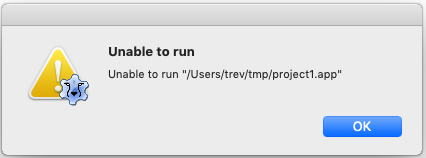](</File:run_dialog_fail.png>) | |
| 25 | 24 | ||
| 26 | 25 | then you need to patch the Lazarus 2.0.10 source code ([Issue #37324](<https://bugs.freepascal.org/view.php?id=37324>) and [Issue #36780](<https://bugs.freepascal.org/view.php?id=36780>)). Specifically, patch `../ide/main.pp` as below (unpatched lines shown first, patched lines shown second): | |
| 27 | 26 | ``` | |
| 28 | 27 | 7243,7245c7243,7245 | |
| 29 | 28 | < if RunAppBundle | |
| 30 | 29 | < and FileExistsUTF8(Process.Executable) | |
| 31 | 30 | < and FileExistsUTF8('/usr/bin/open') then | |
| 32 | 31 | --- | |
| 33 | 32 | > if RunAppBundle then | |
| 34 | 33 | > // and FileExistsUTF8(Process.Executable) | |
| 35 | 34 | > //and FileExistsUTF8('/usr/bin/open') then | |
| 36 | 35 | ``` | |
| 37 | 36 | ||
| 38 | 37 | and recompile the Lazarus IDE. | |
| 39 | 38 | ||
| 40 | 39 | Alternatively, you can omit patching the source code and simply recompile Lazarus 2.0.10 with FPC 3.0.4. | |
| 41 | 40 | ||
| 42 | 41 | A similar patching exercise and recompiling, or simply recompiling with FPC 3.0.4, needs to be done for Lazarus 2.0.8 if it has been compiled with FPC 3.2.0. | |
| 43 | 42 | ||
| 44 | 43 | ### Upgrading from Mojave (10.14) to Catalina (10.15) | |
| 45 | 44 | ||
| 46 | 45 | * Run `sudo xcode-select --install` | |
| 47 | 46 | ||
| 48 | 47 | * To enable Lazarus to locate the `crt1.10.5.o` file change in `/etc/fpc.cfg` the -Fl behind "#ifdef cpux86_64" from | |
| 49 | 48 | ||
| 50 | 49 | ``` | |
| 51 | 50 | -Fl/Applications/Xcode.app/Contents/Developer/Toolchain... | |
| 52 | 51 | ``` | |
| 53 | 52 | ||
| 54 | 53 | to | |
| 55 | 54 | ``` | |
| 56 | 55 | -Fl/Applications/Xcode.app/Contents/Developer/Platforms/MacOSX.platform/Developer/SDKs/MacOSX.sdk/usr/lib/ | |
| 57 | 56 | ``` | |
| 58 | 57 | ||
| 59 | 58 | ### Building the FPC compiler from Mojave (10.14) onwards | |
| 60 | 59 | ||
| 61 | 60 | * To find the crt1.10.5.o file when building a later Free Pascal Compiler version from source, you need to specify: | |
| 62 | 61 | ||
| 63 | 62 | ``` | |
| 64 | 63 | OPT="-XR/Library/Developer/CommandLineTools/SDKs/MacOSX.sdk/" | |
| 65 | 64 | ``` | |
| 66 | 65 | ||
| 67 | 66 | on the make command line because FPC ignores the `/etc/fpc.cfg` configuration file during builds of itself. | |
| 68 | 67 | ||
| 69 | 68 | ### Mac Installation FAQ | |
| 70 | 69 | ||
| 71 | 70 | * See the [[Mac Installation FAQ]] for solutions to other common problems that may arise during (and after) installation of Lazarus and Free Pascal on macOS. | |
| 72 | 71 | ||
| 73 | 72 | ## Uninstalling Lazarus and Free Pascal | |
| 74 | 73 | ||
| 75 | 74 | Refer to [[Uninstalling Lazarus on macOS]] for uninstallation options. | |
| 76 | 75 | ||
| 77 | 76 | ## Legacy Information | |
| 78 | 77 | ||
| 79 | 78 | See [[Legacy Information: Installing Lazarus on Mac|Legacy Information]] for details of: | |
| 80 | 79 | ||
| 81 | 80 | * Installing Lazarus on Mac OS X 10.4 (Tiger), Mac OS X 10.5 (Leopard), OS X 10.8 (Mountain Lion) | |
| 82 | 81 | * Installing Lazarus 2.0.8, 2.0.10 with FPC 3.2.0 for macOS 10.10 and earlier | |
| 83 | 82 | * Installing Lazarus 2.0.8 with FPC 3.2.0 for macOS 10.11+ | |
| 84 | 83 | * Installing Lazarus on PowerPC-based Macs | |
| 85 | 84 | * Old Xcode versions | |
| 86 | 85 | * Installing the gdb debugger | |
| 87 | 86 | * Compatibility matrix for Lazarus 1.0.0 through 1.6.4 and FPC 2.6.0 through 3.0.2. | |
| 88 | 87 | ||
| 89 | 88 | ## See also | |
| 90 | 89 | ||
| 91 | 90 | * [[Xcode]]. | |
| 92 | 91 | * [[Other macOS installation options]]. | |
| 93 | 92 | * [[Multiple Lazarus|Installing multiple Lazarus versions]]. | |
| 94 | 93 | * [[Portal:Mac|Mac Portal]] for an overview of development for macOS with Lazarus and Free Pascal. | |
| 95 | 94 | * [[Mac Installation FAQ]] for solutions to the most frequent problems that may arise during (and after) installation of Lazarus and Free Pascal on macOS. | |
| 96 | 95 | ||
| 97 | 96 | ## External links | |
| 98 | 97 | ||
| 99 | 98 | * [Lazarus daily development version download](<https://sourceforge.net/projects/macos-lazarus-snapshots/files/intel/>) (Intel x86_64) | |
| 100 | 99 | * [Lazarus + FPC daily development version downloads](<https://sourceforge.net/projects/macos-lazarus-snapshots/files/arm64/>) (M1, ARM64, aarch64) | |
| 101 | 100 | * [GIT Succinctly](<https://www.syncfusion.com/succinctly-free-ebooks/git>) \- Free Ebook (PDF, MOBI, EPUB) from SyncFusion. | |
| 102 | 101 | ||
| 103 | 102 | --- | |
| 104 | 103 | *From the Free Pascal wiki, page "Installing Lazarus on macOS", as the Internet Archive kept it on 2025-06-16, last changed on 2025-05-01. Copyright stays with the author who wrote it, according to the old wiki's [[Licensing]] page. If you have concerns about this material, [message the admin](/wiki-contact).* |