

Install on Ubuntu 11.10: what changed
Revision 1 to 2. Removed lines have a minus sign; added lines have a plus sign.
| Old | New | Line | |
|---|---|---|---|
| 1 | 1 | *(Ubuntu only)* | |
| 2 | 2 | ||
| 3 | 3 | ## In General | |
| 4 | 4 | ||
| 5 | 5 | **See [[Installing Lazarus on Linux]] - this page covers most of what you need for most Linux Distributions.** | |
| 6 | 6 | ||
| 7 | 7 | Warning, this page is very out of date and should be removed. | |
| 8 | 8 | ||
| 9 | 9 | ### Overview | |
| 10 | 10 | ||
| 11 | 11 | To install Lazarus you install three things: | |
| 12 | 12 | ||
| 13 | 13 | - fpc - the Free Pascal compiler | |
| 14 | 14 | - fpc-src - the source code for Free Pascal | |
| 15 | 15 | - Lazarus -the IDE for Free Pascal | |
| 16 | 16 | ||
| 17 | 17 | ### Versions | |
| 18 | 18 | ||
| 19 | 19 | You must install the correct version of Free Pascal for the version of Lazarus you choose. The versions below are correct. | |
| 20 | 20 | ||
| 21 | 21 | ## Ubuntu 11.10 (Oneiric Ocelot) | |
| 22 | 22 | ||
| 23 | 23 | ### What you want | |
| 24 | 24 | ||
| 25 | 25 | Matching versions of Lazarus and Free Pascal are in the repository (20/02/12). They are | |
| 26 | 26 | ||
| 27 | 27 | - Lazarus 0.9.30-2. | |
| 28 | 28 | - Free Pascal 2.4.4 | |
| 29 | 29 | ||
| 30 | 30 | In Synaptic they are called Lazarus 0.9.30-2Build1, fpc, and fp. | |
| 31 | 31 | ||
| 32 | 32 | ### Find and install the packages | |
| 33 | 33 | ||
| 34 | 34 | In the Software Centre search for and install: | |
| 35 | 35 | ||
| 36 | 36 | - IDE for FreePascal - SDK metapackage - search under lazarus | |
| 37 | 37 | - Free Pascal - SDK metapackage - search under fpc | |
| 38 | 38 | - FreePascal - SDK source code metapackage- search under fpc | |
| 39 | 39 | ||
| 40 | 40 | With Synaptic, install everything beginning with Laz, fpc or fp. | |
| 41 | 41 | ||
| 42 | 42 | ### Problem 1 | |
| 43 | 43 | ||
| 44 | 44 | Once you have installed Lazarus, it will not work. Even if you add no code at all and compile and run everyone's favourite 'Blank form' project (having first saved it of course) you will get this error message: | |
| 45 | 45 | ||
| 46 | 46 | `Project project1 raised Exception class EInterface critical with message: ....` | |
| 47 | 47 | ||
| 48 | 48 | ### Solution (10 mins): Remove the Ubuntu taskbar menu and overlay scrollbars | |
| 49 | 49 | ||
| 50 | 50 | - Remove the taskbar | |
| 51 | 51 | ||
| 52 | 52 | Open a terminal and try | |
| 53 | 53 | ||
| 54 | 54 | `sudo apt-get remove appmenu-gtk3 appmenu-gtk appmenu-qt` | |
| 55 | 55 | ||
| 56 | 56 | Give your password These can be re-installed if needed with the same command but put 'install' in place of 'remove'. | |
| 57 | 57 | ||
| 58 | 58 | - Remove the Ubuntu overlay scrollbars | |
| 59 | 59 | ||
| 60 | 60 | Open synaptic and search for 'liboverlay-scrollbar'. | |
| 61 | 61 | ||
| 62 | 62 | Uninstall the 2 packages highlighted. They can be re-installed if needed with Synaptic | |
| 63 | 63 | ||
| 64 | 64 | *`You now need to restart Ubuntu and hope.`* | |
| 65 | 65 | ||
| 66 | 66 | **The 'blank form' project should now run with no errors.** | |
| 67 | 67 | ||
| 68 | 68 | ### Problem 2 | |
| 69 | 69 | ||
| 70 | 70 | Add a button to your 'blank form' project. In the *Events* tab of the*Object Inspector* , try to open the 'Click' event handler. You will get the error message | |
| 71 | 71 | ||
| 72 | 72 | `unit not found: Classes` | |
| 73 | 73 | ||
| 74 | 74 | or | |
| 75 | 75 | ||
| 76 | 76 | `unit not found: Sysutils` | |
| 77 | 77 | ||
| 78 | 78 | ### Solution (10 mins): Reconfigure Lazarus as sudo | |
| 79 | 79 | ||
| 80 | 80 | This can be solved as follows: | |
| 81 | 81 | ||
| 82 | 82 | - Open Lazarus as sudo | |
| 83 | 83 | ||
| 84 | 84 | Open a terminal and start Lazarus as sudo with | |
| 85 | 85 | ||
| 86 | 86 | `gksudo StartLazarus` | |
| 87 | 87 | ||
| 88 | 88 | Give your sudo password | |
| 89 | 89 | ||
| 90 | 90 | - Rescan the Pascal source directory | |
| 91 | 91 | ||
| 92 | 92 | **In Lazarus** choose | |
| 93 | 93 | ||
| 94 | 94 | *`Tools -> Rescan FPC source directory`* | |
| 95 | 95 | ||
| 96 | 96 | - Rebuild Lazarus | |
| 97 | 97 | ||
| 98 | 98 | **In Lazarus** choose | |
| 99 | 99 | ||
| 100 | 100 | *`Tools -> BuildLazarus with profile:Build all`* | |
| 101 | 101 | ||
| 102 | 102 | - Close Lazarus. | |
| 103 | 103 | ||
| 104 | 104 | *You should now be able to open Lazarus normally and create a project with a button that is clickable!*' | |
| 105 | 105 | ||
| 106 | 106 | 'Hello World' here we come. | |
| 107 | 107 | ||
| 108 | 108 | *Oh Joy!* | |
| 109 | 109 | ||
| 110 | 110 | ### Lazarus Forum | |
| 111 | 111 | ||
| 112 | 112 | There are several threads that are useful | |
| 113 | 113 | ||
| 114 | 114 | [Forgetting to install Free Pascal source code](http://www.lazarus.freepascal.org/index.php/topic,16062.0.html) | |
| 115 | 115 | ||
| 116 | 116 | [Solving problem 1](http://www.lazarus.freepascal.org/index.php/topic,14982.0.html) | |
| 117 | 117 | ||
| 118 | 118 | [Solving problem 2](http://www.lazarus.freepascal.org/index.php/topic,14672.0.html) | |
| 119 | 119 | ||
| 120 | 120 | [More about problem 2](http://www.lazarus.freepascal.org/index.php/topic,15005.0.html) | |
| 121 | 121 | ||
| 122 | 122 | [Installing using debs](http://www.lazarus.freepascal.org/index.php/topic,14672.0.html) | |
| 123 | 123 | ||
| 124 | 124 | ### Video | |
| 125 | 125 | ||
| 126 | 126 | It's in German. It is very clear. In this case, after the installation, Lazarus ran without problem - mine didn't. | |
| 127 | 127 | ||
| 128 | 128 | [You tube showing install](http://www.youtube.com/watch?v=fgnzdegIB40) | |
| 129 | 129 | ||
| 130 | 130 | ### Problem 2 image | |
| 131 | 131 | ||
| 132 | - | ||
| 133 | - | ||
| 134 | - | ||
| 135 | - | ||
| 132 | + | 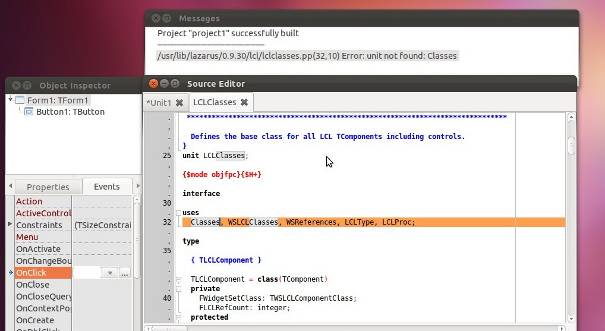 | |
| 136 | 133 | ||
| 137 | 134 | ## Ubuntu 10.04 LTS (Lucid Lynx) | |
| 138 | 135 | ||
| 139 | 136 | The version in this repository is Lazarus 0.9.28.2 which is quite old. It installs via synaptic and it then works. | |
| 140 | 137 | ||
| 141 | 138 | ### Install from .deb files | |
| 142 | 139 | ||
| 143 | 140 | If you want to install a newer version using .deb files then see the wiki page | |
| 144 | 141 | ||
| 145 | 142 | [[Install on Ubuntu from .deb files|How to install from .deb files]] | |
| 146 | 143 | ||
| 147 | 144 | ## See also | |
| 148 | 145 | ||
| 149 | 146 | - [[Install on Ubuntu from .deb files]] | |
| 150 | 147 | ||
| 151 | 148 | --- | |
| 152 | 149 | *From the Free Pascal wiki, page "Install on Ubuntu 11.10", as it stood on 2021-01-17 after a change by Dbannon, out of the wiki's dump of 2024-05-26. Copyright stays with the author who wrote it, according to the old wiki's [[Licensing]] page. If you have concerns about this material, [message the admin](/wiki-contact).* | |
| 153 | 150 | Category: Install | |
| 154 | 151 | Category: Ubuntu |