

iOS Designer: what changed
Revision 0 to 1. Removed lines have a minus sign; added lines have a plus sign.
Title: iOS Designer
| Old | New | Line | |
|---|---|---|---|
| 1 | + | *(iOS only)* | |
| 2 | + | ||
| 3 | + | ### About | |
| 4 | + | ||
| 5 | + | This package adds a designer for XIB-resource files to the Lazarus-IDE. XIB resource files are used to store iOS screen layouts and are normally designed using Xcode. The XIB-designer makes it easier to use iOS screen layouts in combination with Objective Pascal code. | |
| 6 | + | ||
| 7 | + | iOS applications created by this package are using the Objective-Pascal language extensions in order to use the native Objective-C Cocoa and iOS SDK objects. Therefor you need a copy of the iOS-SDK Pascal headers, which are generated from the headers in the iOS SDK. Furthermore you need a Free Pascal compiler for ARM if you want to deploy your applications to a real device, or a Free Pascal compiler for the iphonesim target, if you want to test your applications on the iPhone Simulator. More information about this can be found in the [[iPhone/iPod development]] section. | |
| 8 | + | ||
| 9 | + | This package depends on the [[iPhone Laz Extension]] package, which is used for the integration with Xcode and some utilities from the iOS SDK. | |
| 10 | + | ||
| 11 | + | The extension does **NOT** provide another LCL WidgetSet (like Carbon or Cocoa) nor requires to use any. | |
| 12 | + | ||
| 13 | + | ### Author | |
| 14 | + | ||
| 15 | + | Joost van der Sluis | |
| 16 | + | ||
| 17 | + | email: joost at cnoc dot nl | |
| 18 | + | ||
| 19 | + | ### License | |
| 20 | + | ||
| 21 | + | [modified](http://svn.freepascal.org/svn/lazarus/trunk/COPYING.modifiedLGPL) [LGPL](http://svn.freepascal.org/svn/lazarus/trunk/COPYING.LGPL) (same as the FPC RTL and the Lazarus LCL). | |
| 22 | + | ||
| 23 | + | ### Download | |
| 24 | + | ||
| 25 | + | The latest stable release can be found at svn: | |
| 26 | + | ||
| 27 | + | `svn co https://lazarus-ccr.svn.sourceforge.net/svnroot/lazarus-ccr/components/iosdesigner` | |
| 28 | + | ||
| 29 | + | ### Change Log | |
| 30 | + | ||
| 31 | + | - Version 0.1 Aug 2011 | |
| 32 | + | - Version 0.2 Feb 2013 | |
| 33 | + | ||
| 34 | + | ### Dependencies / System Requirements | |
| 35 | + | ||
| 36 | + | - Lazarus 1.1 (SVN trunk) or higher. | |
| 37 | + | - Mac OS X 10.6 + iPhoneSDK/Xcode | |
| 38 | + | - FPC 2.6.0 | |
| 39 | + | - [[iPhone Laz Extension]] | |
| 40 | + | - Since Apple doesn't provide any tools for development on other than OS X system, the package could be installed and used on Windows or Linux, but in that case you can not compile your applications. | |
| 41 | + | ||
| 42 | + | Status: *Alpha* | |
| 43 | + | ||
| 44 | + | ### Known Issues: | |
| 45 | + | ||
| 46 | + | ### To do: | |
| 47 | + | ||
| 48 | + | ## Installation | |
| 49 | + | ||
| 50 | + | In order to develop for iPhone or iPod, you'll need arm FPC compiler with rtl and packages installed in the system. There're 2 ways to do it: built manually via SVN or installed from a special FPC arm package. Both ways are described [[iPhone/iPod development|here]]. | |
| 51 | + | ||
| 52 | + | You don't need to install ARM compiler or packages, if you're planning to use iPhone simulator only. | |
| 53 | + | ||
| 54 | + | - Make sure you have a Free Pascal compiler installed for ARM or the iPhoneSim target | |
| 55 | + | - Make sure you have the iOS header files installed. (The iPhoneAll unit) | |
| 56 | + | - Install the [[iPhone Laz Extension]] package | |
| 57 | + | - Get the package source via svn or download from Sourceforge | |
| 58 | + | - Open and install the package | |
| 59 | + | ||
| 60 | + | ## How to use | |
| 61 | + | ||
| 62 | + | ### Quick start | |
| 63 | + | ||
| 64 | + | - Start a new application (using File menu -\> new ...) and choose for 'iOS application'. | |
| 65 | + | - The IDE will create a simple application with an empty XIB-layout and an application-delegate. By default the project settings are set to compile the application for the iPhone simulator. | |
| 66 | + | - Drop an UIWindow object from the component palette into the empty layout. | |
| 67 | + | - Maybe add a UIButton too, or else you won't see anything. | |
| 68 | + | - Save the project. (Or else installation on the Simulator will fail) | |
| 69 | + | - Build your application. It will be installed onto the iPhoneSimulator automatically. | |
| 70 | + | - Run the iPhone Simulator (using Project menu -\> Run iPhone Simulator) | |
| 71 | + | - Run your application from within the Simulator. | |
| 72 | + | ||
| 73 | + | ### Combination with XCode | |
| 74 | + | ||
| 75 | + | It is possible to create your XIB-resource with Lazarus, save it, and then open it in the Xcode Designer. The changes that you make in the Xcode designer will be preserved when you open it again in the Lazarus Designer. To open a XIB-layout in Xcode from within the Lazarus-IDE, right-click on the grey area in the Designer-window, and select 'Show in XCode'. Each time you save the XIB-resource in Lazarus, Xcode will detect a change and will reload the file and show your latest changes. This does not work (yet) the other way around, so to view your changes made (and saved) in Xcode, you have to close and reopen the file in Lazarus. | |
| 76 | + | ||
| 77 | + | 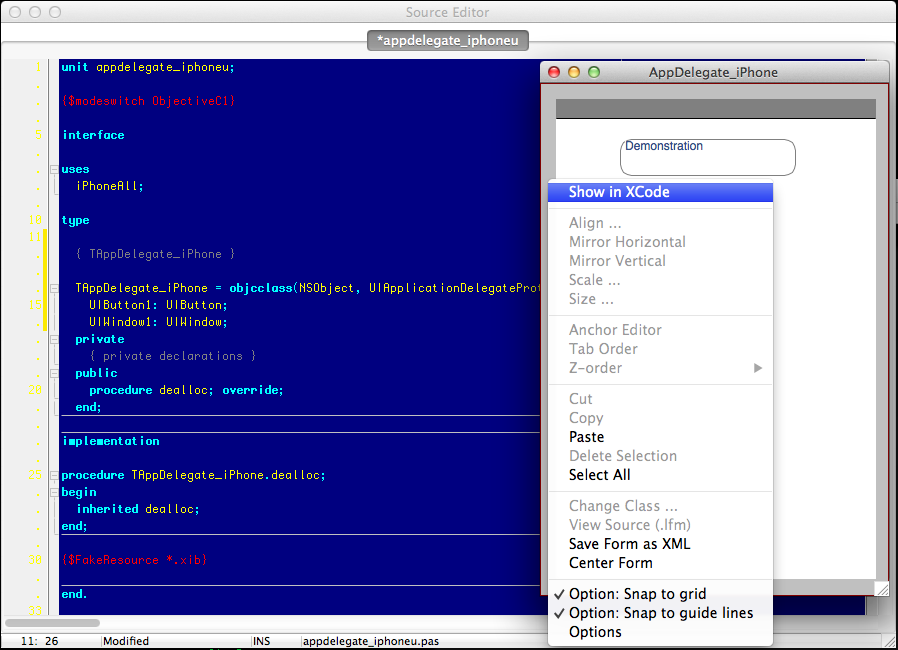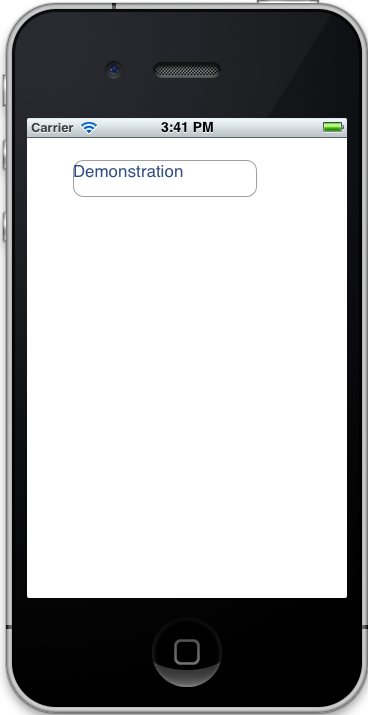 | |
| 78 | + | ||
| 79 | + | 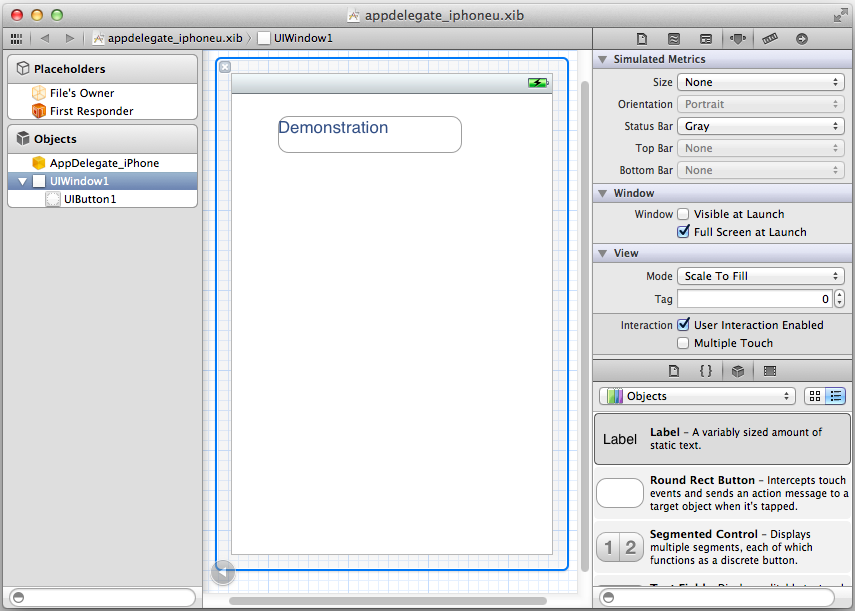 | |
| 80 | + | ||
| 81 | + | Note that it is almost impossible to add all properties, settings and objects from the Xcode designer to the Lazarus XIB-designer. But the Lazarus XIB Designer could be used to make the first layout and to add the basic objects, and then the Xcode designer could be used to fill in all the specific settings. Also the drawing of the designer is very rough. This could also be improved, but the final result could always be showed in the Xcode designer. | |
| 82 | + | ||
| 83 | + | If you want to deploy your application, it has to be signed. This can all be done from within Xcode. You can create a Xcode project for your Lazarus project using the Project menu -\> update XCode project. Then you can open the project in Xcode and compile and run from there. | |
| 84 | + | ||
| 85 | + | ### How does it work | |
| 86 | + | ||
| 87 | + | By default the IDE creates an application-delegate. For each object that is placed onto the designer an outlet (reference) is created which links to the application-delegate. The same holds for events. It is possible to create multiple windows which are bound to one application-delegate. | |
| 88 | + | ||
| 89 | + | ### How does the XIB Designer work | |
| 90 | + | ||
| 91 | + | Normally, Lazarus designers do only work with components. In this case the objects in the designer are objective-c classes. To be able to design the XIB-resource file, some fake components are created and added to the IDE. Instead of storing their properties in memory, these fake components do use getters and setters to read their values. A XIB-file is in fact a xml-file. When the resource-file is loaded the xml is parsed and stored into a DOM-tree. All the properties get and set their values from this DOM-tree. This way, all xml-elements that are unknown to the Lazarus iOS designer are preserved. | |
| 92 | + | ||
| 93 | + | ### Good to know | |
| 94 | + | ||
| 95 | + | - Each application has it's own Application-ID. It is not possible to install multiple applications onto one device (or simulator) with the same Application-ID. So keep in mind to change the Application-ID to something different than the default (using the Project menu -\> Project options, on the iPhone tab) | |
| 96 | + | - When you need an object that is not yet available in the object designer, take a look at the ios_views.pas unit. It is very easy to add a component by your own. And when you've added such an object, please send me the patch so that others can benefit from your work, and spend their time by adding other objects that you might need in the future. | |
| 97 | + | ||
| 98 | + | ## Examples | |
| 99 | + | ||
| 100 | + | There are two examples, one simple 'Hello world' application, and one applications to show how to use an UITableView with a delegate that implements the UITableViewDelegate and UITableViewDataSource protocols. | |
| 101 | + | ||
| 102 | + | ## Also See | |
| 103 | + | ||
| 104 | + | - [[iPhone Laz Extension]] | |
| 105 | + | ||
| 106 | + | --- | |
| 107 | + | *From the Free Pascal wiki, page "iOS Designer", as it stood on 2015-01-18 after a change by Troyf, out of the wiki's dump of 2024-05-26. Copyright stays with the author who wrote it, according to the old wiki's [[Licensing]] page. If you have concerns about this material, [message the admin](/wiki-contact).* | |
| 108 | + | Category: Lazarus-CCR | |
| 109 | + | Category: iOS |