

IDE Window: View project forms units: what changed
Revision 0 to 1. Removed lines have a minus sign; added lines have a plus sign.
Title: IDE Window: View project forms units
| Old | New | Line | |
|---|---|---|---|
| 1 | + | This dialog comes in two flavours: | |
| 2 | + | ||
| 3 | + | 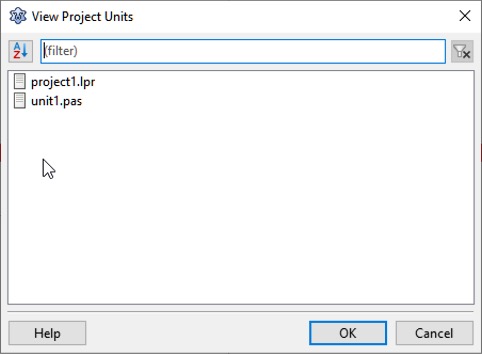 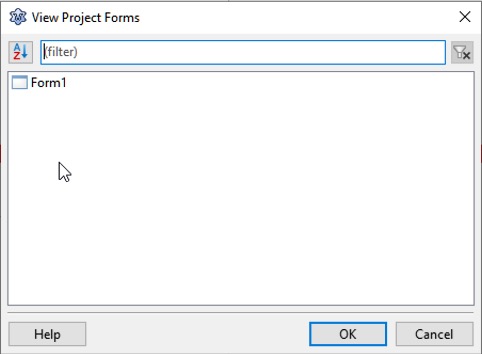 | |
| 4 | + | ||
| 5 | + | - [[Main menu|Main Menu]] \> [[Main menu|Project]] \> Units: shows the units of the current project (this is the same list as that which appears in the [[IDE Window: Project Inspector|Project Inspector]]) | |
| 6 | + | ||
| 7 | + | - [[Main menu|Main Menu]] \> [[Main menu|Project]] \> Forms: shows the forms of the current project. These are all units which have an .lfm file with a streamed component. | |
| 8 | + | ||
| 9 | + | Select: | |
| 10 | + | ||
| 11 | + | - the unit and click OK to open it in the source editor; or | |
| 12 | + | - the form and click OK to open it in the visual form designer. | |
| 13 | + | ||
| 14 | + | --- | |
| 15 | + | *From the Free Pascal wiki, page "IDE Window: View project forms units", as it stood on 2021-02-01 after a change by Trev, out of the wiki's dump of 2024-05-26. Copyright stays with the author who wrote it, according to the old wiki's [[Licensing]] page. If you have concerns about this material, [message the admin](/wiki-contact).* |