

IDE Window: Toolbar Config
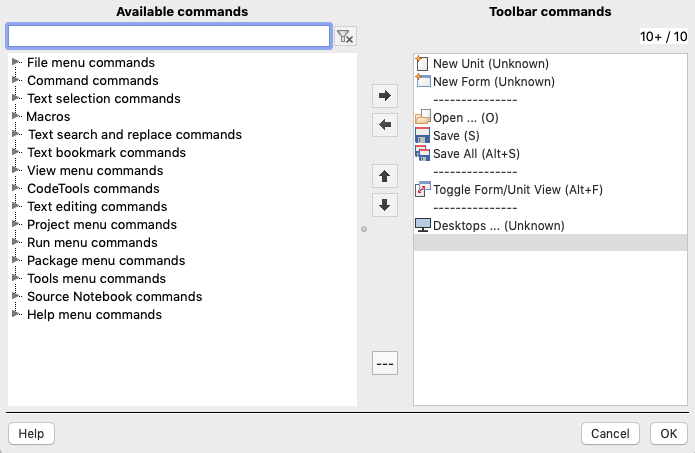
The Toolbar Configuration dialog is used for two toolbars:
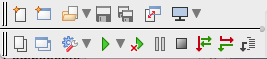

- The Main IDE Coolbar is shown on two lines in the top left corner of the IDE. It has a number of buttons by default:
- Line 1: "New Pascal Unit", "New Form", "Open...", "Save", "Save All", "Toggle Form/Unit" and "Desktops".
- Line 2: "View Project Units", "View Project Forms", "Change Build Mode", "Run with Debug", "Pause", "Stop", "Step over", "Step into", "Step out". The image above also shows the "Run without debugging" green triangle with the red cross.
- The Source Editor Toolbar is shown above source editor, it has few buttons by default: "Configure Toolbar", "Jump Back", "Jump Forward".
Controls
Expand a category in the left pane of the Toolbar Configuration dialog, and then you may select a new item and then use the Move right button to add it to the toolbar list in the right pane.
You may use the Move left button to select an existing item on the toolbar and remove it.
You may rearrange Toolbar items with Move Up and Move Down buttons.
Hint: to append an item at the end, clear selection first.
From the Free Pascal wiki, page "IDE Window: Toolbar Config", as it stood on 2020-08-01 after a change by Trev, out of the wiki's dump of 2024-05-26. Copyright stays with the author who wrote it, according to the old wiki's Licensing page. If you have concerns about this material, message the admin.
Edited on wiki.freepascal.org by 3 people, 2015–2020
From the official wiki's backup of 26 May 2024: who edited this page there, and when. Edits made there after that date were not recorded, and the earlier versions are not shown here; the main page says why.
| When | Who | What changed |
|---|---|---|
| Alextp | Created page | |
| Alextp | About | |
| Alextp | Toolbar Configuration dialog (minor) | |
| Alextp | Toolbar Configuration dialog | |
| Alextp | moved IDE Window: Editor Toolbar to IDE Window: Toolbar Config: window is for two IDE commands. (minor) | |
| Alextp | About | |
| Alextp | Toolbar Configuration dialog | |
| FTurtle | ||
| Trev | Added setting descriptions; Toolbar Configuration dialog image, IDE Coolbar image and Editor toolbar image | |
| Trev | Fix typo (minor) |
Talk about this page
Nobody has opened a bench for this page yet. Sign in to open one.