

IDE Window: Run parameters: what changed
Revision 0 to 1. Removed lines have a minus sign; added lines have a plus sign.
Title: IDE Window: Run parameters
| Old | New | Line | |
|---|---|---|---|
| 1 | + | ## Local | |
| 2 | + | ||
| 3 | + | 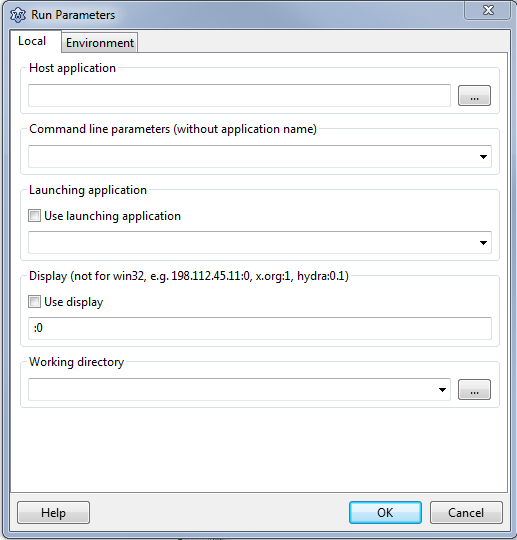 | |
| 4 | + | ||
| 5 | + | ### Host Application | |
| 6 | + | ||
| 7 | + | If your project executable and the executable to debug is different, you can specify here the other executable. | |
| 8 | + | ||
| 9 | + | Default: leave empty | |
| 10 | + | ||
| 11 | + | ### Command line parameters | |
| 12 | + | ||
| 13 | + | Add here the command line parameters, with which your project should be started. | |
| 14 | + | ||
| 15 | + | Default: leave empty | |
| 16 | + | ||
| 17 | + | Note: Not used when using Lauching Application. | |
| 18 | + | ||
| 19 | + | ### Launching application | |
| 20 | + | ||
| 21 | + | If you want to start your project not directly, but via a script on in a terminal or a special profiler or a special debugger specify here the command line and enable the checkbox. Without this you can view output in [[IDE Window: Terminal Output|internal console]] | |
| 22 | + | ||
| 23 | + | On Linux if you run a console program from Lazarus, it is executed but no console is showing. To see the console program ran from Lazarus similarly to Windows, add `/usr/bin/xterm $(TargetCmdLine)` and check `Use launching application` (xterm is installed on almost all Linux systems). | |
| 24 | + | ||
| 25 | + | ### Working directory | |
| 26 | + | ||
| 27 | + | Normally the working directory of a debugged project is the executable directory. That means all relative file names are expanded by the working directory. You can override this directory here. | |
| 28 | + | ||
| 29 | + | Note: On OSX, the system forces the current directory to '/' for all GUI applications, so this doesn't do anything | |
| 30 | + | ||
| 31 | + | ### Display | |
| 32 | + | ||
| 33 | + | To show the application under X (gnome, kde, xfce) on another desktop, specify the Display command line variable. For example to show the application on the second desktop use :1. To show on another computer use 192.168.1.17:0 or hydra:1. | |
| 34 | + | ||
| 35 | + | ### Default Window/Console position and size | |
| 36 | + | ||
| 37 | + | > **Note:** * Lazarus 3.99 | |
| 38 | + | ||
| 39 | + | > **Note:** * Windows Only | |
| 40 | + | ||
| 41 | + | Set bounds for the console window (console app). For GUI apps set bounds for first window with Position = poDefault. | |
| 42 | + | ||
| 43 | + | - Console Window take Left/Top and Columns/Rows. | |
| 44 | + | - GUI apps take Left/Top and Width/Height. | |
| 45 | + | ||
| 46 | + | If Width/Height is set without Left/Top then the OS may assume a Left/Top=0/0. | |
| 47 | + | ||
| 48 | + | ## Environment | |
| 49 | + | ||
| 50 | + | 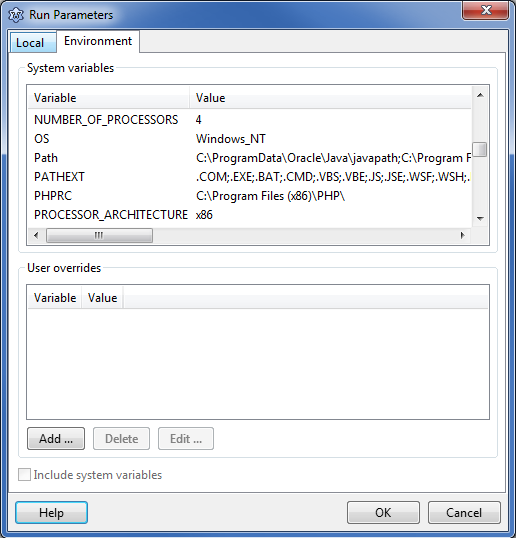 | |
| 51 | + | ||
| 52 | + | Normally a debugged program starts with the same environment variables as the IDE itself. | |
| 53 | + | ||
| 54 | + | ### System variables | |
| 55 | + | ||
| 56 | + | Here you can see, what system variables are currently defined. You cannot change/override them. | |
| 57 | + | ||
| 58 | + | ### User overrides | |
| 59 | + | ||
| 60 | + | Add environment variable overrides for the debugged program. Do not confuse them with command line parameters or config variables. These variables can be retrieved by the program via such functions as GetEnvironmentVariable, GetEnvironmentVariableCount, Application.GetEnvironmentList. | |
| 61 | + | ||
| 62 | + | --- | |
| 63 | + | *From the Free Pascal wiki, page "IDE Window: Run parameters", as it stood on 2024-01-27 after a change by Martin, out of the wiki's dump of 2024-05-26. Copyright stays with the author who wrote it, according to the old wiki's [[Licensing]] page. If you have concerns about this material, [message the admin](/wiki-contact).* |