

IDE Window: Restriction Browser: what changed
Revision 0 to 1. Removed lines have a minus sign; added lines have a plus sign.
Title: IDE Window: Restriction Browser
| Old | New | Line | |
|---|---|---|---|
| 1 | + | ## Navigation | |
| 2 | + | ||
| 3 | + | The Restriction Browser can be reached from the Lazarus IDE [[Main menu|Main Menu]] \> [[Main menu|View]] \> Restriction Browser menu item. | |
| 4 | + | ||
| 5 | + | Alternatively, the Restriction Browser is also located in the fourth tab of the [[IDE Window: Object Inspector|Object Inspector]]. | |
| 6 | + | ||
| 7 | + | ## Overview | |
| 8 | + | ||
| 9 | + | The Restriction Browser lists the Lazarus [[LCL]] widgetset and component limitations for various compiler targets - operating systems and graphics. | |
| 10 | + | ||
| 11 | + | 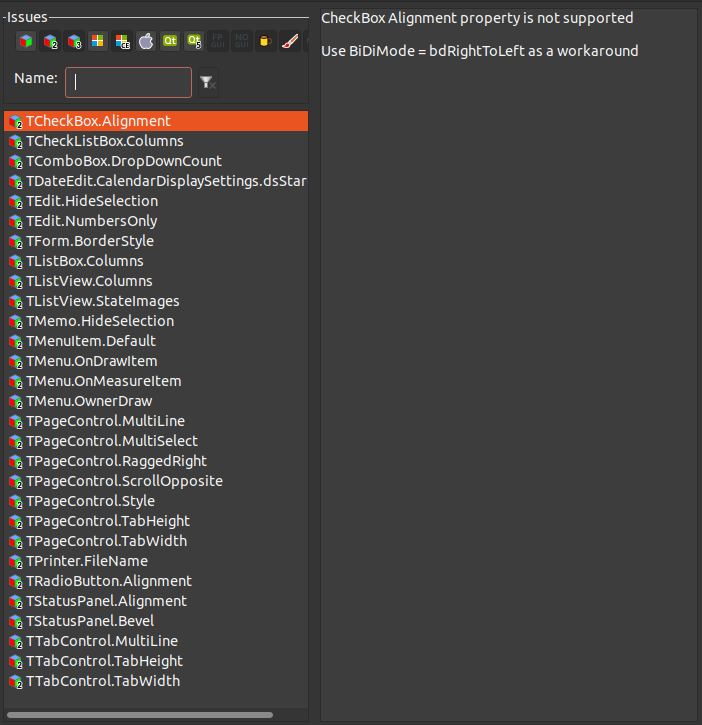 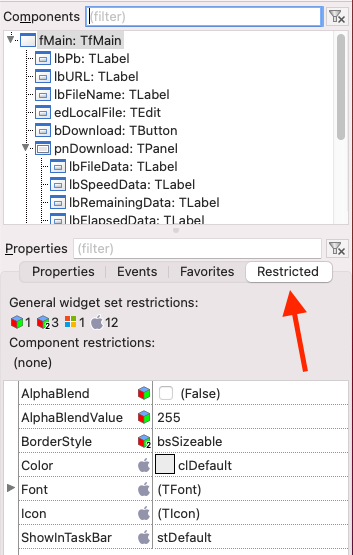 | |
| 12 | + | ||
| 13 | + | ## Adding a restriction | |
| 14 | + | ||
| 15 | + | For the lcl: see the lcl/interfaces/\<widgetset\>/issues.xml | |
| 16 | + | ||
| 17 | + | For other packages: Add an xml file, e.g. *issues.xml* like this: | |
| 18 | + | ||
| 19 | + | <?xml version="1.0" encoding="UTF-8"?> | |
| 20 | + | <package name="lcl"> | |
| 21 | + | <widgetset name="gtk2"> | |
| 22 | + | <issue name="TCheckBox.Alignment"> | |
| 23 | + | <short>CheckBox Alignment property is not supported</short> | |
| 24 | + | <descr>Use BiDiMode = bdRightToLeft as a workaround</descr> | |
| 25 | + | </issue> | |
| 26 | + | </widgetset> | |
| 27 | + | </package> | |
| 28 | + | ||
| 29 | + | Then open the package editor of your package, add the file to the package, and change its [[Lazarus Packages|file type]] to "issues xml file", by right clicking the file to open the popup menu, then File type. | |
| 30 | + | ||
| 31 | + | --- | |
| 32 | + | *From the Free Pascal wiki, page "IDE Window: Restriction Browser", as it stood on 2022-07-20 after a change by Mattias2, out of the wiki's dump of 2024-05-26. Copyright stays with the author who wrote it, according to the old wiki's [[Licensing]] page. If you have concerns about this material, [message the admin](/wiki-contact).* | |
| 33 | + | Category: IDE | |
| 34 | + | Category: IDE Window | |
| 35 | + | Category: Lazarus |