

IDE Window: Package Graph: what changed
Revision 0 to 1. Removed lines have a minus sign; added lines have a plus sign.
Title: IDE Window: Package Graph
| Old | New | Line | |
|---|---|---|---|
| 1 | + | ## Navigation | |
| 2 | + | ||
| 3 | + | The Package Graph dialog is accessible via the Lazarus IDE [[Main menu|Main Menu]] \> [[Main menu|Package]] \> Package Graph. | |
| 4 | + | ||
| 5 | + | ## Overview | |
| 6 | + | ||
| 7 | + | The package graph shows the currently loaded packages and which package uses which, and which package is used by which. | |
| 8 | + | ||
| 9 | + | 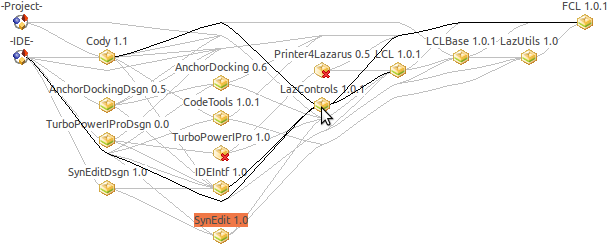 | |
| 10 | + | ||
| 11 | + | Move the mouse cursor over nodes and edges to highlight dependencies. | |
| 12 | + | ||
| 13 | + | Click on a package to see some general information about it in the window below. | |
| 14 | + | ||
| 15 | + | ## Usage | |
| 16 | + | ||
| 17 | + | Double click on a package to open the [[IDE Window: Package Editor|Package Editor]] for this package. | |
| 18 | + | ||
| 19 | + | Double click on a project to open the [[IDE Window: Project Inspector|Project Inspector]]. | |
| 20 | + | ||
| 21 | + | Double click on the IDE to configure the installed packages. | |
| 22 | + | ||
| 23 | + | Packages are automatically unloaded, when they are not used anymore. | |
| 24 | + | ||
| 25 | + | ## State | |
| 26 | + | ||
| 27 | + | A package can have one of the following states: | |
| 28 | + | ||
| 29 | + | - Installed - the package is installed. An installed package is compiled into the IDE and its classes are available in the component palette. | |
| 30 | + | - AutoCreated - the package is part of the IDE, it can not be uninstalled. | |
| 31 | + | - Install on next start - the package is not yet installed, but will be compiled into the IDE and will be installed after exiting the IDE and starting the new IDE. You compile a new IDE in Tools -\> Build Lazarus. | |
| 32 | + | - Uninstall on next start (unless needed by an installed package) - This package was installed automatically because it was needed by a package that was installed normally. When the normally installed package is uninstalled this package will be uninstalled as well. | |
| 33 | + | ||
| 34 | + | --- | |
| 35 | + | *From the Free Pascal wiki, page "IDE Window: Package Graph", as it stood on 2021-02-02 after a change by Trev, out of the wiki's dump of 2024-05-26. Copyright stays with the author who wrote it, according to the old wiki's [[Licensing]] page. If you have concerns about this material, [message the admin](/wiki-contact).* |