

Revision 2 of 4, by WikiArchive on 11-4-2026. The page as it is now.
IDE Window: Menu Editor
Note: Description of old version Menu Editor you can see (and edit) at discussion page
About
"Menu editor" is dialog which allows to customize contents of menus: TMainMenu, TPopupMenu.
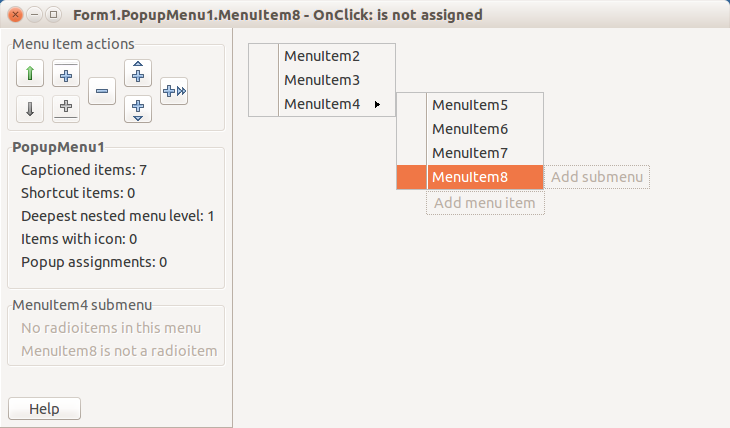
Preview area
This area shows preview of menu designed. For TMainMenu it shows horizontal band with top-level items, for TPopupMenu it shows vertical band (more vertical bands shown for each submenu). Clickable labels:
- "Add menu item" to add item. This label is shown when the last item of menu is selected (in TPopupMenu - bottom item).
- "Add submenu" to add child submenu.
To edit properties of an item, click it on preview, then call Object Inspector. Or you can skip using OI, instead use right-click on each item.
Action buttons
Buttons with icons peform these actions:
- icons "long arrows": Move selected item up/down (or left/right in TMainMenu top level).
- icons "plus with line": Add separator item above/below selected item. Disabled for TMainMenu top level.
- icon "minus": Delete selected item.
- icons "plus with 1 arrow": Add item before/after selected item (and select it).
- icon "plus with 2 arrows": Add submenu for selected item (and select its first item).
Icons are different for TMainMenu top level (since items here are arranged horizontally).
From the Free Pascal wiki, page "IDE Window: Menu Editor", as it stood on 2017-08-25 after a change by Djzepi, out of the wiki's dump of 2024-05-26. Copyright stays with the author who wrote it, according to the old wiki's Licensing page. If you have concerns about this material, message the admin.