

IDE Window: Menu Editor: what changed
Revision 3 to 4. Removed lines have a minus sign; added lines have a plus sign.
Title: IDE Window: menu editor IDE Window: Menu Editor
| Old | New | Line | |
|---|---|---|---|
| 1 | - | ||
| 1 | + | > **Note:** Description of old version Menu Editor you can see (and edit) at discussion page | |
| 2 | + | ||
| 3 | + | ## About | |
| 4 | + | ||
| 5 | + | "Menu editor" is dialog which allows to customize contents of menus: [[TMainMenu]], [[TPopupMenu]]. | |
| 6 | + | ||
| 7 | + | 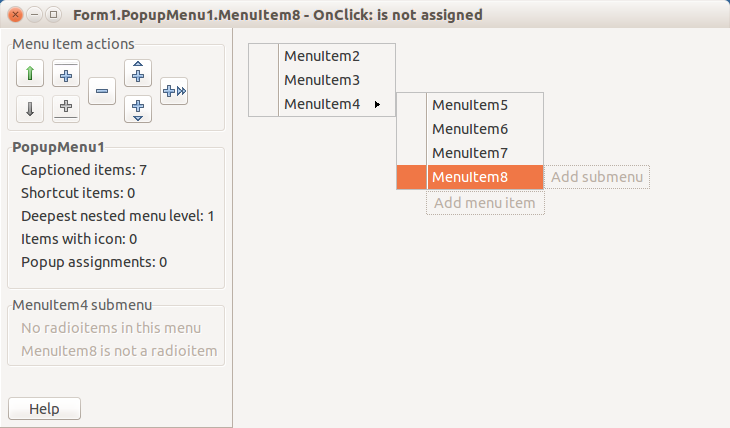 | |
| 8 | + | ||
| 9 | + | ## Preview area | |
| 10 | + | ||
| 11 | + | This area shows preview of menu designed. For TMainMenu it shows horizontal band with top-level items, for TPopupMenu it shows vertical band (more vertical bands shown for each submenu). Clickable labels: | |
| 12 | + | ||
| 13 | + | - "Add menu item" to add item. This label is shown when the last item of menu is selected (in TPopupMenu - bottom item). | |
| 14 | + | - "Add submenu" to add child submenu. | |
| 15 | + | ||
| 16 | + | To edit properties of an item, click it on preview, then call Object Inspector. Or you can skip using OI, instead use right-click on each item. | |
| 17 | + | ||
| 18 | + | ## Action buttons | |
| 19 | + | ||
| 20 | + | Buttons with icons peform these actions: | |
| 21 | + | ||
| 22 | + | - icons "long arrows": Move selected item up/down (or left/right in TMainMenu top level). | |
| 23 | + | - icons "plus with line": Add separator item above/below selected item. Disabled for TMainMenu top level. | |
| 24 | + | - icon "minus": Delete selected item. | |
| 25 | + | - icons "plus with 1 arrow": Add item before/after selected item (and select it). | |
| 26 | + | - icon "plus with 2 arrows": Add submenu for selected item (and select its first item). | |
| 27 | + | ||
| 28 | + | Icons are different for TMainMenu top level (since items here are arranged horizontally). | |
| 29 | + | ||
| 30 | + | --- | |
| 31 | + | *From the Free Pascal wiki, page "IDE Window: Menu Editor", as it stood on 2017-08-25 after a change by Djzepi, out of the wiki's dump of 2024-05-26. Copyright stays with the author who wrote it, according to the old wiki's [[Licensing]] page. If you have concerns about this material, [message the admin](/wiki-contact).* |