

IDE Window: Local Variables: what changed
Revision 1 to 2. Removed lines have a minus sign; added lines have a plus sign.
| Old | New | Line | |
|---|---|---|---|
| 1 | - | ||
| 2 | - | ||
| 3 | - | ||
| 4 | - | ||
| 5 | - | ||
| 6 | - | ||
| 7 | - | ||
| 8 | - | ||
| 9 | - | ||
| 10 | 1 | ## Navigation | |
| 11 | 2 | ||
| 12 | - | ||
| 3 | + | [[Main menu|Main Menu]] \> [[Main menu|View]] \> Debug Windows \> Local Variables | |
| 13 | 4 | ||
| 14 | 5 | ## Important | |
| 15 | 6 | ||
| 16 | - | ||
| 7 | + | You must [[Debugger Setup|setup the debugger]] and start the project to debug it. Only then this window will be useful. | |
| 17 | 8 | ||
| 18 | 9 | ## Local variables | |
| 19 | 10 | ||
| 20 | - | ||
| 11 | + | 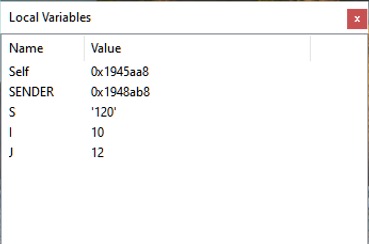 | |
| 21 | 12 | ||
| 22 | - | ||
| 13 | + | This is the list of the local variables and their current values of the current function/procedure. | |
| 23 | 14 | ||
| 24 | 15 | ## Data displayed | |
| 25 | 16 | ||
| 26 | - | ||
| 27 | - | ||
| 28 | - | ||
| 29 | - | ||
| 17 | + | Name | |
| 18 | + | The mangled name of the variable. Normally the compiler converts the Pascal identifier to uppercase. You will see local variables only if the procedure was compiled with debugging information. | |
| 30 | 19 | ||
| 31 | - | ||
| 20 | + | Values | |
| 21 | + | The current value of the local variable. | |
| 32 | 22 | ||
| 23 | + | Note: The values are shown in a very basic form. e.g Objects are shown as pointer, instead of structure. You may get more information by adding a variable to the [[IDE Window: Watch list|Watches]] window. | |
| 24 | + | ||
| 33 | 25 | ## Scope (Stackframe, Thread, History) | |
| 34 | 26 | ||
| 35 | - | ||
| 27 | + | The values are evaluated according to the scope set in the [[IDE Window: Threads|Thread]] and [[IDE Window: Call Stack|Call Stack]] dialogs. Default is the current Thread and top stack frame. Both (Stack and Frame) dialogs offer to change the "current" Frame/Thread. The Watches window will follow this selection. | |
| 36 | 28 | ||
| 37 | - | ||
| 29 | + | It is also possible to select previously displayed values, using the [[IDE Window: Debug History|History]] dialog. | |
| 38 | 30 | ||
| 39 | 31 | ## See also | |
| 40 | 32 | ||
| 41 | - | ||
| 42 | - | ||
| 33 | + | - [[IDE Window: Watch list|Watches Window]] | |
| 34 | + | - [[IDE Window: Debug History|Debug History]] | |
| 43 | 35 | ||
| 44 | 36 | --- | |
| 45 | - | ||
| 37 | + | *From the Free Pascal wiki, page "IDE Window: Local Variables", as it stood on 2021-02-01 after a change by Trev, out of the wiki's dump of 2024-05-26. Copyright stays with the author who wrote it, according to the old wiki's [[Licensing]] page. If you have concerns about this material, [message the admin](/wiki-contact).* |