

IDE Window: IDE Options - Debugger Value-Formatter: what changed
Revision 1 to 2. Removed lines have a minus sign; added lines have a plus sign.
| Old | New | Line | |
|---|---|---|---|
| 1 | 1 | > **Note:** This page applies to Lazarus 3.99 | |
| 2 | 2 | ||
| 3 | 3 | 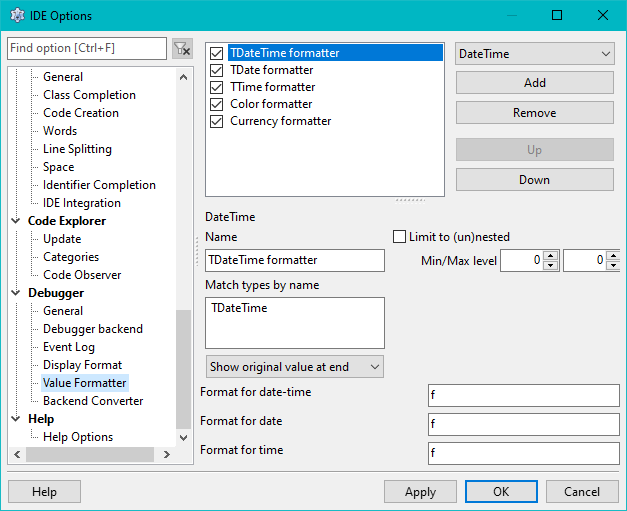 | |
| 4 | 4 | ||
| 5 | 5 | __toc__ | |
| 6 | 6 | ||
| 7 | 7 | # About Value-Formatter | |
| 8 | 8 | ||
| 9 | 9 | Value-Formatter change the format in which a value is displayed. | |
| 10 | 10 | ||
| 11 | 11 | They do not affect the content. The underlying data retrieved from the debugged process is not affected by a value formatter. Value formatter can only change the presentation of that data. This can range from formatting (spacing, line breaking, quoting), over simple conversion (decimal/hex or float-as-date) to performing calculations/lookups on/with the data. | |
| 12 | 12 | ||
| 13 | 13 | Value formatters can act on the entire result of a watched value, including the entire structure or array. Or they can act on individual entries/fields. | |
| 14 | 14 | ||
| 15 | 15 | # General Configuration | |
| 16 | 16 | ||
| 17 | 17 | ## Search Order | |
| 18 | 18 | ||
| 19 | 19 | A value can only be formatted by one formatter. In case of a structure or array, that can mean each field is a value that can be formatted. | |
| 20 | 20 | ||
| 21 | 21 | The IDE needs to find decide which Value-Formatter to use. If several Value-Formatter match their Filter, then the following criteria are used. | |
| 22 | 22 | ||
| 23 | 23 | ### Project vs IDE list | |
| 24 | 24 | ||
| 25 | 25 | Value-Formatter can be configured globally for the entire IDE, or for the current project. If enabled, the IDE will first look for a Value-Formatter from the project, and only if none is found it will look for a Value-Formatter from the IDE config. | |
| 26 | 26 | ||
| 27 | 27 | In the Project settings it is possible to enable/disable each of those two lists.\ | |
| 28 | 28 |  | |
| 29 | 29 | ||
| 30 | 30 | "Store Formatter Config in session" | |
| 31 | 31 | The project list of Display-Formatters is stored in the session, rather than the lpi file.\ | |
| 32 | 32 | The settings to "store in session" itself remains in the lpi. | |
| 33 | 33 | ||
| 34 | 34 | ### Ordering | |
| 35 | 35 | ||
| 36 | 36 | Value-Formatter can be ordered in their list (Up/Down buttons). Each list is searched top to bottom for the first match. | |
| 37 | 37 | ||
| 38 | 38 | ### Checked (Enabled) or direct selection (watch properties) | |
| 39 | 39 | ||
| 40 | 40 | Each Value-Formatter has a checkbox. The IDE will only apply enabled/active Value-Formatter automatically (if they match). | |
| 41 | 41 | ||
| 42 | 42 | Non active Value-Formatter will be ignored by default. They can be manually applied to an individual watch (or in the inspect/evaluate windows). For this the watch properties have a drop down that allows to select a Value-Formatter. From this list active and non-active Value-Formatter can be selected. Please note, that selected Value-Formatter must still have matching filter settings. But for non-active Value-Formatter the filters can be set more relaxed to make sure they do match. | |
| 43 | 43 | ||
| 44 | 44 | ## Adding / Removing | |
| 45 | 45 | ||
| 46 | 46 | To add a new Value-Formatter, first select it from the drop down. Then press "Add". | |
| 47 | 47 | ||
| 48 | 48 | ## Filters | |
| 49 | 49 | ||
| 50 | 50 | Some Value-Formatter have build in filters. Such as a Value-Formatter that takes a number as input will only work on values of numeric type. If you are watching a structure or array the Value-Formatter can however act on matching entries/fields. | |
| 51 | 51 | ||
| 52 | 52 | ### Match type by name | |
| 53 | 53 | ||
| 54 | 54 | You must specify which data type or types the Value-Formatter should be applied to. At least one value must be given. You can specify more than one type, by adding one one each line. In this case at least one must be matched. | |
| 55 | 55 | ||
| 56 | 56 | This can be the exact name of a type: boolean, word, TForm (leading or trailing spaces will be ignored) | |
| 57 | 57 | ||
| 58 | 58 | Or you can match the typename using "*" as placeholder (for zero, one or more characters) | |
| 59 | 59 | ||
| 60 | - | ||
| 61 | - | ||
| 62 | - | ||
| 63 | - | ||
| 60 | + | ```text | |
| 61 | + | TData* | |
| 62 | + | *Ptr | |
| 63 | + | T*Foo | |
| 64 | + | T*Frame* | |
| 65 | + | ``` | |
| 64 | 66 | ||
| 65 | 67 | Any amount of * can be used. | |
| 66 | 68 | ||
| 67 | 69 | For class types inheritance can be checked by starting a line with "is:" | |
| 68 | 70 | ||
| 69 | - | ||
| 70 | - | ||
| 71 | - | ||
| 71 | + | ```text | |
| 72 | + | is:TControl | |
| 73 | + | is:TCustom* | |
| 74 | + | is:*Form | |
| 75 | + | ``` | |
| 72 | 76 | ||
| 73 | 77 | > **Note:** FPC resolves typenames to their un-aliased form. So "Integer" will be known as "longint" (except on 16bit systems). | |
| 74 | 78 | ||
| 75 | 79 | #### Match the variable name or expression | |
| 76 | 80 | ||
| 77 | 81 | It is also possible to match the name of the variable or field. | |
| 78 | 82 | ||
| 79 | 83 | Lines prefixed with either "var:" or "expr:" will do that. | |
| 80 | 84 | ||
| 81 | - | ||
| 82 | - | ||
| 83 | - | ||
| 85 | + | ``` pascal | |
| 86 | + | var:MyForm | |
| 87 | + | var:*Data | |
| 88 | + | expr:*.SomeField | |
| 89 | + | ``` | |
| 84 | 90 | ||
| 85 | 91 | - "var:" will be matched against the term that you entered into the watch "expression" property, or the name of a local, or the identifier in your hint or inspect/evaluate Window.\ | |
| 86 | 92 | If you watch "MyPoint: TPoint" then | |
| 87 | 93 | ||
| 88 | 94 | :* The watch window will display: (X: 123; y: 99) | |
| 89 | 95 | ||
| 90 | 96 | :* If your Value-Formatter is matching the entire structure, then "var:My*" will match "MyPoint" | |
| 91 | 97 | ||
| 92 | 98 | :* If your Value-Formatter is matching each field then for each field the term "MyPoint" will be matched by "var:My*".\ | |
| 93 | 99 | But if you tried "var:*X" to match only the X value, then that does not work. The term being matched is "MyPoint" | |
| 94 | 100 | ||
| 95 | 101 | :* if you expand the watch in the watch window, so you have in-lined extra rows for x and y then those extra rows are new watches and their term is "MyPoint.X" or "MyPoint.Y". They will be matched by both "var:My*" or "var:*.X". But they would not be matched by "var:MyPoint" (since there is no * and this is an exact match) | |
| 96 | 102 | ||
| 97 | 103 | ||
| 98 | 104 | ||
| 99 | 105 | - "expr:" will be matched against the var + path-to-field. (Albeit, in a simplified form).\ | |
| 100 | 106 | The same "MyPoint" watch. | |
| 101 | 107 | ||
| 102 | 108 | :* If you are matching fields in the single line view of the watch windows, the fields will have the term "MyPoint.X" (or Y). | |
| 103 | 109 | ||
| 104 | 110 | :* If you are matching fields in the expanded view of the watch windows, the fields will also have the term "MyPoint.X" (or Y). | |
| 105 | 111 | ||
| 106 | 112 | :* Array indexes are omitted | |
| 107 | 113 | ||
| 108 | 114 | If you have a field "MyFoo" on an object, then your watch can either be | |
| 109 | 115 | ||
| 110 | - | ||
| 111 | - | ||
| 112 | - | ||
| 116 | + | ```text | |
| 117 | + | MyObject | |
| 118 | + | MyObject.MyFoo | |
| 119 | + | MyFoo | |
| 120 | + | ``` | |
| 113 | 121 | ||
| 114 | 122 | The last one, if you are in a method of the object. | |
| 115 | 123 | ||
| 116 | 124 | To match the field in all cases, use the following two: | |
| 117 | 125 | ||
| 118 | - | ||
| 119 | - | ||
| 126 | + | ```text | |
| 127 | + | expr:*.MyFoo | |
| 128 | + | expr:MyFoo | |
| 129 | + | ``` | |
| 120 | 130 | ||
| 121 | 131 | The second could also be "var:MyFoo". The first matches if MyFoo is in the structure. For the watch "MyObject" the IDE will append the ".MyFoo" when displaying the field. | |
| 122 | 132 | ||
| 123 | 133 | Note, if you click the + to expand a watch, then the new watches on the expanded rows may contain a typecast (depending on the watch settings). So the Watch-name to match may be "TMyObject(MyObject).MyFoo". On the other hand the term passed to "expr:" prefixed matches for fields on the non-expanded line does not have such a typecast. | |
| 124 | 134 | ||
| 125 | 135 | > **Note:** When matching the name, there must still be a match for the type. If the type does not matter then specify a standalone "*" | |
| 126 | 136 | ||
| 127 | 137 | ### Limit to nest-level | |
| 128 | 138 | ||
| 129 | 139 | If you have structures or arrays, then entries/fields are seen as "nested values". | |
| 130 | 140 | ||
| 131 | 141 | You may have situations were you want to exclude those from being formatted. Then you can set the Min/Max nest-level to 0. (This also saves the IDE the work to perform matching on type names). | |
| 132 | 142 | ||
| 133 | 143 | Or you may only want to have formatting if a value is nested, then set the min-level to 1. (or higher). Note, that | |
| 134 | 144 | ||
| 135 | 145 | - if you specify "MyObject", then the fields are at level 1 | |
| 136 | 146 | - If you expand that watch to have individual rows to display each field, then they are at level 0 (top level) | |
| 137 | 147 | - if you enter a watch "MyObject.FieldFoo" then that is at level 0 (top level). | |
| 138 | 148 | ||
| 139 | 149 | The reason is, that if it has a row on its own, it has more space to display, and therefore different handling may be wanted. | |
| 140 | 150 | ||
| 141 | 151 | If your watch is just "FieldFoo" (while in a method of the owning object), then you can not check if this is a field, or what the name of the owning variable is (in this case it would be "self"). | |
| 142 | 152 | ||
| 143 | 153 | ## Settings | |
| 144 | 154 | ||
| 145 | 155 | ### Show original | |
| 146 | 156 | ||
| 147 | 157 | Most Value-Formatter have the option to show the original/unchanged value next to the formatted value. | |
| 148 | 158 | ||
| 149 | 159 | # Available Value-Formatter | |
| 150 | 160 | ||
| 151 | 161 | ## Date Time | |
| 152 | 162 | ||
| 153 | 163 | Convert a float to human read-able date/time. | |
| 154 | 164 | ||
| 155 | 165 | You can set the format for the output according to <https://www.freepascal.org/docs-html/rtl/sysutils/formatchars.html> | |
| 156 | 166 | ||
| 157 | 167 | There are 3 fields for specifying a format: | |
| 158 | 168 | ||
| 159 | 169 | - "Date Time" if the value has non-zero parts for date and time | |
| 160 | 170 | - "Date" if the value has a zero part for time | |
| 161 | 171 | - "Time" if the value has a zero part for date | |
| 162 | 172 | ||
| 163 | 173 | By default the IDE comes with 3 instances of the formatter setup, for the data types: | |
| 164 | 174 | ||
| 165 | 175 | - TDateTime | |
| 166 | 176 | - TDate | |
| 167 | 177 | - TTime | |
| 168 | 178 | ||
| 169 | 179 | This means it is possible to set up a different format for a TTime that for some reason has a date part, and a TDateTime which is expected to have a date part. | |
| 170 | 180 | ||
| 171 | 181 | ## Color | |
| 172 | 182 | ||
| 173 | 183 | Will lookup the name of the color. Such as "clRed" or "clBlue". | |
| 174 | 184 | ||
| 175 | 185 | Alternatively it can display an RGB list. | |
| 176 | 186 | ||
| 177 | 187 | The color names are looked up from those registered in the IDE. For use with FPC's "FindIntToIdent". If the application registers its own list, that is not taken into account. In such a case consider #Convert_Ordinal_to_name . | |
| 178 | 188 | ||
| 179 | 189 | ## Alpha Color | |
| 180 | 190 | ||
| 181 | 191 | As TColor, but for TAlphaColor | |
| 182 | 192 | ||
| 183 | 193 | ## CharArray as string | |
| 184 | 194 | ||
| 185 | 195 | For data type | |
| 186 | 196 | ||
| 187 | - | ||
| 188 | - | ||
| 197 | + | ```text | |
| 198 | + | Array of char | |
| 199 | + | Array [n..m] of char | |
| 200 | + | ``` | |
| 189 | 201 | ||
| 190 | 202 | Displays the data as string. This improves readability over a list of individual chars. | |
| 191 | 203 | ||
| 192 | 204 | The string can be cut at the first \#0. | |
| 193 | 205 | ||
| 194 | 206 | ## Custom DisplayFormat | |
| 195 | 207 | ||
| 196 | 208 | Set a specific DisplayFormat. (e.g. Hex or Binary). | |
| 197 | 209 | ||
| 198 | 210 | If you have data types (or fields/variables by name) that you always want in a specific DisplayFormat | |
| 199 | 211 | ||
| 200 | 212 | - The option "Override watch settings" | |
| 201 | 213 | ||
| 202 | 214 | :* If not checked then the DisplayFormat acts as default, but you can choose a different setting in the watch properties | |
| 203 | 215 | ||
| 204 | 216 | :* If checked then the DisplayFormat will override the setting from the watch properties | |
| 205 | 217 | ||
| 206 | 218 | The latter case can be useful if the format is to be applied to some fields in a structure. The settings in the watch properties can then be used for other fields, but the field matched by the Value-Formatter will be forced to the format given here. | |
| 207 | 219 | ||
| 208 | 220 | It can be useful to have 2 Value-Formatters | |
| 209 | 221 | ||
| 210 | 222 | - Min/Max level = 0 (top level) with "Override watch settings" not checked | |
| 211 | 223 | - Min level = 1 (nested) with "Override watch settings" checked | |
| 212 | 224 | ||
| 213 | 225 | ## Convert Ordinal to name | |
| 214 | 226 | ||
| 215 | 227 | Find the name for named integer constants. | |
| 216 | 228 | ||
| 217 | 229 | if you have code like | |
| 218 | 230 | ||
| 219 | - | ||
| 220 | - | ||
| 221 | - | ||
| 222 | - | ||
| 223 | - | ||
| 224 | - | ||
| 225 | - | ||
| 231 | + | ``` pascal | |
| 232 | + | const | |
| 233 | + | ecLeft = 1; // Move cursor left one char | |
| 234 | + | ecRight = 2; // Move cursor right one char | |
| 235 | + | ecUp = 3; // Move cursor up one line | |
| 236 | + | ecDown = 4; // Move cursor down one line | |
| 237 | + | ecWordLeft = 5; // Move cursor left one word | |
| 238 | + | ecWordRight = 6; // Move cursor right one word | |
| 239 | + | ``` | |
| 226 | 240 | ||
| 227 | 241 | You can copy that code into the config for the Value-Formatter (it will ignore the comments). | |
| 228 | 242 | ||
| 229 | 243 | It expects | |
| 230 | 244 | ||
| 231 | 245 | - one value per line | |
| 232 | 246 | - NAME = 123 | |
| 233 | 247 | - optional comment / optional ; at end | |
| 234 | 248 | - comment are skipped multi-line | |
| 235 | 249 | - NAME=TMyType(123) // TMyType is ignored | |
| 236 | 250 | - NAME=PREVIOUS_NAME + 123 // in that exact order only | |
| 237 | 251 | ||
| 238 | 252 | If the value formatter is applied to a value it will look up the number and print the text. | |
| 239 | 253 | ||
| 240 | 254 | --- | |
| 241 | 255 | *From the Free Pascal wiki, page "IDE Window: IDE Options - Debugger Value-Formatter", as it stood on 2024-04-29 after a change by Martin, out of the wiki's dump of 2024-05-26. Copyright stays with the author who wrote it, according to the old wiki's [[Licensing]] page. If you have concerns about this material, [message the admin](/wiki-contact).* | |
| 242 | 256 | Category: Debugging |