

FPDoc Editor: what changed
Revision 0 to 1. Removed lines have a minus sign; added lines have a plus sign.
Title: FPDoc Editor
| Old | New | Line | |
|---|---|---|---|
| 1 | + | ## Contents | |
| 2 | + | ||
| 3 | + | * 1 Introduction | |
| 4 | + | * 2 Using the FPDoc Editor | |
| 5 | + | * 3 Editing FPDoc entries for the LCL sources and Lazarus sources | |
| 6 | + | * 4 Editing FPDoc entries for the FPC sources, RTL and FCL | |
| 7 | + | * 5 Future plans | |
| 8 | + | * 5.1 Already done | |
| 9 | + | ||
| 10 | + | ## Introduction | |
| 11 | + | ||
| 12 | + | FPDoc is the Free Pascal documentation tool which is specifically designed to create help files for individual units of Pascal source code. For more information about FPDoc see here: [Free Pascal documentation tool manual](<http://www.freepascal.org/docs-html/fpdoc/fpdoc.html>). | |
| 13 | + | ||
| 14 | + | [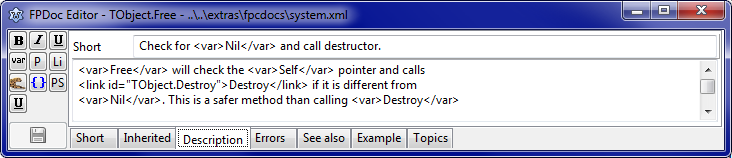](</File:FPDocEditorDescription.png>) | |
| 15 | + | ||
| 16 | + | Lazarus provides inline FPDoc help viewer in hints and two help file editors either of which you can use to create or update source code documentation in FPDoc format. If you want to see it correctly formatted, you have to install Package TurboPowerIProDsgn.lpk! The simpler editor, integrated into the Lazarus IDE is called **FPDoc Editor** , and is described on this page. There is also a more complete and complex editor called [[Lazarus Documentation Editor|LazDE]]. | |
| 17 | + | ||
| 18 | + | **LazDE** is a bigger brother to **FPDoc Editor** and is the Lazarus Documentation Editor. It is a standalone application (not an integral part of the IDE). It is located at ($LazDir)/doceditor/lazde.lpi. Once you have compiled the lazde project (using Lazarus) LazDE then runs outside the IDE. You can add it into menu Tools as external tool. | |
| 19 | + | ||
| 20 | + | ## Using the FPDoc Editor | |
| 21 | + | ||
| 22 | + | To use the FPDoc Editor you simply: | |
| 23 | + | ||
| 24 | + | 1. Open the FPDoc Editor. You will find it under the View menu. | |
| 25 | + | 2. In the Lazarus source code editor move the cursor to some code element. You will notice that the FPDoc Editor's Caption changes to show the selected source element together with the filename of the documentation file. Within FPDoc Editor you can select an appropriate page where you can edit a specific documentation tag. Of course it is also possible to use FPDoc Editor only to view documentation files, without changing them. | |
| 26 | + | 3. Click on the Create Help button. If you have not yet set up search paths for FPDoc the IDE will ask you where the FPDoc files it generates should be stored. For each of your projects you would normally provide a 'docs' subdirectory. | |
| 27 | + | 4. Write a short description. | |
| 28 | + | 5. Click on the Save button to the left or go to the next item (the editor automatically saves a description when you move away from it). | |
| 29 | + | ||
| 30 | + | ## Editing FPDoc entries for the LCL sources and Lazarus sources | |
| 31 | + | ||
| 32 | + | There are in folder ($LazDir)\docs\xml, You can add this folder to FPDoc paths at Tools / Options / Environment / FPDoc Editor | |
| 33 | + | ||
| 34 | + | ## Editing FPDoc entries for the FPC sources, RTL and FCL | |
| 35 | + | ||
| 36 | + | The FPDoc entries for the FPC sources can be downloaded from svn: | |
| 37 | + | ``` | |
| 38 | + | cd /home/username/yourchoice/ | |
| 39 | + | svn co http://svn.freepascal.org/svn/fpcdocs/trunk fpcdocs | |
| 40 | + | ``` | |
| 41 | + | ||
| 42 | + | Add the path _/home/username/yourchoice/fpcdocs_ to Tools / Options / Environment / FPDoc Editor | |
| 43 | + | ||
| 44 | + | A good item to test FPDoc on is _TComponent.Name_. | |
| 45 | + | ||
| 46 | + | ## Future plans | |
| 47 | + | ||
| 48 | + | The todo list currently contains the following items, in no particular order: | |
| 49 | + | ||
| 50 | + | * Write a help editor for topics. | |
| 51 | + | * Create nicer HTML output for the hint windows. | |
| 52 | + | * Support Operators | |
| 53 | + | * Jump to next/previous undocumented identifier | |
| 54 | + | ||
| 55 | + | ### Already done | |
| 56 | + | ||
| 57 | + | * Extend the link editor to show packages and identifiers | |
| 58 | + | * Add documentation tags "example" to FPDoc Editor | |
| 59 | + | * Add documentation tags "topic" to FPDoc Editor | |
| 60 | + | * Make FPDoc Editor create new elements in documentation | |
| 61 | + | * Make FPDoc Editor create new documentation files | |
| 62 | + | * Adding a small toolbar makes it possible to use the available markup tags | |
| 63 | + | * Make FPDoc Editor work on keydown in source code editor | |
| 64 | + | * Add FPDoc Editor to IDE settings (showing and position in IDE) | |
| 65 | + | * Make it work for fpc sources (rtl files already exist) | |
| 66 | + | * Add settings to environment menu | |
| 67 | + | * Make it work on project files also | |
| 68 | + | * Propose to expand documentation tags with: "todo" and "notes" (no need for that, as there are alternatives) | |
| 69 | + | * Reduce overhead even further | |
| 70 | + | * All source elements are interpreted by FPDoc Editor using codetools | |
| 71 | + | * Find inherited entries. For example TControl.Align of TButton.Align | |
| 72 | + | * Optimization: inherited Entries are parsed on idle | |
| 73 | + | * Optimization: xml files are cached, and only parsed once or if they changed on disk | |
| 74 | + | * Add a HTML viewer. This is available by installing the turbopoweriprodsgn package | |
| 75 | + | * Checks for invalid xml tags and auto repairs them | |
| 76 | + | ||
| 77 | + | --- | |
| 78 | + | *From the Free Pascal wiki, page "IDE Window: FPDoc Editor", as the Internet Archive kept it on 2024-07-25. Copyright stays with the author who wrote it, according to the old wiki's [[Licensing]] page. If you have concerns about this material, [message the admin](/wiki-contact).* |