

IDE Window: External Tool: what changed
Revision 0 to 1. Removed lines have a minus sign; added lines have a plus sign.
Title: IDE Window: External Tool
| Old | New | Line | |
|---|---|---|---|
| 1 | + | > **Note:** External tools are global, not project specific | |
| 2 | + | ||
| 3 | + | 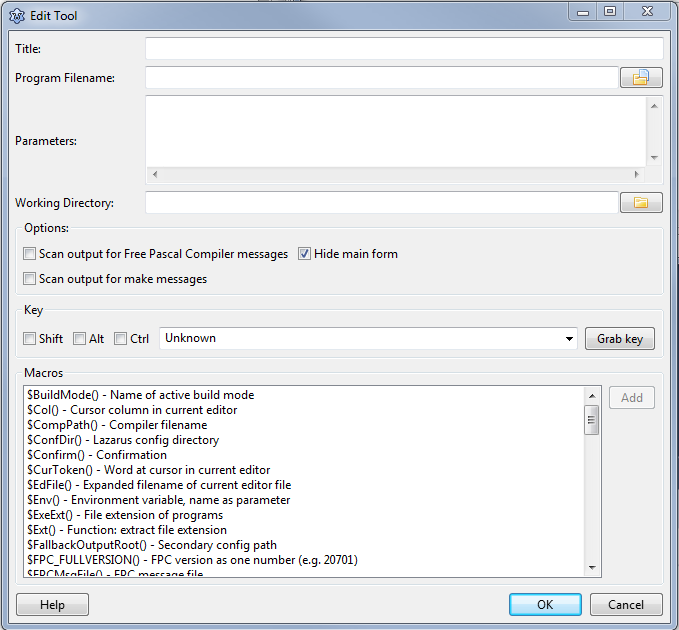 | |
| 4 | + | ||
| 5 | + | ### Title | |
| 6 | + | ||
| 7 | + | This name is is shown in the IDE menu. | |
| 8 | + | ||
| 9 | + | ### Program Filename | |
| 10 | + | ||
| 11 | + | The full path to the tool. For example: | |
| 12 | + | ||
| 13 | + | ` /usr/bin/ppc386` | |
| 14 | + | ||
| 15 | + | ### Parameters | |
| 16 | + | ||
| 17 | + | The command line parameters. For example: | |
| 18 | + | ||
| 19 | + | ` -l test.pas` | |
| 20 | + | ||
| 21 | + | ### Working Directory | |
| 22 | + | ||
| 23 | + | The directory, where to start the tool. All relative paths will be relative to this. | |
| 24 | + | ||
| 25 | + | ### Options | |
| 26 | + | ||
| 27 | + | #### Scan output for FPC messages | |
| 28 | + | ||
| 29 | + | Parse the output for FPC messages and jump to errors. | |
| 30 | + | ||
| 31 | + | #### Show console | |
| 32 | + | ||
| 33 | + | Only available on MS Windows. Creates a console. Default is false. Since 1.7. | |
| 34 | + | ||
| 35 | + | #### Hide window | |
| 36 | + | ||
| 37 | + | Only available on MS Windows. Do not show the application window. Default is true. Since 1.7. | |
| 38 | + | ||
| 39 | + | #### Scan output for make messages | |
| 40 | + | ||
| 41 | + | Parse the output for make messages and jump to errors. | |
| 42 | + | ||
| 43 | + | ### Key | |
| 44 | + | ||
| 45 | + | Define the shortcut for this tool. This is optional. | |
| 46 | + | ||
| 47 | + | ### Macros | |
| 48 | + | ||
| 49 | + | You can use macros in the programfilename, the parameters and the working directory. | |
| 50 | + | ||
| 51 | + | See [[IDE Macros in paths and filenames]]. | |
| 52 | + | ||
| 53 | + | ### Examples | |
| 54 | + | ||
| 55 | + | #### Run cmd.exe | |
| 56 | + | ||
| 57 | + | Choose \<Tools\>\<Configure External Tools\> from the lazarus main menu and setup the following. | |
| 58 | + | ||
| 59 | + | - Title: cmd.exe | |
| 60 | + | - Program Filename: C:\windows\system32\cmd.exe | |
| 61 | + | - Working Directory: \$(ProjPath) | |
| 62 | + | - Disable all scanners | |
| 63 | + | - Show console: enable | |
| 64 | + | - Hide window: disable | |
| 65 | + | ||
| 66 | + | #### Run Tortoisesvn to checkout or update your local svn repository | |
| 67 | + | ||
| 68 | + | Add a function to checkout svn sources from the repository. This example shows how to do this if you are on windows and have tortoisesvn installed. First create a batch-file in the folder lazarus\tools. (e.g lazarus\tools\checkout_lazarus_win.bat) | |
| 69 | + | ||
| 70 | + | *tortoiseproc /command:checkout /url:"<http://svn.freepascal.org/svn/lazarus/trunk/>" /path:"..\\"* | |
| 71 | + | ||
| 72 | + | Then choose \<Tools\>\<Configure External Tools\> from the lazarus main menu and setup the following. | |
| 73 | + | ||
| 74 | + | - Title: Checkout Lazarus | |
| 75 | + | - Program Filename: \$LazarusDir()\tools\checkout_lazarus_win.bat | |
| 76 | + | - Working Directory: \$LazarusDir()\tools\\ | |
| 77 | + | ||
| 78 | + | If you want to add an additional function to update the Lazarus sources from repository, then you can create another batch-file with the following content. | |
| 79 | + | ||
| 80 | + | *tortoiseproc /command:update /path:"..\\"* | |
| 81 | + | ||
| 82 | + | --- | |
| 83 | + | *From the Free Pascal wiki, page "IDE Window: External Tool", as it stood on 2023-05-09 after a change by Mattias2, out of the wiki's dump of 2024-05-26. Copyright stays with the author who wrote it, according to the old wiki's [[Licensing]] page. If you have concerns about this material, [message the admin](/wiki-contact).* | |
| 84 | + | Category: IDE Window |