

IDE Window: External Tool/fr: what changed
Revision 1 to 2. Removed lines have a minus sign; added lines have a plus sign.
| Old | New | Line | |
|---|---|---|---|
| 1 | 1 | Note: Les outils externes sont globaux , non spécifiques à un projet. | |
| 2 | 2 | ||
| 3 | 3 | # Capture d'écran | |
| 4 | 4 | ||
| 5 | 5 | 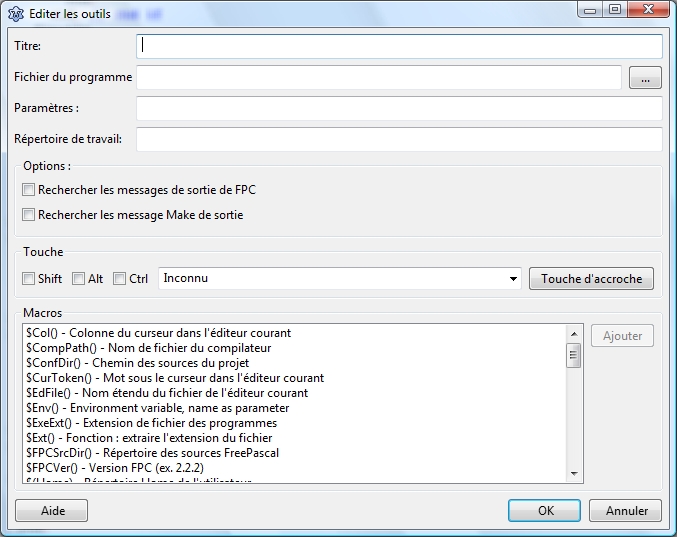 | |
| 6 | 6 | ||
| 7 | 7 | # Titre | |
| 8 | 8 | ||
| 9 | 9 | Le nom tel qu'il sera montré dans le menu de l'IDE. | |
| 10 | 10 | ||
| 11 | 11 | # Fichier du Programme | |
| 12 | 12 | ||
| 13 | 13 | Le chemin complet vers l'outil . Par exemple : | |
| 14 | 14 | ||
| 15 | - | ||
| 15 | + | ```text | |
| 16 | + | /usr/bin/ppc386 | |
| 17 | + | ``` | |
| 16 | 18 | ||
| 17 | 19 | # Paramètres | |
| 18 | 20 | ||
| 19 | 21 | Les paramètres en ligne de commande. Par exemple : | |
| 20 | 22 | ||
| 21 | - | ||
| 23 | + | ```text | |
| 24 | + | -l test.pas | |
| 25 | + | ``` | |
| 22 | 26 | ||
| 23 | 27 | # Répertoire de travail | |
| 24 | 28 | ||
| 25 | 29 | Le répertoire, où mettre en marche l'outil. Tous les chemins relatifs le seront à celui ci. | |
| 26 | 30 | ||
| 27 | 31 | # Options | |
| 28 | 32 | ||
| 29 | 33 | ## Recherche les messages de sortie de FPC | |
| 30 | 34 | ||
| 31 | 35 | Analyse la sortie à la recherche des messages de FPC et se penche sur les erreurs . | |
| 32 | 36 | ||
| 33 | 37 | ## Rechercher les messages Make de sortie | |
| 34 | 38 | ||
| 35 | 39 | Analyse la sortie à la recherche des messages de make et se penche sur les erreurs. | |
| 36 | 40 | ||
| 37 | 41 | # Touche | |
| 38 | 42 | ||
| 39 | 43 | Defini le raccourci pour cet outil. C'est facultatif. | |
| 40 | 44 | ||
| 41 | 45 | # Macros | |
| 42 | 46 | ||
| 43 | 47 | Vous pouvez employer des macros dans programfilename, les paramètres et le répertoire de travail. | |
| 44 | 48 | ||
| 45 | 49 | Voir [[IDE Macros in paths and filenames/fr|les macros de l'IDE dans les répertoires et les noms de fichiers]]. | |
| 46 | 50 | ||
| 47 | 51 | # Example | |
| 48 | 52 | ||
| 49 | 53 | Add a function to checkout Lazarus sources from the repository. This example shows how to do this if you are on windows and have tortoisesvn installed. First create a batch-file in the folder lazarus\tools. (e.g lazarus\tools\checkout_lazarus_win.bat) | |
| 50 | 54 | ||
| 51 | 55 | *tortoiseproc /command:checkout /url:"<http://svn.freepascal.org/svn/lazarus/trunk/>" /path:"..\\"* | |
| 52 | 56 | ||
| 53 | 57 | Then choose \<Tools\>\<Configure External Tools\> from the lazarus main menu and setup the following. | |
| 54 | 58 | ||
| 55 | 59 | - Title: Checkout Lazarus | |
| 56 | 60 | - Program Filename: \$LazarusDir()\tools\checkout_lazarus_win.bat | |
| 57 | 61 | - Working Directory: \$LazarusDir()\tools\\ | |
| 58 | 62 | ||
| 59 | 63 | If you want to add an additional function to update the Lazarus sources from repository, then you can create another batch-file with the following content. | |
| 60 | 64 | ||
| 61 | 65 | *tortoiseproc /command:update /path:"..\\"* | |
| 62 | 66 | ||
| 63 | 67 | --- | |
| 64 | 68 | *From the Free Pascal wiki, page "IDE Window: External Tool/fr", as it stood on 2009-07-07 after a change by Paulatreides, out of the wiki's dump of 2024-05-26. Copyright stays with the author who wrote it, according to the old wiki's [[Licensing]] page. If you have concerns about this material, [message the admin](/wiki-contact).* |