

IDE Window: Event Log: what changed
Revision 0 to 1. Removed lines have a minus sign; added lines have a plus sign.
Title: IDE Window: Event Log
| Old | New | Line | |
|---|---|---|---|
| 1 | + | ## Navigation | |
| 2 | + | ||
| 3 | + | [[Main menu|Main Menu]] \> [[Main menu|View]] \> Debug Windows \> Event Log | |
| 4 | + | ||
| 5 | + | ## Important | |
| 6 | + | ||
| 7 | + | You must [[Debugger Setup|setup the debugger]] and start the project to debug it. Only then this window will be useful. | |
| 8 | + | ||
| 9 | + | ## Event Log | |
| 10 | + | ||
| 11 | + | 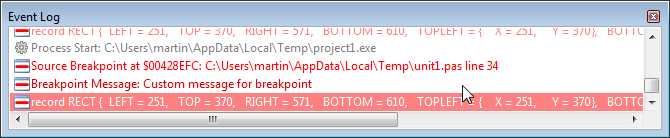 | |
| 12 | + | ||
| 13 | + | The Event Log provides a place into which the debugger will log a record for the occurrence of various events. You can configure the Event Log by using its context menu or the Debugger page of the Tools, Environment Options dialog box. | |
| 14 | + | ||
| 15 | + | The types of events that are logged include process information such as process start, process stop, and module load debugger breakpoints, as well as windows messages sent to the application. | |
| 16 | + | ||
| 17 | + | Application output using the [[OutputDebugString|OutputDebugString()]] function provides a handy means to help you debug Windows applications. The single parameter to OutputDebugString(aString) is a string which will be added to the Event Log. This allows you to keep track of variable values or similar debug information without having to use [[IDE Window: Watch list|Watches]] or displaying intrusive debug dialog boxes. | |
| 18 | + | ||
| 19 | + | [TCustomApplication.Log()](https://www.freepascal.org/docs-html/current/fcl/custapp/tcustomapplication.log.html) also writes its output to the Event Log (if it has been implemented). | |
| 20 | + | ||
| 21 | + | ### Context menu | |
| 22 | + | ||
| 23 | + | 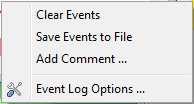 | |
| 24 | + | ||
| 25 | + | **Clear Events**: Clears all the events from the Events Log window. | |
| 26 | + | ||
| 27 | + | **Save Events to File**: Enables you to save the contents of the Event Log to a file. | |
| 28 | + | ||
| 29 | + | **Add Comment**: Enables you to add a comment to the Event Log. | |
| 30 | + | ||
| 31 | + | [[IDE Window: Debugger Options|Event Log Options]]: Options to configure the events which appear in the Event Log. | |
| 32 | + | ||
| 33 | + | --- | |
| 34 | + | *From the Free Pascal wiki, page "IDE Window: Event Log", as it stood on 2021-02-02 after a change by Trev, out of the wiki's dump of 2024-05-26. Copyright stays with the author who wrote it, according to the old wiki's [[Licensing]] page. If you have concerns about this material, [message the admin](/wiki-contact).* |