

IDE Window: Evaluate/Modify: what changed
Revision 0 to 1. Removed lines have a minus sign; added lines have a plus sign.
Title: IDE Window: Evaluate/Modify
| Old | New | Line | |
|---|---|---|---|
| 1 | + | # Important | |
| 2 | + | ||
| 3 | + | You must [[Debugger Setup|setup the debugger]] and start the project to debug it. Only then will this window be useful. | |
| 4 | + | ||
| 5 | + | # Evaluate/Modify | |
| 6 | + | ||
| 7 | + | 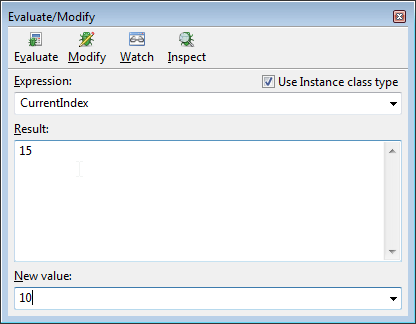 | |
| 8 | + | ||
| 9 | + | ### Interface | |
| 10 | + | ||
| 11 | + | ||
| 12 | + | *Evaluate/Modify* window can be displayed via Main Menu→Run→Evaluate/Modify... | |
| 13 | + | ||
| 14 | + | It is **not** grayed only when the executed application is **paused**. | |
| 15 | + | ||
| 16 | + | Evaluate | |
| 17 | + | Evaluates the given expression | |
| 18 | + | ||
| 19 | + | Modify | |
| 20 | + | When the new values is set, it assigns the new value to the expression. The expression can only be a property or a variable. (Read notes on "New Value") | |
| 21 | + | ||
| 22 | + | Watch | |
| 23 | + | Add the expression to the [[IDE Window: Watch list|watch list]] | |
| 24 | + | ||
| 25 | + | Inspect | |
| 26 | + | Show the [[IDE Window:Variable Inspector|variable inspector]] for the expression. The expression can only be a property or a variable. | |
| 27 | + | ||
| 28 | + | Use Instance class type | |
| 29 | + | Objects are normally shown according to the declaration of the watched expression. Evaluating "Sender: TObject" will only show you data, that is declared in TObject. However object variables can contain objects of inherited classes. Sender may be a TForm. Using this the debugger will find the actual class of the object and display all data. | |
| 30 | + | ||
| 31 | + | ### Data | |
| 32 | + | ||
| 33 | + | Expression | |
| 34 | + | Enter the expression to be evaluated/modified/watched/inspected here | |
| 35 | + | ||
| 36 | + | Result | |
| 37 | + | The result of the evaluation. If the evaluation of the expression failed, an error message is shown. | |
| 38 | + | ||
| 39 | + | New Value | |
| 40 | + | The new value you want to use for a variable or property. | |
| 41 | + | ||
| 42 | + | Important note on "New Value": | |
| 43 | + | ||
| 44 | + | ||
| 45 | + | You should not attempt to modify "managed" types (strings, dynamic array). This will lead to memory corruption. | |
| 46 | + | ||
| 47 | + | There is currently no safety check in place, so you must ensure this yourself. | |
| 48 | + | ||
| 49 | + | --- | |
| 50 | + | *From the Free Pascal wiki, page "IDE Window: Evaluate/Modify", as it stood on 2018-01-31 after a change by Paskal, out of the wiki's dump of 2024-05-26. Copyright stays with the author who wrote it, according to the old wiki's [[Licensing]] page. If you have concerns about this material, [message the admin](/wiki-contact).* |