

IDE Window: Editor Options: what changed
Revision 2 to 3. Removed lines have a minus sign; added lines have a plus sign.
| Old | New | Line | |
|---|---|---|---|
| 1 | - | ||
| 1 | + | 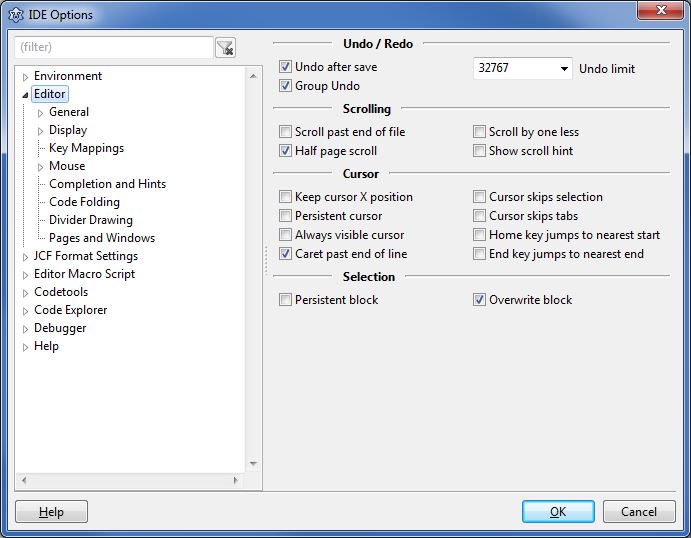 | |
| 2 | 2 | ||
| 3 | 3 | This is part of the online help for the IDE. | |
| 4 | 4 | ||
| 5 | 5 | It describes the section: "Editor Options". You can open the described dialog in your IDE via: | |
| 6 | 6 | ||
| 7 | 7 | - The menu: "Tools" =\> "Options" / Editor options ... | |
| 8 | 8 | - The source-editor pop-up menu: "Editor properties ... | |
| 9 | 9 | ||
| 10 | 10 | The available editor options are: | |
| 11 | 11 | ||
| 12 | 12 | - [[IDE Window: Editor Options General|General]] | |
| 13 | 13 | - Undo / Redo | |
| 14 | 14 | - Scrolling | |
| 15 | 15 | - Indent and Tabs\ | |
| 16 | 16 | Please also see Codetools for automatic indent of Pascal sources | |
| 17 | 17 | - Cursor | |
| 18 | 18 | - Selection | |
| 19 | 19 | - [[IDE Window: Editor Options General Misc|Misc]] | |
| 20 | 20 | - Showing Whitespace | |
| 21 | 21 | - Trimming spaces | |
| 22 | 22 | - Copy/paste: unselected / fold | |
| 23 | 23 | - Search | |
| 24 | 24 | - [[IDE Window: Editor Options Display|Display]] | |
| 25 | 25 | - [[IDE Window: Editor Options Display Gutter|Gutter / Margin]] | |
| 26 | 26 | - Font | |
| 27 | 27 | - Line-spacing | |
| 28 | 28 | - [[IDE Window: Editor Options HighlightColors|Colors]] | |
| 29 | 29 | - Highlighting Pascal/Language specific elements | |
| 30 | 30 | - General Highlighting (Selection, Line Highlights, ...) | |
| 31 | 31 | - [[IDE Window: Editor Options Markup|Markup and Matches]] | |
| 32 | 32 | - Highlight other occurrences of the current word | |
| 33 | 33 | - Matching brackets | |
| 34 | 34 | - Extended Pascal-Keyword settings | |
| 35 | 35 | - [[IDE Window: Editor User Defined Words|User defined markup]] | |
| 36 | 36 | - Highlight your own chosen words | |
| 37 | 37 | - [[IDE Window: Editor Options Keymap|Key Mappings]] | |
| 38 | 38 | - Keyboard | |
| 39 | 39 | - See [[Lazarus IDE Shortcuts]]. | |
| 40 | 40 | - [[IDE Window: Editor Options Mouse|Mouse settings]] | |
| 41 | 41 | - Mouse | |
| 42 | 42 | - [[IDE Window: Editor Options Completion Hints|Completion and Hints]] | |
| 43 | 43 | - Automatic removal of unused events | |
| 44 | 44 | - Automatic completion of Pascal blocks (begin/end) | |
| 45 | 45 | - Automatic completion of identifiers | |
| 46 | 46 | - Hints in the Editor | |
| 47 | 47 | - [[IDE Window: Editor Options Code Folding|Code Folding]] | |
| 48 | 48 | - Source/Text folding | |
| 49 | 49 | - [[IDE Window: Divider Drawing Divider Draw|Divider Drawing]] | |
| 50 | 50 | - Drawing divider lines | |
| 51 | 51 | - [[IDE Window: Editor Options MultiWindow|Pages and Windows]] | |
| 52 | 52 | - Notebook and its tabs | |
| 53 | 53 | - Automatic selection of windows for code navigation | |
| 54 | 54 | ||
| 55 | 55 | --- | |
| 56 | 56 | *From the Free Pascal wiki, page "IDE Window: Editor Options", as it stood on 2021-11-04 after a change by Trev, out of the wiki's dump of 2024-05-26. Copyright stays with the author who wrote it, according to the old wiki's [[Licensing]] page. If you have concerns about this material, [message the admin](/wiki-contact).* |