

IDE Window: Debug Output: what changed
Revision 0 to 1. Removed lines have a minus sign; added lines have a plus sign.
Title: IDE Window: Debug Output
| Old | New | Line | |
|---|---|---|---|
| 1 | + | ## Navigation | |
| 2 | + | ||
| 3 | + | 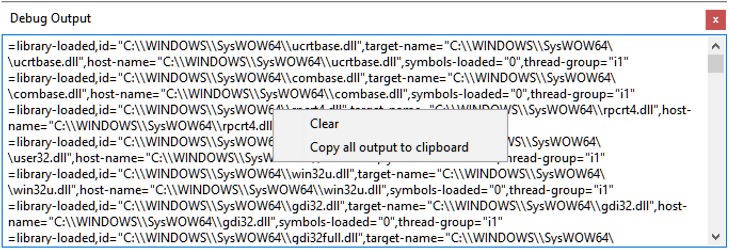 | |
| 4 | + | ||
| 5 | + | [[Main menu|Main Menu]] \> [[Main menu|View]] \> IDE Internals \> Debug Output | |
| 6 | + | ||
| 7 | + | ## Important | |
| 8 | + | ||
| 9 | + | You must [[Debugger Setup|setup the debugger]] and start the project to debug it. Only then is this window useful. | |
| 10 | + | ||
| 11 | + | ## Overview | |
| 12 | + | ||
| 13 | + | This window shows the commands and answers between the IDE and the debugger. | |
| 14 | + | ||
| 15 | + | The window is not needed for normal debug operation. It may provide useful information, if the debugger itself fails to work as expected. | |
| 16 | + | ||
| 17 | + | ## Context menu | |
| 18 | + | ||
| 19 | + | **Clear**: Clears the output. | |
| 20 | + | ||
| 21 | + | **Copy All Output to Clipboard**: Copies the content of the window to the ClipBoard. | |
| 22 | + | ||
| 23 | + | --- | |
| 24 | + | *From the Free Pascal wiki, page "IDE Window: Debug Output", as it stood on 2021-02-01 after a change by Trev, out of the wiki's dump of 2024-05-26. Copyright stays with the author who wrote it, according to the old wiki's [[Licensing]] page. If you have concerns about this material, [message the admin](/wiki-contact).* |