

IDE Window: Codetools Options: what changed
Revision 1 to 2. Removed lines have a minus sign; added lines have a plus sign.
| Old | New | Line | |
|---|---|---|---|
| 1 | - | ||
| 1 | + | 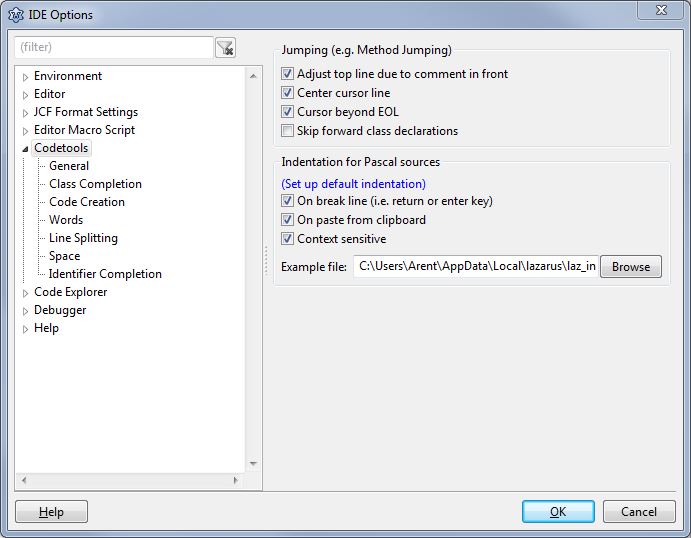 | |
| 2 | 2 | ||
| 3 | 3 | ## General | |
| 4 | 4 | ||
| 5 | 5 | ### Additional Source search path for all projects/packages | |
| 6 | 6 | ||
| 7 | 7 | If you are too lazy to setup packages and you do not want to share your projects/packages, then you can set here a global search path. Please note: "global" refers to codetools, and does not include the settings for the compiler. You have to add the path to the fpc.cfg as well. | |
| 8 | 8 | ||
| 9 | 9 | ### Jumping (e.g. Method Jumping) | |
| 10 | 10 | ||
| 11 | 11 | - **Adjust top line due to comment in front**: When jumping from method declaration to method body, the IDE tries to position the source editor, so that the top line shown in the editor is the first line of the procedure. Normally a comment in front belongs to the procedure as well. Enable this option to scroll so that the comment is shown too. | |
| 12 | 12 | ||
| 13 | 13 | - **Center cursor line**: If jumping from the method body to the declaration in the class (or interface) the IDE can center line vertically in the editor. | |
| 14 | 14 | ||
| 15 | 15 | - **Cursor beyond EOL**: When the IDE jumps to a new position it is allowed to jump to a nice position, even if this is beyond the end of the line. This must be enabled for the source editor too. | |
| 16 | 16 | ||
| 17 | 17 | - **Skip forward declarations**: When doing a *find declaration* the codetools searches upwards and stops on the first fit. This might be a forward declaration, e.g. *TControl = class;*. If this option is enabled the codetools will jump to the real class declaration instead. | |
| 18 | 18 | ||
| 19 | 19 | - **Jump directly to method body**: When *Find declaration* jumps to a method/procedure declaration it takes an extra jump to the implementation. | |
| 20 | 20 | ||
| 21 | 21 | ### Indentation | |
| 22 | 22 | ||
| 23 | 23 | Since 0.9.29 the source editor has a smarter auto indenter for pascal. It imitates your indentation. For example when you press return after a *try* the indenter will search for other *try..finally* blocks and indents accordingly. When pasting code from the clipboard the indenter will indent it too. | |
| 24 | 24 | ||
| 25 | 25 | - **On break line**: Indent when pressing return and breaking the line. If disabled the default indenter of synedit is used, which indents as the line above. | |
| 26 | 26 | ||
| 27 | 27 | - **On paste form clipboard**: Indent when copying text from the clipboard. At the moment it only indents when inserting at column 1. | |
| 28 | 28 | ||
| 29 | 29 | - **Context sensitive**: The indenter searches in the surrounding code for similar code and copies the indentation. This means it searches first the code in front, then the code below. If it is a project unit, all project units are searched. If it is a package unit all package units are searched. Finally the example file is searched. If this option is disabled only the example file is searched. | |
| 30 | 30 | ||
| 31 | 31 | - **Example file**: This file contains beautiful code examples. You can edit the default file or select another. It can be a unit or program source. | |
| 32 | 32 | ||
| 33 | 33 | For a detailed explanation see [[Fully automatic indentation]]. | |
| 34 | 34 | ||
| 35 | 35 | ## Class Completion | |
| 36 | 36 | ||
| 37 | 37 | ### Insert class part | |
| 38 | 38 | ||
| 39 | 39 | Defines where to insert new variables and method to the class declaration: | |
| 40 | 40 | ||
| 41 | 41 | - Alphabetically | |
| 42 | 42 | - Last | |
| 43 | 43 | ||
| 44 | 44 | ### Insert methods | |
| 45 | 45 | ||
| 46 | 46 | Where to insert new method bodies. Methods of the same class are always grouped together. | |
| 47 | 47 | ||
| 48 | 48 | - Alphabetically | |
| 49 | 49 | - Last | |
| 50 | 50 | - Class order: Use the same order as in the class declaration | |
| 51 | 51 | ||
| 52 | 52 | ### Method default section | |
| 53 | 53 | ||
| 54 | 54 | What class visibility should be used for new methods by default (since 1.8). | |
| 55 | 55 | ||
| 56 | 56 | - Private | |
| 57 | 57 | - Protected | |
| 58 | 58 | - Public | |
| 59 | 59 | - Published | |
| 60 | 60 | ||
| 61 | 61 | ### Flags | |
| 62 | 62 | ||
| 63 | 63 | - Mix methods and properties: When adding a new method allow to insert between properties. | |
| 64 | 64 | - Update all method signatures: | |
| 65 | 65 | - Enabled: Class completion updates all method signature (i.e. case, modifiers) from declaration to implementation. | |
| 66 | 66 | - Disabled: Class completion updates only the method signature under the cursor. | |
| 67 | 67 | - Header comment for class: Add a *{ TYourClass }* comment in front of type. | |
| 68 | 68 | - Implementation comment for class: Add a *{ TYourClass }* comment in front of the first method body. | |
| 69 | 69 | ||
| 70 | 70 | ### Header comment for class | |
| 71 | 71 | ||
| 72 | 72 | Add a header comment in front of the class declaration. For example { TForm } | |
| 73 | 73 | ||
| 74 | 74 | ### Implementation comment for class | |
| 75 | 75 | ||
| 76 | 76 | Add a comment in front of the first method body. For example { TForm } | |
| 77 | 77 | ||
| 78 | 78 | ### Property completion | |
| 79 | 79 | ||
| 80 | 80 | - Complete properties: Enable to complete incomplete property declarations. | |
| 81 | 81 | - Read Prefix - the 'Get' in 'function GetColor: TColor' | |
| 82 | 82 | - Write Prefix - the 'Set' in 'procedure SetColor(aValue: TColor)' | |
| 83 | 83 | - Stored Prefix - the 'IsStored' in 'function IsStoredColor'; | |
| 84 | 84 | - Variable Prefix - The new private variable name is this prefix plus property name, e.g. the 'F' in 'FColor'. | |
| 85 | 85 | - Set property Variable - the parameter name for the setter, e.g. the 'aValue' in 'procedure SetColor(aValue: TColor)'. | |
| 86 | 86 | - is prefix - enable to use aValueColor instead of aValue as parameter name. e.g. 'procedure SetColor(aValueColor: TColor)'. | |
| 87 | 87 | - use const - enable to use the 'const' accessor for the parameter. e.g. 'procedure SetColor(const aValue: TColor)'. | |
| 88 | 88 | ||
| 89 | 89 | ## Code Creation | |
| 90 | 90 | ||
| 91 | 91 | In this section you can define, where (and in which order) new procedures and units will be inserted. | |
| 92 | 92 | ||
| 93 | 93 | ### Procedure insert policy | |
| 94 | 94 | ||
| 95 | 95 | Where to insert new procedure bodies | |
| 96 | 96 | ||
| 97 | 97 | - Last (at end of source) | |
| 98 | 98 | - in front of methods | |
| 99 | 99 | - behind methods | |
| 100 | 100 | ||
| 101 | 101 | ### Keep order of procedures | |
| 102 | 102 | ||
| 103 | 103 | When inserting new procedure bodies, keep order of the interface. | |
| 104 | 104 | ||
| 105 | 105 | ## Words | |
| 106 | 106 | ||
| 107 | 107 | ### Keyword policy | |
| 108 | 108 | ||
| 109 | 109 | How to write new keywords. | |
| 110 | 110 | ||
| 111 | 111 | ### Identifier policy | |
| 112 | 112 | ||
| 113 | 113 | How to write new identifiers. | |
| 114 | 114 | ||
| 115 | 115 | ## Line Splitting | |
| 116 | 116 | ||
| 117 | 117 | ## Space | |
| 118 | 118 | ||
| 119 | 119 | ## Identifier completion | |
| 120 | 120 | ||
| 121 | 121 | See the tutorial [[Lazarus IDE Tools|Identifier completion]]. | |
| 122 | 122 | ||
| 123 | 123 | ### Add semicolon | |
| 124 | 124 | ||
| 125 | 125 | Allow to add missing semicolon. For example: | |
| 126 | 126 | ||
| 127 | 127 | ``` pascal | |
| 128 | 128 | s:=Caption| // | |
| 129 | 129 | ``` | |
| 130 | 130 | ||
| 131 | 131 | will add a semicolon. It does not add a semicolon if the identifier is a L-Value like in the following example: | |
| 132 | 132 | ||
| 133 | 133 | ``` pascal | |
| 134 | 134 | Button1| | |
| 135 | 135 | ``` | |
| 136 | 136 | ||
| 137 | 137 | ### Add assignment operator | |
| 138 | 138 | ||
| 139 | 139 | This will add a **:=** if the identifier is a L-Value with no sub identifiers. For example: | |
| 140 | 140 | ||
| 141 | 141 | ``` pascal | |
| 142 | 142 | Caption| // Caption is a string, so Caption:= | |
| 143 | 143 | ``` | |
| 144 | 144 | ||
| 145 | 145 | ### Automatically invoke after point | |
| 146 | 146 | ||
| 147 | 147 | If enabled the identifier completion is automatically shown, when user pressed a point *.* and waited for the time shown in Editor / Automatic Features / Tooltip expression evaluation. For example: | |
| 148 | 148 | ||
| 149 | 149 | ``` pascal | |
| 150 | 150 | Button1.| // typing the point and wait will show the completion box | |
| 151 | 151 | ``` | |
| 152 | 152 | ||
| 153 | 153 | ### Add parameter brackets | |
| 154 | 154 | ||
| 155 | 155 | ### Replace whole identifier | |
| 156 | 156 | ||
| 157 | 157 | - Enable: replace the whole identifier at cursor | |
| 158 | 158 | - Disable: replace only the identifier in front of the cursor | |
| 159 | 159 | ||
| 160 | 160 | --- | |
| 161 | 161 | *From the Free Pascal wiki, page "IDE Window: Codetools Options", as it stood on 2020-02-17 after a change by Trev, out of the wiki's dump of 2024-05-26. Copyright stays with the author who wrote it, according to the old wiki's [[Licensing]] page. If you have concerns about this material, [message the admin](/wiki-contact).* |