

IDE Window: Codetools Defines Editor: what changed
Revision 0 to 1. Removed lines have a minus sign; added lines have a plus sign.
Title: IDE Window: Codetools Defines Editor
| Old | New | Line | |
|---|---|---|---|
| 1 | + |  **Note:** These values are only used by the codetools, not by the compiler. To setup search paths use the [[IDE Window: Environment Options|Environment options]], [[IDE Window: Compiler Options|Compiler Options]], [[IDE Window: Package Editor|Package Editor]] and [[IDE Window: Project Inspector|Project Inspector]]. The IDE automatically creates codetools nodes for those values. | |
| 2 | + | ||
| 3 | + | This dialog is mainly for debugging, when codetools parse different than the compiler. Or to setup the Delphi sources in the Lazarus IDE. | |
| 4 | + | ||
| 5 | + | [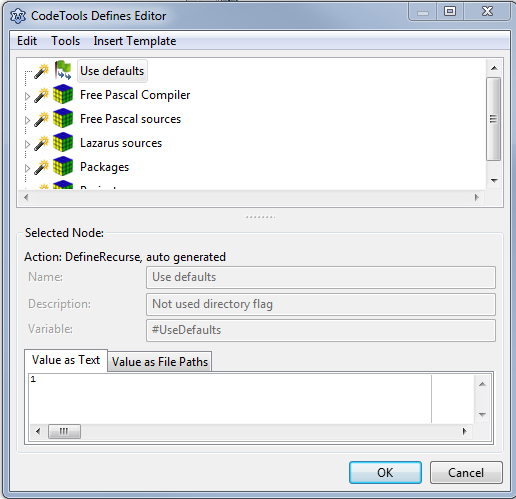](</File:Codetools_Defines_Editor.png>) | |
| 6 | + | ||
| 7 | + | ## Contents | |
| 8 | + | ||
| 9 | + | * 1 Introduction | |
| 10 | + | * 2 Tree - predefined nodes | |
| 11 | + | * 2.1 Free Pascal Compiler | |
| 12 | + | * 2.2 Free Pascal Sources | |
| 13 | + | * 2.3 Lazarus Sources | |
| 14 | + | * 2.4 Packages | |
| 15 | + | * 3 Node types | |
| 16 | + | * 3.1 Block | |
| 17 | + | * 3.2 Directory | |
| 18 | + | * 3.3 Define | |
| 19 | + | * 3.4 Define Recurse | |
| 20 | + | * 3.5 Undefine | |
| 21 | + | * 3.6 Undefine Recurse | |
| 22 | + | * 3.7 Undefine All | |
| 23 | + | * 3.8 IfDef | |
| 24 | + | * 3.9 IfNDef | |
| 25 | + | * 3.10 If | |
| 26 | + | * 3.11 ElseIf | |
| 27 | + | * 3.12 Else | |
| 28 | + | * 4 Menu | |
| 29 | + | * 4.1 Exit - Save and Exit | |
| 30 | + | * 4.2 Exit - Exit without Save | |
| 31 | + | * 4.3 Edit - Move node up | |
| 32 | + | * 4.4 Edit - Move node down | |
| 33 | + | * 4.5 Edit - Move node one level up | |
| 34 | + | * 4.6 Edit - Move node one level down | |
| 35 | + | * 4.7 Edit - Insert node below | |
| 36 | + | * 4.8 Edit - Insert node as child | |
| 37 | + | * 4.9 Edit - Delete node | |
| 38 | + | * 4.10 Edit - Convert node | |
| 39 | + | * 4.11 Tools - Open Preview | |
| 40 | + | * 4.12 Insert Template | |
| 41 | + | * 5 Treeview | |
| 42 | + | * 6 Selected node | |
| 43 | + | * 6.1 Name | |
| 44 | + | * 6.2 Description | |
| 45 | + | * 6.3 Value | |
| 46 | + | * 6.4 Value as Text | |
| 47 | + | * 6.5 Values as File Paths | |
| 48 | + | ||
| 49 | + | ## Introduction | |
| 50 | + | ||
| 51 | + | The codetools provide functions to parse pascal sources - FreePascal, Delphi, Kylix. To find the pascal sources they need the search paths and to parse the IFDEFs they need the compiler flags. These values are defined by rules - the **define templates**. | |
| 52 | + | ||
| 53 | + | For every directory the codetools manage a set of values. That means every unit in a directory share the same values (paths and flags). That's why you should **only** put two projects/packages into one directory if they use the same settings. On the other hand this system allows to handle an arbitrary number of distinct sources at the same time. For example you can have Delphi and FreePascal sources. The Delphi sources will use the Delphi system.pas, while the FPC sources will use the FPC system.pp. Or you can have two different FPC versions. Or several FPC cross sources (For example for linux and windows). You do not need to restart the IDE or recompile anything for that. Note: The compiler of course can only handle one type of sources. | |
| 54 | + | ||
| 55 | + | This dialog allows to explore and edit the define templates. | |
| 56 | + | ||
| 57 | + | All values and variables can contain macros. A variable that was assigned an empty value _is still defined. That means 'IFDEF variable' will still result in 'true'. To purge a variable use 'Undefine'._ | |
| 58 | + | ||
| 59 | + | ## Tree - predefined nodes | |
| 60 | + | ||
| 61 | + | ### Free Pascal Compiler | |
| 62 | + | ||
| 63 | + | This node provides global definitions, provided by the currently used compiler set in the project's compiler options. They are updated if you change the compiler in the compiler options (e.g. IDE loads a project) or 'Rescan FPC source directory'. they are not automatically updated when you install another FPC while the IDE is running. They are auto generated and can not be changed. | |
| 64 | + | ||
| 65 | + | ### Free Pascal Sources | |
| 66 | + | ||
| 67 | + | This node provides definitions for the Free Pascal source directory, defined in the environment options. The nodes are auto created by some fix wired heuristics in the codetools (components/codetools/definetemplates.pas function CreateFPCSrcTemplate) and can not be changed in the dialog. They are updated when the FPC source directory is changed (e.g. in options or on IDE start) or the Target CPU or OS changes or by 'Rescan FPC source directory'. They are not updated, when files are changed on disk while the IDE is running. | |
| 68 | + | ||
| 69 | + | ### Lazarus Sources | |
| 70 | + | ||
| 71 | + | This node provides definitions for the Lazarus source directory, defined in the environment options. The nodes are auto created by some fix wired heuristics in the codetools (components/codetools/definetemplates.pas function CreateLazarusSrcTemplate) and can not be changed in the dialog. They are updated when the Lazarus source directory is changed (e.g. in options or on IDE start). They are not updated, when files are changed on disk while the IDE is running. | |
| 72 | + | ||
| 73 | + | ### Packages | |
| 74 | + | ||
| 75 | + | The IDE creates on node for each package. At the moment the nodes of the packages LCL, IDEIntf, SynEdit and Codetools are special packages and defined by the 'Lazarus Sources'. | |
| 76 | + | ||
| 77 | + | ## Node types | |
| 78 | + | ||
| 79 | + | The codetools parse the nodes from top to bottom. Some nodes like _Directory_ , _IF_ , _IFDEF_ , ... control if their child nodes are parsed or not. | |
| 80 | + | ||
| 81 | + | The tree shows two icons for each node. The first is the node type (Block, IF, IFDEF, ...). The second icon shows a 'computer', if the node was auto created and can not be altered. | |
| 82 | + | ||
| 83 | + | ### Block | |
| 84 | + | ||
| 85 | + | This node type exists only to group nodes. | |
| 86 | + | ||
| 87 | + | ### Directory | |
| 88 | + | ||
| 89 | + | To create nodes only valid for a specific directory use this node type. The child nodes are only parsed for the directory specified in **Value**. **Define** and **Undefine** nodes will set/clear variables only for this directory, not for the sub directories. To set/clear variables for sub directories, create a child node of type **Directory** or use the **Define Recurse** , **Undefine Recurse**. | |
| 90 | + | ||
| 91 | + | ### Define | |
| 92 | + | ||
| 93 | + | Sets a flag/value for the current directory. Examples: | |
| 94 | + | ||
| 95 | + | * Set Name to 'Def1'. Now IFDEF Def1 will be true and in source a {$IFDEF Def1} will be parsed by the codetools. | |
| 96 | + | * Set Name to 'Def1' and Value to '123'. Same as above, but addionally IF Def1=123 gives true. | |
| 97 | + | * Set Name to 'Def1' and Value to '$(Def1);bogus'. This will append ';bogus' to the value of Def1. | |
| 98 | + | ||
| 99 | + | ### Define Recurse | |
| 100 | + | ||
| 101 | + | Same as **Define** , but for the current directory and all sub directories. | |
| 102 | + | ||
| 103 | + | ### Undefine | |
| 104 | + | ||
| 105 | + | Purges a variable form the current set of definitions. | |
| 106 | + | ||
| 107 | + | ### Undefine Recurse | |
| 108 | + | ||
| 109 | + | Same as **Undefine** , but for the current directory and all sub directories. | |
| 110 | + | ||
| 111 | + | ### Undefine All | |
| 112 | + | ||
| 113 | + | Same as **Undefine Recurse** , but purges all variables. Useful for directories that build their own world. For example the FPC source. | |
| 114 | + | ||
| 115 | + | ### IfDef | |
| 116 | + | ||
| 117 | + | If the Variable is defined the child nodes are executed. | |
| 118 | + | ||
| 119 | + | ### IfNDef | |
| 120 | + | ||
| 121 | + | If the Variable is **not** defined the child nodes are executed. | |
| 122 | + | ||
| 123 | + | ### If | |
| 124 | + | ||
| 125 | + | Executes the expression in Value and if the result is '1' then the child nodes are executed. The syntax is the same as the compiler. For example 'defined(avariable)' returns '1' if the avariable is defined, otherwise '0'. Examples: | |
| 126 | + | ||
| 127 | + | * Set 'Value' to 'defined(linux) and defined(i386)' | |
| 128 | + | * To check for a specific FPC version: 'VER2_0 or VER2_2'. The variables will be replaced by their values. Empty or not defined values result in '0'. | |
| 129 | + | * To compare the values of two variables use: '$(#TargetOS)'='$(#SrcOS)'. IMPORTANT: If you forget the apostrophes, the following will happen: First the macros will be replaced, which results in linux=unix, which is further replaced by the values of the variables: 1=1, which always results to true. | |
| 130 | + | ||
| 131 | + | ### ElseIf | |
| 132 | + | ||
| 133 | + | If all former If resulted in false, then the ElseIf or Else node is executed. The ElseIf is the same as an Else If. | |
| 134 | + | ||
| 135 | + | ### Else | |
| 136 | + | ||
| 137 | + | If all former If or ElseIf resulted false, then this node is executed. | |
| 138 | + | ||
| 139 | + | ## Menu | |
| 140 | + | ||
| 141 | + | ### Exit - Save and Exit | |
| 142 | + | ||
| 143 | + | Save changes and close dialog. | |
| 144 | + | ||
| 145 | + | ### Exit - Exit without Save | |
| 146 | + | ||
| 147 | + | Discard changes and close dialog. | |
| 148 | + | ||
| 149 | + | ### Edit - Move node up | |
| 150 | + | ||
| 151 | + | Move selected node in front of next upper sibling. | |
| 152 | + | ||
| 153 | + | ### Edit - Move node down | |
| 154 | + | ||
| 155 | + | Move selected node below next lower sibling. | |
| 156 | + | ||
| 157 | + | ### Edit - Move node one level up | |
| 158 | + | ||
| 159 | + | Move selected node to parent node. | |
| 160 | + | ||
| 161 | + | ### Edit - Move node one level down | |
| 162 | + | ||
| 163 | + | Make selected node a child of the previous sibling. | |
| 164 | + | ||
| 165 | + | ### Edit - Insert node below | |
| 166 | + | ||
| 167 | + | Create a new node and insert it below selected node. | |
| 168 | + | ||
| 169 | + | ### Edit - Insert node as child | |
| 170 | + | ||
| 171 | + | Create a new node and insert it as child of selected node. | |
| 172 | + | ||
| 173 | + | ### Edit - Delete node | |
| 174 | + | ||
| 175 | + | Delete selected node. | |
| 176 | + | ||
| 177 | + | ### Edit - Convert node | |
| 178 | + | ||
| 179 | + | Change type of selected node. | |
| 180 | + | ||
| 181 | + | ### Tools - Open Preview | |
| 182 | + | ||
| 183 | + | Open the [[IDE Window: Codetools Directory Values|Codetools Directory Values]]. | |
| 184 | + | ||
| 185 | + | ### Insert Template | |
| 186 | + | ||
| 187 | + | Create a new node from the templates and insert it below selected node. | |
| 188 | + | ||
| 189 | + | ## Treeview | |
| 190 | + | ||
| 191 | + | Select a node and view the details below. | |
| 192 | + | ||
| 193 | + | ## Selected node | |
| 194 | + | ||
| 195 | + | ### Name | |
| 196 | + | ||
| 197 | + | ### Description | |
| 198 | + | ||
| 199 | + | ### Value | |
| 200 | + | ||
| 201 | + | ### Value as Text | |
| 202 | + | ||
| 203 | + | Shows the value. | |
| 204 | + | ||
| 205 | + | ### Values as File Paths | |
| 206 | + | ||
| 207 | + | Splits the value for semicolons and shows each path on a separate line. | |
| 208 | + | ||
| 209 | + | --- | |
| 210 | + | *From the Free Pascal wiki, page "IDE Window: Codetools Defines Editor", as the Internet Archive kept it on 2024-01-21. Copyright stays with the author who wrote it, according to the old wiki's [[Licensing]] page. If you have concerns about this material, [message the admin](/wiki-contact).* |