

IDE Window: Code Explorer Options: what changed
Revision 1 to 2. Removed lines have a minus sign; added lines have a plus sign.
| Old | New | Line | |
|---|---|---|---|
| 1 | - | ||
| 1 | + | 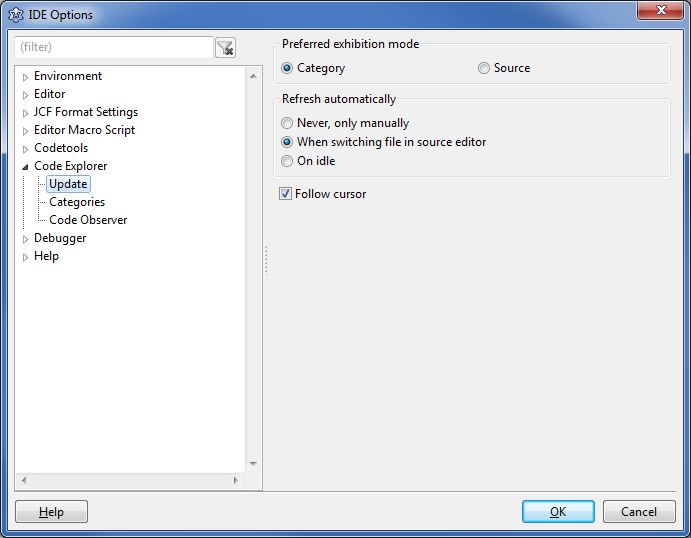 The dialog is explained here: [[IDE Window: Code Explorer]] | |
| 2 | 2 | ||
| 3 | 3 | ## Update | |
| 4 | 4 | ||
| 5 | 5 | Preferred Exhibition Mode | |
| 6 | 6 | ||
| 7 | 7 | - Category - sort all declarations into categories like constants, variables, types, procedures, ... | |
| 8 | 8 | - Source - show all declarations as they are in the source | |
| 9 | 9 | ||
| 10 | 10 | Refresh automatically | |
| 11 | 11 | ||
| 12 | 12 | - Never, only manually - only when pressing the Refresh button | |
| 13 | 13 | - When switching file in source editor - when switching to another unit | |
| 14 | 14 | - On idle - whenever the user does not type or move the mouse | |
| 15 | 15 | ||
| 16 | 16 | ## Categories | |
| 17 | 17 | ||
| 18 | 18 | Shows the available categories. Check all that you want to see in the code explorer. | |
| 19 | 19 | ||
| 20 | 20 | The category **Code Observer** exists since 0.9.27 and lists uncommon or hard to read code fragments. You can set the details in the next option page. | |
| 21 | 21 | ||
| 22 | 22 | ## Code Observer | |
| 23 | 23 | ||
| 24 | 24 | Complexity | |
| 25 | 25 | ||
| 26 | 26 | - Long procedures\ | |
| 27 | 27 | Lists all procedures with more lines of code than in the edit field to the right. Long procedures are hard to read by others. Use the [[IDE Window: Extract Procedure|Extract Procedure]] tool to split it into several procedures. | |
| 28 | 28 | - Many parameters\ | |
| 29 | 29 | Lists all procedures with more parameters than in the edit field to the right. | |
| 30 | 30 | - Many nested procedures\ | |
| 31 | 31 | Lists all procedures with more nested sub procedures than in the edit field to the right. | |
| 32 | 32 | ||
| 33 | 33 | Empty constructs | |
| 34 | 34 | ||
| 35 | 35 | - Empty procedures\ | |
| 36 | 36 | Lists all procedures without code. They can contain comments and directives. The code below will be listed under linux. | |
| 37 | 37 | ||
| 38 | 38 | ``` pascal | |
| 39 | 39 | begin | |
| 40 | 40 | {$IFDEF win32}write;{$ENDIF} | |
| 41 | 41 | end; | |
| 42 | 42 | ``` | |
| 43 | 43 | ||
| 44 | 44 | - Empty blocks\ | |
| 45 | 45 | Lists all empty blocks, like begin..end and repeat..until. Blocks containing comments are not listed. Empty blocks can be endless loops or forgotten to clean up. | |
| 46 | 46 | - Empty class sections\ | |
| 47 | 47 | Lists all empty class sections like *private*, *public*, *protected*. | |
| 48 | 48 | ||
| 49 | 49 | Style | |
| 50 | 50 | ||
| 51 | 51 | - Unnamed Constants\ | |
| 52 | 52 | Lists all literal constants in statements, that means constants that have no name. You can define in the text fields below what should not be listed. | |
| 53 | 53 | - Unsorted visibility\ | |
| 54 | 54 | Lists all class sections, that are not sorted. For example if a private section comes behind a public section. | |
| 55 | 55 | - Unsorted members\ | |
| 56 | 56 | Lists all class variables, methods and properties that are not sorted alphabetically. | |
| 57 | 57 | ||
| 58 | 58 | Other | |
| 59 | 59 | ||
| 60 | 60 | - Wrong indentation\ | |
| 61 | 61 | Lists all places with suspicious indentation. For example: In the next example the *then* statement was accidentally deleted: | |
| 62 | 62 | ||
| 63 | 63 | ``` pascal | |
| 64 | 64 | for i:=0 to 10 do | |
| 65 | 65 | if i=0 then | |
| 66 | 66 | writeln(''); | |
| 67 | 67 | ``` | |
| 68 | 68 | ||
| 69 | 69 | - Published properties without default\ | |
| 70 | 70 | Lists all properties without a default value. For example: | |
| 71 | 71 | ||
| 72 | 72 | ``` pascal | |
| 73 | 73 | published | |
| 74 | 74 | property Flag: booolean read FFlag write SetFlag; | |
| 75 | 75 | ``` | |
| 76 | 76 | ||
| 77 | 77 | Since FPC 2.2.4 such properties are treated as if they have the *nodefault* specifier. That means they are always saved to the lfm. | |
| 78 | 78 | ||
| 79 | 79 | - ToDos\ | |
| 80 | 80 | Lists alls ToDos. See the [[IDE Window: ToDo List|ToDo list]]. | |
| 81 | 81 | ||
| 82 | 82 | Ignore next unnamed constants | |
| 83 | 83 | ||
| 84 | 84 | These constants will not be listed in the unnamed category. Examples: | |
| 85 | 85 | ||
| 86 | 86 | ``` pascal | |
| 87 | 87 | 0 | |
| 88 | 88 | 1 | |
| 89 | 89 | 'a' | |
| 90 | 90 | 'abc' | |
| 91 | 91 | #3 | |
| 92 | 92 | #$3 | |
| 93 | 93 | ``` | |
| 94 | 94 | ||
| 95 | 95 | Ignore constants in next functions | |
| 96 | 96 | ||
| 97 | 97 | Constants passed as parameters to the following functions will not be listed in the unnamed category. There are two types. For example: | |
| 98 | 98 | ||
| 99 | 99 | ``` pascal | |
| 100 | 100 | Write | |
| 101 | 101 | .ParamByName | |
| 102 | 102 | ``` | |
| 103 | 103 | ||
| 104 | 104 | Note the point in front of ParamByName. | |
| 105 | 105 | ||
| 106 | 106 | Result: | |
| 107 | 107 | ||
| 108 | 108 | ``` pascal | |
| 109 | 109 | Write('A'); // 'A' will be ignored | |
| 110 | 110 | MemStream.Write('A'); // 'A' will be listed | |
| 111 | 111 | DataModule1.SQLQuery1.Params.ParamByName('ART_ID').AsString; // will be ignored | |
| 112 | 112 | ParamByName('ART_ID').AsString; // will be listed | |
| 113 | 113 | ``` | |
| 114 | 114 | ||
| 115 | 115 | --- | |
| 116 | 116 | *From the Free Pascal wiki, page "IDE Window: Code Explorer Options", as it stood on 2020-07-13 after a change by Arent, out of the wiki's dump of 2024-05-26. Copyright stays with the author who wrote it, according to the old wiki's [[Licensing]] page. If you have concerns about this material, [message the admin](/wiki-contact).* |