

IDE Window: Clean up build files dialog
Deutsch · English
Overview
This dialog can be found via the IDE menu Run / Clean up build files ...
It shows all files of all output directories of the project and all its packages. You can define filters and delete the files. You can clean up all source directories too.
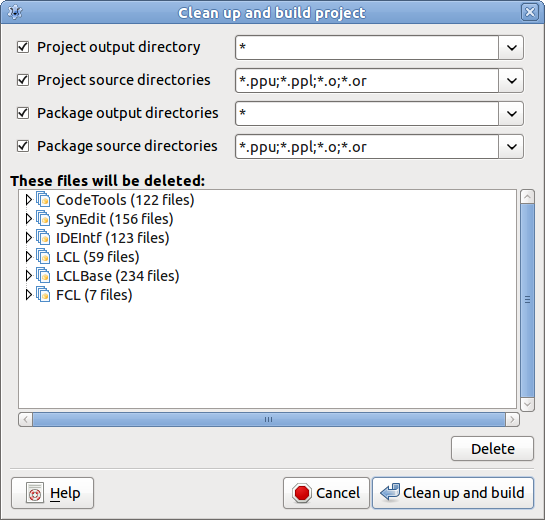
You can define one filter for each category:
- the project output directory (See Project / Project Options / Compiler options / Paths / Unit output directory)
- the project source directories (See Project / Project Options / Compiler options / Paths / Other unit files)
- the package output directories
- the package source directories
A filter is a semicolon separated list of file masks. The file masks support the globbing characters star ***** for anything and question mark ? for any character.
The project filters are stored in the project sesssion file (lps). The package filters are stored in the IDE's global options (~/.lazarus/inputhistory.xml).
From the Free Pascal wiki, page "IDE Window: Clean up build files dialog", as it stood on 2015-07-02 after a change by FTurtle, out of the wiki's dump of 2024-05-26. Copyright stays with the author who wrote it, according to the old wiki's Licensing page. If you have concerns about this material, message the admin.
Edited on wiki.freepascal.org by 4 people, 2011–2015
From the official wiki's backup of 26 May 2024: who edited this page there, and when. Edits made there after that date were not recorded, and the earlier versions are not shown here; the main page says why.
| When | Who | What changed |
|---|---|---|
| Mattias2 | New page: =Overview= This dialog can be found via the IDE menu ''Run / Clean up build files ...'' It shows all files of all output directories of the project and all its packages. You can define f... | |
| Mattias2 | Overview (minor) | |
| Mattias2 | IDE Window: Clean Build Project Dialog moved to IDE Window: Clean up build files dialog: corrected (minor) | |
| Swen | (minor) | |
| Jwdietrich | categorized | |
| FTurtle |
Talk about this page
Nobody has opened a bench for this page yet. Sign in to open one.