

IDE Window: Clean Directory: what changed
Revision 0 to 1. Removed lines have a minus sign; added lines have a plus sign.
Title: IDE Window: Clean Directory
| Old | New | Line | |
|---|---|---|---|
| 1 | + | 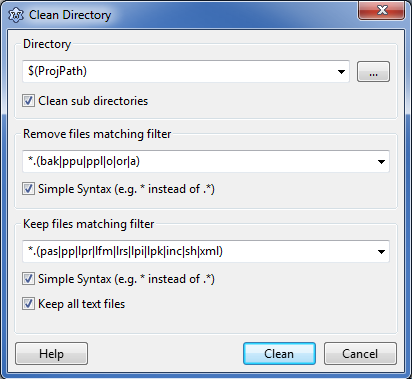 | |
| 2 | + | ||
| 3 | + | ## Directory | |
| 4 | + | ||
| 5 | + | This is the directory where to clean up. Use the '...' button to the right to browse for a directory. Enable 'Clean sub directories' to clean up recursively all sub folders. | |
| 6 | + | ||
| 7 | + | ## Remove files matching filter | |
| 8 | + | ||
| 9 | + | All files matching this filter and not matching the filter below are removed. For the syntax see [[IDE regular expressions]]. | |
| 10 | + | ||
| 11 | + | ## Keep files matching filter | |
| 12 | + | ||
| 13 | + | All files matching this filter will be kept, even if the above filter includes the files. | |
| 14 | + | ||
| 15 | + | Enable 'Keep all text file' to also keep all files, that look like text. That means, they do not contain special characters in the first 1000 bytes. | |
| 16 | + | ||
| 17 | + | --- | |
| 18 | + | *From the Free Pascal wiki, page "IDE Window: Clean Directory", as it stood on 2017-03-22 after a change by Arent, out of the wiki's dump of 2024-05-26. Copyright stays with the author who wrote it, according to the old wiki's [[Licensing]] page. If you have concerns about this material, [message the admin](/wiki-contact).* |