

IDE Window: Assembler: what changed
Revision 0 to 1. Removed lines have a minus sign; added lines have a plus sign.
Title: IDE Window: Assembler
| Old | New | Line | |
|---|---|---|---|
| 1 | + | ## Navigation | |
| 2 | + | ||
| 3 | + | [[Main menu|Main Menu]] \> [[Main menu|View]] \> Debug Windows \> Assembler | |
| 4 | + | ||
| 5 | + | [[IDE Window: Call Stack|CallStack Window]] \> Context menu \> View Assembler | |
| 6 | + | ||
| 7 | + | ## Important | |
| 8 | + | ||
| 9 | + | You must [[Debugger Setup|setup the debugger]] and start the project to debug it. Only then this window will be useful. | |
| 10 | + | ||
| 11 | + | ## Assembler | |
| 12 | + | ||
| 13 | + | 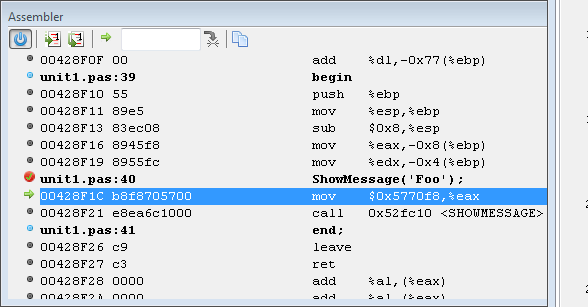 | |
| 14 | + | ||
| 15 | + | Shows an assembler view of the current code. This can be used with the [[IDE Window: Registers|Registers]] window. | |
| 16 | + | ||
| 17 | + | ### Data displayed | |
| 18 | + | ||
| 19 | + | Address | |
| 20 | + | ||
| 21 | + | Hex dump | |
| 22 | + | ||
| 23 | + | Asm statement | |
| 24 | + | The output depends on your CPU | |
| 25 | + | ||
| 26 | + | Pascal lines | |
| 27 | + | If Pascal sources are available, then they are shown in front of their ASM representation. | |
| 28 | + | ||
| 29 | + | ### Interface | |
| 30 | + | ||
| 31 | + | Vertical Srollbar | |
| 32 | + | The vertical scrollbar behaves different from normal scrollbars. Since the assembly data may continue to an unknown extend in both directions, there is no fixed range. Move and hold the slider in either direction to scroll. The further you move the slider from the center position the faster the scroll. If released the slider returns to the center. | |
| 33 | + | ||
| 34 | + | Toolbar | |
| 35 | + | ||
| 36 | + |  Power | |
| 37 | + | Switch off the disassembler. The current disassembled data is kept as is. If the current location changes, it will be indicated only within the data. Introduced to deal with slow data loading since fetching any data from gdb takes noticeable time. It offers a quick way to temporarily disable loading so that other debug windows may be able to display their data sooner. | |
| 38 | + | ||
| 39 | + |  Step over or into (one asm instruction) | |
| 40 | + | Single step (into) one asm instructions, instead of on entire pascal instructions. Will enter subroutines. | |
| 41 | + | ||
| 42 | + |  Step over (one asm instruction) | |
| 43 | + | Single step (over )one asm instructions, instead of on entire pascal instructions. Will skip over subroutines. | |
| 44 | + | ||
| 45 | + |  Return to current address | |
| 46 | + | Returns to the current execution-point. | |
| 47 | + | ||
| 48 | + |  Goto custom address | |
| 49 | + | Shows the data at the address entered in the input field. | |
| 50 | + | ||
| 51 | + |  Copy to clipboard | |
| 52 | + | Copies the selected line(s) to the clipboard. | |
| 53 | + | ||
| 54 | + | Context menu  Copies the selected line(s) to the clipboard.\ | |
| 55 | + | ||
| 56 | + | ### Using the same or different keys for Pascal and ASM stepping | |
| 57 | + | ||
| 58 | + | The default keyboard settings are: | |
| 59 | + | ||
| 60 | + | - `F7` or `F8`: step into/over one pascal instruction | |
| 61 | + | - `Alt`-`F7` or `Alt`-`F8`: step into/over one asm instruction | |
| 62 | + | ||
| 63 | + | Those keys will act, independent of the focused window. | |
| 64 | + | ||
| 65 | + | In the keyboard mapping (editor options) under "Run Menu" are also entries: | |
| 66 | + | ||
| 67 | + | - `Alt`-`Shift`-`F7` or `Alt`-`Shift`-`F8`: "Step into,over (Context) | |
| 68 | + | ||
| 69 | + | Those will step asm only if the assembler window is focused, and step pascal otherwise. | |
| 70 | + | ||
| 71 | + | The key mapping can be changed, for the unmodified F7/F8 to act on context. | |
| 72 | + | ||
| 73 | + | ### Improve speed using the power button | |
| 74 | + | ||
| 75 | + | The debugger will disassemble the required memory range after each step, or each run. This may require some time. | |
| 76 | + | ||
| 77 | + | During single stepping the next execution point often is in already disassembled data. If you code is not self-modifying, then you can use the power button to disable the repeated disassembling. Once you stepped to the border of the disassembled range, you need to turn power on to allow disassembling the next block of data. Once you have the next block of data turn it off again. And so on. | |
| 78 | + | ||
| 79 | + | ## Scope | |
| 80 | + | ||
| 81 | + | The assembler window does not follow any scope. | |
| 82 | + | ||
| 83 | + | The Stack window (context menu) allows to jump to the address of any stackframe. This acts like jumping to a custom address, the  button will always return to the execution point at the top stack frame. | |
| 84 | + | ||
| 85 | + | ## See also | |
| 86 | + | ||
| 87 | + | - [[IDE Window: Registers|Registers]] | |
| 88 | + | ||
| 89 | + | --- | |
| 90 | + | *From the Free Pascal wiki, page "IDE Window: Assembler", as it stood on 2021-03-20 after a change by Martin, out of the wiki's dump of 2024-05-26. Copyright stays with the author who wrote it, according to the old wiki's [[Licensing]] page. If you have concerns about this material, [message the admin](/wiki-contact).* |