

How To Write Lazarus Component/es: what changed
Revision 0 to 1. Removed lines have a minus sign; added lines have a plus sign.
Title: How To Write Lazarus Component/es
| Old | New | Line | |
|---|---|---|---|
| 1 | + | Esta es una guía sobre como construir componentes. | |
| 2 | + | ||
| 3 | + | ## Paso 1: Crear el paquete | |
| 4 | + | ||
| 5 | + | - En el menú de Lazarus, clic en **Paquete \> Nuevo Paquete** para ejecutar el administrador de paquetes. | |
| 6 | + | ||
| 7 | + | <figure> | |
| 8 | + | <img src="package_menu.png" title="package_menu.png" /> | |
| 9 | + | <figcaption>package_menu.png</figcaption> | |
| 10 | + | </figure> | |
| 11 | + | ||
| 12 | + | - Un dialogo **Guardar** aparecerá. Elije una carpeta y un nombre y presiona guardar. Si el IDE pregunta por usar nombres de archivo en minúsculas presiona 'sí'. | |
| 13 | + | ||
| 14 | + | - Felicidades: Has creado tu primer paquete. | |
| 15 | + | ||
| 16 | + | <figure> | |
| 17 | + | <img src="How_to_write_lazarus_component_package_maker.png" title="Package Maker" /> | |
| 18 | + | <figcaption>Package Maker</figcaption> | |
| 19 | + | </figure> | |
| 20 | + | ||
| 21 | + | ## Paso 2: Crear la unidad | |
| 22 | + | ||
| 23 | + | Puedes crear una nueva unidad o usar un archivo existente. Las dos opciones son desarrolladas debajo. | |
| 24 | + | ||
| 25 | + | ### Crear una nueva unidad | |
| 26 | + | ||
| 27 | + | - Usa el botón **Add \> Nuevo componente**. | |
| 28 | + | ||
| 29 | + | <figure> | |
| 30 | + | <img src="package_new_component.png" title="package_new_component.png" /> | |
| 31 | + | <figcaption>package_new_component.png</figcaption> | |
| 32 | + | </figure> | |
| 33 | + | ||
| 34 | + | - Escoge un componente tal como TComboBox. | |
| 35 | + | - Escoge *customcontrol1.pas* como **Nombre de fichero para la unit** y *CustomControl1* como **Nombre de la unit**. | |
| 36 | + | - Ahora ya puedes asignar al componenete un icono y determinar en que solapa de la paleta del IDE de Lazarus aparecera el componente. | |
| 37 | + | - Click en **Crear Nuevo Componente**. | |
| 38 | + | ||
| 39 | + | ``` pascal | |
| 40 | + | unit CustomControl1; | |
| 41 | + | ||
| 42 | + | {$mode objfpc}{$H+} | |
| 43 | + | ||
| 44 | + | interface | |
| 45 | + | ||
| 46 | + | uses | |
| 47 | + | Classes, SysUtils, LResources, Forms, Controls, Graphics, Dialogs, StdCtrls; | |
| 48 | + | ||
| 49 | + | type | |
| 50 | + | TCustomControl1 = class(TComboBox) | |
| 51 | + | private | |
| 52 | + | { Declaraciones Privadas} | |
| 53 | + | protected | |
| 54 | + | { Declaraciones Protegidas } | |
| 55 | + | public | |
| 56 | + | { Declaraciones Públicas } | |
| 57 | + | published | |
| 58 | + | { Declaraciones Publicadas } | |
| 59 | + | end; | |
| 60 | + | ||
| 61 | + | procedure Register; | |
| 62 | + | ||
| 63 | + | implementation | |
| 64 | + | ||
| 65 | + | procedure Register; | |
| 66 | + | begin | |
| 67 | + | RegisterComponents('Standard',[TCustomControl1]); | |
| 68 | + | end; | |
| 69 | + | ||
| 70 | + | end. | |
| 71 | + | ``` | |
| 72 | + | ||
| 73 | + | - Instala el paquete haciendo clic en el botón **Use -\> Install** arriba del editor del paquete. | |
| 74 | + | ||
| 75 | + | <figure> | |
| 76 | + | <img src="package_install.png" title="package_install.png" /> | |
| 77 | + | <figcaption>package_install.png</figcaption> | |
| 78 | + | </figure> | |
| 79 | + | ||
| 80 | + | - Ahora el IDE te preguntará ¿Desea reconstruir ahora Lazarus?, le indicamos que \[Si\]. | |
| 81 | + | ||
| 82 | + | <figure> | |
| 83 | + | <img src="package_rebuild.png" title="package_rebuild.png" /> | |
| 84 | + | <figcaption>package_rebuild.png</figcaption> | |
| 85 | + | </figure> | |
| 86 | + | ||
| 87 | + | - Una vez reiniciado el IDE de Lazarus deberiamos poder ver el nuevo componente en la paleta dentro de la solapa adecuada. Felicidades, ya tienes instalado tu primer paquete con tu primer paquete de componente. | |
| 88 | + | ||
| 89 | + | <figure> | |
| 90 | + | <img src="package_installed.png" title="package_installed.png" /> | |
| 91 | + | <figcaption>package_installed.png</figcaption> | |
| 92 | + | </figure> | |
| 93 | + | ||
| 94 | + | ### Añadir una unidad existente | |
| 95 | + | ||
| 96 | + | Si ya tienes una unidad creada la puedes añadir al paquete: | |
| 97 | + | ||
| 98 | + | <figure> | |
| 99 | + | <img src="package_existing_unit.png" title="package_existing_unit.png" /> | |
| 100 | + | <figcaption>package_existing_unit.png</figcaption> | |
| 101 | + | </figure> | |
| 102 | + | ||
| 103 | + | - Click the **Add** button, go to the **Add Files** tab. At the Unit file name, browse to your existing file. Click **Add files to package**. If the package manager complains that the unit is not in the unit path, click yes to add the directory to the unit path. | |
| 104 | + | - Click the **Add** button again, go to the **Add Files** tab, browse to the *.lrs* file and click OK (See Step 3 about creating this icon file). | |
| 105 | + | - Click the **Add** button again, go to the **New Requirement** tab. In the Package name select **LCL** and click OK. | |
| 106 | + | ||
| 107 | + | El resultado final debería parecerse a esto: | |
| 108 | + | ||
| 109 | + | <figure> | |
| 110 | + | <img src="How_to_write_lazarus_component_package_maker_done.png" title="Package Maker" /> | |
| 111 | + | <figcaption>Package Maker</figcaption> | |
| 112 | + | </figure> | |
| 113 | + | ||
| 114 | + | - Click bajo el árbol de ficheros en el Gestor de Paquetes. En Propiedades de Fichero, asegúrate que la *Register unit* se encuentra chequeada. | |
| 115 | + | - Click en el pulsador de Opciones. Selecciona la solapa de Integración del IDE. En Tipo de Paquete, asegúrate que están seleccionados Designtime y Runtime. | |
| 116 | + | - Click en el pulsador de Compilar para chequearque todo se compile sin errores. | |
| 117 | + | - Click en el pulsador de Instalar. Lazarus se reconstruirá y reiniciará automáticamente. | |
| 118 | + | ||
| 119 | + | El componente se ha creado y está listo para ser utilizado: | |
| 120 | + | ||
| 121 | + | <figure> | |
| 122 | + | <img src="How_to_write_lazarus_component_created.png" title="Component Created" /> | |
| 123 | + | <figcaption>Component Created</figcaption> | |
| 124 | + | </figure> | |
| 125 | + | ||
| 126 | + | ## Paso 3: Crear iconos para el paquete | |
| 127 | + | ||
| 128 | + | Se deben crear iconos con dimensiones 24x24 píxeles y formato de fichero PNG. | |
| 129 | + | ||
| 130 | + | FPC es capaz de utilizar ficheros de recurso estandar `.rc` y recursos compilados `.res` desde la versión 2.6. Ver [[Lazarus Resources|Lazarus_Resources#FPC_resources]] | |
| 131 | + | ||
| 132 | + | Por hacer: escribir la descripción de creación de iconos utilizando recursos FPC. | |
| 133 | + | ||
| 134 | + | Los `.lrs`: ver más abajo. | |
| 135 | + | ||
| 136 | + | ### Utilizando el Editor de Imágen de Lazarus | |
| 137 | + | ||
| 138 | + | Puedes utilizar el [[Lazarus Image Editor|Editor de Imágenes de Lazarus]] para crear los iconos en formato ".lrs". | |
| 139 | + | ||
| 140 | + | ### Utilizando lazres | |
| 141 | + | ||
| 142 | + | `lazres` se encuentra habitualmente en el directorio tools de Lazarus. | |
| 143 | + | ||
| 144 | + | Se necesita compilarlo para su primer uso [[lazres]]. Simplemente abre el fichero *lazres.lpi* en el IDE y haz click en **run \> build** en el menu. | |
| 145 | + | ||
| 146 | + | **Create lrs file** | |
| 147 | + | ||
| 148 | + | Para crear el fichero lrs arranca: | |
| 149 | + | ||
| 150 | + | `~/lazarus/tools/lazres samplepackage.lrs TMyCom.png` | |
| 151 | + | ||
| 152 | + | Donde: | |
| 153 | + | ||
| 154 | + | - *samplepackage* es el nombre de tu paquete. | |
| 155 | + | - *TMyCom* es el nombre de tu componente. **El nombre de la imagen debe coincidir con el nombre de tu componente**. | |
| 156 | + | ||
| 157 | + | Puedes añadir más de una imagen al fichero lrs añadiendo el nombre del fichero de imagen al final. E.g. ~/lazarus/tools/lazres samplepackage.lrs TMyCom.png TMyOtherCom.png ... Y **Ejemplo** | |
| 158 | + | ||
| 159 | + | El siguiente es un ejemplo del fichero *samplepackage.lrs* resultante. | |
| 160 | + | ||
| 161 | + | LazarusResources.Add('TMyCom','PNG',[ | |
| 162 | + | #137'PNG'#13#10#26#10#0#0#0#13'IHDR'#0#0#0#24#0#0#0#24#8#2#0#0#0'o'#21#170#175 | |
| 163 | + | +#0#0#0#4'gAMA'#0#0#177#143#11#252'a'#5#0#0#0'|IDAT8O'#237#212#209#10#192' '#8 | |
| 164 | + | +#5'P'#247#231#251's'#215#138#133#164#166'\'#220#195'`'#209'c'#157'L'#173#131 | |
| 165 | + | +#153#169'd4'#168'dP'#137'r_'#235'5'#136'@Zmk'#16'd9'#144#176#232#164'1'#247 | |
| 166 | + | +'I'#8#160'IL'#206'C'#179#144#12#199#140'.'#134#244#141'~'#168#247#209'S~;'#29 | |
| 167 | + | +'V+'#196#201'^'#10#15#150'?'#255#18#227#206'NZ>42'#181#159#226#144#15'@'#201 | |
| 168 | + | +#148#168'e'#224'7f<@4'#130'u_YD'#23#213#131#134'Q]'#158#188#135#0#0#0#0'IEND' | |
| 169 | + | +#174'B`'#130 | |
| 170 | + | ]); | |
| 171 | + | ||
| 172 | + | Asegúrate de incluir tu fichero de recursos en la fuente de tu nuevo componente añadiendo lo siguiente al fondo de la unit del componente e incluyendo **"LResources"** en la claúsula **uses**. | |
| 173 | + | ||
| 174 | + | ``` pascal | |
| 175 | + | initialization | |
| 176 | + | {$I samplepackage.lrs} | |
| 177 | + | ``` | |
| 178 | + | ||
| 179 | + | ### Utilizando glazres | |
| 180 | + | ||
| 181 | + | **GLazRes** is the graphical version of `lazres` that can assemble files into a Lazarus resource file (.lrs). It can be found in the tools directory of a Lazarus installation. | |
| 182 | + | ||
| 183 | + | ## Recompilando paquetes | |
| 184 | + | ||
| 185 | + | Es necesario reconstruir el paquete cada vez que se realizan cambios en el fichero *mycom.pas* . Para reconstruir el paquete ve a Paquete -\> Abrir Archivo de Paquete (.lpk)...-\> Seleccionar el fichero *samplepackage.lpk* en el gestor de paquetes y hacer click en el pulsador Usar -\> Instalar. | |
| 186 | + | ||
| 187 | + | ## Eliminando paquetes | |
| 188 | + | ||
| 189 | + | - Para eliminar componentes instalados: en el menú del IDE hacer Click en Paquete -\> \> Instalar/Desinstalar Paquetes. La siguiente imagen muestra la utilidad de Paquetes Instalados. | |
| 190 | + | ||
| 191 | + | 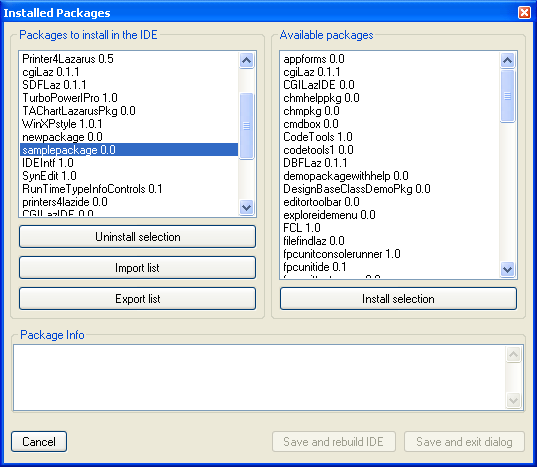 | |
| 192 | + | ||
| 193 | + | - Selecciona el paquete que necesitas desinstalar y haz Click en Desinstalar Selección. | |
| 194 | + | ||
| 195 | + | Si algo va mal con un paquete (e.g. el directorio del paquete se ha borrado sin que primeramente se haya desinstalado), entonces Lazarus no permitirá desinstalar los paquetes. Para solucionar el problema se procede a seleccionar Herramientas en el menú del IDE y a continuación Construir Lazarus, lo cual hará que Lazarus reconstruya todos los paquetes y reinicie. A partir de ahí ya debería permitirte desinstalar los paquetes problemáticos. | |
| 196 | + | ||
| 197 | + | ## Mejorando mycom.pas | |
| 198 | + | ||
| 199 | + | - El código en *mycom.pas* te muestra lo básico que necesitas para crear un componente. Lo siguiente es una mejora con algunos tips sobre como escribir procedimientos y eventos para componentes. | |
| 200 | + | - El*OnChange2* muestra como crear eventos. | |
| 201 | + | - El *OnSample* muestra como crear eventos personlizados. | |
| 202 | + | - *MyText* y *MyText2* muestran caminos diferentes de escribir propiedades. | |
| 203 | + | - Puedes utilizar TComboBox en lugar de TCustomComboBox como clase base, la cual publica todas las propiedades como TComboBox. | |
| 204 | + | - Si se utiliza TCustomComboBox como la clase base, notarás que se pierden un montón de propiedades y eventos en el Inspector de Objetos del IDE. Para añadir estas propiedades y eventos, simplemente copia y pega las propiedades tal como se listan abajo.*// properties from TComboBox*. Esta lista de propiedades se pueden obtener desde la declaración de TComboBox en la unidad StdCtrls. Omite cualquier propiedad que necesites manegar por ti mismo. | |
| 205 | + | ||
| 206 | + | ``` pascal | |
| 207 | + | unit mycom; | |
| 208 | + | ||
| 209 | + | {$mode objfpc}{$H+} | |
| 210 | + | ||
| 211 | + | interface | |
| 212 | + | ||
| 213 | + | uses | |
| 214 | + | Classes, SysUtils, StdCtrls, Forms, Dialogs, | |
| 215 | + | LCLType,LCLIntf,lresources,LCLProc; | |
| 216 | + | ||
| 217 | + | type | |
| 218 | + | ||
| 219 | + | TSampleEvent = procedure(MyText: String) of Object; | |
| 220 | + | ||
| 221 | + | TMyCom = class (TCustomComboBox) | |
| 222 | + | private | |
| 223 | + | FMyText: String; | |
| 224 | + | FOnChange2: TNotifyEvent; | |
| 225 | + | FOnSample: TSampleEvent; | |
| 226 | + | public | |
| 227 | + | constructor Create(TheOwner: TComponent); override; | |
| 228 | + | procedure CreateWnd; override; | |
| 229 | + | procedure Change; override; | |
| 230 | + | protected | |
| 231 | + | function GetMyText2: String; | |
| 232 | + | procedure SetMyText2(MyText: String); | |
| 233 | + | published | |
| 234 | + | property MyText: String read FMyText write FMyText; | |
| 235 | + | property MyText2: String read GetMyText2 write SetMyText2; | |
| 236 | + | property OnChange2: TNotifyEvent read FOnChange2 write FOnChange2; | |
| 237 | + | property OnSample: TSampleEvent read FOnSample write FOnSample; | |
| 238 | + | ||
| 239 | + | // properties from TComboBox | |
| 240 | + | property Align; | |
| 241 | + | property Anchors; | |
| 242 | + | property ArrowKeysTraverseList; | |
| 243 | + | property AutoComplete; | |
| 244 | + | property AutoCompleteText; | |
| 245 | + | property AutoDropDown; | |
| 246 | + | property AutoSelect; | |
| 247 | + | property AutoSize; | |
| 248 | + | property BidiMode; | |
| 249 | + | property BorderSpacing; | |
| 250 | + | property CharCase; | |
| 251 | + | property Color; | |
| 252 | + | property Ctl3D; | |
| 253 | + | property Constraints; | |
| 254 | + | property DragCursor; | |
| 255 | + | property DragMode; | |
| 256 | + | property DropDownCount; | |
| 257 | + | property Enabled; | |
| 258 | + | property Font; | |
| 259 | + | property ItemHeight; | |
| 260 | + | property ItemIndex; | |
| 261 | + | property Items; | |
| 262 | + | property ItemWidth; | |
| 263 | + | property MaxLength; | |
| 264 | + | property OnChange; | |
| 265 | + | property OnChangeBounds; | |
| 266 | + | property OnClick; | |
| 267 | + | property OnCloseUp; | |
| 268 | + | property OnContextPopup; | |
| 269 | + | property OnDblClick; | |
| 270 | + | property OnDragDrop; | |
| 271 | + | property OnDragOver; | |
| 272 | + | property OnDrawItem; | |
| 273 | + | property OnEndDrag; | |
| 274 | + | property OnDropDown; | |
| 275 | + | property OnEditingDone; | |
| 276 | + | property OnEnter; | |
| 277 | + | property OnExit; | |
| 278 | + | property OnGetItems; | |
| 279 | + | property OnKeyDown; | |
| 280 | + | property OnKeyPress; | |
| 281 | + | property OnKeyUp; | |
| 282 | + | property OnMeasureItem; | |
| 283 | + | property OnMouseDown; | |
| 284 | + | property OnMouseMove; | |
| 285 | + | property OnMouseUp; | |
| 286 | + | property OnStartDrag; | |
| 287 | + | property OnSelect; | |
| 288 | + | property OnUTF8KeyPress; | |
| 289 | + | property ParentBidiMode; | |
| 290 | + | property ParentColor; | |
| 291 | + | property ParentCtl3D; | |
| 292 | + | property ParentFont; | |
| 293 | + | property ParentShowHint; | |
| 294 | + | property PopupMenu; | |
| 295 | + | property ReadOnly; | |
| 296 | + | property ShowHint; | |
| 297 | + | property Sorted; | |
| 298 | + | property Style; | |
| 299 | + | property TabOrder; | |
| 300 | + | property TabStop; | |
| 301 | + | property Text; | |
| 302 | + | property Visible; | |
| 303 | + | end; | |
| 304 | + | ||
| 305 | + | procedure Register; | |
| 306 | + | ||
| 307 | + | implementation | |
| 308 | + | ||
| 309 | + | procedure Register; | |
| 310 | + | begin | |
| 311 | + | RegisterComponents('Sample',[TMyCom]); | |
| 312 | + | end; | |
| 313 | + | ||
| 314 | + | constructor TMyCom.Create(TheOwner: TComponent); | |
| 315 | + | begin | |
| 316 | + | inherited Create(TheOwner); | |
| 317 | + | Self.Style := csDropDownList; | |
| 318 | + | end; | |
| 319 | + | ||
| 320 | + | procedure TMyCom.CreateWnd; | |
| 321 | + | begin | |
| 322 | + | inherited CreateWnd; | |
| 323 | + | Items.Assign(Screen.Fonts); | |
| 324 | + | end; | |
| 325 | + | ||
| 326 | + | procedure TMyCom.Change; | |
| 327 | + | begin | |
| 328 | + | inherited; | |
| 329 | + | if Assigned(FOnChange2) then FOnChange2(Self); | |
| 330 | + | if Assigned(FOnSample) then FOnSample(FMyText); | |
| 331 | + | end; | |
| 332 | + | ||
| 333 | + | function TMyCom.GetMyText2: String; | |
| 334 | + | begin | |
| 335 | + | Result:=FMyText; | |
| 336 | + | end; | |
| 337 | + | ||
| 338 | + | procedure TMyCom.SetMyText2(MyText: String); | |
| 339 | + | begin | |
| 340 | + | FMyText:=MyText; | |
| 341 | + | end; | |
| 342 | + | ||
| 343 | + | initialization | |
| 344 | + | {$I samplepackage.lrs} | |
| 345 | + | ||
| 346 | + | end. | |
| 347 | + | ``` | |
| 348 | + | ||
| 349 | + | Además notarás que existen en el Inspector de Objetos del IDE algunos elementos no declarados y posiblemente innecesarios. Para removerlos, los que no necesites, puedes declararlos en la sección *Published* como simples variables. Por ejemplo: | |
| 350 | + | ||
| 351 | + | ``` pascal | |
| 352 | + | Published | |
| 353 | + | ... | |
| 354 | + | property Height: Integer; | |
| 355 | + | property Width: Integer; | |
| 356 | + | ... | |
| 357 | + | ``` | |
| 358 | + | ||
| 359 | + | ## Utilizando componentes (visuales) embebidos | |
| 360 | + | ||
| 361 | + | Puedes utilizar componenetes estandar embebidos dentro de tus propios componentes (mira por ejemplo en TLabeledEdit o TButtonPanel). | |
| 362 | + | ||
| 363 | + | Digamos que necesitas crear un panel personalizado con un TLabel en el mismo. Con los pasos descritos se pueden crear el paquete base y los ficheros fuente. | |
| 364 | + | ||
| 365 | + | Ahora haz lo siguiente para añadir un TLabel al componente: | |
| 366 | + | ||
| 367 | + | - Añade un atributo para el componente label(FEmbeddedLabel: TLabel;). | |
| 368 | + | - Añade una propiedad publicada de solo lectura para el componente label (property EmbeddedLabel: TLabel read FEmbeddedLabel;) | |
| 369 | + | - Create the label in the component's (overridden) constructor (FEmbeddedLabel := TLabel.Create(self); ) | |
| 370 | + | - Set the parent of the component (FEmbeddedLabel.Parent := self;) | |
| 371 | + | - If the component to be embedded is not a 'subcomponent' by default (like TBoundLabel, TPanelBitBtn etc) then add the call to SetSubComponent. This is necessary for the IDE so it knows that it has to store the properties of the embedded component as well. TLabel is not a subcomponent by default so the call to the method must be added (FEmbeddedLabel.SetSubComponent(true);). | |
| 372 | + | ||
| 373 | + | To sum it up you would get something like this (solamente se muestran las partes esenciales): | |
| 374 | + | ||
| 375 | + | ``` pascal | |
| 376 | + | TEnhancedPanel = class(TCustomControl) | |
| 377 | + | private | |
| 378 | + | { El nuevo atributo para el label embebido } | |
| 379 | + | FEmbeddedLabel: TLabel; | |
| 380 | + | ||
| 381 | + | public | |
| 382 | + | { El contructor debe ser overriden para que el label pueda crearse } | |
| 383 | + | constructor Create(AOwner: TComponent); override; | |
| 384 | + | ||
| 385 | + | published | |
| 386 | + | { Hacer el label visible en el IDE } | |
| 387 | + | property EmbeddedLabel: TLabel read FEmbeddedLabel; | |
| 388 | + | end; | |
| 389 | + | ||
| 390 | + | implementation | |
| 391 | + | ||
| 392 | + | constructor TEnhancedPanel.Create(AOwner: TComponent); | |
| 393 | + | begin | |
| 394 | + | inherited Create(AOwner); | |
| 395 | + | ||
| 396 | + | // Establece el ancho y alto por defecto | |
| 397 | + | with GetControlClassDefaultSize do | |
| 398 | + | SetInitialBounds(0, 0, CX, CY); | |
| 399 | + | ||
| 400 | + | // Add the embedded label | |
| 401 | + | FEmbeddedLabel := TLabel.Create(Self); // Add the embedded label | |
| 402 | + | FEmbeddedLabel.Parent := self; // Show the label in the panel | |
| 403 | + | FEmbeddedLabel.SetSubComponent(true); // Tell the IDE to store the modified properties | |
| 404 | + | FLabel.Name := 'EmbeddedLabel'; | |
| 405 | + | FLabel.Caption := 'Howdy World!'; | |
| 406 | + | ||
| 407 | + | // Make sure the embedded label can not be selected/deleted within the IDE | |
| 408 | + | FLabel.ControlStyle := FLabel.ControlStyle - [csNoDesignSelectable]; | |
| 409 | + | ||
| 410 | + | // Establecer otras propiedades si es neceario | |
| 411 | + | //... | |
| 412 | + | ||
| 413 | + | end; | |
| 414 | + | ``` | |
| 415 | + | ||
| 416 | + | ## Using custom paint procedure | |
| 417 | + | ||
| 418 | + | You can always subclass a component inside your program. For example, this implements a custom Paint procedure to a TLabel: | |
| 419 | + | ||
| 420 | + | ``` pascal | |
| 421 | + | type | |
| 422 | + | TMyLabel = class(TLabel) | |
| 423 | + | protected | |
| 424 | + | procedure Paint; override; | |
| 425 | + | end; | |
| 426 | + | {...} | |
| 427 | + | implementation | |
| 428 | + | {...} | |
| 429 | + | procedure TMyLabel.Paint; | |
| 430 | + | begin | |
| 431 | + | // your code to implement Paint, for example | |
| 432 | + | Canvas.TextOut(0,0,Caption); | |
| 433 | + | end; | |
| 434 | + | ``` | |
| 435 | + | ||
| 436 | + | Now you can create a MyLabel inside your program, at run time, with that overridden Paint procedure instead of the standard one. | |
| 437 | + | ||
| 438 | + | For most components, and for most methods, it would be recommendable to call inherited procedure inside it: | |
| 439 | + | ||
| 440 | + | ``` pascal | |
| 441 | + | procedure TMyLabel.Paint; | |
| 442 | + | begin | |
| 443 | + | ||
| 444 | + | inherited Paint; ///////////////////// | |
| 445 | + | ||
| 446 | + | // your code to implement Paint, for example | |
| 447 | + | Canvas.TextOut(0,0,Caption); | |
| 448 | + | end; | |
| 449 | + | ``` | |
| 450 | + | ||
| 451 | + | However, inherited behavior is not desirable in this case, since the second writing action would overlap the first (inherited) one. | |
| 452 | + | ||
| 453 | + | ## Integrando el componente con el IDE | |
| 454 | + | ||
| 455 | + | ### Editores de propiedades | |
| 456 | + | ||
| 457 | + | Los editores de propiedades proveen diálogos personalizados para editar propiedades en el Inspector de Objetos. Para la mayor parte de las propiedades, tales como cadenas, listados de cadenas, imágenes, tipos enumerados y otros, hay ya editores de propiedades por defecto, pero pero si un componente personalizado tiene cualquier tipo de propiedad especial se hace necesario un diálogo personalizado para editar la propiedad. | |
| 458 | + | ||
| 459 | + | Cada editor de propiedad es una clase, la cual debe descender de TPropertyEditor o de uno de sus descendientes e implementar métodos de esta clase base. Deberían registrase en el procedimiento 'Register' utilizando la función RegisterPropertyEditor de la unidad PropEdits. Es un estandar nombrar a los editores de propiedades con el nombre de la propiedad seguido por 'Property', por ejemplo TFieldProperty para el editor de propiedades de la propiedad TField. | |
| 460 | + | ||
| 461 | + | ``` pascal | |
| 462 | + | TPropertyEditor = class | |
| 463 | + | public | |
| 464 | + | function AllEqual: Boolean; Virtual; | |
| 465 | + | function AutoFill: Boolean; Virtual; | |
| 466 | + | procedure Edit; Virtual; // Activated by double-clicking the property value | |
| 467 | + | procedure ShowValue; Virtual; // Activated by control-clicking the property value | |
| 468 | + | function GetAttributes: TPropertyAttributes; Virtual; | |
| 469 | + | function GetEditLimit: Integer; Virtual; | |
| 470 | + | function GetName: ShortString; Virtual; | |
| 471 | + | procedure GetProperties(Proc: TGetPropEditProc); Virtual; | |
| 472 | + | function GetHint(HintType: TPropEditHint; x, y: integer): String; Virtual; | |
| 473 | + | function GetDefaultValue: AnsiString; Virtual; | |
| 474 | + | procedure GetValues(Proc: TGetStrProc); Virtual; | |
| 475 | + | procedure SetValue(const NewValue: AnsiString); Virtual; | |
| 476 | + | procedure UpdateSubProperties; Virtual; | |
| 477 | + | function SubPropertiesNeedsUpdate: Boolean; Virtual; | |
| 478 | + | function IsDefaultValue: Boolean; Virtual; | |
| 479 | + | function IsNotDefaultValue: Boolean; Virtual; | |
| 480 | + | // ... shortened | |
| 481 | + | end; | |
| 482 | + | ``` | |
| 483 | + | ||
| 484 | + | Un buen ejemplo para un editor de propiedades es el de TFont. | |
| 485 | + | ||
| 486 | + | Uno de los casos más habituales de editores de propiedades es el de propiedades que son clases. Debido a que classes tiene bastantes campos y puede tener una variedad de formatos no es posible para Lazarus tener el campo de edición del inspector de objetos capaz de editarlo, tal como es realizado para cadenas y tipos numéricos. | |
| 487 | + | ||
| 488 | + | Para clases, una convención es tener el valor del campo mostrado permanentemente de la clase entre paréntesis, por ejemplo "(TFont)" y el pulsador "..." muestra un diálogo para editar esta clase. Este comportamiento, excepto para el diálogo, se implementa por medio de un editor estandar de de propiedades para clases llamado TClassPropertyEditor, del cual puede heredar cuando se escriben editores de propiedades para clases: | |
| 489 | + | ||
| 490 | + | ``` pascal | |
| 491 | + | TClassPropertyEditor = class(TPropertyEditor) | |
| 492 | + | public | |
| 493 | + | constructor Create(Hook: TPropertyEditorHook; APropCount: Integer); Override; | |
| 494 | + | function GetAttributes: TPropertyAttributes; Override; | |
| 495 | + | procedure GetProperties(Proc: TGetPropEditProc); Override; | |
| 496 | + | function GetValue: AnsiString; Override; | |
| 497 | + | property SubPropsTypeFilter: TTypeKinds Read FSubPropsTypeFilter | |
| 498 | + | Write SetSubPropsTypeFilter | |
| 499 | + | Default tkAny; | |
| 500 | + | end; | |
| 501 | + | ``` | |
| 502 | + | ||
| 503 | + | Volviendo al ejemplo de TFont, heredando desde TClassPropertyEditor already offers part of the desired behavior and then the TFontPropertyEditor class only needs to implement showing the dialog in the Edit method and set the attributes for the editor: | |
| 504 | + | ||
| 505 | + | ``` pascal | |
| 506 | + | TFontPropertyEditor = class(TClassPropertyEditor) | |
| 507 | + | public | |
| 508 | + | procedure Edit; Override; | |
| 509 | + | function GetAttributes: TPropertyAttributes; Override; | |
| 510 | + | end; | |
| 511 | + | ||
| 512 | + | procedure TFontPropertyEditor.Edit; | |
| 513 | + | var | |
| 514 | + | FontDialog: TFontDialog; | |
| 515 | + | begin | |
| 516 | + | FontDialog := TFontDialog.Create(NIL); | |
| 517 | + | try | |
| 518 | + | FontDialog.Font := TFont(GetObjectValue(TFont)); | |
| 519 | + | FontDialog.Options := FontDialog.Options + [fdShowHelp, fdForceFontExist]; | |
| 520 | + | if FontDialog.Execute then SetPtrValue(FontDialog.Font); | |
| 521 | + | finally | |
| 522 | + | FontDialog.Free; | |
| 523 | + | end; | |
| 524 | + | end; | |
| 525 | + | ||
| 526 | + | function TFontPropertyEditor.GetAttributes: TPropertyAttributes; | |
| 527 | + | begin | |
| 528 | + | Result := [paMultiSelect, paSubProperties, paDialog, paReadOnly]; | |
| 529 | + | end; | |
| 530 | + | ``` | |
| 531 | + | ||
| 532 | + | ### Editores de componentes | |
| 533 | + | ||
| 534 | + | Los editores de componentes controlan el comportamiento de los mismos en cuanto a clickeo derecho y doble click en el diseñador de formularios. | |
| 535 | + | ||
| 536 | + | Cada componente del editor es una clase, la cual debería descender de TComponentEditor o uno de sus descendientes e implementar métodos para esta clase base. Se deberían registrar en el procedimiento 'Register' utilizando la función RegisterComponentEditor de la unidad ComponentEditors. Es un estandar para nombrar los editores de componentes con el nombre del componente seguido por 'Editor', por ejemplo TStringGridComponentEditor para la propiedad de editior del componente TStringGrid. Although user component editors deberían estar basados en TComponentEditor, la mayoría de sus métodos son actualmente un ancestor, por lo que es necesario conocer además TBaseComponentEditor: | |
| 537 | + | ||
| 538 | + | ``` pascal | |
| 539 | + | TBaseComponentEditor = class | |
| 540 | + | protected | |
| 541 | + | public | |
| 542 | + | constructor Create(AComponent: TComponent; | |
| 543 | + | ADesigner: TComponentEditorDesigner); Virtual; | |
| 544 | + | procedure Edit; Virtual; Abstract; | |
| 545 | + | procedure ExecuteVerb(Index: Integer); Virtual; Abstract; | |
| 546 | + | function GetVerb(Index: Integer): String; Virtual; Abstract; | |
| 547 | + | function GetVerbCount: Integer; Virtual; Abstract; | |
| 548 | + | procedure PrepareItem(Index: Integer; const AnItem: TMenuItem); Virtual; Abstract; | |
| 549 | + | procedure Copy; Virtual; Abstract; | |
| 550 | + | function IsInInlined: Boolean; Virtual; Abstract; | |
| 551 | + | function GetComponent: TComponent; Virtual; Abstract; | |
| 552 | + | function GetDesigner: TComponentEditorDesigner; Virtual; Abstract; | |
| 553 | + | function GetHook(out Hook: TPropertyEditorHook): Boolean; Virtual; Abstract; | |
| 554 | + | procedure Modified; Virtual; Abstract; | |
| 555 | + | end; | |
| 556 | + | ``` | |
| 557 | + | ||
| 558 | + | El método más importante de un editor componente es Edit, el cual se llama cuando se hace doble click sobre el componente. Cuando se invocael menú contextual del componente se realiza la llamada a los métodos GetVerbCount y GetVerb para construir el menú. Si se selecciona uno de los verbs (que significa elementos del menú en este caso) entonces se llama a ExecuteVerb. Existe un componente de editor por defecto (TDefaultEditor) el cual implementa Edit para buscar en las propiedades del componente la más apropiada para ser editada. Usualmente escoge un evento, el cual se edita añadiendo su estructura de código en el editor de código y estableciendo el cursor a ubicar al cual añadir código. | |
| 559 | + | ||
| 560 | + | Otros métodos importantes para TBasComponentEditor son:: ExecuteVerb(Index), el cual ejecuta uno de los elementos extra del menú ubicado en el menu popup del click derecho; GetVerb – Para retornar el nombre de cada elemento extra del menú popup. Ten en cuenta que es responsabilidad del editor de componente ubicar special menu item caption characters like & to create a keyboard accelerator and “-” to create a separator; GetVerbCount – Returns the amount of items to be added to the popup menu. The index for the routines GetVerb and ExecuteVerb is zero based, going from 0 to GetVerbCount – 1; PrepareItem – Called for each verb after the menu item was created. Allows the menu item to be customized such as by adding subitems, adding a checkbox or even hiding it by setting Visible to false; Copy - Called when the component is being copied to the clipboard. The component data for use by Lazarus will always be added and cannot be modified. This method is instead for adding a different kind of clipboard information to paste the component in other applications, but which won't affect the Lazarus paste. | |
| 561 | + | ||
| 562 | + | Un simple e interesante ejemplo es el editor de componente TCheckListBox el cual crea un diálogo de edición. Más conveniente que implementar todos los métodos desde TBaseComponentEditor es heredarlos desde TComponentEditor, y esto es lo que TCheckListBoxEditor hace. Esta clase base añade implementaciones vacía para la mayor parte de los métodos y agunos por defecto para otros. Para Edit llama a ExecuteVerb(0), por lo que si el primer elemento es idéntico a la acción doble click, la cual es una convención para editor, no habrá necesidad de implementar Edit. Esta acción básica para doble-click y el primer elemento de del menú es a menudo un diálogo, y para TCheckListBox se realiza además: | |
| 563 | + | ||
| 564 | + | ``` pascal | |
| 565 | + | TCheckListBoxComponentEditor = class(TComponentEditor) | |
| 566 | + | protected | |
| 567 | + | procedure DoShowEditor; | |
| 568 | + | public | |
| 569 | + | procedure ExecuteVerb(Index: Integer); override; | |
| 570 | + | function GetVerb(Index: Integer): String; override; | |
| 571 | + | function GetVerbCount: Integer; override; | |
| 572 | + | end; | |
| 573 | + | ||
| 574 | + | procedure TCheckGroupComponentEditor.DoShowEditor; | |
| 575 | + | var | |
| 576 | + | Dlg: TCheckGroupEditorDlg; | |
| 577 | + | begin | |
| 578 | + | Dlg := TCheckGroupEditorDlg.Create(NIL); | |
| 579 | + | try | |
| 580 | + | // .. shortened | |
| 581 | + | Dlg.ShowModal; | |
| 582 | + | // .. shortened | |
| 583 | + | finally | |
| 584 | + | Dlg.Free; | |
| 585 | + | end; | |
| 586 | + | end; | |
| 587 | + | ||
| 588 | + | procedure TCheckGroupComponentEditor.ExecuteVerb(Index: Integer); | |
| 589 | + | begin | |
| 590 | + | case Index of | |
| 591 | + | 0: DoShowEditor; | |
| 592 | + | end; | |
| 593 | + | end; | |
| 594 | + | ||
| 595 | + | function TCheckGroupComponentEditor.GetVerb(Index: Integer): String; | |
| 596 | + | begin | |
| 597 | + | Result := 'CheckBox Editor...'; | |
| 598 | + | end; | |
| 599 | + | ||
| 600 | + | function TCheckGroupComponentEditor.GetVerbCount: Integer; | |
| 601 | + | begin | |
| 602 | + | Result := 1; | |
| 603 | + | end; | |
| 604 | + | ``` | |
| 605 | + | ||
| 606 | + | ## Depurando un componente en tiempo de diseño | |
| 607 | + | ||
| 608 | + | Para detectar errores en tiempo de diseño en un (nuevamente creado) *dbgcomponent*: | |
| 609 | + | ||
| 610 | + | - Abrir proyecto `C:\lazarus\ide\lazarus.lpi`; | |
| 611 | + | - Ejecutar proyecto; | |
| 612 | + | - Establecer punto de interrupción en *dbgcomponent* in main (1st) app; | |
| 613 | + | - use *dbgcomponent* pascal code in second app; | |
| 614 | + | - step through design-time component code in debug-session; do whatever is necessary; | |
| 615 | + | ||
| 616 | + | ## See also | |
| 617 | + | ||
| 618 | + | - [[Extending the IDE]] | |
| 619 | + | - [[Lazarus Packages]] - A guide for creating a package under Lazarus | |
| 620 | + | - [[Components and Code examples]] | |
| 621 | + | - [[Lazarus Components]] | |
| 622 | + | - [[IDE Window: Add to Package]] | |
| 623 | + | ||
| 624 | + | You can post questions regarding this page [here](http://forum.lazarus.freepascal.org/index.php/topic,5789.0.html) | |
| 625 | + | ||
| 626 | + | --- | |
| 627 | + | *From the Free Pascal wiki, page "How To Write Lazarus Component/es", as it stood on 2020-02-17 after a change by Trev, out of the wiki's dump of 2024-05-26. Copyright stays with the author who wrote it, according to the old wiki's [[Licensing]] page. If you have concerns about this material, [message the admin](/wiki-contact).* |