

Hiding a macOS app from the Dock
Overview
While there is no way to hide an application from the Dock at runtime, this can be done at design-time if the application declares itself to be an agent or a background application. These two application categories and their attributes are explained below.
Agent applications
Agent applications do not appear in the Dock or in the Force Quit window; but they are visible to utilities like Activity Monitor, Unix command-line tools (eg top), as well as macOS API functions.. If the agent key exists and is set to YES in the application's .plist file, Launch Services runs the application as an agent. Although they typically run as background applications, they can come to the foreground to present a user interface if desired. A click on a window belonging to an agent application brings that application forward to handle events.
Agents are often shown in the macOS menu bar, in which case the agent application should provide a StatusBar (TTrayIcon) user interface and hotkeys if it needs a menu-like user interface.
For example, startlazarus is an agent application, launched by the Lazarus IDE when rebuilt. Similarly, the Dock and Login Window are also two applications that run as agents.
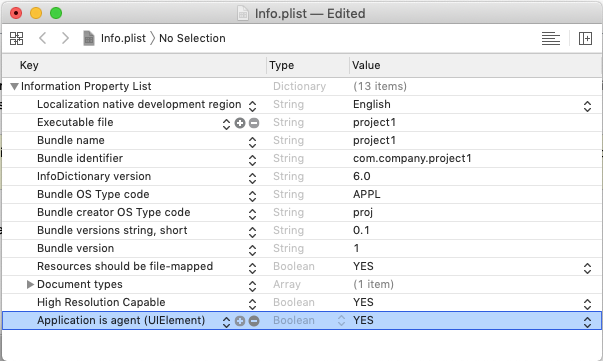
To declare an application to be an agent application, use Xcode to open the application's bundle Info.plist file:
- add a property UIElement (or "Application is agent");
- set the UIElement property's value to True;
- save the Info.plist file.
Background only applications
A background only application runs only in the background. If background application key exists and is set to YES, Launch Services runs the application in the background only. You can use this key to create faceless background applications. You should also use this key if your application uses higher-level frameworks that connect to the window server, but are not intended to be visible to users.
As background applications are never shown in the macOS menu bar, you should be launch/terminate the application with another GUI application.
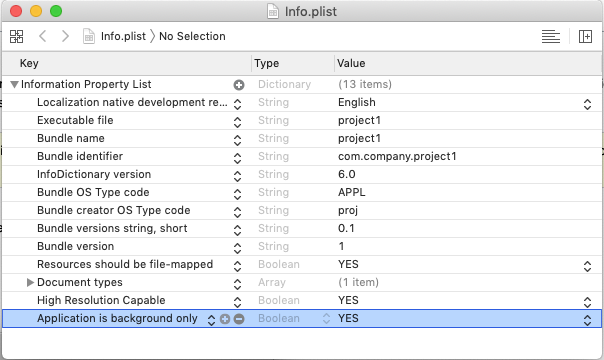
To declare an application to be a background application, use Xcode to open the application's bundle Info.plist file:
- add a property LSBackgroundOnly (or "Application is background only");
- set the LSBackgroundOnly property's value to True;
- save the Info.plist file.
See also
- Application disable resize over Dock
- Bounce Application Icon in Dock
- macOS Application Dock Menu
- Show Badge on Application Icon in Dock
External links
- Apple: Technical Note TN2083 - Daemons and Agents
- Apple: Pre Login Agents
- Apple: Daemons and Services Programming Guide
From the Free Pascal wiki, page "Hiding a macOS app from the Dock", as it stood on 2021-12-15 after a change by Trev, out of the wiki's dump of 2024-05-26. Copyright stays with the author who wrote it, according to the old wiki's Licensing page. If you have concerns about this material, message the admin.
Edited on wiki.freepascal.org by 1 person, 2019–2021
From the official wiki's backup of 26 May 2024: who edited this page there, and when. Edits made there after that date were not recorded, and the earlier versions are not shown here; the main page says why.
| When | Who | What changed |
|---|---|---|
| Trev | New page "Hiding a macOS app from the Dock" | |
| Trev | Hiding a macOS app from the Dock: Fixed duped heading :- (minor) | |
| Trev | Rationalised macOS categories (minor) | |
| Trev | Updated to add background applications and clarify/contrast agent attributes | |
| Trev | Background only applications: Clarify (minor) | |
| Trev | External links: New section | |
| Trev | Overview: Fix typo (minor) | |
| Trev | See also: New section | |
| Trev | See also: Add` |
Talk about this page
Nobody has opened a bench for this page yet. Sign in to open one.