

heaptrc: what changed
Revision 1 to 2. Removed lines have a minus sign; added lines have a plus sign.
| Old | New | Line | |
|---|---|---|---|
| 1 | - | ||
| 1 | + | **`Heaptrc`** is a unit that can be used to debug allocation and deallocation of memory blocks. It keeps track of calls to [`GetMem`](<https://www.freepascal.org/docs-html/rtl/system/getmem.html>)/[`FreeMem`](<https://www.freepascal.org/docs-html/rtl/system/freemem.html>) calls, and, implicitly, of [`New`](<https://www.freepascal.org/docs-html/rtl/system/new.html>)/[`Dispose`](<https://www.freepascal.org/docs-html/rtl/system/dispose.html>) statements. | |
| 2 | 2 | ||
| 3 | - | ||
| 3 | + | [](</File:Warning-icon.png>) | |
| 4 | 4 | ||
| 5 | - | ||
| 5 | + | **Warning:** Do not add the `Heaptrc` unit manually. The `Heaptrc` unit needs to be loaded before `Lineinfo` and only the compiler can do that. `Heaptrc` is also a memory manager, so do not try to use any memory manager – including `Heaptrc` itself – in the [[Uses|`uses` clause]], because that may lead to memory corruption and false results. This topic contains a note with example code to handle such a case in a generic way. | |
| 6 | 6 | ||
| 7 | - | ||
| 7 | + | When a program using Heaptrc ends, Heaptrc can write out the total memory used and a list of allocated but not freed blocks to a file. When run in the console (*nix or Windows), Heaptrc will print this output to screen unless otherwise instructed. In Lazarus GUI programs on Windows, the output will appear in numerous small dialog boxes, which may be very unpractical, although you can redirect output to file. | |
| 8 | 8 | ||
| 9 | - | ||
| 9 | + | [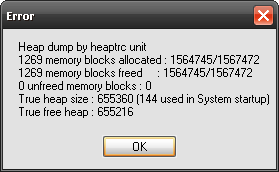](</File:Win_heaptrc_output_no_error.png> "Standard output of Heaptrc on Windows \(despite of the title there is no error in the application\)") | |
| 10 | 10 | ||
| 11 | - | ||
| 11 | + | On *nix (including BSD, Linux and macOS), by default, nothing will be shown for GUI programs. In this case, to see heaptrc output when you terminate your program (GUI or non-GUI), open "Console In/Output" (Ctrl+Alt+O or View -> Debug Window -> ...) | |
| 12 | 12 | ||
| 13 | + | See [[leakview]] for details on how to make use of Heaptrc effectively. | |
| 14 | + | ||
| 13 | 15 | ## Usage | |
| 14 | 16 | ||
| 15 | 17 | ### Using Heaptrc in FPC | |
| 16 | 18 | ||
| 17 | - | ||
| 18 | - | ||
| 19 | - | ||
| 19 | + | Add a parameter `-gh` to your compilation command line or to `fpc.cfg`. | |
| 20 | + | ``` | |
| 20 | 21 | fpc -gh Helloworld.pas | |
| 21 | 22 | ``` | |
| 22 | 23 | ||
| 23 | - | ||
| 24 | - | ||
| 25 | - | ||
| 24 | + | or usually combined with line info: | |
| 25 | + | ``` | |
| 26 | 26 | fpc -glh Helloworld.pas | |
| 27 | 27 | ``` | |
| 28 | 28 | ||
| 29 | - | ||
| 29 | + | This will add Heaptrc implicitly as a hidden first unit of the program's uses clause. | |
| 30 | 30 | ||
| 31 | - | ||
| 31 | + | [](</File:Warning-icon.png>) | |
| 32 | 32 | ||
| 33 | - | ||
| 33 | + | **Warning:** All examples given on this page can only be used in the **main project file**. That is, in a file that begins with `Program ...`, and not `Unit ...`. Typically this file has the extension `.lpr` or `.pp`. You can open it in Lazarus via the `Project > View project source` menu. | |
| 34 | 34 | ||
| 35 | - | ||
| 35 | + | [](</File:Warning-icon.png>) | |
| 36 | 36 | ||
| 37 | - | ||
| 37 | + | **Warning:** Don't confuse using `{$if declared(UseHeapTrace)}}` with using `{$if defined(UseHeapTrace)}}` or `{$ifdef UseHeapTrace}}`. To check heaptrc you need the first option since the others will always be false. | |
| 38 | 38 | ||
| 39 | - | ||
| 39 | + | You can test in code if Heaptrc is active by examining the global constant [**`UseHeapTrace`**](<https://www.freepascal.org/docs-html/rtl/heaptrc/useheaptrace.html>) for the presence of Heaptrc and its status like so: | |
| 40 | + | ``` | |
| 40 | 41 | program PossiblyHeaptraced(Input, Output, StdErr); | |
| 41 | - | ||
| 42 | - | ||
| 43 | - | ||
| 44 | - | ||
| 45 | - | ||
| 46 | - | ||
| 47 | - | ||
| 48 | - | ||
| 49 | - | ||
| 50 | - | ||
| 42 | + | begin | |
| 43 | + | {$if declared(UseHeapTrace)} | |
| 44 | + | WriteLn('Heaptrc is used.'); | |
| 45 | + | // Heaptrc reports can be turned off when linked in... so true or false | |
| 46 | + | WriteLn('Heaptrc is active: ', UseHeapTrace); | |
| 47 | + | // you can subsequently test/set any Heaptrc reporting options | |
| 48 | + | {$else} | |
| 49 | + | WriteLn('No trace of Heaptrc.'); | |
| 50 | + | {$endIf} | |
| 51 | + | end. | |
| 51 | 52 | ``` | |
| 52 | 53 | ||
| 53 | 54 | ### Using Heaptrc in Lazarus | |
| 54 | 55 | ||
| 55 | - | ||
| 56 | - | ||
| 57 | - | ||
| 58 | - | ||
| 56 | + | To enable this in your Lazarus project: | |
| 59 | 57 | ||
| 60 | - | ||
| 58 | + | 1. Go to _Project Options/Linking_ and | |
| 59 | + | 2. in the Debugging section enable _Use Heaptrc unit (check for mem-leaks) (-gh)_ | |
| 61 | 60 | ||
| 62 | - | ||
| 61 | + | You can test for the presence of `Heaptrc` in a similar manner as in the above example by testing for the presence of `UseHeapTrace` in your Project.lpr file. | |
| 62 | + | ``` | |
| 63 | 63 | {$if declared(UseHeapTrace)} | |
| 64 | - | ||
| 65 | - | ||
| 66 | - | ||
| 67 | - | ||
| 68 | - | ||
| 69 | - | ||
| 70 | - | ||
| 71 | - | ||
| 64 | + | // ... do something | |
| 65 | + | ||
| 66 | + | // test if active | |
| 67 | + | if UseHeapTrace then | |
| 68 | + | begin | |
| 69 | + | // ... | |
| 70 | + | end; | |
| 71 | + | {$endIf} | |
| 72 | 72 | ``` | |
| 73 | 73 | ||
| 74 | 74 | ### Show report only on leak | |
| 75 | 75 | ||
| 76 | - | ||
| 77 | - | ||
| 78 | - | ||
| 76 | + | If you want to show `Heaptrc` report dialog only if there were leaks in your application, then put this [[Becomes|assignment]] somewhere in your main project source file: | |
| 77 | + | ``` | |
| 79 | 78 | {$if declared(UseHeapTrace)} | |
| 80 | - | ||
| 81 | - | ||
| 79 | + | GlobalSkipIfNoLeaks := True; // supported as of debugger version 3.2.0 | |
| 80 | + | {$endIf} | |
| 82 | 81 | ``` | |
| 83 | 82 | ||
| 84 | 83 | ### Programmatically disable report | |
| 85 | 84 | ||
| 86 | - | ||
| 87 | - | ||
| 88 | - | ||
| 85 | + | If the `UseHeapTrace` variable is `false` when the program exits, then the leak will not be reported, even if it is detected. You can use this in your code: | |
| 86 | + | ``` | |
| 89 | 87 | UseHeapTrace := false; | |
| 90 | 88 | ``` | |
| 91 | 89 | ||
| 92 | - | ||
| 90 | + | Note that changing `UseHeapTrace` can neither turn heaptrc on nor off, since the memory manager cannot be changed while the program is running. This only controls the output of the leak message at the end of the program. | |
| 93 | 91 | ||
| 94 | - | ||
| 92 | + | This is worth considering, for example, when using [`KeepReleased`](<https://www.freepascal.org/docs-html/rtl/heaptrc/keepreleased.html>) \- this requires a lot of additional memory, and setting `UseHeapTrace := false` will not free it. | |
| 95 | 93 | ||
| 96 | 94 | ### Continue execution even on heap error | |
| 97 | 95 | ||
| 98 | - | ||
| 99 | - | ||
| 100 | - | ||
| 96 | + | If you want your application to continue execution even in case of a heap error then manipulate [`HaltOnError` constant](<https://www.freepascal.org/docs-html/rtl/heaptrc/haltonerror.html>) at program startup: | |
| 97 | + | ``` | |
| 101 | 98 | HaltOnError := False; | |
| 102 | 99 | ``` | |
| 103 | 100 | ||
| 104 | 101 | ### Redirect report to file | |
| 105 | 102 | ||
| 106 | - | ||
| 107 | - | ||
| 108 | - | ||
| 103 | + | If you want to redirect leak report to file then add this to beginning of you main project file: | |
| 104 | + | ``` | |
| 109 | 105 | SetHeapTraceOutput('Trace.log'); // supported as of debugger version 3.2.0 | |
| 110 | 106 | ``` | |
| 111 | 107 | ||
| 112 | 108 | ### Why Heaptrc should not be added to the uses clause manually | |
| 113 | 109 | ||
| 114 | - | ||
| 110 | + | You should never add Heaptrc manually in a normal program, because the Heaptrc unit needs to be loaded before Lineinfo for debugging to work properly. | |
| 115 | 111 | ||
| 116 | - | ||
| 112 | + | Decoding dwarf debugging info efficiently requires a working heap manager and this means that Heaptrc needs to be loaded before the the [[DWARF]] line info decoding unit which is loaded by -gl, so Heaptrc cannot be used explicitly. | |
| 117 | 113 | ||
| 118 | - | ||
| 114 | + | Only the compiler itself can insert the unit in its proper place as a hidden first unit in the uses clause. Adding the unit by hand can cause all kind of unwanted side effects. E.g. crashes, reported Lineinfo is not reliable and not all leaks can reliably be reported. | |
| 119 | 115 | ||
| 120 | - | ||
| 116 | + | This has always been the case, but is only properly documented from FPC version 3.0.2. So if you still see Heaptrc in your uses clause, remove it! for debugging and reporting to work properly. | |
| 121 | 117 | ||
| 122 | - | ||
| 123 | - | ||
| 124 | - | ||
| 125 | - | ||
| 126 | - | ||
| 127 | - | ||
| 128 | - | ||
| 129 | - | ||
| 130 | - | ||
| 131 | - | ||
| 132 | - | ||
| 133 | - | ||
| 134 | - | ||
| 135 | - | ||
| 136 | - | ||
| 137 | - | ||
| 138 | - | ||
| 139 | - | ||
| 140 | - | ||
| 141 | - | ||
| 142 | - | ||
| 143 | - | ||
| 144 | - | ||
| 118 | + |  **Note:** If your program is designed to use an alternative memory manager, you can adapt your program's uses clause like so: | |
| 119 | + | ``` | |
| 120 | + | program AlternativeMemoryManager(Input, Output, StdErr); | |
| 121 | + | {$mode ObjFPC} | |
| 122 | + | uses | |
| 123 | + | // This will conditionally switch in a memory manager | |
| 124 | + | // based on the presence of Heaptrc | |
| 125 | + | {$if not declared(UseHeapTrace)} | |
| 126 | + | CMem, | |
| 127 | + | {$endIf} | |
| 128 | + | SysUtils, Classes; // the latter two are just to test. | |
| 129 | + | ||
| 130 | + | begin | |
| 131 | + | {$if declared(UseHeapTrace)} | |
| 132 | + | WriteLn('Heaptrc is used.', ' Heaptrc is active: ', UseHeapTrace); | |
| 133 | + | {$else} | |
| 134 | + | WriteLn('No trace of Heaptrc.'); | |
| 135 | + | {$endIf} | |
| 136 | + | end. | |
| 137 | + | ``` | |
| 145 | 138 | ||
| 139 | + | In the above example the conditional in the uses clause makes sure that the CMem memory manager is only compiled in if the Heaptrc option is not used. | |
| 140 | + | ||
| 146 | 141 | ## See also | |
| 147 | 142 | ||
| 148 | - | ||
| 149 | - | ||
| 150 | - | ||
| 143 | + | * [Documentation issue 30637](<https://gitlab.com/freepascal.org/fpc/documentation/-/issues/30637>) | |
| 144 | + | * [[leakview]]: Examples how to enable Heaptrc in Lazarus and Free Pascal. | |
| 145 | + | * [RTL Reference for unit 'Heaptrc'](<http://lazarus-ccr.sourceforge.net/docs/rtl/heaptrc/> "doc:rtl/heaptrc/") (this link is not yet up-to-date) | |
| 151 | 146 | ||
| 152 | 147 | --- | |
| 153 | - | ||
| 148 | + | *From the Free Pascal wiki, page "heaptrc", as the Internet Archive kept it on 2024-12-25, last changed on 2024-10-25. Copyright stays with the author who wrote it, according to the old wiki's [[Licensing]] page. If you have concerns about this material, [message the admin](/wiki-contact).* |