

GridPrinter: what changed
Revision 1 to 2. Removed lines have a minus sign; added lines have a plus sign.
| Old | New | Line | |
|---|---|---|---|
| 1 | 1 | ## About | |
| 2 | 2 | ||
| 3 | - | ||
| 4 | - | ||
| 5 | - | ||
| 6 | - | ||
| 3 | + | 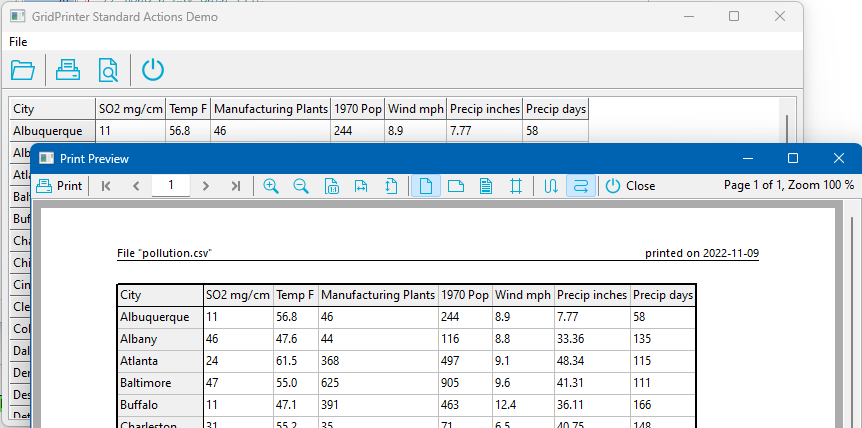 | |
| 7 | 4 | ||
| 8 | - | ||
| 5 | + | `TGridPrinter` is a component to simplify printing of string grids or other descendants of TCustomGrid. It is bundled together with a ready-made print preview dialog, `TGridPrintPreviewDialog`, as well as standard actions to trigger printing or to show the preview dialog without writing a single line of code. | |
| 9 | 6 | ||
| 10 | 7 | Author: Werner Pamler. | |
| 11 | 8 | ||
| 12 | 9 | License: Modified LGPL-2 (with linking exception, like Lazarus LCL). | |
| 13 | 10 | ||
| 14 | 11 | ## Download and Installation | |
| 15 | 12 | ||
| 16 | 13 | ### Release version | |
| 17 | 14 | ||
| 18 | 15 | The package is made available for installation by the Online-Package-Manager. Additionally, a zip file with the most recent release version can be found at [Lazarus CCR at SourceForge](https://sourceforge.net/projects/lazarus-ccr/files/GridPrinter/); unzip the file into any folder; load the file *gridprinterpkg.lpk* into Lazarus and click *Use* \> *Install*. | |
| 19 | 16 | ||
| 20 | 17 | ### Development version | |
| 21 | 18 | ||
| 22 | 19 | The current development version is hosted at [Lazarus CCR](https://sourceforge.net/p/lazarus-ccr/svn/HEAD/tree/components/gridprinter/). Use SVN to check it out, or download the zipped snapshot from this page. Install by loading the *gridprinterpkg.lpk* package file into Lazarus and clicking *Use* \> *Install*. | |
| 23 | 20 | ||
| 24 | 21 | ## Getting Started | |
| 25 | 22 | ||
| 26 | 23 | #### How can I print a StringGrid? | |
| 27 | 24 | ||
| 28 | 25 | Nothing easier when you have the GridPrinter package... | |
| 29 | 26 | ||
| 30 | 27 | - Drop a `TGridPrinter` component on the form. | |
| 31 | 28 | - Link its `Grid` property to the StringGrid that you want to print. | |
| 32 | 29 | - In the `OnClick` handler of the button or menu item that is supposed to start the print-out, call the `Print` method of the `GridPrinter`. That's all. | |
| 33 | 30 | ||
| 34 | 31 | ``` Pascal | |
| 35 | 32 | procedure TForm1.PrintButtonClick(Sender: TObject); | |
| 36 | 33 | begin | |
| 37 | 34 | GridPrinter1.Print; | |
| 38 | 35 | end; | |
| 39 | 36 | ``` | |
| 40 | 37 | ||
| 41 | 38 | #### How can I see a preview of the printout before the printer starts to waste paper? | |
| 42 | 39 | ||
| 43 | 40 | - Drop also a `TGridPrintPreviewDialog` on the form. | |
| 44 | 41 | - Links its `GridPrinter` property to the GridPrinter instance that you had added in the previous exercise. | |
| 45 | 42 | - In the `OnClick` handler of the button or menu item that is supposed to show the preview, call the `Execute` method of the `GridPrintPreviewDialog`. | |
| 46 | 43 | - In the preview dialog you can scroll through the pages, zoom to various levels, change page orientation, adjust the page margins by dragging with the mouse, or add a header and/or footer. Of course, you can also print here, too. | |
| 47 | 44 | ||
| 48 | 45 | ``` Pascal | |
| 49 | 46 | procedure TForm1.PrintPreviewButtonClick(Sender: TObject); | |
| 50 | 47 | begin | |
| 51 | 48 | GridPrintPreviewDialog1.Execute; | |
| 52 | 49 | end; | |
| 53 | 50 | ``` | |
| 54 | 51 | ||
| 55 | 52 | #### I have several printers and want to make sure that the print-out goes to the right one | |
| 56 | 53 | ||
| 57 | 54 | `TGridPrinter` has a property `ShowPrintDialog` which controls whether a print dialog should be displayed before printing starts. The kind of dialog is determined by the following options: | |
| 58 | 55 | ||
| 59 | 56 | - `gpdNone`: no print dialog | |
| 60 | 57 | - `gpdPageSetup`: shows a `TPageSetupDialog`. Here you can select the paper size and set page orientation as well as page margins. | |
| 61 | 58 | - `gpdPrintDialog`: shows a `TPrintDialog` where you can select the printer, the number of copies and the range of printed pages. | |
| 62 | 59 | - `gpdPrinterSetup`: shows `TPrinterSetupDialog`. Here you can select the printer, the paper size and the page orientation. | |
| 63 | 60 | ||
| 64 | 61 | #### Can individual cell formatting by the OnPrepareCanvas event be applied to the printout? | |
| 65 | 62 | ||
| 66 | 63 | Yes. The `TGridPrinter` fires an `OnPrepareCanvas` event, too. Both even can share the same event handler. You only should be careful to use the correct `Canvas` when handling the event: When the `Sender` of the event is the grid, you must refer to the grid's `Canvas`, and when the `Sender` is the `GridPrinter` you must use that `Canvas` exposed by the `GridPrinter`; during printing this is the printer's `Canvas`, and when the preview is painted it is the `Canvas` of a temporary `TBitmap`. | |
| 67 | 64 | ||
| 68 | 65 | Let's assume that your `OnPrepareCanvas` handler is supposed to paint the column title in bold type face. This could be done by the following code. The procedure must be assigned to the `OnPrepareCanvas` of both grid and `GridPrinter`. | |
| 69 | 66 | ||
| 70 | 67 | ``` Pascal | |
| 71 | 68 | procedure TForm1.PrepareCanvasHandler(Sender: TObject; ACol, ARow: Integer; AState: TGridDrawState); | |
| 72 | 69 | var | |
| 73 | 70 | lCanvas: TCanvas; | |
| 74 | 71 | begin | |
| 75 | 72 | if Sender = StringGrid1 then | |
| 76 | 73 | lCanvas := StringGrid1.Canvas | |
| 77 | 74 | else | |
| 78 | 75 | if Sender = GridPrinter1 then | |
| 79 | 76 | lCanvas := GridPrinter1.Canvas | |
| 80 | 77 | else | |
| 81 | 78 | raise Exception.Create('Unknown sender of OnPrepareCanvas.'); | |
| 82 | 79 | ||
| 83 | 80 | if ARow < StringGrid1.FixedRows then | |
| 84 | 81 | lCanvas.Font.Style := [fsBold]; | |
| 85 | 82 | end; | |
| 86 | 83 | ``` | |
| 87 | 84 | ||
| 88 | 85 | #### Can I print a DBGrid? | |
| 89 | 86 | ||
| 90 | 87 | Yes, but it requires a bit more work than just connecting it to the `Grid` property of the `GridPrinter`. A `DBGrid` displays data from a `TDataset`, but it keeps only a small number of records. But you usually want to print the entire dataset, rather than just the section loaded into the `DBGrid`. | |
| 91 | 88 | ||
| 92 | 89 | At first we must tell the `GridPrinter` how many rows it will have to print. This can be done by providing a handler for the event `OnGetRowCount` in which we pass the dataset's `RecordCount` value to the provided parameter. Note that the title row must be included here. Note also that the `RecordCount` property often is only correct after the dataset pointer has been moved to the last record and back to the first record. | |
| 93 | 90 | ||
| 94 | 91 | ``` Pascal | |
| 95 | 92 | procedure TForm1.GridPrinter1GetRowCount(Sender: TObject; AGrid: TCustomGrid; | |
| 96 | 93 | var ARowCount: Integer); | |
| 97 | 94 | var | |
| 98 | 95 | dbGrid: TDBGrid; | |
| 99 | 96 | begin | |
| 100 | 97 | dbGrid := AGrid as TDBGrid; | |
| 101 | 98 | dbGrid.Datasource.Dataset.Last; | |
| 102 | 99 | dbGrid.Datasource.Dataset.First; | |
| 103 | 100 | ARowCount := dbGrid.Datasource.Dataset.RecordCount + 1; // we must 1 for the header row | |
| 104 | 101 | end; | |
| 105 | 102 | ``` | |
| 106 | 103 | ||
| 107 | 104 | In order to provide the cell texts for the GridPrinter we must write a handler for the `OnGetCellText` event which is fired whenever the GridPrinter needs any cell text. We will return to this in a minute. We must first clarify the process flow. The easiest way to get the cell texts is by iterating over the entire dataset. Provide a handler for the `OnBeforePrint` event which moves the dataset to its first record: | |
| 108 | 105 | ||
| 109 | 106 | ``` Pascal | |
| 110 | 107 | procedure TForm1.GridPrinter1BeforePrint(Sender: TObject); | |
| 111 | 108 | begin | |
| 112 | 109 | DBGrid1.DataSource.Dataset.First; | |
| 113 | 110 | end; | |
| 114 | 111 | ``` | |
| 115 | 112 | ||
| 116 | 113 | Another event, `OnNewLine` fires when the `GridPrinter` has finished printing a line and wants to proceed with the next one. This means we must advance the dataset to its next record. However, if a printed line extends over several pages we must be able to return to this record for completing its printout on the next page. Generally this must be handled by setting bookmarks - please see the example *dbgrid2* in the `GridPrinter` installation folder for details. For some flat-file databases such as *dBase*, *BufDataset* etc. there is a simpler way by using the `RecNo` property of the dataset. This is a running number for each record starting at 1 with the first record. So, in the `OnNewLine` event we simply set the dataset's `RecNo` to the row parameter passed to the event: | |
| 117 | 114 | ||
| 118 | 115 | ``` Pascal | |
| 119 | 116 | procedure TForm1.GridPrinter1NewLine(Sender: TObject; AGrid: TCustomGrid; | |
| 120 | 117 | ARow: Integer); | |
| 121 | 118 | var | |
| 122 | 119 | dbGrid: TDBGrid; | |
| 123 | 120 | begin | |
| 124 | 121 | dbGrid := AGrid as TDBGrid; | |
| 125 | 122 | BufDataset1.RecNo := ARow; // RecNo starts at 1. ARow starts at 1, too, since we display the header row | |
| 126 | 123 | end; | |
| 127 | 124 | ``` | |
| 128 | 125 | ||
| 129 | 126 | Then, within each row, the `GridPrinter` proceeds from grid column to grid column. In order to extract the cell text, we determine the column `col` from the `ACol` parameter of the `OnGetCellText`event and thus have access to the dataset field in that column (`col.Field`). Finally, we can query the cell text by calling the field's `AsString` method. Special handling is required for the very first row (`ARow = 0`) which corresponds to the grid titles: | |
| 130 | 127 | ||
| 131 | 128 | ``` Pascal | |
| 132 | 129 | procedure TForm1.GridPrinter1GetCellText(Sender: TObject; AGrid: TCustomGrid; | |
| 133 | 130 | ACol, ARow: Integer; var AText: String); | |
| 134 | 131 | var | |
| 135 | 132 | dbGrid: TDBGrid; | |
| 136 | 133 | col: TColumn; | |
| 137 | 134 | colOffs: Integer; | |
| 138 | 135 | begin | |
| 139 | 136 | AText := ''; | |
| 140 | 137 | ||
| 141 | 138 | dbGrid := AGrid as TDBGrid; | |
| 142 | 139 | ||
| 143 | 140 | if (dgIndicator in dbGrid.Options) then | |
| 144 | 141 | colOffs := 1 | |
| 145 | 142 | else | |
| 146 | 143 | colOffs := 0; | |
| 147 | 144 | ||
| 148 | 145 | if ACol < colOffs then | |
| 149 | 146 | exit; | |
| 150 | 147 | ||
| 151 | 148 | col := dbGrid.Columns[ACol - colOffs]; | |
| 152 | 149 | ||
| 153 | 150 | if (ARow = 0) then | |
| 154 | 151 | AText := col.FieldName | |
| 155 | 152 | else | |
| 156 | 153 | AText := col.Field.AsString; | |
| 157 | 154 | end; | |
| 158 | 155 | ``` | |
| 159 | 156 | ||
| 160 | 157 | As already mentioned, there are `DBGrid` sample projects in the `GridPrinter` installation to demonstrate the steps for `DBGrid` printing. | |
| 161 | 158 | ||
| 162 | 159 | #### How can I print a page number? | |
| 163 | 160 | ||
| 164 | 161 | You can print a page number at the top or bottom of every page by activating the header or footer of the `GridPrinter`. For this you select the `Header` (or `Footer` property and switch is `Visible` property to `true`. Then you enter the header (or footer) text in the property `Text`. In order to print the page number use for it the symbol `$PAGE` which is replaced by the number of the currently printed page. Note that the header/footer text consists of a left-aligned, centered and right-aligned part separated by a `'|'` character. So, if you want the page number to be centered the `Text` should be `'|$PAGE|'`, and if you want to include the total page count you could use '\|\$PAGE of \$PAGECOUNT\|'. Learn about the other symbols in the documentation section below. | |
| 165 | 162 | ||
| 166 | 163 | ## Documentation | |
| 167 | 164 | ||
| 168 | 165 | ### TGridPrinter | |
| 169 | 166 | ||
| 170 | 167 | #### Public methods | |
| 171 | 168 | ||
| 172 | 169 | - `function CreatePreviewBitmap(APageNo, APercentage: Integer): TBitmap` -- Creates the preview bitmap for the printout of the specified page. The bitmap is scaled by the given percentage relative to the original pager size (100). | |
| 173 | 170 | - `function GetCellText(ACol, ARow: Integer): String` -- Returns the text to be printed for the grid cell at the given row and column indices. | |
| 174 | 171 | - `procedure Print` -- Prints the grid. **Main method of the component**. | |
| 175 | 172 | - `procedure ScaleToPages(NumHor, NumVert: Integer)` -- Scales the printout such that it fits on `NumHor` pages horizontally and `NumVert` pages vertically. When `NumHorPages` is 0 (or smaller) only the height is scaled according to `NumVert`. Similarly when `NumVert` is 0 (or smaller). | |
| 176 | 173 | - `function ScaleX(AValue: Integer): Integer` -- General scaling function for conversion of horizontal screen pixels to pixels on the printer or the preview bitmap. | |
| 177 | 174 | - `function ScaleY(AValue: Integer): Integer` -- General scaling function for conversion of vertical screen pixels to pixels on the printer or the preview bitmap. | |
| 178 | 175 | - `procedure UpdatePreview` -- Fires the event `OnUpdatePreview` if the `GridPrinter` is in preview mode. | |
| 179 | 176 | ||
| 180 | 177 | #### Public properties | |
| 181 | 178 | ||
| 182 | 179 | - `Canvas: TCanvas` (read-only) -- Canvas currently used by the `GridPrinter`. This is either the printer canvas or the canvas of the preview bitmap sent to the `TGridPrintPreview` component. | |
| 183 | 180 | - `ColCount: Integer` (read-only) -- Number of columns to be printed (including fixed columns). | |
| 184 | 181 | - `ColWidth[AIndex: Integer]: Double` (read-only) -- Width of the specified column, given in pixels of the current output device (printer or preview bitmap). | |
| 185 | 182 | - `FooterMargin: Integer` (read-only) -- Distance of the footer bottom from the page bottom, in pixels of the current output device. | |
| 186 | 183 | - `HeaderMargin: Integer` (read-only) -- Distance of the header top from the page top, in pixels of the current output device. | |
| 187 | 184 | - `PageHeight: Integer` (read-only) -- Height of the page, in pixels of the current output device. | |
| 188 | 185 | - `PageWidth: Integer` (read-only) -- Width of the page, in pixels of the current output device. | |
| 189 | 186 | - `PageRect: TRect` (read-only) -- Rectangle on the page, in pixels of the current output device, available for printing the grid. In other words: size of the page with margins subtracted. | |
| 190 | 187 | - `PixelsPerInchX: Integer` (read-only) -- Pixel density of the current output device, in horizontal direction. | |
| 191 | 188 | - `PixelsPerInchY: Integer` (read-only) -- Pixel density of the current output device, in vertical direction. | |
| 192 | 189 | - `Padding: Integer` (read-only) -- Distance, in pixels of the current output device, between cell text and cell border. | |
| 193 | 190 | - `PageCount: Integer` (read-only) -- Total number of pages to be printed. | |
| 194 | 191 | - `PrintPageNumber: Integer` (read-only) -- Number of the page which is currently printed. Pages numbers begin with `1`. | |
| 195 | 192 | - `PrintScaleToNumHorPages: Integer` -- The `PrintScalingFactor` is adjusted such that this number of pages fits onto a single sheet of paper horizontally. | |
| 196 | 193 | - `PrintScaleToNumVertPages: Integer` -- The `PrintScalingFactor` is adjusted such that this number of pages fits onto a single sheet of paper vertically. | |
| 197 | 194 | - `PrintScalingMode: TGridPrnScalingMode` -- Determines how the print output is scaled. | |
| 198 | 195 | - `smManual` -- The current value of the `PrintScalingFactor` is applied. | |
| 199 | 196 | - `smFitToWidth` -- The `PrintScalingFactor` is adjusted so that the number of pages given by `PrintScaleToNumVertPages` fit onto a single page vertically. | |
| 200 | 197 | - `smsmFitToHeight` -- The `PrintScalingFactor` is adjusted so that the number of pages given by `PrintScaleToNumHorPages` fit onto a single page horizontally. | |
| 201 | 198 | - `smFitAll` -- The `PrintScalingFactor` is adjusted so that the entire grid fits onto a single page. | |
| 202 | 199 | - `RowCount: Integer` (read-only) -- Number of rows to be printed (including fixed rows). | |
| 203 | 200 | - `RowHeight[AIndex: Integer]: Double` (read-only) -- Height of the specified row, given in pixels of the current output device. | |
| 204 | 201 | ||
| 205 | 202 | #### Published properties and events | |
| 206 | 203 | ||
| 207 | 204 | **Properties** | |
| 208 | 205 | ||
| 209 | 206 | - `Grid: TCustomGrid` -- Links to the grid to be printed. Ideally, this should be a `TStringGrid`, but other descendants of `TCustomGrid` can be printed as well when the appropriate event handlers are provided. | |
| 210 | 207 | - `BorderLineColor: TColor` -- Line color of the outer border of the printed grid. | |
| 211 | 208 | - `BorderLineWidth: Double` -- Line width of the outer border of the printed grid, in millimeters. If not positive, the scaled value of the grid's `GridLineWidth` is used. | |
| 212 | 209 | - `FileName: String` -- Has no functional use inside the `GridPrinter`. But indicates the name of the file which is printed, if applicable. The filename is displayed in the header or footer of the printout/preview where it is used to replace the symbols `$FULL_FILENAME`, `$FILENAME`, `$PATH` in the header/footer `Text`. | |
| 213 | 210 | - `FixedLineColor: TColor` -- Line color of the dividing line between fixed and normal cells in the printout/preview. | |
| 214 | 211 | - `FixedLineWidth: Double` -- Line width of the dividing line between fixed and normal cells in the printout/preview, in millimeters. If not positive, the scaled value of the grid's `GridLineWidth` is used. | |
| 215 | 212 | - `Footer: TGridPrnHeaderFooter` -- Parameters for printing a footer at the bottom of each page. See TGridPrnHeaderFooter. | |
| 216 | 213 | - `FromPage: Integer` -- Defines the first page to be printed. Any value less than 1 is interpreted as "first page". | |
| 217 | 214 | - `GridLineColor: TColor` -- Color of the inner grid lines. | |
| 218 | 215 | - `GridLineWidth: Double` -- Line width of the inner grid lines, in millimeters. If not positive, the scaled value of the grid's `GridLineWidth` is used. | |
| 219 | 216 | - `Header: TGridPrnHeaderFooter` -- Parameters for printing a header at the top of each page. See TGridPrnHeaderFooter | |
| 220 | 217 | - `Margins: TGridPrnMargins` -- Defines page and header/footer margins, in millimeters. See TGridPrnMargins. | |
| 221 | 218 | - `Monochrome: Boolean` -- Prints the grid only with black color. | |
| 222 | 219 | - `Options: TGridPrnOptions` -- Options for fine-tuning the printout: | |
| 223 | 220 | - `gpoCenterHor` -- Centers the printed table on the page horizontally. | |
| 224 | 221 | - `gpoCenterVert` -- Centers the printed table on the page vertically. | |
| 225 | 222 | - `gpoHorGridLines` -- Overrides the corresponding grid option and can be used to show/hide horizontal grid lines between the printed rows. | |
| 226 | 223 | - `gpoVertGridLines` -- Overrides the corresponding grid option and can be used to show/hide vertical grid lines between the printed columns. | |
| 227 | 224 | - `gpoFixedHorGridLines` -- Can be used to show/hide horizontal grid lines between the fixed cells. | |
| 228 | 225 | - `gpoFixedVertGridLines` -- Can be used to show/hide vertical grid lines between the fixed cells. | |
| 229 | 226 | - `gpoHeaderBorderLines` -- Can be used to show/hide dividing lines between the fixed and normal cells. | |
| 230 | 227 | - `gpoOuterBorderLines` -- Can be used to show/hide outer lines around the grid. | |
| 231 | 228 | - `Orientation: TPrinterOrientation` -- Defines the page orientation: `poPortrait`, `poLandscape`, `poReverseLandscape`, `poReversePortrait` (declared in the *Printers* unit). | |
| 232 | 229 | - `PrintOrder: TGridPrnOrder` -- Large grids are wrapped into several pages. This property defines whether rows (`poRowsFirst`) or columns (`poColsFirst`) will be completed first. | |
| 233 | 230 | - `PrintScaleFactor: Double` -- Scaling factor for the printout. Default: `1.0`. Call the method `ScaleToPages()` if you want to adjust the `PrintScaleFactor` such that the entire printout fits on a given number of pages. | |
| 234 | 231 | - `ShowPrintDialog: TGridPrnDialog` -- Determines whether one of the Lazarus print dialogs should be shown before printing begins: `gpdNone`, `gpdPageSetup`, `gpdPrintDialog`, `gpdPrinterSetup`. | |
| 235 | 232 | - `ToPage: Integer` -- Defines the last page to be printed. Any value larger than the real page count prints to the last page. | |
| 236 | 233 | ||
| 237 | 234 | **Events** | |
| 238 | 235 | ||
| 239 | 236 | - `OnAfterPrint` -- Fires when printing is finished. | |
| 240 | 237 | - `OnBeforePrint` -- Fires before printing begins. The printer has not yet received its `BeginDoc` command. | |
| 241 | 238 | - `OnGetCellText` -- Whenever the `GridPrinter` needs to know the text in a specific cell it sends this event. The text to be printed can be passed in a parameter. This way non-standard grid which have different cell technology can be printed as well. | |
| 242 | 239 | - `OnGetRowCount` -- In this event the application can tell the `GridPrinter` the number of rows to be printed. This is useful for printing a `DBGrid` which holds only a small portion of all rows of a dataset. | |
| 243 | 240 | - `OnGetColCount` -- Similar to `OnGetRowCount`, just for columns, rather than rows. | |
| 244 | 241 | - `OnLinePrinted` -- Fires when the `GridPrinter` has finished printing a specific line. | |
| 245 | 242 | - `OnNewLine` -- Fires when the `GridPrinter` starts printing a new line of cells. | |
| 246 | 243 | - `OnNewPage` -- Fires when the `GridPrinter` begins a new page. | |
| 247 | 244 | - `OnPrepareCanvas` -- Similar to the equally-named event of the grid. When the canvas for printing a cell has been prepared the user has the opportunity here to override the selection of colors, fonts, alignments etc. The handler can be shared between grid and `GridPrinter`, it only must be guaranteed that the correct canvas is used in the code. | |
| 248 | 245 | - `OnPrintCell` -- When this event has a handler it completely replaces the built-in code for printing a cell. Can be used for printing very specific grids. | |
| 249 | 246 | - `OnUpdatePreview` -- When the `GridPrinter` runs in preview mode the application can be notified, for example, when some parameter has been changed and the preview can repaint itself. | |
| 250 | 247 | ||
| 251 | 248 | ##### TGridPrnHeaderFooter | |
| 252 | 249 | ||
| 253 | 250 | This is the class of the header and footer lines which can be printed at the top and bottom of each page. | |
| 254 | 251 | ||
| 255 | 252 | **Published properties** | |
| 256 | 253 | ||
| 257 | 254 | - `Font: TFont` -- Font used for printing the header/footer. | |
| 258 | 255 | - `LineColor: TColor` -- Color of the dividing line printed below the header/above the footer. | |
| 259 | 256 | - `LineWidth: Double` -- Line width of the dividing line printed below the header/above the footer, in millimeters. | |
| 260 | 257 | - `SectionSeparator: String` -- The header/footer text can consist of a left-aligned, centered, and a right-aligned part, all specified together in the `Text`property. Defines the separator character or string between these three sections, default: `'|'`. | |
| 261 | 258 | - `ShowLine: Boolean` -- Shows/hides the dividing line printed below the header/above the footer. | |
| 262 | 259 | - `Text: String` -- Contains the text to be displayed in the header/footer. It can consist of up to three sections, separated by the `SectionSeparator`, which are printed at the left, in the center or at the right end of the header/footer. Moreover, the `Text` can contain the following symbols which are replaced during printing by the current values: | |
| 263 | 260 | - `$DATE` -- Replaced by current date. | |
| 264 | 261 | - `$PAGECOUNT` -- Total number of pages to be printed. | |
| 265 | 262 | - `$PAGE` -- Number of the currently printed page. First page number is `1`. | |
| 266 | 263 | - `$FULL_FILENAME` -- Is replaced by the full path of the `FileName` property of the `GridPrinter`. | |
| 267 | 264 | - `$FILENAME` -- Is replaced by the `FileName` property of the `GridPrinter` after removal of the file path. | |
| 268 | 265 | - `$PATH` -- Is replaced by the path to the `FileName` property of the `GridPrinter`. | |
| 269 | 266 | - `$TIME` -- Replaced by current time. | |
| 270 | 267 | - `Visible: Boolean` -- Shows/hides the header/footer. | |
| 271 | 268 | ||
| 272 | 269 | **Public properties** | |
| 273 | 270 | ||
| 274 | 271 | - `ProcessedText[AIndex: TGridPrnHeaderFooterSection]: String` where `TGridPrnHeaderFooterSection = (hfsLeft, hfsCenter, hfsRight)` -- returns the header/footer text in the specified section after replacement of the symbols. | |
| 275 | 272 | - `SectionText[AIndex: TGridPrnHeaderFooterSection]: String` where `TGridPrnHeaderFooterSection = (hfsLeft, hfsCenter, hfsRight)` -- returns the specified section `Text`. | |
| 276 | 273 | ||
| 277 | 274 | ##### TGridPrnMargins | |
| 278 | 275 | ||
| 279 | 276 | This class collects the parameters for the page margins: | |
| 280 | 277 | ||
| 281 | 278 | **Published properties** | |
| 282 | 279 | ||
| 283 | 280 | - `Left: Double` -- Left margin, in millimeters. | |
| 284 | 281 | - `Top: Double` -- Top margin, in millimeters. | |
| 285 | 282 | - `Right: Double` -- Right margin, in millimeters. | |
| 286 | 283 | - `Bottom: Double` -- Bottom margin, in millimeters. | |
| 287 | 284 | - `Header: Double` -- Margin to the top of the header, in millimeters. Note that it is not checked that the header does not overlap with the grid. | |
| 288 | 285 | - `Footer: Double` -- Margin to the bottom of the footer, in millimeters. Note that it is not checked that the footer does not overlap with the grid. | |
| 289 | 286 | ||
| 290 | 287 | ### TGridPrintPreviewDialog | |
| 291 | 288 | ||
| 292 | 289 | In unit *GridPrnPreviewDlg*. | |
| 293 | 290 | ||
| 294 | 291 | #### Public methods | |
| 295 | 292 | ||
| 296 | 293 | - `procedure Execute` -- Displays the preview form **(Main method of the component)**. | |
| 297 | 294 | ||
| 298 | 295 | #### Published properties | |
| 299 | 296 | ||
| 300 | 297 | - `FormParams: TGridPrintPreviewFormParams` -- Parameters which define size and position of the preview form. See TGridPrintPreviewFormParams. | |
| 301 | 298 | - `GridPrinter: TGridPrinter` -- Links to the `TGridPrinter` instance which actually performs the printing. | |
| 302 | 299 | - `Options: TGridPrintPreviewOptions` -- Controls the options the user has to modify the preview (declared in unit *GridPrnPreviewForm*: | |
| 303 | 300 | - `ppoNavigationBtns` -- Enables/disables page navigation in the preview. | |
| 304 | 301 | - `ppoNavigationEdit` -- Shows/hides the edit control in the preview toolbar with which the user can navigate to a specific page of the preview. | |
| 305 | 302 | - `ppoZoomBtns` -- Enables/disables zooming in the preview. | |
| 306 | 303 | - `ppoPageOrientationBtns` -- Enables/disables selection of page orientation. | |
| 307 | 304 | - `ppoMarginsBtn` -- Enables/disables page margin selection in the preview. | |
| 308 | 305 | - `ppoHeaderFooterBtn` -- Enables/disables the possibility to set up the header and footer in a dialog. | |
| 309 | 306 | - `ppoPrintOrderBtns` -- Enables/disables the possibility to define the order of pages when the entire print-out does not fit onto a single page of paper. | |
| 310 | 307 | - `ppoCenterBtns` -- Shows/hides the buttons to center the grid on the printed page. | |
| 311 | 308 | - `ppoScalePrinterBtn` -- Shows/hides the button to scale the printer output manually or to force a given count of pages onto a single sheet. | |
| 312 | 309 | - `ppoPageSetupBtn` -- Shows/hides a toolbar button with a dropdown menu containing options to control the page layout (page orientation, margin selection, etc). | |
| 313 | 310 | - `ppoPageNumberInfo` -- Shows/hides the display of page number and total page count in the preview form. | |
| 314 | 311 | - `ppoZoomLevelInfo` -- Shows/hides the display of the preview zoom level (percentage) in the preview form. | |
| 315 | 312 | - `Zoom: Integer` -- Scaling factor, in percent, applied when the preview bitmap is displayed in the preview form. Default: `100`. | |
| 316 | 313 | - `ZoomMode: TGridPrintPreviewZoomMode` - Determines how the preview bitmap is scaled by means of the `Zoom` scaling factor: | |
| 317 | 314 | - `zmCustom` -- The current value of the `Zoom` factor is applied directly. | |
| 318 | 315 | - `zmFitWidth` -- The `Zoom` factor is adjusted so that the page fits horizontally into the preview window. | |
| 319 | 316 | - `zmFitHeight` -- The `Zoom` factor is adjusted such that the page fits vertically into the preview window. | |
| 320 | 317 | ||
| 321 | 318 | ##### TGridPrintPreviewFormParams | |
| 322 | 319 | ||
| 323 | 320 | - `Left: Integer` -- Position of the left edge of the preview form on the screen, in screen pixels. | |
| 324 | 321 | - `Top: Integer` -- Position of the top edge of the preview form on the screen, in screen pixels. | |
| 325 | 322 | - `Width: Integer` -- Width of the preview form, in screen pixels. | |
| 326 | 323 | - `Height: Integer` -- Height of the preview form, in screen pixels. | |
| 327 | 324 | - `Position: TPosition` -- Standard LCL form position options overriding the other parameters in the `GridPrintPreviewFormParams`, e.g. `poMainFormCenter` or `poScreenCenter` to center the form over the mainform or on the screen, respectively. | |
| 328 | 325 | ||
| 329 | 326 | #### Functionality of the preview form | |
| 330 | 327 | ||
| 331 | 328 | The preview dialog contains a toolbar with a variety of buttons. By means of the `Options` of the `GridPrintPreviewDialog` it is possible to hide those buttons which are not needed. | |
| 332 | 329 | ||
| 333 | 330 | Here is a description of what the buttons can be used for: | |
| 334 | 331 | ||
| 335 | 332 | -  Sends the grid to the printer, as displayed by the preview. | |
| 336 | 333 | -  Displays the first page of the preview. | |
| 337 | 334 | -  Displays the previous page of the preview. | |
| 338 | 335 | -  Displays the next page of the preview. | |
| 339 | 336 | -  Displays the last page of the preview. | |
| 340 | 337 | -  Enlarges the preview ("zoom in"). | |
| 341 | 338 | -  Reduces the preview ("zoom out"). | |
| 342 | 339 | -  Original size of the preview page (100%). | |
| 343 | 340 | -  Scales the preview image so that it fills the width of the preview window. | |
| 344 | 341 | -  Scales the preview image so that it fills the height of the preview window. | |
| 345 | 342 | -  Switches the page to portrait orientation. | |
| 346 | 343 | -  Switches the page to landscape orientation. | |
| 347 | 344 | -  Shows a dialog to set up the header and/or footer of the printout. | |
| 348 | 345 | -  Displays the page margins as lines. Drag these lines to adjust the margins. | |
| 349 | 346 | -  In case of large grids the rows are printed first before advancing to the next block of rows. | |
| 350 | 347 | -  In case of large grids the columns are printed first before advancing to the next block of columns. | |
| 351 | 348 | -  Centers the grid on the printed page horizontally. | |
| 352 | 349 | -  Centers the grid on the printed page vertically. | |
| 353 | 350 | -  Opens a dialog in which a scale factor for the printout can be defined. This way, for example, a large grid can be "squeezed" onto a single page. | |
| 354 | 351 | -  Opens a dropdown menu with a collection of the commandsabove. This is useful when not all buttons are shown on the toolbar. | |
| 355 | 352 | ||
| 356 | 353 | The icons displayed on these buttons are taken from the Lazarus general-purpose image collection provided by [Roland Hahn](https://www.rhsoft.de/). | |
| 357 | 354 | ||
| 358 | 355 | ### GridPrinter Actions | |
| 359 | 356 | ||
| 360 | 357 | Unit *GridPrnActions* implements two standard actions for further simplification of usage | |
| 361 | 358 | ||
| 362 | 359 | #### TGridPrinterAction | |
| 363 | 360 | ||
| 364 | 361 | When its property `GridPrinter` is linked to a `TGridPrinter` instance and the action is linked to the `Action` property of a control a click on the control executes the `Print` method of the `GridPrinter` without any additional code. | |
| 365 | 362 | ||
| 366 | 363 | #### TGridPrintPreviewAction | |
| 367 | 364 | ||
| 368 | 365 | When its property `PreviewDialog` is linked to a `TGridPrintPreviewDialog` instance and the action is linked to the `Action` property of a control a click on the control runs the `Execute` method of the `GridPrintPreviewDialog` without any additional code. | |
| 369 | 366 | ||
| 370 | 367 | --- | |
| 371 | 368 | *From the Free Pascal wiki, page "GridPrinter", as it stood on 2022-12-14 after a change by Wp, out of the wiki's dump of 2024-05-26. Copyright stays with the author who wrote it, according to the old wiki's [[Licensing]] page. If you have concerns about this material, [message the admin](/wiki-contact).* |