

Gold: what changed
Revision 1 to 2. Removed lines have a minus sign; added lines have a plus sign.
| Old | New | Line | |
|---|---|---|---|
| 1 | 1 | Gold is a free parsing system compatible with Free Pascal that you can use to develop your own programming languages, scripting languages, interpreters, and all kind of parsers and expression analyzers. It uses [LALR](https://en.wikipedia.org/wiki/LALR_parser) parsing, and a mix of [BNF](https://en.wikipedia.org/wiki/Backus–Naur_form) notation, character sets and regular expressions for terminals to define language grammars. Code and grammar are separated, so grammar is not tied to implementation language. This means that the same grammar can be loaded into engines made in different programming languages. | |
| 2 | 2 | ||
| 3 | 3 | There is a subjective [feature comparison table](http://goldparser.org/about/comparison-parsers.htm) of several parsers on Gold site, with special attention to [Gold vs Yacc](http://goldparser.org/about/comparison-yacc.htm) comparison. | |
| 4 | 4 | ||
| 5 | 5 | # Gold Parser Builder | |
| 6 | 6 | ||
| 7 | 7 | [GOLD Parser Builder](http://goldparser.org/) can be used to create, modify and test languages in Windows IDE (runs on Wine, too). Command line tools are also available. | |
| 8 | 8 | ||
| 9 | 9 | Features: | |
| 10 | 10 | ||
| 11 | 11 | - Grammar editor with syntax highlighting. | |
| 12 | 12 | - Grammar generating wizard. | |
| 13 | 13 | - Test window to step through parsing of a sample source. | |
| 14 | 14 | - Templating system that can generate lexers/parsers or skeleton programs for various languages (including Delphi and FreePascal). | |
| 15 | 15 | - Importing/exporting YACC/Bison format. Exporting XML and HTML format. | |
| 16 | 16 | - Interactive inspection of the compiled DFA and LALR tables. | |
| 17 | 17 | ||
| 18 | 18 | Importing YACC/BISON can be very picky, so you will probably have to convert linux line endings and delete most of the not needed code leaving just BNF rules. Import from lex file does not exist, so you will have to examine lex file yourself to see if there are terminals that you should manually add to your GOLD grammar. | |
| 19 | 19 | ||
| 20 | 20 | # Gold Engines | |
| 21 | 21 | ||
| 22 | 22 | Gold Parser Builder has an option to build skeleton application for Delphi and FreePascal from existing grammar. However, there are also user made Gold Engines for FreePascal/Lazarus which can load compiled grammar (CGT v1.0 or EGT v5.0 file) and parse some file according to loaded grammar. | |
| 23 | 23 | ||
| 24 | 24 | Gold Parser Builder has changed CGT file format in version 5 to EGT. EGT v5.0 file format is used for all Gold Parser Builder versions newer then 5.0.0 (including 5.2.0 which is the actual version at the moment of writing this text), and CGT v1.0 for all older versions. This means that with older engines you will need to use older Gold Parser Builder. Although Gold parser Builder can still save CGT v1.0 file format, engines will sometime have trouble with it, so it's best to use older Gold Parser Builder if you need CGT v1.0. You can find old v3.4.4 version [here](http://www.semitwist.com/download/gold-parser-builder-3-4-4.zip). | |
| 25 | 25 | ||
| 26 | 26 | ## Engines for FreePascal and Lazarus | |
| 27 | 27 | ||
| 28 | 28 | There are several Gold Engines for FreePascal and Lazarus, and one of them supports latest Gold EGT v5.0 file format. | |
| 29 | 29 | ||
| 30 | 30 | ### Lazarus Gold Engine 2018 | |
| 31 | 31 | ||
| 32 | 32 | This is a refactored cross platform Delphi engine used for JSON parsing example. It supports only CGT v1.0 file format so you need to use older Gold Parser Builder with it. You can find it [here](http://forum.lazarus.freepascal.org/index.php/topic,33830.msg295876.html#msg295876). | |
| 33 | 33 | ||
| 34 | 34 | ### Gold Parser for Lazarus | |
| 35 | 35 | ||
| 36 | 36 | Another adaptation of the same Delphi engine for Lazarus. It's a little more commented then the 2018 version so it might be more appealing to the ones who want to understand the code. It also supports only CGT v1.0 file format so you need to use older Gold Parser Builder. You can find the engine [here](https://github.com/cgarciagl/goldparser-Lazarus). | |
| 37 | 37 | ||
| 38 | 38 | ### Gold Parser for Free Pascal and Lazarus | |
| 39 | 39 | ||
| 40 | 40 | There are 2 versions of this engine. One derived from the same old Delphi engine compatible only with CGT v1.0, and the new one derived from Java which is compatible with both CGT v1.0 and EGT v5.0. This means that it will load grammars compiled with latest version of Gold Parser Builder (5.2.0 at the moment of writing). This engine was used for Pascal parsing example. You can find it [here](https://gitlab.com/teo-tsirpanis-718/gold-parser-lazarus). | |
| 41 | 41 | ||
| 42 | 42 | ### FPC Gold Engine with VS Code parser plugin and code generator | |
| 43 | 43 | ||
| 44 | 44 | [FPC Gold Engine](https://github.com/Warfley/FPCGoldEngine) supports both CGT v1.0 and EGT v5.0, has very interesting [VS Code extension](https://github.com/Warfley/gold-parser-tools) to parse and debug grammars, and to generate Pascal and TypeScript code out of grammars. Some additional documentation is available [here](https://github.com/Warfley/GoldEngines/blob/master/docs/index.md). | |
| 45 | 45 | ||
| 46 | 46 | ## Engines Usage Examples | |
| 47 | 47 | ||
| 48 | 48 | A lot of grammars found on the net are pretty old and many can not compile out of the box with recent versions of Gold Parser Builder. Therefore you can find here 2 examples which compile fine. These examples are recommended for your initial testing. They are just meant to show you how to parse sample text or code with a grammar, and will not go further then that. | |
| 49 | 49 | ||
| 50 | 50 | ### JSON example | |
| 51 | 51 | ||
| 52 | 52 | You should copy/paste simple JSON grammar from below into 'Grammar Window' of Gold Parser Builder 3.4.4, save the grammar as 'json.grm" file, press 'Continue' button in the bottom right 3 times in a row, the press it 4th time and in file browser save compiled grammar as 'json.cgt' file. Now copy/paste JSON test code from below into 'Test Grammar' window of Gold Parser Builder 3.4.4, press 'Start' button, and then press 'Parse All' button. There should be no errors and you should see the populated 'Parse Tree' tab at the bottom of your 'Test Grammar' window. You will find nice parsing steps info in 'Parse Actions' tab, and you can even execute step by step if you use 'Step' button instead of the mentioned 'Parse All' button. | |
| 53 | 53 | ||
| 54 | 54 | After testing is finished, we load project GOLDParserEngineSource from *Lazarus Gold Engine 2018* into Lazarus, open Project Inspector to add 'sparta_generics' package as a new requirement, compile and start the executable, load file 'json.cgt' into 'Test Input' memo field, paste JSON Test Code into memo, and press 'Parse' button to start the parser. If everything went fine then you should see the memo populated with parsed tree represented in textual form. Of course, instead of showing parsed tree you can do whatever you want. You can implement semantic checks, emit code for template based code generator, interpret tree... | |
| 55 | 55 | ||
| 56 | 56 | JSON screenshots from below show what you should expect to see. | |
| 57 | 57 | ||
| 58 | 58 | #### JSON Grammar | |
| 59 | 59 | ||
| 60 | 60 | ```bnf | |
| 61 | 61 | "Name" = JSON Grammar | |
| 62 | 62 | "Author" = Ars ne von Wyss | |
| 63 | 63 | "Version" = 1.0 | |
| 64 | 64 | "About" = 'Grammar for JSON data, following http://www.json.org/' | |
| 65 | 65 | ! and compliant with http://www.ietf.org/rfc/rfc4627 | |
| 66 | 66 | ||
| 67 | 67 | "Start Symbol" = <Json> | |
| 68 | 68 | "Case Sensitive" = True | |
| 69 | 69 | "Character Mapping" = 'Unicode' | |
| 70 | 70 | ||
| 71 | 71 | ! ------------------------------------------------- Sets | |
| 72 | 72 | ||
| 73 | 73 | ! Uncomment next line only on Gold 5.x.x and newer when running in new EGT v5.0 engine: | |
| 74 | 74 | ! {Unescaped} = {All Valid} - {&1 .. &19} - ["\] | |
| 75 | 75 | ! Older engines do not handle correctly {All Valid} with Unicode character mapping, | |
| 76 | 76 | ! so we will replace {All Valid} with {Printable}. Just have in mind that mentioned | |
| 77 | 77 | ! RFC4627 compliance is therefore lost. | |
| 78 | 78 | ||
| 79 | 79 | {Unescaped} = {Printable} - {&1 .. &19} - ["\] ! compatible with old CGT v1.0 engines | |
| 80 | 80 | {Hex} = {Digit} + [ABCDEFabcdef] | |
| 81 | 81 | {Digit9} = {Digit} - [0] | |
| 82 | 82 | ||
| 83 | 83 | ! ------------------------------------------------- Terminals | |
| 84 | 84 | ||
| 85 | 85 | Number = '-'?('0'|{Digit9}{Digit}*)('.'{Digit}+)?([Ee][+-]?{Digit}+)? | |
| 86 | 86 | String = ["]({Unescaped}|'\'(["\/bfnrt]|'u'{Hex}{Hex}{Hex}{Hex}))*["] | |
| 87 | 87 | ||
| 88 | 88 | ! ------------------------------------------------- Rules | |
| 89 | 89 | ||
| 90 | 90 | <Json> ::= <Object> | |
| 91 | 91 | | <Array> | |
| 92 | 92 | ||
| 93 | 93 | <Object> ::= '{' '}' | |
| 94 | 94 | | '{' <Members> '}' | |
| 95 | 95 | ||
| 96 | 96 | <Members> ::= <Pair> | |
| 97 | 97 | | <Pair> ',' <Members> | |
| 98 | 98 | ||
| 99 | 99 | <Pair> ::= String ':' <Value> | |
| 100 | 100 | ||
| 101 | 101 | <Array> ::= '[' ']' | |
| 102 | 102 | | '[' <Elements> ']' | |
| 103 | 103 | ||
| 104 | 104 | <Elements> ::= <Value> | |
| 105 | 105 | | <Value> ',' <Elements> | |
| 106 | 106 | ||
| 107 | 107 | <Value> ::= String | |
| 108 | 108 | | Number | |
| 109 | 109 | | <Object> | |
| 110 | 110 | | <Array> | |
| 111 | 111 | | true | |
| 112 | 112 | | false | |
| 113 | 113 | | null | |
| 114 | 114 | ``` | |
| 115 | 115 | ||
| 116 | 116 | #### JSON Test Code | |
| 117 | 117 | ||
| 118 | 118 | ``` javascript | |
| 119 | 119 | {"widget": { | |
| 120 | 120 | "debug": "on", | |
| 121 | 121 | "window": { | |
| 122 | 122 | "title": "Sample Konfabulator Widget", | |
| 123 | 123 | "name": "main_window", | |
| 124 | 124 | "width": 500, | |
| 125 | 125 | "height": 500 | |
| 126 | 126 | }, | |
| 127 | 127 | "image": { | |
| 128 | 128 | "src": "Images/Sun.png", | |
| 129 | 129 | "name": "sun1", | |
| 130 | 130 | "hOffset": 250, | |
| 131 | 131 | "vOffset": 250, | |
| 132 | 132 | "alignment": "center" | |
| 133 | 133 | }, | |
| 134 | 134 | "text": { | |
| 135 | 135 | "data": "Click Here", | |
| 136 | 136 | "size": 36, | |
| 137 | 137 | "style": "bold", | |
| 138 | 138 | "name": "text1", | |
| 139 | 139 | "hOffset": 250, | |
| 140 | 140 | "vOffset": 100, | |
| 141 | 141 | "alignment": "center", | |
| 142 | 142 | "onMouseUp": "sun1.opacity = (sun1.opacity / 100) * 90;" | |
| 143 | 143 | } | |
| 144 | 144 | }} | |
| 145 | 145 | ``` | |
| 146 | 146 | ||
| 147 | 147 | #### JSON screenshots | |
| 148 | 148 | ||
| 149 | - | ||
| 149 | + | 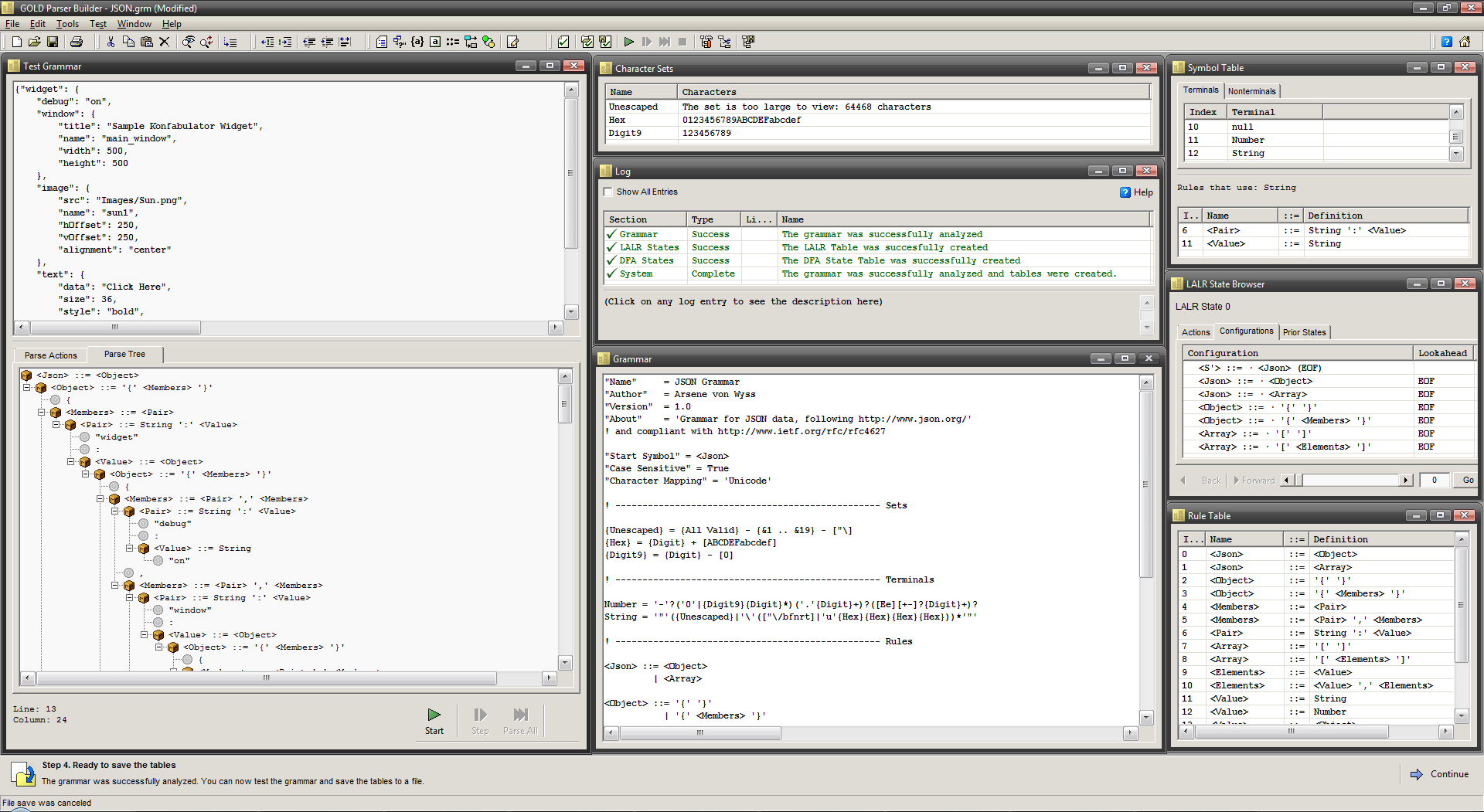 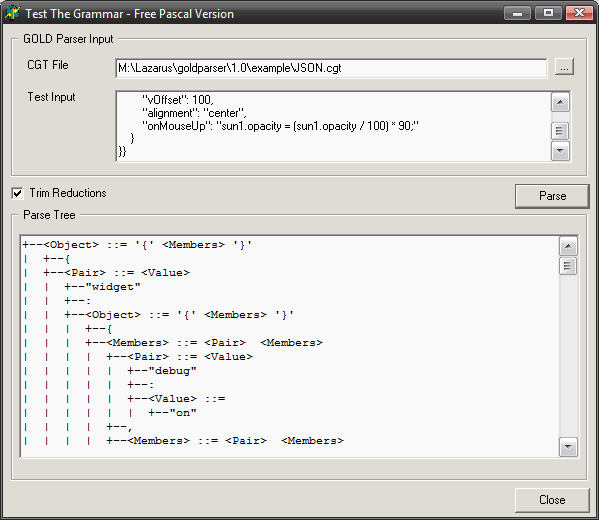 | |
| 150 | 150 | ||
| 151 | 151 | ### Pascal example | |
| 152 | 152 | ||
| 153 | 153 | You should copy/paste Pascal grammar from below into 'Grammar' window of Gold Parser Builder 5.2.0, save the grammar as 'pascal.grm" file, press 'Next' button in the bottom right 3 times in a row, then press it 4th time and save compiled grammar as 'pascal.egt' file. Now copy/paste Pascal test code from below into 'Test Grammar' window of Gold Parser Builder 5.2.0, and press button with fast forward symbol icon (that's 'Parse All' button). There should be no errors and you should see the populated 'Actions' tab at the right side of your 'Test Grammar' window with all parsing steps info. You can see the whole parse tree in 'Tree' tab, and you can even execute step by step if you use button with play symbol icon. Now from the test menu choose 'Save The Test File As...' and save it as 'pascal.pas'. | |
| 154 | 154 | ||
| 155 | 155 | After testing is finished, we load package 'gold_parser_5.lpk' from 'Gold Parser for Free Pascal and Lazarus', compile it, then open 'GoldTreeParser.lpi' project and compile it too. Now from command prompt execute this command: | |
| 156 | 156 | ||
| 157 | 157 | ``` bash | |
| 158 | 158 | goldtrcc pascal.egt pascal.pas pascal.txt | |
| 159 | 159 | ``` | |
| 160 | 160 | ||
| 161 | 161 | If everything went fine then you should see parse tree and parsed steps flying fast on your screen. Don't worry. Just open 'pascal.txt' file in your favorite editor and watch the result. Of course, instead of showing parsed tree and steps you can do whatever you want. You can implement semantic checks, emit code for template based code generator, interpret tree... | |
| 162 | 162 | ||
| 163 | 163 | #### Pascal Grammar | |
| 164 | 164 | ||
| 165 | 165 | Pascal grammar is relatively big, so it is hidden and to show it you need to expand it first with the linked button on the right. | |
| 166 | 166 | ||
| 167 | 167 | ```bnf | |
| 168 | 168 | ! --------------------------------------------------------------------------------- | |
| 169 | 169 | ! Standard Pascal Grammar | |
| 170 | 170 | ! | |
| 171 | 171 | ! modified by Avra (Zeljko Avramovic) for compatibility with latest version of Gold | |
| 172 | 172 | ! --------------------------------------------------------------------------------- | |
| 173 | 173 | ||
| 174 | 174 | "Name" = 'Pascal' | |
| 175 | 175 | "Version" = '1973' | |
| 176 | 176 | "Author" = 'Niklaus Wirth' | |
| 177 | 177 | "About" = 'PASCAL was developed by NIKLAUS WIRTH of the ETH Technical Institute of Zuerich in 1970-1971.(published in 1973)' | |
| 178 | 178 | ||
| 179 | 179 | "Case Sensitive" = False | |
| 180 | 180 | "Start Symbol" = <Program> | |
| 181 | 181 | ||
| 182 | 182 | Comment Start = '{' | |
| 183 | 183 | Comment End = '}' | |
| 184 | 184 | Comment Line = '//' | |
| 185 | 185 | ||
| 186 | 186 | {Hex Digit} = {Digit} + [ABCDEF] | |
| 187 | 187 | ||
| 188 | 188 | {Id Head} = {Letter} + [_] | |
| 189 | 189 | {Id Tail} = {Id Head} + {Digit} | |
| 190 | 190 | ||
| 191 | 191 | {String Ch} = {Printable} - [''] | |
| 192 | 192 | {Char Ch} = {Printable} - [''] | |
| 193 | 193 | ||
| 194 | 194 | DecLiteral = [123456789]{digit}* | |
| 195 | 195 | HexLiteral = '$'{Hex Digit}+ | |
| 196 | 196 | FloatLiteral = {Digit}*'.'{Digit}+ | |
| 197 | 197 | ||
| 198 | 198 | StringLiteral = ''( {String Ch} | '\'{Printable} )* '' | |
| 199 | 199 | CharLiteral = '' ( {Char Ch} | '\'{Printable} )'' | |
| 200 | 200 | ||
| 201 | 201 | id = {Id Head}{Id Tail}* | |
| 202 | 202 | ||
| 203 | 203 | <constant> ::= DecLiteral | |
| 204 | 204 | | StringLiteral | |
| 205 | 205 | | FloatLiteral | |
| 206 | 206 | | HexLiteral | |
| 207 | 207 | | CharLiteral | |
| 208 | 208 | ||
| 209 | 209 | !=========================================== Program | |
| 210 | 210 | ||
| 211 | 211 | <Program> ::= <ProgramHeader> <Declarations> <CompoundStatement> '.' | |
| 212 | 212 | ||
| 213 | 213 | <ProgramHeader> ::= PROGRAM id ';' | |
| 214 | 214 | | PROGRAM id '(' <IdList> ')' ';' | |
| 215 | 215 | ||
| 216 | 216 | <Declarations> ::= <ConstantDefinitions> <TypeDefinitions> <VariableDeclarations> <ProcedureDeclarations> | |
| 217 | 217 | ||
| 218 | 218 | <ConstantDefinitions> ::= CONST <ConstantDefinitionList> | |
| 219 | 219 | | | |
| 220 | 220 | ||
| 221 | 221 | <ConstantDefinitionList> ::= <ConstantDef> | |
| 222 | 222 | | <ConstantDef> <ConstantDefinitionList> | |
| 223 | 223 | ||
| 224 | 224 | <ConstantDef> ::= id '=' <constant> ';' | |
| 225 | 225 | ||
| 226 | 226 | <TypeDefinitions> ::= TYPE <TypeDefinitionList> | |
| 227 | 227 | | | |
| 228 | 228 | ||
| 229 | 229 | <TypeDefinitionList> ::= <TypeDef> | |
| 230 | 230 | | <TypeDef> <TypeDefinitionList> | |
| 231 | 231 | ||
| 232 | 232 | <TypeDef> ::= id '=' <TypeSpecifier> ';' | |
| 233 | 233 | ||
| 234 | 234 | <VariableDeclarations> ::= VAR <VariableDeclarationList> | |
| 235 | 235 | | | |
| 236 | 236 | ||
| 237 | 237 | <VariableDeclarationList> ::= <VariableDec> | |
| 238 | 238 | | <VariableDec> <VariableDeclarationList> | |
| 239 | 239 | ||
| 240 | 240 | <VariableDec> ::= <IdList> ':' <TypeSpecifier> ';' | |
| 241 | 241 | ||
| 242 | 242 | <ProcedureDeclarations> ::= <ProcedureDec> <ProcedureDeclarations> | |
| 243 | 243 | | | |
| 244 | 244 | ||
| 245 | 245 | <ProcedureDec> ::= <ProcedureHeader> FORWARD ';' | |
| 246 | 246 | | <ProcedureHeader> <Declarations> <CompoundStatement> ';' | |
| 247 | 247 | | <FunctionHeader> FORWARD ';' | |
| 248 | 248 | | <FunctionHeader> <Declarations> <CompoundStatement> ';' | |
| 249 | 249 | ||
| 250 | 250 | <ProcedureHeader> ::= PROCEDURE id <Arguments> ';' | |
| 251 | 251 | ||
| 252 | 252 | <FunctionHeader> ::= FUNCTION id <Arguments> ':' <TypeSpecifier> ';' | |
| 253 | 253 | ||
| 254 | 254 | <Arguments> ::= '(' <ArgumentList> ')' | |
| 255 | 255 | | | |
| 256 | 256 | ||
| 257 | 257 | <ArgumentList> ::= <Arg> | |
| 258 | 258 | | <Arg> ';' <ArgumentList> | |
| 259 | 259 | ||
| 260 | 260 | <Arg> ::= <IdList> ':' <TypeSpecifier> | |
| 261 | 261 | | VAR <IdList> ':' <TypeSpecifier> | |
| 262 | 262 | ||
| 263 | 263 | <CompoundStatement> ::= BEGIN <StatementList> END | |
| 264 | 264 | ||
| 265 | 265 | <StatementList> ::= <Statement> | |
| 266 | 266 | | <Statement> ';' <StatementList> | |
| 267 | 267 | ||
| 268 | 268 | <Statement> ::= <CompoundStatement> | |
| 269 | 269 | | <AssignmentStatement> | |
| 270 | 270 | | <ProcedureCall> | |
| 271 | 271 | | <ForStatement> | |
| 272 | 272 | | <WhileStatement> | |
| 273 | 273 | | <IfStatement> | |
| 274 | 274 | | <CaseStatement> | |
| 275 | 275 | | <RepeatStatement> | |
| 276 | 276 | | | |
| 277 | 277 | ||
| 278 | 278 | <AssignmentStatement> ::= <Variable> ':=' <Expression> | |
| 279 | 279 | ! | <Variable> ':=' <FunctionCall> | |
| 280 | 280 | ||
| 281 | 281 | <ProcedureCall> ::= id <Actuals> | |
| 282 | 282 | ||
| 283 | 283 | <ForStatement> ::= FOR id ':=' <Expression> TO <Expression> DO <Statement> | |
| 284 | 284 | | FOR id ':=' <Expression> DOWNTO <Expression> DO <Statement> | |
| 285 | 285 | ||
| 286 | 286 | <WhileStatement> ::= WHILE <Expression> DO <Statement> | |
| 287 | 287 | ||
| 288 | 288 | <IfStatement> ::= IF <Expression> THEN <Statement> ELSE <Statement> | |
| 289 | 289 | ||
| 290 | 290 | <RepeatStatement> ::= REPEAT <StatementList> UNTIL <Expression> | |
| 291 | 291 | ||
| 292 | 292 | <CaseStatement> ::= CASE <Expression> OF <CaseList> END | |
| 293 | 293 | ||
| 294 | 294 | <CaseList> ::= <Case> | |
| 295 | 295 | | <Case> ';' <CaseList> | |
| 296 | 296 | ||
| 297 | 297 | <Case> ::= <ConstantList> ':' <Statement> | |
| 298 | 298 | ||
| 299 | 299 | <ConstantList> ::= <constant> | |
| 300 | 300 | | <constant> ',' <ConstantList> | |
| 301 | 301 | ||
| 302 | 302 | <Expression> ::= <SimpleExpression> | |
| 303 | 303 | | <SimpleExpression> '=' <SimpleExpression> | |
| 304 | 304 | | <SimpleExpression> '<>' <SimpleExpression> | |
| 305 | 305 | | <SimpleExpression> '<' <SimpleExpression> | |
| 306 | 306 | | <SimpleExpression> '<=' <SimpleExpression> | |
| 307 | 307 | | <SimpleExpression> '>' <SimpleExpression> | |
| 308 | 308 | | <SimpleExpression> '>=' <SimpleExpression> | |
| 309 | 309 | | <FunctionCall> | |
| 310 | 310 | ||
| 311 | 311 | <SimpleExpression> ::= <Term> | |
| 312 | 312 | | <SimpleExpression> '+' <Term> | |
| 313 | 313 | | <SimpleExpression> '-' <Term> | |
| 314 | 314 | | <SimpleExpression> OR <Term> | |
| 315 | 315 | ||
| 316 | 316 | <Term> ::= <Factor> | |
| 317 | 317 | | <Term> '*' <Factor> | |
| 318 | 318 | | <Term> '/' <Factor> | |
| 319 | 319 | | <Term> 'DIV' <Factor> | |
| 320 | 320 | | <Term> 'MOD' <Factor> | |
| 321 | 321 | | <Term> 'AND' <Factor> | |
| 322 | 322 | ||
| 323 | 323 | <Factor> ::= '(' <Expression> ')' | |
| 324 | 324 | | '+' <Factor> | |
| 325 | 325 | | '-' <Factor> | |
| 326 | 326 | | NOT <Factor> | |
| 327 | 327 | | <constant> | |
| 328 | 328 | | <Variable> | |
| 329 | 329 | ||
| 330 | 330 | <FunctionCall> ::= id <Actuals> | |
| 331 | 331 | ||
| 332 | 332 | <Actuals> ::= '(' <ExpressionList> ')' | |
| 333 | 333 | ||
| 334 | 334 | <ExpressionList> ::= <Expression> | |
| 335 | 335 | | <Expression> ',' <ExpressionList> | |
| 336 | 336 | | | |
| 337 | 337 | ||
| 338 | 338 | <Variable> ::= id | |
| 339 | 339 | | <Variable> '.' id | |
| 340 | 340 | | <Variable> '^' | |
| 341 | 341 | | <Variable> '[' <ExpressionList> ']' | |
| 342 | 342 | ||
| 343 | 343 | <TypeSpecifier> ::= id | |
| 344 | 344 | | '^' <TypeSpecifier> | |
| 345 | 345 | | '(' <IdList> ')' | |
| 346 | 346 | | <constant> '..' <constant> | |
| 347 | 347 | | ARRAY '[' <DimensionList> ']' OF <TypeSpecifier> | |
| 348 | 348 | | RECORD <FieldList> END | |
| 349 | 349 | | FILE OF <TypeSpecifier> | |
| 350 | 350 | ||
| 351 | 351 | <DimensionList> ::= <Dimension> | |
| 352 | 352 | | <Dimension> ',' <DimensionList> | |
| 353 | 353 | ||
| 354 | 354 | <Dimension> ::= <constant> '..' <constant> | |
| 355 | 355 | | id | |
| 356 | 356 | ||
| 357 | 357 | <FieldList> ::= <Field> | |
| 358 | 358 | | <Field> ';' <FieldList> | |
| 359 | 359 | ||
| 360 | 360 | <Field> ::= <IdList> ':' <TypeSpecifier> | |
| 361 | 361 | ||
| 362 | 362 | <IdList> ::= id | |
| 363 | 363 | | id ',' <IdList> | |
| 364 | 364 | ``` | |
| 365 | 365 | ||
| 366 | 366 | #### Pascal Test Code | |
| 367 | 367 | ||
| 368 | 368 | ``` pascal | |
| 369 | 369 | program test; // simple pascal code for testing parser | |
| 370 | 370 | ||
| 371 | 371 | const | |
| 372 | 372 | PI = 3.1415; | |
| 373 | 373 | ||
| 374 | 374 | var | |
| 375 | 375 | a, b, c: real; | |
| 376 | 376 | ||
| 377 | 377 | procedure hello(s: string; b, c: real); | |
| 378 | 378 | begin | |
| 379 | 379 | writeln(s); | |
| 380 | 380 | writeln(b); | |
| 381 | 381 | writeln(c); | |
| 382 | 382 | end; | |
| 383 | 383 | ||
| 384 | 384 | function square(a: real): real; | |
| 385 | 385 | begin | |
| 386 | 386 | result := a * a; | |
| 387 | 387 | end; | |
| 388 | 388 | ||
| 389 | 389 | function half(a: real): real; | |
| 390 | 390 | begin | |
| 391 | 391 | result := a / 2; | |
| 392 | 392 | end; | |
| 393 | 393 | ||
| 394 | 394 | function twopi: real; | |
| 395 | 395 | begin | |
| 396 | 396 | result := pi * 2; | |
| 397 | 397 | end; | |
| 398 | 398 | ||
| 399 | 399 | begin | |
| 400 | 400 | a := PI; | |
| 401 | 401 | b := a * 10; | |
| 402 | 402 | c := square(half(twopi())); | |
| 403 | 403 | hello('Hello World!', b, c); | |
| 404 | 404 | end. | |
| 405 | 405 | ``` | |
| 406 | 406 | ||
| 407 | 407 | #### Pascal screenshots | |
| 408 | 408 | ||
| 409 | - | ||
| 409 | + | 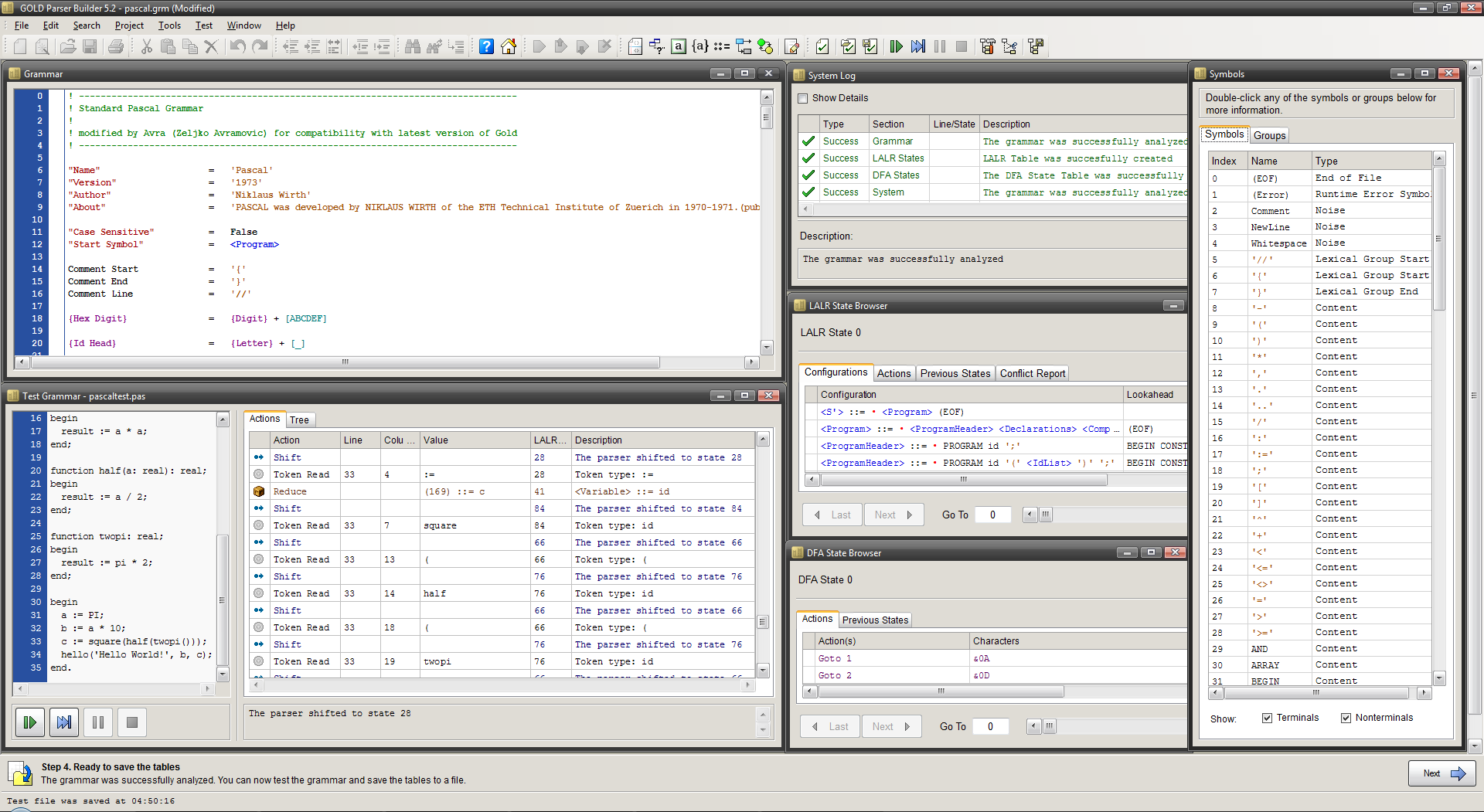  | |
| 410 | 410 | ||
| 411 | 411 | # Goldie Tools | |
| 412 | 412 | ||
| 413 | 413 | Although [Goldie](https://www.semitwist.com/goldie/) is not originaly made for use with Pascal, it has many [command line tools](https://www.semitwist.com/goldie/Tools/) which can be useful to manipulate CGT files (Gold compiled grammar). You can show CGT file in human readable format, compile grammar to CGT v1.0 file without Gold Parser Builder executable, and parse source according to some CGT file to save the resulting tokens and parsed tree to JSON file. | |
| 414 | 414 | ||
| 415 | 415 | # Useful links | |
| 416 | 416 | ||
| 417 | 417 | - [[Make your own compiler, interpreter, parser, or expression analyzer]] | |
| 418 | 418 | - [Gold Parser Builder home page](http://goldparser.org) | |
| 419 | 419 | - [Gold Parser Builder 3.4.4 setup for older engines not compatible with latest Gold 5.x CGT files](http://www.semitwist.com/download/gold-parser-builder-3-4-4.zip) | |
| 420 | 420 | - [Gold Parser Builder 5.2.0 setup](http://goldparser.org/builder/files/GOLD-Builder-5.2.0-Setup.zip) | |
| 421 | 421 | - [Introduction to Gold Parser](https://www.codeproject.com/articles/10492/introduction-to-gold-parser) | |
| 422 | 422 | - [Let Your Parser Go for the GOLD](https://www.developer.com/net/csharp/article.php/3689776/Let-Your-Parser-Go-for-the-iGOLDi.htm) | |
| 423 | 423 | ||
| 424 | 424 | --- | |
| 425 | 425 | *From the Free Pascal wiki, page "Gold", as it stood on 2023-12-15 after a change by Avra, out of the wiki's dump of 2024-05-26. Copyright stays with the author who wrote it, according to the old wiki's [[Licensing]] page. If you have concerns about this material, [message the admin](/wiki-contact).* | |
| 426 | 426 | Category: Code | |
| 427 | 427 | Category: Compiler design | |
| 428 | 428 | Category: Utilities |