

Getting Lazarus/pt: what changed
Revision 2 to 3. Removed lines have a minus sign; added lines have a plus sign.
| Old | New | Line | |
|---|---|---|---|
| 1 | 1 | ## Através do Subversion | |
| 2 | 2 | ||
| 3 | 3 | ### Pegando o Subversion | |
| 4 | 4 | ||
| 5 | 5 | Você pode baixar um bom cliente Subversion (SVN) para Windows aqui [1](http://tortoisesvn.tigris.org/). | |
| 6 | 6 | ||
| 7 | 7 | Um cliente de linha de comando do SVN está disponível para várias plataformas incluindo Linux e Windows nesta [página](http://subversion.tigris.org/). | |
| 8 | 8 | ||
| 9 | 9 | ### Usando o Subversion | |
| 10 | 10 | ||
| 11 | 11 | #### Usando a linha de comando | |
| 12 | 12 | ||
| 13 | 13 | Para pegar o Lazarus pela primeira vez: | |
| 14 | 14 | ||
| 15 | 15 | Abra um terminal/prompt de comando, mude para o diretório onde você quer que a pasta do Lazarus seja criada e digite: | |
| 16 | 16 | ||
| 17 | - | ||
| 17 | + | ```text | |
| 18 | + | svn co http://svn.freepascal.org/svn/lazarus/trunk lazarus | |
| 19 | + | ``` | |
| 18 | 20 | ||
| 19 | 21 | Para atualizar os fontes do Lazarus: | |
| 20 | 22 | ||
| 21 | 23 | Abra um terminal/prompt de comando, mude para o diretório do Lazarus e digite: | |
| 22 | 24 | ||
| 23 | - | ||
| 25 | + | ```text | |
| 26 | + | svn update | |
| 27 | + | ``` | |
| 24 | 28 | ||
| 25 | 29 | #### Usando o TortoiseSVN para Windows | |
| 26 | 30 | ||
| 27 | 31 | O TortoiseSVN se integra ao Windows Explorer. Depois da instalação, todos os comandos estão disponíveis no Windows Explorer através do menu de contexto (clicar com o botão direito do mouse sobre) da pasta ou arquivo. | |
| 28 | 32 | ||
| 29 | 33 | Para pegar o Lazarus pela primeira vez: | |
| 30 | 34 | ||
| 31 | 35 | - Abra o Windows Explorer | |
| 32 | 36 | - Crie um diretório onde você quaer colocar os arquivos vindos do servidor SVN | |
| 33 | 37 | - Clique com o botão direito do mouse no diretório criado | |
| 34 | 38 | - Selecione *SVN Checkout...* no menu de contexto | |
| 35 | 39 | ||
| 36 | 40 | 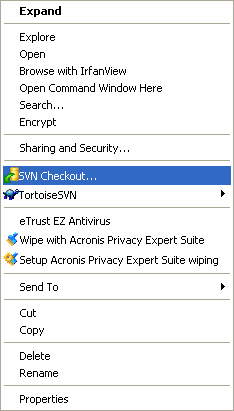 | |
| 37 | 41 | ||
| 38 | 42 | - No próximo diálogo você entra a URL do servidor de fontes do Lazarus: | |
| 39 | 43 | ||
| 40 | - | ||
| 44 | + | ```text | |
| 45 | + | http://svn.freepascal.org/svn/lazarus/trunk | |
| 46 | + | ``` | |
| 41 | 47 | ||
| 42 | 48 | - Aguarde o TortoiseSVN importar a árvore de arquivos do servidor. Isso leva um certo tempo para ser concluído. | |
| 43 | 49 | ||
| 44 | 50 | Para atualizar os fontes do Lazarus: | |
| 45 | 51 | ||
| 46 | 52 | - Abra o Windows Explorer | |
| 47 | 53 | - Clique com o botão direito do mouse no diretório dos fontes | |
| 48 | 54 | - Selecione *SVN Update...* no menu de contexto | |
| 49 | 55 | ||
| 50 | 56 | 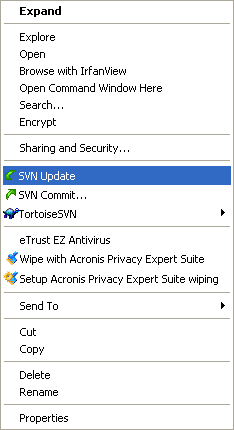 | |
| 51 | 57 | ||
| 52 | 58 | *PS: Parece haver um bug de um recurso do TortoiseSVN (1.24) em algum ponto. Após ter terminado com ele e fechado o Windows Explorer, pode ser necessário matar o processo TSVNCache.exe pelo Task Manager (CTRL+ALT+DEL). --Prognatus 18:28, 26 Sep 2005 (CEST)* | |
| 53 | 59 | ||
| 54 | 60 | #### Scripts | |
| 55 | 61 | ||
| 56 | 62 | Lightning: Here is a windows batch script that takes care of checking out and updating **Lazarus** from **SVN** to a subdirectory and even basic error fixing, because i have no way of knowing where Lazarus is installed it cannot compile or copy the files to your working Lazarus instalation. Please save the script as **getlaz.bat** or some other name, however there is no warranty of any kind, use at your own risk, put it in a test directory first and make sure there is no subdirectory already called **lazarus**. | |
| 57 | 63 | ||
| 58 | - | ||
| 59 | - | ||
| 64 | + | ```text | |
| 65 | + | @REM Script for checkout and update Lazarus from SVN | |
| 66 | + | @echo. | |
| 60 | 67 | ||
| 61 | - | ||
| 62 | - | ||
| 63 | - | ||
| 64 | - | ||
| 65 | - | ||
| 66 | - | ||
| 67 | - | ||
| 68 | - | ||
| 68 | + | @REM Check if lazarus directory exists to update or checkout first | |
| 69 | + | @if not exist lazarus goto CheckoutLaz | |
| 70 | + | @echo Updating Lazarus, please wait ... | |
| 71 | + | @cd lazarus | |
| 72 | + | svn update | |
| 73 | + | @if not %errorlevel% == 0 goto CleanupLaz | |
| 74 | + | @cd.. | |
| 75 | + | @goto Exit | |
| 69 | 76 | ||
| 70 | - | ||
| 71 | - | ||
| 72 | - | ||
| 73 | - | ||
| 77 | + | :CheckoutLaz | |
| 78 | + | @echo Checking out Lazarus for the first time, this might take a while ... | |
| 79 | + | svn checkout http://svn.freepascal.org/svn/lazarus/trunk lazarus | |
| 80 | + | @goto Exit | |
| 74 | 81 | ||
| 75 | - | ||
| 76 | - | ||
| 77 | - | ||
| 78 | - | ||
| 79 | - | ||
| 80 | - | ||
| 81 | - | ||
| 82 | - | ||
| 83 | - | ||
| 84 | - | ||
| 85 | - | ||
| 86 | - | ||
| 87 | - | ||
| 82 | + | :CleanupLaz | |
| 83 | + | @echo. | |
| 84 | + | @echo Something went wrong, trying to fix any problems if possible ... | |
| 85 | + | svn cleanup | |
| 86 | + | @if not %errorlevel% == 0 goto CleanupFailedLaz | |
| 87 | + | @cd.. | |
| 88 | + | @echo. | |
| 89 | + | @echo Cleanup complete please run the script again. | |
| 90 | + | goto Exit | |
| 91 | + | :CleanupFailedLaz | |
| 92 | + | @cd.. | |
| 93 | + | @echo. | |
| 94 | + | @echo Cleanup Failed ! Please check or delete/move/rename the lazarus subdirectory ... | |
| 88 | 95 | ||
| 89 | - | ||
| 96 | + | :Exit | |
| 97 | + | ``` | |
| 90 | 98 | ||
| 91 | 99 | Matthijs: In Linux I use a script (it is not very sophisticated, but does the trick) to download the latest SVN-version for Lazarus. Before I copy it here I'll explain my system. In my home-directory I have a special cvsroot-directory. In this directory I have a script for downloading Lazarus and other interesting projects. Lazarus is installed in /usr/share/lazarus. Before building a new version from SVN I make a backup, just in case the current svn is unstable. This is done by moving the /usr/share/lazarus directory to /usr/share/lazarus.bu To adapt the script to your system you only need to alter the constants defined at the start of the script. But without further ado, here is the script. But (big but) it is given without any guarantee. :) If things break you are on your own. | |
| 92 | 100 | ||
| 93 | - | ||
| 101 | + | ```text | |
| 102 | + | #!/bin/bash | |
| 94 | 103 | ||
| 95 | - | ||
| 96 | - | ||
| 97 | - | ||
| 104 | + | # before you can use this script you have to checkout all files | |
| 105 | + | # so first do a | |
| 106 | + | # svn checkout http://svn.freepascal.org/svn/lazarus/trunk lazarus | |
| 98 | 107 | ||
| 99 | - | ||
| 100 | - | ||
| 101 | - | ||
| 102 | - | ||
| 103 | - | ||
| 108 | + | #Define some directories | |
| 109 | + | BASEDIR=/usr/share/ | |
| 110 | + | LAZCVSDIR=~/cvsroot/lazarus/ | |
| 111 | + | LAZDIR=/usr/share/lazarus/ | |
| 112 | + | LAZBACKUP=/usr/share/lazarus.bu | |
| 104 | 113 | ||
| 105 | - | ||
| 106 | - | ||
| 107 | - | ||
| 108 | - | ||
| 109 | - | ||
| 110 | - | ||
| 111 | - | ||
| 112 | - | ||
| 113 | - | ||
| 114 | + | #Remove old backup if it exists | |
| 115 | + | date +"%T %tStart" | |
| 116 | + | if [ -d $LAZBACKUP ] | |
| 117 | + | then | |
| 118 | + | date +"%T %tRemoving old backup" | |
| 119 | + | rm $LAZBACKUP -fr | |
| 120 | + | else | |
| 121 | + | date +"%T %tNo backup to remove" | |
| 122 | + | fi | |
| 114 | 123 | ||
| 115 | - | ||
| 116 | - | ||
| 124 | + | date +"%T %tCreating copy of lazarus dir" | |
| 125 | + | cp -R $LAZDIR $LAZBACKUP | |
| 117 | 126 | ||
| 118 | - | ||
| 119 | - | ||
| 120 | - | ||
| 127 | + | #Getting stuff from svn | |
| 128 | + | date +"%T %tUpdate lazarus" | |
| 129 | + | svn update lazarus > ~/cvs_update.log | |
| 121 | 130 | ||
| 122 | - | ||
| 123 | - | ||
| 124 | - | ||
| 131 | + | #Copying cvs-files to our laz dir. | |
| 132 | + | date +"%T %tcopying files" | |
| 133 | + | cp -Rf $LAZCVSDIR $BASEDIR --reply=yes | |
| 125 | 134 | ||
| 126 | - | ||
| 127 | - | ||
| 128 | - | ||
| 129 | - | ||
| 130 | - | ||
| 131 | - | ||
| 132 | - | ||
| 135 | + | #Make and building of lazarus | |
| 136 | + | date +"%T %tmake lazarus" | |
| 137 | + | cd $LAZDIR | |
| 138 | + | make > /dev/null | |
| 139 | + | date +"%T %tmake the packages" | |
| 140 | + | make idepkg > /dev/null | |
| 141 | + | date +"%T %tFinished" | |
| 142 | + | ``` | |
| 133 | 143 | ||
| 134 | 144 | ## Método Cópia Instantânea | |
| 135 | 145 | ||
| 136 | 146 | Se você não quiser utilizar o svn diretamente, uma cópia instantânea do svn corrente está disponível em [lazarus snapshot site](http://www.de.freepascal.org/lazarus/) ou um dos seus espelhos. | |
| 137 | 147 | ||
| 138 | 148 | ## Baixando releases | |
| 139 | 149 | ||
| 140 | 150 | Releases binários para várias plataformas estão disponíveis via [Lazarus Sourceforge, área de download](http://sourceforge.net/project/showfiles.php?group_id=89339). | |
| 141 | 151 | ||
| 142 | 152 | ## Colaboradores originais e Mudanças | |
| 143 | 153 | ||
| 144 | 154 | Essa página foi convertida da versão [epikwiki](http://lazarus-ccr.sourceforge.net/index.php?wiki=GettingLazarus). | |
| 145 | 155 | ||
| 146 | 156 | --- | |
| 147 | 157 | *From the Free Pascal wiki, page "Getting Lazarus/pt", as it stood on 2007-01-10 after a change by Swen, out of the wiki's dump of 2024-05-26. Copyright stays with the author who wrote it, according to the old wiki's [[Licensing]] page. If you have concerns about this material, [message the admin](/wiki-contact).* |