

GTK2 Interface: what changed
Revision 2 to 3. Removed lines have a minus sign; added lines have a plus sign.
| Old | New | Line | |
|---|---|---|---|
| 1 | - | ||
| 2 | - | ||
| 3 | - | ||
| 4 | - | ||
| 5 | - | ||
| 6 | - | ||
| 7 | - | ||
| 8 | - | ||
| 9 | - | ||
| 10 | - | ||
| 11 | - | ||
| 12 | - | ||
| 13 | - | ||
| 14 | - | ||
| 15 | - | ||
| 16 | - | ||
| 17 | - | ||
| 18 | - | ||
| 19 | - | ||
| 20 | - | ||
| 21 | - | ||
| 22 | - | ||
| 23 | - | ||
| 24 | - | ||
| 25 | - | ||
| 26 | - | ||
| 27 | - | ||
| 28 | - | ||
| 29 | - | ||
| 30 | - | ||
| 31 | - | ||
| 32 | - | ||
| 33 | - | ||
| 34 | - | ||
| 35 | - | ||
| 36 | - | ||
| 37 | - | ||
| 38 | - | ||
| 39 | - | ||
| 40 | - | ||
| 41 | - | ||
| 42 | - | ||
| 43 | - | ||
| 44 | - | ||
| 45 | - | ||
| 46 | - | ||
| 47 | - | ||
| 48 | - | ||
| 49 | - | ||
| 50 | - | ||
| 51 | - | ||
| 1 | + | *(GTK+ only)* | |
| 52 | 2 | ||
| 53 | 3 | ## Introduction | |
| 54 | 4 | ||
| 55 | - | ||
| 56 | - | ||
| 57 | - | ||
| 58 | - | ||
| 59 | - | ||
| 60 | - | ||
| 61 | - | ||
| 62 | - | ||
| 63 | - | ||
| 64 | - | ||
| 65 | - | ||
| 66 | - | ||
| 67 | - | ||
| 68 | - | ||
| 69 | - | ||
| 70 | - | ||
| 71 | - | ||
| 72 | - | ||
| 73 | - | ||
| 74 | - | ||
| 75 | - | ||
| 76 | - | ||
| 77 | - | ||
| 78 | - | ||
| 79 | - | ||
| 80 | - | ||
| 81 | - | ||
| 82 | - | ||
| 83 | - | ||
| 84 | - | ||
| 5 | + | The gtk2 widgetset is stable and all components work. And it needs optimizations. | |
| 85 | 6 | ||
| 86 | - | ||
| 7 | + | The documentation can be found [here](http://www.gtk.org/). | |
| 87 | 8 | ||
| 88 | - | ||
| 89 | - | ||
| 90 | - | ||
| 91 | - | ||
| 92 | - | ||
| 93 | - | ||
| 9 | + | The minimum Gtk 2 version supported is Gtk 2.8 | |
| 94 | 10 | ||
| 95 | 11 | ## Road map for the gtk2 interface | |
| 96 | 12 | ||
| 97 | 13 | Here: [[Roadmap|Roadmap#Widgetset_dependent_components]] | |
| 98 | 14 | ||
| 99 | 15 | ## Quick start guide for Linux, FreeBSD, etc | |
| 100 | 16 | ||
| 101 | - | ||
| 17 | + | The first thing to do is to install the gtk2 libraries including the development packages. For example: linux/debian systems call them libgtk2.0-dev. There are complete installers for Windows [here](http://www.gtk.org/). | |
| 102 | 18 | ||
| 103 | - | ||
| 19 | + | The gtk2 is the default widgetset, so it should work out of the box. | |
| 104 | 20 | ||
| 105 | - | ||
| 21 | + | You can compile the LCL for gtk2. First open your normal compiled Lazarus. Then go on the menu "Tools" --\> "Configure Build Lazarus". Set LCL to "clean+build" and everything else to "None". Now select "gtk2" and click on the "Ok" button. Next go to the menu "Tools" --\> "Build Lazarus". Now the LCL is compiled for gtk2 too. | |
| 106 | 22 | ||
| 107 | - | ||
| 23 | + | To compile a project for gtk2 just select it as the target widgetset on the Compiler Options dialog. | |
| 108 | 24 | ||
| 109 | 25 | ### Ubuntu Unity liboverlay | |
| 110 | 26 | ||
| 111 | - | ||
| 27 | + | The Ubuntu's Unity LIBOVERLAY override breaks the gtk_grab_add function, so mouse capturing does not work in synedit, treeview and many more LCL controls that descend from TCustomControl. That means dragging or selecting text with the mouse does not work. | |
| 112 | 28 | ||
| 113 | - | ||
| 29 | + | This is true for many applications, which is why liboverlay has an internal list to disable itself for many famous applications (e.g. gimp). | |
| 114 | 30 | ||
| 115 | - | ||
| 31 | + | That's why the gtk2 interface of the LCL disables liboverlay by default. You can enable it by compiling the LCL with -dEnableLibOverlay. | |
| 116 | 32 | ||
| 117 | - | ||
| 33 | + | If it is enabled: The LCL will write a warning with [[DebugLn]] if it spots liboverlay. | |
| 118 | 34 | ||
| 119 | - | ||
| 120 | - | ||
| 121 | - | ||
| 122 | - | ||
| 35 | + | To disable liboverlay for a single application set the environment variable LIBOVERLAY_SCROLLBAR to '0' *before* starting the application. There is no way to disable liboverlay when the application is already running. For example: | |
| 123 | 36 | ||
| 124 | - | ||
| 37 | + | `LIBOVERLAY_SCROLLBAR=0 ./lazarus` | |
| 125 | 38 | ||
| 126 | - | ||
| 39 | + | You can disable it on a whole machine by uninstalling the package "liboverlay-scrollbar-0.2-0". | |
| 127 | 40 | ||
| 41 | + | The IDE starter "startlazarus" sets this variable before starting the IDE (since 1.0). startlazarus is called for example when you use the desktop menu item. | |
| 42 | + | ||
| 128 | 43 | ### Ubuntu Unity Menuproxy | |
| 129 | 44 | ||
| 130 | - | ||
| 45 | + | In more recent Ubuntu versions, Ubuntu tries to create a "one menubar" look like macOS has, but this fails miserably with multi window programs like Lazarus. The main problem is not being able to access the menu without first selecting the main lazarus window. (the window that would hold the menubar). | |
| 131 | 46 | ||
| 132 | - | ||
| 47 | + | Turning off seems to be impossible without massive changes (probably that is because then everybody would turn such features off immediately). | |
| 133 | 48 | ||
| 134 | - | ||
| 49 | + | Turning off manually is possible through setting environment variable UBUNTU_MENUPROXY equal to 0 before starting. | |
| 135 | 50 | ||
| 136 | - | ||
| 51 | + | UBUNTU_MENUPROXY=0 ./lazarus | |
| 137 | 52 | ||
| 138 | - | ||
| 139 | - | ||
| 140 | - | ||
| 141 | - | ||
| 142 | - | ||
| 143 | - | ||
| 53 | + | or put it in a script like: | |
| 144 | 54 | ||
| 55 | + | `#!/bin/sh`\ | |
| 56 | + | `export UBUNTU_MENUPROXY=0`\ | |
| 57 | + | `./startlazarus` | |
| 58 | + | ||
| 145 | 59 | ### Raspberry Pi OS | |
| 146 | 60 | ||
| 147 | - | ||
| 61 | + | Note: the following advice is proably not necessary if you have installed libgtk2.0-dev as mentioned further up this page | |
| 148 | 62 | ||
| 149 | - | ||
| 63 | + | Lazarus GTK2 cannot be compiled by default, because of missing symlinks for libraries. These symlinks are missed: | |
| 150 | 64 | ||
| 151 | - | ||
| 152 | - | ||
| 153 | - | ||
| 154 | - | ||
| 155 | - | ||
| 156 | - | ||
| 157 | - | ||
| 158 | - | ||
| 159 | - | ||
| 160 | - | ||
| 65 | + | - libgdk-x11-2.0.so | |
| 66 | + | - libgtk-x11-2.0.so | |
| 67 | + | - libX11.so | |
| 68 | + | - libgdk_pixbuf-2.0.so | |
| 69 | + | - libglib-2.0 | |
| 70 | + | - libgthread-2.0.so | |
| 71 | + | - libgmodule-2.0.so | |
| 72 | + | - libpango-1.0.so | |
| 73 | + | - libcairo.so | |
| 74 | + | - libatk-1.0.so | |
| 161 | 75 | ||
| 162 | - | ||
| 163 | - | ||
| 164 | - | ||
| 165 | - | ||
| 166 | - | ||
| 76 | + | The existing .so files are located in the "/usr/lib/aarch64-linux-gnu". For all mentioned files, you need to make symlinks like this: | |
| 167 | 77 | ||
| 78 | + | `cd /usr/lib/aarch64-linux-gnu`\ | |
| 79 | + | `sudo ln -s libatk-1.0.so.0 libatk-1.0.so` | |
| 80 | + | ||
| 168 | 81 | ## Using the GTK2 interface under macOS | |
| 169 | 82 | ||
| 170 | 83 | ### Installing X11 | |
| 171 | 84 | ||
| 172 | - | ||
| 85 | + | If you want to use the gtk widgetset instead of the default Carbon widgetset, then make sure **X11** is installed. X11 is no longer included with Mac, but X11 server and client libraries are available from the [XQuartz project](https://www.xquartz.org/). The last XQuartz release was version 2.7.11 on 2016-10-29 for Snow Leopard 10.6.3 or later. | |
| 173 | 86 | ||
| 174 | - | ||
| 87 | + | How do you know whether X11 is installed? Look in the /Applications/Utilities folder for an application named XQuartz.app. All further details are in /opt/X11/ (soft linked from /usr/X11). | |
| 175 | 88 | ||
| 176 | - | ||
| 89 | + | **Tip** - Drag and drop X11 onto the dock so you'll have a one-click way of opening an X11 window. | |
| 177 | 90 | ||
| 178 | 91 | ### Installing GTK2-Lazarus with fink | |
| 179 | 92 | ||
| 180 | - | ||
| 181 | - | ||
| 182 | - | ||
| 183 | - | ||
| 93 | + | Install [Fink](http://www.finkproject.org/), the package manager for macOS. Install the GTK2 version of Lazarus with the following command: | |
| 184 | 94 | ||
| 185 | - | ||
| 95 | + | ` fink install lazarus-gtk2` | |
| 186 | 96 | ||
| 187 | - | ||
| 97 | + | You will be asked to install a number of other packages. Simply answer yes. The installation takes quite a while. After it has finished, the GTK2 application can be started with a double click on /Applications/Fink/lazarus. | |
| 188 | 98 | ||
| 99 | + | Note: Projects using GTK2 can equally be created using the Aqua version of Lazarus, which is installed with "fink install lazarus-aqua". | |
| 100 | + | ||
| 189 | 101 | ### Installing gtk using MacPorts | |
| 190 | 102 | ||
| 191 | - | ||
| 192 | - | ||
| 193 | - | ||
| 194 | - | ||
| 195 | - | ||
| 103 | + | Follow these steps to install the libraries using MacPorts. Install MacPorts from [**www.macports.org**](http://www.macports.org/). When MacPorts is set up, you need to install two library sets using the following commands: | |
| 196 | 104 | ||
| 197 | - | ||
| 198 | - | ||
| 199 | - | ||
| 200 | - | ||
| 105 | + | `sudo /opt/local/bin/port install gtk1`\ | |
| 106 | + | `sudo /opt/local/bin/port install gdk-pixbuf` | |
| 201 | 107 | ||
| 202 | - | ||
| 203 | - | ||
| 204 | - | ||
| 205 | - | ||
| 108 | + | Then make sure that Lazarus can find the library by using the command below before running Lazarus. Alternatively you can add this command to your bash startup script (`/etc/profile` or `~/.bash_profile`) before you start the shell to run Lazarus: | |
| 206 | 109 | ||
| 110 | + | `export DYLD_FALLBACK_LIBRARY_PATH="/opt/local/lib:$DYLD_FALLBACK_LIBRARY_PATH"` | |
| 111 | + | ||
| 112 | + | If this doesn't work, simply do | |
| 113 | + | ||
| 114 | + | `sudo ln -s /opt/local /sw` | |
| 115 | + | ||
| 207 | 116 | ### Using the GTK2 libraries included with Gimp | |
| 208 | 117 | ||
| 209 | - | ||
| 118 | + | Now that the Cocoa widgetset is the default for Lazarus on macOS, there probably isn't much need for developing or distributing GTK2-based apps on macOS. However, you might want to test your apps with the GTK2 widgetset to see how well the graphical portion will work under Linux, where GTK2 is likely to be the default. You can also compile Lazarus itself against the GTK2 widgetset if you're curious about how Lazarus looks with GTK2. | |
| 210 | 119 | ||
| 211 | - | ||
| 120 | + | An easy way to obtain recent GTK2 libraries is to download and install Gimp from <http://www.gimp.org/macintosh/>. Gimp is not only a useful image editor in its own right, but it also installs GTK2 version **2.16.6** libraries that you can link your apps against. | |
| 212 | 121 | ||
| 213 | - | ||
| 122 | + | Copy and paste the files given below into a text editor and save them as **gimplib.cfg** and **glaunch.sh**. File gimplib.cfg tells FPC how to link against the GTK2 libraries; file glaunch.sh initializes GTK2 and starts a GTK2-compiled executable specified on the command line. | |
| 214 | 123 | ||
| 215 | - | ||
| 124 | + | To compile an app against the GTK2 widgetset and link it with the Gimp GTK2 libraries, do the following: | |
| 216 | 125 | ||
| 217 | - | ||
| 218 | - | ||
| 219 | - | ||
| 126 | + | - In the Lazarus Compiler Options dialog, on the Other tab, check Use Additional Compiler Config File and enter the path to gimplib.cfg in the text box (for example, ~/tools/scripts/gimplib.cfg). | |
| 127 | + | - In the Lazarus Compiler Options dialog, on the Paths tab, select GTK2 as the LCL Widget Type. | |
| 128 | + | - Choose Run \| Build. | |
| 220 | 129 | ||
| 221 | - | ||
| 130 | + | To run a GTK2-compiled executable, open an X11 window, change to your app's folder, and enter the following (which assumes glaunch.sh is in ~/tools/scripts): | |
| 222 | 131 | ||
| 223 | - | ||
| 132 | + | - ~/tools/scripts/glaunch.sh myexec | |
| 224 | 133 | ||
| 225 | - | ||
| 134 | + | To compile Lazarus itself, do the following: | |
| 226 | 135 | ||
| 227 | - | ||
| 228 | - | ||
| 229 | - | ||
| 136 | + | - Open an X11 window and change to your Lazarus source folder. | |
| 137 | + | - Make a copy of your Carbon-based Lazarus, in case something goes wrong (cp -p lazarus lazarus-carb). | |
| 138 | + | - make clean all LCL_PLATFORM=gtk2 FPC=fpc OPT="@~/tools/scripts/gimplib.cfg -dHasX" | |
| 230 | 139 | ||
| 231 | - | ||
| 140 | + | This will rebuild lazarus, lazbuild and startlazarus. You'll probably want to rename your lazarus executables: | |
| 232 | 141 | ||
| 233 | - | ||
| 234 | - | ||
| 142 | + | - mv lazarus lazarus-gtk2 | |
| 143 | + | - mv lazarus-carb lazarus | |
| 235 | 144 | ||
| 236 | - | ||
| 145 | + | To run the GTK2-compiled Lazarus: | |
| 237 | 146 | ||
| 238 | - | ||
| 147 | + | - ~/tools/scripts/glaunch.sh lazarus-gtk2 | |
| 239 | 148 | ||
| 240 | - | ||
| 241 | - | ||
| 242 | - | ||
| 149 | + | Here is the gimplib.cfg config file. Note that this assumes you installed Gimp in your Applications folder. | |
| 150 | + | ||
| 151 | + | -k'-headerpad_max_install_names' | |
| 243 | 152 | -k'-L/usr/lib' | |
| 244 | 153 | -k'-L/usr/X11R6/lib' | |
| 245 | 154 | -k'-L/Applications/Gimp.app/Contents/Resources/lib' | |
| 246 | 155 | -k'-lgthread-2.0' | |
| 247 | - | ||
| 156 | + | ||
| 248 | 157 | -k'-dylib_file' | |
| 249 | 158 | -k'/tmp/skl/Gimp.app/Contents/Resources/lib/libpangoft2-1.0.0.dylib:/Applications/Gimp.app/Contents/Resources/lib/libpangoft2-1.0.0.dylib' | |
| 250 | 159 | -k'-dylib_file' | |
| 251 | 160 | -k'/tmp/skl/Gimp.app/Contents/Resources/lib/libz.1.dylib:/Applications/Gimp.app/Contents/Resources/lib/libz.1.dylib' | |
| 252 | 161 | -k'-dylib_file' | |
| 253 | 162 | -k'/tmp/skl/Gimp.app/Contents/Resources/lib/libpangocairo-1.0.0.dylib:/Applications/Gimp.app/Contents/Resources/lib/libpangocairo-1.0.0.dylib' | |
| 254 | 163 | -k'-dylib_file' | |
| 255 | 164 | -k'/tmp/skl/Gimp.app/Contents/Resources/lib/libgmodule-2.0.0.dylib:/Applications/Gimp.app/Contents/Resources/lib/libgmodule-2.0.0.dylib' | |
| 256 | 165 | -k'-dylib_file' | |
| 257 | 166 | -k'/tmp/skl/Gimp.app/Contents/Resources/lib/libintl.8.dylib:/Applications/Gimp.app/Contents/Resources/lib/libintl.8.dylib' | |
| 258 | 167 | -k'-dylib_file' | |
| 259 | 168 | -k'/tmp/skl/Gimp.app/Contents/Resources/lib/libiconv.2.dylib:/Applications/Gimp.app/Contents/Resources/lib/libiconv.2.dylib' | |
| 260 | 169 | -k'-dylib_file' | |
| 261 | 170 | -k'/tmp/skl/Gimp.app/Contents/Resources/lib/libcairo.2.dylib:/Applications/Gimp.app/Contents/Resources/lib/libcairo.2.dylib' | |
| 262 | 171 | -k'-dylib_file' | |
| 263 | 172 | -k'/tmp/skl/Gimp.app/Contents/Resources/lib/libfreetype.6.dylib:/Applications/Gimp.app/Contents/Resources/lib/libfreetype.6.dylib' | |
| 264 | 173 | -k'-dylib_file' | |
| 265 | 174 | -k'/tmp/skl/Gimp.app/Contents/Resources/lib/libfontconfig.1.dylib:/Applications/Gimp.app/Contents/Resources/lib/libfontconfig.1.dylib' | |
| 266 | 175 | -k'-dylib_file' | |
| 267 | 176 | -k'/tmp/skl/Gimp.app/Contents/Resources/lib/libexpat.1.dylib:/Applications/Gimp.app/Contents/Resources/lib/libexpat.1.dylib' | |
| 268 | 177 | -k'-dylib_file' | |
| 269 | 178 | -k'/tmp/skl/Gimp.app/Contents/Resources/lib/libXrender.1.dylib:/Applications/Gimp.app/Contents/Resources/lib/libXrender.1.dylib' | |
| 270 | 179 | -k'-dylib_file' | |
| 271 | 180 | -k'/tmp/skl/Gimp.app/Contents/Resources/lib/libtiff.3.dylib:/Applications/Gimp.app/Contents/Resources/lib/libtiff.3.dylib' | |
| 272 | 181 | -k'-dylib_file' | |
| 273 | 182 | -k'/tmp/skl/Gimp.app/Contents/Resources/lib/libjpeg.62.dylib:/Applications/Gimp.app/Contents/Resources/lib/libjpeg.62.dylib' | |
| 274 | 183 | -k'-dylib_file' | |
| 275 | 184 | -k'/tmp/skl/Gimp.app/Contents/Resources/lib/libpng12.0.dylib:/Applications/Gimp.app/Contents/Resources/lib/libpng12.0.dylib' | |
| 276 | 185 | -k'-dylib_file' | |
| 277 | 186 | -k'/tmp/skl/Gimp.app/Contents/Resources/lib/libXinerama.1.dylib:/Applications/Gimp.app/Contents/Resources/lib/libXinerama.1.dylib' | |
| 278 | 187 | -k'-dylib_file' | |
| 279 | 188 | -k'/tmp/skl/Gimp.app/Contents/Resources/lib/libpixman-1.0.dylib:/Applications/Gimp.app/Contents/Resources/lib/libpixman-1.0.dylib' | |
| 280 | 189 | -k'-dylib_file' | |
| 281 | 190 | -k'/tmp/skl/Gimp.app/Contents/Resources/lib/libgio-2.0.0.dylib:/Applications/Gimp.app/Contents/Resources/lib/libgio-2.0.0.dylib' | |
| 282 | 191 | -k'-dylib_file' | |
| 283 | 192 | -k'/tmp/skl/Gimp.app/Contents/Resources/lib/libjasper.1.dylib:/Applications/Gimp.app/Contents/Resources/lib/libjasper.1.dylib' | |
| 284 | - | ||
| 285 | 193 | ||
| 286 | - | ||
| 287 | - | ||
| 288 | - | ||
| 289 | - | ||
| 194 | + | Here is the glaunch.sh script file: | |
| 195 | + | ||
| 196 | + | #!/bin/sh | |
| 197 | + | ||
| 290 | 198 | TMP="/tmp/$UID/TemporaryItems" | |
| 291 | 199 | GRES="Gimp.app/Contents/Resources" | |
| 292 | 200 | GIMP="/Applications/$GRES" | |
| 293 | - | ||
| 201 | + | if ! [ -e "$GIMP" ] | |
| 294 | 202 | then | |
| 295 | 203 | GIMP="~/Desktop/$GRES" | |
| 296 | - | ||
| 204 | + | if ! [ -e "$GIMP" ] | |
| 297 | 205 | then | |
| 298 | 206 | GIMP="~/$GRES" | |
| 299 | - | ||
| 207 | + | if ! [ -e "$GIMP" ] | |
| 300 | 208 | then | |
| 301 | 209 | GIMP="~/Applications/$GRES" | |
| 302 | - | ||
| 210 | + | if ! [ -e "$GIMP" ] | |
| 303 | 211 | then | |
| 304 | 212 | GIMP="" | |
| 305 | 213 | fi | |
| 306 | 214 | fi | |
| 307 | 215 | fi | |
| 308 | 216 | fi | |
| 309 | - | ||
| 217 | + | ||
| 310 | 218 | if [ "$GIMP" = "" ] | |
| 311 | 219 | then | |
| 312 | 220 | echo "Can't locate Gimp" | |
| 313 | 221 | else | |
| 314 | 222 | export "DYLD_FORCE_FLAT_NAMESPACE=1" | |
| 315 | 223 | export "DYLD_INSERT_LIBRARIES=/usr/lib/libiconv.dylib" | |
| 316 | 224 | export "DYLD_LIBRARY_PATH=/System/Library/Frameworks/ApplicationServices.framework/Versions/A/Frameworks/ImageIO.framework/Versions/A/Resources:$GIMP/lib" | |
| 317 | 225 | export "PANGO_RC_FILE=$TMP/pangorc" | |
| 318 | 226 | export "FONTCONFIG_PATH=$GIMP/etc/fonts" | |
| 319 | 227 | export "GTK_IM_MODULE_FILE=$TMP/gtk.immodules" | |
| 320 | 228 | export "GDK_PIXBUF_MODULE_FILE=$TMP/gdk-pixbuf.loaders" | |
| 321 | 229 | export "GTK_DATA_PREFIX=$GIMP" | |
| 322 | 230 | export "GTK_EXE_PREFIX=$GIMP" | |
| 323 | - | ||
| 231 | + | ||
| 324 | 232 | mkdir -p "$TMP" | |
| 325 | 233 | sed 's|/tmp/skl/Gimp.app/Contents/Resources/etc/pango|'"$TMP|g" "$GIMP/etc/pango/pangorc" > "$TMP/pangorc" | |
| 326 | 234 | sed 's|/tmp/skl/Gimp.app/Contents/Resources|'"$GIMP|g" "$GIMP/etc/pango/pango.modules" > "$TMP/pango.modules" | |
| 327 | 235 | cp -f "$GIMP/etc/pango/pangox.aliases" "$TMP" | |
| 328 | 236 | sed 's|/tmp/skl/Gimp.app/Contents/Resources|'"$GIMP|g" "$GIMP/etc/gtk-2.0/gtk.immodules" > "$TMP/gtk.immodules" | |
| 329 | 237 | sed 's|/tmp/skl/Gimp.app/Contents/Resources|'"$GIMP|g" "$GIMP/etc/gtk-2.0/gdk-pixbuf.loaders" > "$TMP/gdk-pixbuf.loaders" | |
| 330 | - | ||
| 238 | + | ||
| 331 | 239 | ./$1 | |
| 332 | 240 | fi | |
| 333 | - | ||
| 334 | 241 | ||
| 335 | 242 | ## Using the Gtk2 interface under Microsoft Windows | |
| 336 | 243 | ||
| 337 | 244 | ### Getting the needed Gtk2 libraries | |
| 338 | 245 | ||
| 339 | - | ||
| 246 | + | Using the Gtk2 libraries from gtk.org: | |
| 340 | 247 | ||
| 341 | - | ||
| 248 | + | - <http://www.gtk.org/download> | |
| 342 | 249 | ||
| 343 | - | ||
| 250 | + | or using the GTK-Runtime project: | |
| 344 | 251 | ||
| 345 | - | ||
| 252 | + | - <https://gtk-win.sourceforge.io> | |
| 346 | 253 | ||
| 347 | - | ||
| 254 | + | or using the Gtk2 libraries provided by Gimp: | |
| 348 | 255 | ||
| 349 | - | ||
| 256 | + | - <http://gimp-win.sourceforge.net/stable.html> | |
| 350 | 257 | ||
| 351 | 258 | ### Standalone Application under Windows | |
| 352 | 259 | ||
| 353 | - | ||
| 260 | + | You may prefer a standalone application to avoid versions conflicts. All needed libraries are in the packages mentioned above. They should be placed in the same folder of your executable. You will need all these libraries: | |
| 354 | 261 | ||
| 355 | - | ||
| 356 | - | ||
| 357 | - | ||
| 358 | - | ||
| 359 | - | ||
| 360 | - | ||
| 361 | - | ||
| 362 | - | ||
| 363 | - | ||
| 364 | - | ||
| 365 | - | ||
| 366 | - | ||
| 367 | - | ||
| 368 | - | ||
| 262 | + | - libcairo-2.dll | |
| 263 | + | - libglib-2.0-0.dll | |
| 264 | + | - libpangocairo-1.0-0.dll | |
| 265 | + | - libpng12.dll | |
| 266 | + | - libgdk-win32-2.0-0.dll | |
| 267 | + | - libgmodule-2.0-0.dll | |
| 268 | + | - libgtk-win32-2.0-0.dll | |
| 269 | + | - libatk-1.0-0.dll | |
| 270 | + | - libgdk_pixbuf-2.0-0.dll | |
| 271 | + | - libgobject-2.0-0.dll | |
| 272 | + | - libpango-1.0-0.dll | |
| 273 | + | - libpangowin32-1.0-0.dll | |
| 274 | + | - libgio-2.0-0.dll | |
| 275 | + | - zlib1.dll | |
| 369 | 276 | ||
| 370 | 277 | ### Themes | |
| 371 | 278 | ||
| 372 | - | ||
| 279 | + | The default GTK2 interface is quite ugly and not very integrated with the Windows Desktop. Your GTK2 application may use the Windows Theme if you use the [gtk-wimp project](http://gtk-wimp.sourceforge.net/). Into your application's folder you should add the following files ([Available here](http://sourceforge.net/project/showfiles.php?group_id=76416)): | |
| 373 | 280 | ||
| 374 | - | ||
| 375 | - | ||
| 281 | + | - .\lib\gtk-2.0\engines\libwimp.dll | |
| 282 | + | - .\share\themes\Raleigh\gtk-2.0\gtkrc | |
| 376 | 283 | ||
| 377 | 284 | ### A sample project | |
| 378 | 285 | ||
| 379 | - | ||
| 286 | + | A complete and working "Hello world" project (with sources) is available [here](http://www.lazarusforum.de/lazwiki/winGTK2_Demo.zip). | |
| 380 | 287 | ||
| 381 | - | ||
| 288 | + | 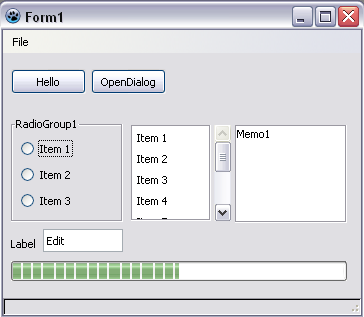 | |
| 382 | 289 | ||
| 383 | 290 | ## Current issues | |
| 384 | 291 | ||
| 385 | - | ||
| 386 | - | ||
| 387 | - | ||
| 292 | + | Here are some notes about some of the current issues. It is not a complete list, but mainly a collection of the information about some of the most annoying problems, that can not be solved simply. | |
| 388 | 293 | ||
| 389 | 294 | ### Editor Options allows to select incompatible fonts | |
| 390 | 295 | ||
| 391 | - | ||
| 392 | - | ||
| 393 | - | ||
| 296 | + | TFontDialog must be extended to show only monospace fonts by default and only if the users insists show all fonts. | |
| 394 | 297 | ||
| 395 | 298 | ### Moving with keys in the OI sometimes does not move the edit field | |
| 396 | 299 | ||
| 397 | - | ||
| 300 | + | ToDo | |
| 398 | 301 | ||
| 399 | 302 | ### Destroying handle during OnKeyDown gives AV | |
| 400 | 303 | ||
| 401 | - | ||
| 304 | + | This is a more general problem, not only KeyDown. There are two solutions: | |
| 402 | 305 | ||
| 403 | - | ||
| 404 | - | ||
| 306 | + | - Increase reference counters of all used widgets during events. Difficult to maintain and we will never be sure to ref count every used widget. | |
| 307 | + | - Instead of destroying widgets immediately, hide them, untie them and put them into a queue. The widgets will then be destroyed in the message loop and on gtk intf shut down. | |
| 405 | 308 | ||
| 406 | 309 | ### Z-Order of controls | |
| 407 | 310 | ||
| 408 | - | ||
| 311 | + | In Gtk2 many controls don't have a window, so they are just painted on their parent. This makes they be painted before controls with a window, so we get a wrong Z-Order. | |
| 409 | 312 | ||
| 410 | 313 | Here is a list of gtk widgets that don't have windows: <https://developer.gnome.org/gtk-tutorial/stable/x481.html> | |
| 411 | 314 | ||
| 412 | 315 | The solution is adding a GtkEventBox under each of these widgets: <https://developer.gnome.org/gtk-tutorial/stable/c1226.html#SEC-EVENTBOX> | |
| 413 | 316 | ||
| 414 | 317 | **Bug reports** | |
| 415 | 318 | ||
| 416 | - | ||
| 417 | - | ||
| 319 | + | - <http://bugs.freepascal.org/view.php?id=964> | |
| 320 | + | - <http://bugs.freepascal.org/view.php?id=8346> | |
| 418 | 321 | ||
| 419 | 322 | ### Open Dialog Options | |
| 420 | 323 | ||
| 421 | - | ||
| 324 | + | TOpenDialog has several options to control the dialog. When implementing these options in Gtk2, however, one needs to watch out because of the vast amount of bugs in Gtk 2, which may prevent the options from working. For example, ofForceShowHidden doesn't work because of Gtk 2 bugs, althougth it is implemented correctly. | |
| 422 | 325 | ||
| 423 | 326 | **Bug reports** | |
| 424 | 327 | ||
| 425 | - | ||
| 328 | + | - ofForceShowHidden - <http://bugs.freepascal.org/view.php?id=8473> | |
| 426 | 329 | ||
| 427 | 330 | ### TScrollBox and Scrolling problems | |
| 428 | 331 | ||
| 429 | - | ||
| 332 | + | TScrollBox and Scrolling seems deeply broken in Gtk 2. | |
| 430 | 333 | ||
| 431 | 334 | **Bug reports** | |
| 432 | 335 | ||
| 433 | - | ||
| 434 | - | ||
| 435 | - | ||
| 436 | - | ||
| 336 | + | - <http://bugs.freepascal.org/view.php?id=10779> | |
| 337 | + | - <http://bugs.freepascal.org/view.php?id=10952> | |
| 338 | + | - <http://bugs.freepascal.org/view.php?id=9049> | |
| 339 | + | - <http://bugs.freepascal.org/view.php?id=11010> | |
| 437 | 340 | ||
| 438 | 341 | ### Shortcut keys | |
| 439 | 342 | ||
| 440 | 343 | **Bug reports** | |
| 441 | 344 | ||
| 442 | - | ||
| 443 | - | ||
| 444 | - | ||
| 345 | + | - <http://bugs.freepascal.org/view.php?id=1946> | |
| 346 | + | - <http://bugs.freepascal.org/view.php?id=7249> | |
| 347 | + | - <http://bugs.freepascal.org/view.php?id=10282> | |
| 445 | 348 | ||
| 446 | 349 | ### Up/Down key navigation between TEdits | |
| 447 | 350 | ||
| 448 | - | ||
| 449 | - | ||
| 450 | - | ||
| 351 | + | A standard Gtk 2 feature allows the use of up/down key to navigate between GtkEntry widgets (like TEdits), but this is undesirable if the user implements a dropdrow list to be attached to the TEdit. As we cannot know what code the user has written, the best option is to disable this feature. Possible ways to do that are: | |
| 451 | 352 | ||
| 452 | - | ||
| 453 | - | ||
| 454 | - | ||
| 455 | - | ||
| 353 | + | - Listen to key press events of GtkEntry and for Up/Down events shift the focus to implemented widget. | |
| 354 | + | - Don't propagate Up/Down key press events to GtkEntry. | |
| 456 | 355 | ||
| 457 | 356 | **As of lazarus 0.9.31 r31562 GtkEntry behaviour is same as under other widgetsets - NO FOCUS CHANGING BY VK_UP or VK_DOWN.** | |
| 458 | 357 | ||
| 459 | 358 | **Bug reports** | |
| 460 | 359 | ||
| 461 | - | ||
| 360 | + | - <http://bugs.freepascal.org/view.php?id=11115> | |
| 462 | 361 | ||
| 463 | 362 | ## Done issues | |
| 464 | 363 | ||
| 465 | 364 | ### Done: ~~Synedit is very slow~~ | |
| 466 | 365 | ||
| 467 | - | ||
| 366 | + | Actually this is not a bug of the gtk2 intf, but a problem of gtk2 and some video drivers. On some systems SynEdit is as fast as any other text editor. Some bugs were fixed with gtk 2.12. SynEdit already paints every token with the ExtTextOut function. It does not use a TCanvas text function, which would be even slower. | |
| 468 | 367 | ||
| 469 | 368 | Bug Tracker item: <http://www.freepascal.org/mantis/view.php?id=7717> | |
| 470 | 369 | ||
| 471 | - | ||
| 472 | - | ||
| 473 | - | ||
| 370 | + | For people using the Nvidia drivers, setting GlyphCache=1 may speed up SynEdit. You will need the beta-drivers: <http://www.nvnews.net/vbulletin/showthread.php?s=399832e3761a522d34db6faaf8423ad9&t=118088> | |
| 474 | 371 | ||
| 475 | 372 | ### Done: ~~Small TButton does not center text~~ | |
| 476 | 373 | ||
| 477 | - | ||
| 374 | + | Actually the text is centered, but some themes (like the default under ubuntu) define a big minimum space above and below the label. The gtk2 default is not that big. So, it is a user setting. | |
| 478 | 375 | ||
| 479 | - | ||
| 480 | - | ||
| 481 | - | ||
| 482 | - | ||
| 483 | - | ||
| 484 | - | ||
| 485 | - | ||
| 486 | - | ||
| 487 | - | ||
| 376 | + | - a\) It might be possible to override this setting and set the space to 0. | |
| 377 | + | - Pro: Most small autosize buttons would look better. | |
| 378 | + | - Cons: the AutoSize would be incorrect. And the bug is still there for themes with big text. | |
| 379 | + | - b\) set the interface constraint to the gtk_button normal height. | |
| 380 | + | - Pro: there are no small buttons. | |
| 381 | + | - Con: Enlarging a button requires autosizing all surrounding controls too. And you need a nice auto shrink feature, which does not exist yet. | |
| 382 | + | - c\) Set the space to 0 and when calculating the preferred size, restore temporarily the space size. | |
| 383 | + | - Pro: Most small buttons will look better, autosize will still work. | |
| 384 | + | - Con: Most difficult solution to implement. Maybe not possible without a hack. | |
| 488 | 385 | ||
| 489 | 386 | **Bug Reports** | |
| 490 | 387 | ||
| 491 | - | ||
| 492 | - | ||
| 388 | + | - <http://bugs.freepascal.org/view.php?id=11120> | |
| 389 | + | - <http://bugs.freepascal.org/view.php?id=8765> | |
| 493 | 390 | ||
| 494 | 391 | ### Done: ~~TOpenPictureDialog does not update the preview~~ | |
| 495 | 392 | ||
| 496 | 393 | ### Done: ~~Only the main form appears in the window list~~ | |
| 497 | 394 | ||
| 498 | - | ||
| 395 | + | Probably a bug in the window hints parameters. | |
| 499 | 396 | ||
| 500 | 397 | ### Done: ~~Slow and visible resizing when creating/resizing a dialog~~ | |
| 501 | 398 | ||
| 502 | - | ||
| 399 | + | This has several reasons, which fall into 3 categories: | |
| 503 | 400 | ||
| 504 | - | ||
| 401 | + | 1\. Too many resizes. Status: Acceptable. | |
| 505 | 402 | ||
| 506 | - | ||
| 403 | + | 2\. Slow painting. Status: It seems other gtk2 apps are as slow, so maybe it is a gtk2 issue. | |
| 507 | 404 | ||
| 508 | - | ||
| 405 | + | 3\. Some resizes happen after painting. Status: Acceptable. | |
| 509 | 406 | ||
| 510 | - | ||
| 511 | - | ||
| 512 | - | ||
| 513 | - | ||
| 514 | - | ||
| 515 | - | ||
| 516 | - | ||
| 407 | + | - The application does not resize the controls in one step, but in many small steps. For example: It resizes a control in several small steps SetBounds, AnchorParallel, ... . Or first the the Form is resized, then the a TPageControl, then a TButton, ... . Solution: The LCL sets BeginAlign/EndAlign during loading/creation. | |
| 408 | + | - If there are anchored or autosized controls, every resize triggers the resize system of the the LCL. The LCL tries to combine many resizes during csLoading and Begin/EndAlign. During creation the LCL still sends several times the bounds to the interface. ToDo Solution: Send bounds not during BeginAlign (including parents), but send them all in EndAlign. | |
| 409 | + | - The hen-egg problem. In order to autosize, the LCL needs the current gtk theme sizes. The current gtk theme sizes can only be calculated by creating a handle. When you create a handle you need the size. Solution: Create some hidden widgets to test the current gtk sizes. This already works for TCustomGroupBox and descendants. ToDo: the other controls. | |
| 410 | + | - The gtk does not resize immediately, but puts resizes on a queue and resizes later. These values are stored in private, hidden variables. Especially if you resize a TGroupBox, the inner borders are updated later by the gtk. That means the GetClientRect function is not reliable during resizing. That's why the LCL first works with the wrong ClientRect. Solution: The LCL anticipates the new ClientRect based on the old. And there is now a GetDefaultClientRect function to ask the interface for an estimation of the ClientRect. | |
| 411 | + | - The gtk1 intf caches LCL resize requests. This accelerates many typical overhead, but it only works with delayed painting and creates flicker during creation and resizing a form never works smooth. The delayed painting breaks the gtk2 double buffering and special paint contexts (opengl), so this trick is disabled under gtk2 and therefore the delayed resize does not work under gtk2. | |
| 412 | + | - Top level controls, like TForm can not move/resize freely. The window manager decides, what is possible. Often they take only the first position/size request and ignores the later changes. And even worse: first the window is created, realized, then resized, then mapped and 'shown' and finally moved to the final position. So, if the gtk intf asks the gtk where a form is during creation, it will most of the time get 0,0, even though it told the gtk to move the window long ago. Because this is a more general problem (not gtk specific, but X), the LCL tries avoids asking the interface for coords and only asks on rare occasions like LM_SIZE, LM_MOVE messages coming from the interface or if told to do so. | |
| 413 | + | - The LCL expects a LM_SIZE message on resize, including window state changes like iconify/maximize. But the gtk first notifies about the change and then resizes. ToDo: 1. Maybe: Omit the message, if the state does not change (is this Delphi compatible?). 2. Send the current window state with the normal resizes (Should work for maximize and restore from maximize). 3. Find a solution for iconify and restore from iconify. | |
| 517 | 414 | ||
| 518 | - | ||
| 415 | + | Things done to handle the above issues: | |
| 519 | 416 | ||
| 520 | - | ||
| 521 | - | ||
| 522 | - | ||
| 523 | - | ||
| 524 | - | ||
| 417 | + | - The gtk2 intf now calls gtk_widget_size_allocate when resizing widgets. This initializes the Widget^.allocation, so that further reads by the LCL no longer give old values. | |
| 418 | + | - Resizes of child widgets (not gtkwindow or not top level) are now given to the gtk immediately. This does not resize immediately, but together with other changes this resizes earlier, reducing the total number of resizes. | |
| 419 | + | - gtk resize events are now given almost always directly to the LCL. The only exception is gtkwindow and the client areas (gtk_fixed). The gtk resize events come bottom up, so the client areas are always triggered before the widget itself is resized. | |
| 420 | + | - The gtk intf now checks the mapped attribute for gtkwindow, which seems finally to work reliable under gtk2. This means the gtk intf no longer send window positions to the LCL, before the window is really moved. | |
| 421 | + | - In order to let the LCL resize during component/handle creation, the new function GetDefaultClientRect allows every widget class to provide a nice clientrect even before the handle is created. This is done by using the hidden style widgets of the gtk intf. | |
| 525 | 422 | ||
| 526 | 423 | ### Done: ~~Selecting a TPage in the designer gives the wrong bounds rectangle~~ | |
| 527 | 424 | ||
| 528 | - | ||
| 425 | + | GetClientOrigin needed extra code for TNotebook, which does not have a normal client area. | |
| 529 | 426 | ||
| 530 | 427 | ### Done: ~~Sometimes the hint window of the component palette is not resized~~ | |
| 531 | 428 | ||
| 532 | - | ||
| 429 | + | Sometimes the gtk does not resize the gdkwindow. This is now forced and it seems to fix this problem. | |
| 533 | 430 | ||
| 534 | 431 | ### Done: ~~gtk criticals in IDE codetools options dialog~~ | |
| 535 | 432 | ||
| 536 | - | ||
| 433 | + | Empty comboboxes do not have all private structures, so you can not set callbacks. | |
| 537 | 434 | ||
| 538 | 435 | ### Done: System Colors | |
| 539 | 436 | ||
| 540 | - | ||
| 437 | + | The system colors depend on the theme, but many themes don't give adequate colors and many controls use system colors, so we need them to have a correct value. To solve this, a list of ignored system colors was constructed, and in case the user sets any of these colors, it is ignored and the default theme color is used instead. | |
| 541 | 438 | ||
| 542 | - | ||
| 439 | + | List of colors which were tested and need to be ignored for the correct functioning of programs: | |
| 543 | 440 | ||
| 544 | - | ||
| 441 | + | - clBtnFace - Otherwise Notebooks and Buttons look bad | |
| 545 | 442 | ||
| 546 | 443 | **Bug reports** | |
| 547 | 444 | ||
| 548 | - | ||
| 445 | + | - <http://bugs.freepascal.org/view.php?id=8684> | |
| 549 | 446 | ||
| 550 | 447 | ## Gtk1/Gtk2 separation roadmap | |
| 551 | 448 | ||
| 552 | - | ||
| 449 | + | List of already separated elements: | |
| 553 | 450 | ||
| 554 | - | ||
| 555 | - | ||
| 556 | - | ||
| 557 | - | ||
| 451 | + | - gtk2wscomctrls --- gtkwscomctrls | |
| 452 | + | - gtk2wsdialogs --- gtkwsdialogs | |
| 453 | + | - gtk2wsspin --- gtkwsspin | |
| 454 | + | - gtk2wscalendar --- gtkwscalendar | |
| 558 | 455 | ||
| 559 | - | ||
| 456 | + | Next tasks: | |
| 560 | 457 | ||
| 561 | - | ||
| 562 | - | ||
| 458 | + | - Rework of the events system | |
| 459 | + | - Rework of private classes | |
| 563 | 460 | ||
| 564 | 461 | ## Profiling | |
| 565 | 462 | ||
| 566 | - | ||
| 463 | + | There are various compiler switches: | |
| 567 | 464 | ||
| 568 | - | ||
| 569 | - | ||
| 465 | + | - VerboseSizeMsg - This will show you all changes and messages, with coords and reasons. Even for simple forms this gives a lot of output. | |
| 466 | + | - DisableLoadedClientSize - This will ignore the ClientWidth/Height stored in the .lfm/.lrs files. This way you can somehow simulate, what happens, if you start an application under a different theme. | |
| 570 | 467 | ||
| 571 | 468 | --- | |
| 572 | - | ||
| 469 | + | *From the Free Pascal wiki, page "GTK2 Interface", as it stood on 2022-11-25 after a change by Dbannon, out of the wiki's dump of 2024-05-26. Copyright stays with the author who wrote it, according to the old wiki's [[Licensing]] page. If you have concerns about this material, [message the admin](/wiki-contact).* |