

GDB Debugger Tips: what changed
Revision 2 to 3. Removed lines have a minus sign; added lines have a plus sign.
| Old | New | Line | |
|---|---|---|---|
| 1 | 1 | ## Introduction | |
| 2 | 2 | ||
| 3 | 3 | Lazarus comes with [[GDB]] as default debugger. From Lazarus 2.0 onwards, this default has changed to LLDB on MacOs. | |
| 4 | 4 | ||
| 5 | 5 | - This page is for Lazarus 1.0 and newer. For older versions see \[ previous version of this page\] | |
| 6 | 6 | - Note on GDB 7.5: GDB 7.5 is not supported by the released 1.0. Fixes to support it were made in 1.1. | |
| 7 | 7 | ||
| 8 | 8 | ## See also | |
| 9 | 9 | ||
| 10 | 10 | ### Setup (GDB and LLDB) | |
| 11 | 11 | ||
| 12 | 12 | To get the best possible results, you must ensure that your IDE and Project are both correctly configured. | |
| 13 | 13 | ||
| 14 | 14 | See [[Debugger Setup]] how to set up the IDE and your project in order to use the debugger. | |
| 15 | 15 | ||
| 16 | 16 | [Setup Video Tutorial](http://www.youtube.com/watch?v=cf4G06k2YL8) | |
| 17 | 17 | ||
| 18 | 18 | ### Other | |
| 19 | 19 | ||
| 20 | 20 | - [[Debugger Console App|Debugging console applications]] | |
| 21 | 21 | - [[Debugger Status|Overview and Status of debugger-backends in Lazarus]] | |
| 22 | 22 | ||
| 23 | 23 | ## General | |
| 24 | 24 | ||
| 25 | 25 | ### Debug Info Type (GDB and LLDB) | |
| 26 | 26 | ||
| 27 | 27 | > **Note:** Those setting apply only to the project or package to which they are set. If changing settings in either project or package options, it should be ensured that this is done for **all** packages and the project.\ | |
| 28 | 28 | > Otherwise your project will have mixed debug info, which can lead to a degraded debug experience.\ | |
| 29 | 29 | > The setting can be applied to project and packages using [[IDE Window: Compiler Options|Additions and Overrides]] | |
| 30 | 30 | ||
| 31 | 31 | > **Note:** When compiling 32Bit apps (native or cross) FPC defaults to "Stabs" (At least on some OS). It is recommended to change your configuration to "Dwarf". | |
| 32 | 32 | ||
| 33 | 33 | For 64 bit applications, FPC supports only "Dwarf". (Older FPC also support "Stabs", but that is not recommended) | |
| 34 | 34 | ||
| 35 | 35 | ### Stabs (only GDB) | |
| 36 | 36 | ||
| 37 | 37 | -g or -gs | |
| 38 | 38 | ||
| 39 | 39 | You should only use if your gdb version does not support dwarf. There are very few other cases where you need it. | |
| 40 | 40 | ||
| 41 | 41 | You may need it with "var param" (param by ref) procedure foo(var a: integer); However the IDE deals with this in 99% of all cases. | |
| 42 | 42 | ||
| 43 | 43 | The LLDB based debugger does not support Stabs | |
| 44 | 44 | ||
| 45 | 45 | #### Dwarf (GDB and LLDB) | |
| 46 | 46 | ||
| 47 | 47 | ##### Dwarf 2 (-gw) | |
| 48 | 48 | ||
| 49 | 49 | This sets the format to Dwarf2. This is the most basic dwarf setting. | |
| 50 | 50 | ||
| 51 | 51 | ##### Dwarf 2 with sets (-gw -godwarfsets) | |
| 52 | 52 | ||
| 53 | 53 | This setting adds the ability to inspect sets: "type TFoo=set of (a,b,c);". This is borrowed from the Dwarf 3 specs, but supported by most versions of GDB (any GDB from version 7 upwards should do). | |
| 54 | 54 | ||
| 55 | - | ||
| 55 | + | ```text | |
| 56 | + | This is the recommended setting. | |
| 57 | + | ``` | |
| 56 | 58 | ||
| 57 | 59 | ##### Dwarf 3 (-gw3) | |
| 58 | 60 | ||
| 59 | 61 | Dwarf 3 can encode additional info for some types (such as strings and arrays). It also preserves the case of identifiers in the debug info. | |
| 60 | 62 | ||
| 61 | 63 | However there are still issues with the produced debug info. Some info may be incorrectly encoded, and other is not understood by GDB. In some cases this can lead to gdb crashing. This setting can be used, when using the FpDebug based debugger (add on package for the IDE) | |
| 62 | 64 | ||
| 63 | 65 | #### Differences | |
| 64 | 66 | ||
| 65 | 67 | This list is in no way complete: | |
| 66 | 68 | ||
| 67 | 69 | - dwarf allows some properties (those directly mapped to a field) | |
| 68 | 70 | - stabs (and modern gdb) can do -gp (preserve the case of symbols, instead of getting the all caps stuff). | |
| 69 | 71 | - stabs has problems with some class type casts. The IDE fixes that in some cases. (Only affects gdb 7.0 and up) [1](http://bugs.freepascal.org/view.php?id=19920) | |
| 70 | 72 | ||
| 71 | 73 | ### Inspecting data types (Watch/Hint) | |
| 72 | 74 | ||
| 73 | 75 | #### Strings | |
| 74 | 76 | ||
| 75 | 77 | GDB does not know the Pascal string data type. The type information GDB returns does not currently allow for the IDE to differentiate between a PChar (index is 0 based) or a String (index is 1 based). | |
| 76 | 78 | ||
| 77 | 79 | As a Result "mystring\[10\]" could be the 10th char in a string, or 11th in a PChar. | |
| 78 | 80 | ||
| 79 | 81 | Because the IDE cannot be sure which one applies, it will show both. The 2 results will be prefixed String/PChar. | |
| 80 | 82 | ||
| 81 | 83 | #### Properties | |
| 82 | 84 | ||
| 83 | 85 | Currently the debugger does not support any method execution. Therefore only properties that refer directly to a variable can be inspected. (This only works if using dwarf) | |
| 84 | 86 | ||
| 85 | 87 | ``` pascal | |
| 86 | 88 | TFoo = Class | |
| 87 | 89 | private | |
| 88 | 90 | FBar: Integer; | |
| 89 | 91 | function GetValue: Integer; | |
| 90 | 92 | public | |
| 91 | 93 | property Bar: Integer read FBar; // Can be inspected (if Dwarf is used) | |
| 92 | 94 | property Value: Integer read GetValue; // Can *not* be inspected | |
| 93 | 95 | end; | |
| 94 | 96 | ``` | |
| 95 | 97 | ||
| 96 | 98 | #### Nested Procedures / Function | |
| 97 | 99 | ||
| 98 | 100 | ``` pascal | |
| 99 | 101 | procedure SomeObject.Outer(NumText: string); | |
| 100 | 102 | var | |
| 101 | 103 | OuterVarInScope: Integer; | |
| 102 | 104 | ||
| 103 | 105 | procedure Nested; | |
| 104 | 106 | var | |
| 105 | 107 | I: Integer; | |
| 106 | 108 | begin | |
| 107 | 109 | WriteLn(OuterVarInScope); | |
| 108 | 110 | end; | |
| 109 | 111 | ||
| 110 | 112 | var | |
| 111 | 113 | OuterVarOutsideScope: Integer; | |
| 112 | 114 | ||
| 113 | 115 | begin | |
| 114 | 116 | Nested; | |
| 115 | 117 | end; | |
| 116 | 118 | ``` | |
| 117 | 119 | ||
| 118 | 120 | If you step into "Nested", then the IDE allows you to inspect variables from both stack frames. | |
| 119 | 121 | ||
| 120 | 122 | This is you can inspect: I, OuterVarInScope, NumText (without having to change the current stack frame, in the stack window) | |
| 121 | 123 | ||
| 122 | 124 | However there are some caveats: | |
| 123 | 125 | ||
| 124 | 126 | You can also inspect: OuterVarOutsideScope. That is against Pascal scoping rules. This only matters if you have several nested levels, and they all contain a variable of the same name, but the Pascal scoping would hide the variable from the middle frame. Then you get to see the wrong value. | |
| 125 | 127 | ||
| 126 | 128 | You cannot evaluate statements across the 2 frames: "OuterVarnScope-I" does not work. | |
| 127 | 129 | ||
| 128 | 130 | > **Warning:** You may see a wrong value. If there is in any other unit a global (or otherwise visible to GDB scoping rules) variable, with the same name as the local var from the outer frame, then that global var will be shown. There is no warning for that. The safe way is to explicitly select the outer stack frame in which the local var is defined, and check the value. | |
| 129 | 131 | ||
| 130 | 132 | #### Arrays | |
| 131 | 133 | ||
| 132 | 134 | ``` pascal | |
| 133 | 135 | array [x..y] of Integer; | |
| 134 | 136 | ``` | |
| 135 | 137 | ||
| 136 | 138 | shows as chars, instead of int. Only gdb 7.2 or up seems to handle it correctly. | |
| 137 | 139 | ||
| 138 | 140 | Additionally there may be issues when using arrays of (unnamed) records. | |
| 139 | 141 | ||
| 140 | 142 | Dynamic Arrays will only show a limited amount of their data. As of Lazarus 1.1 the limit can be specified. | |
| 141 | 143 | ||
| 142 | 144 | If Watches/Hint values are not displaying correctly disable REGVARS. Set -OoNOREGVAR in "Custom Options". | |
| 143 | 145 | ||
| 144 | 146 | ### Specifying GDB disassembly flavor | |
| 145 | 147 | ||
| 146 | 148 | GDB allows one to specify the assembly flavor (intel or AT&T style) to be used when displaying assembly code. If one wants to change to a specific flavor this can be changed in the AssemblerStyle property in Lazarus's debugger options for GDB (feature available from Lazarus 2.0). Alternatively (and the only way to achieve this from inside Lazarus in older versions before Lazarus 2.0) one can specify this option by passing the *set disassembly-flavor* instruction to [Debugger_Startup_options](/wiki-images/5/5d/Media%3ADbg_setup_options2.png). Several syntax variations can be used (depending on GDB version), a few variations are shown below: | |
| 147 | 149 | ||
| 148 | - | ||
| 149 | - | ||
| 150 | - | ||
| 151 | - | ||
| 150 | + | ```text | |
| 151 | + | -ex "set disassembly-flavor intel" | |
| 152 | + | --eval-command="set disassembly-flavor intel" | |
| 153 | + | -eval-command="set disassembly-flavor intel" | |
| 154 | + | --eval-command "set disassembly-flavor intel" | |
| 155 | + | ``` | |
| 152 | 156 | ||
| 153 | 157 | Note that it may be necessary to reset the debugger *(Run \| Reset Debugger)* before GDB will load with the new setting. | |
| 154 | 158 | ||
| 155 | 159 | ## Windows | |
| 156 | 160 | ||
| 157 | 161 | ### Environment and Unicode / None-Latin based locale | |
| 158 | 162 | ||
| 159 | 163 | GDB in combination with Lazarus can have issues, if your environment (such as Username, or PATH, or ...) contain none Latin chars. | |
| 160 | 164 | ||
| 161 | 165 | This is not an issue with any particular GDB version. Rather it depends on how GDB was build. To work correctly under Lazarus GDB needs to have been build using Cygwin. | |
| 162 | 166 | ||
| 163 | 167 | There are several builds available provided by the Lazarus team. Some of them are build with Cygwin. For 64bit: <https://sourceforge.net/projects/lazarus/files/Lazarus%20Windows%2064%20bits/Alternative%20GDB/> | |
| 164 | 168 | ||
| 165 | 169 | For 32bit the builds have not yet been tested. <https://sourceforge.net/projects/lazarus/files/Lazarus%20Windows%2032%20bits/Alternative%20GDB/> | |
| 166 | 170 | ||
| 167 | 171 | ### Console output for GUI application | |
| 168 | 172 | ||
| 169 | 173 | On Windows, the IDE does not have the "Debugger - Console output" window. This is because console applications open their own console window. GUI applications by default have no console. In order to have a console for a GUI application, the compiler settings must be changed (Project options / Compiler Options / Config and Target / Win32 Gui Application: -WC / -WG) | |
| 170 | 174 | ||
| 171 | 175 | ### Debugging applications with Administrative privileges | |
| 172 | 176 | ||
| 173 | 177 | On Windows Vista+, in Project Options setting the manifest file permissions for the program to "as Administrator" will run the program with Administrator privileges. If your IDE is not running as Administrator, debugging will appear to start ok, the program will show in the tasklist, but its GUI will not show. | |
| 174 | 178 | ||
| 175 | 179 | So please be aware that you have to match privilege level between the IDE (and gdb) and the applicationt to be debugged. | |
| 176 | 180 | ||
| 177 | 181 | ## Win 64 bit | |
| 178 | 182 | ||
| 179 | 183 | - Requires Lazarus 1.0+ (with FPC 2.6+) | |
| 180 | 184 | - Advised to use dwarf | |
| 181 | 185 | ||
| 182 | 186 | ### Using 32 bit Lazarus on 64 bit Windows | |
| 183 | 187 | ||
| 184 | 188 | Alternatively it is possible to debug applications as 32 bit applications (using the 32bit version of gdb). Once successfully debugged: | |
| 185 | 189 | ||
| 186 | 190 | - the app can then be cross-compiled to 64 bit, or | |
| 187 | 191 | - a 2nd Lazarus installation can be used (using a different configuration --primary-config-path option from the 32 bit Lazarus) | |
| 188 | 192 | ||
| 189 | 193 | When installing the 32 bit Lazarus, ensure you change configuration so the correct 32 bit FPC and GDB are used. | |
| 190 | 194 | ||
| 191 | 195 | ### More Win 64 bit problems and solutions | |
| 192 | 196 | ||
| 193 | 197 | See also <http://forum.lazarus.freepascal.org/index.php/topic,13188.0/topicseen.html> | |
| 194 | 198 | ||
| 195 | 199 | ## Win CE | |
| 196 | 200 | ||
| 197 | 201 | ### Debugger does not find any source files | |
| 198 | 202 | ||
| 199 | 203 | Menu: "Tools" Page: "Debugger"/"Generic" Field: "Additional search path" | |
| 200 | 204 | ||
| 201 | 205 | Put your the drive letter of your project directory in this field. | |
| 202 | 206 | ||
| 203 | 207 | ## Linux | |
| 204 | 208 | ||
| 205 | 209 | ### Known Problems | |
| 206 | 210 | ||
| 207 | 211 | - There might be issues on at least some CPUs when using an old version of gdb (e.g. SPARC, with gdb 6.4 as supplied by Debian "Etch"). In particular, background threads might lock up even if the program appears to run correctly standalone. | |
| 208 | 212 | - If your program appears to lock up at start up, go to Tools / Options / Debugger / General and set DisableLoadSymbolsForLibraries=True | |
| 209 | 213 | ||
| 210 | 214 | ## macOS | |
| 211 | 215 | ||
| 212 | 216 | With the release of macOS 10.14 (Mojave) in 2018, **gdb** was replaced by *[[lldb]]*', and is no longer supported. | |
| 213 | 217 | ||
| 214 | 218 | This section is a first approach to collect information about known issues and workarounds. The information provided here depends a lot on feedback from macOS users. | |
| 215 | 219 | ||
| 216 | 220 | From Lazarus 2.0 onwards the IDE has an LLDB based debugger. The GDB based debugger can also be used, but requires a lot of work building and code-signing the gdb binary and is not supported. | |
| 217 | 221 | ||
| 218 | 222 | ### Known Problems (GDB) | |
| 219 | 223 | ||
| 220 | 224 | #### Debugging 32 bit app on 64 bit architecture | |
| 221 | 225 | ||
| 222 | 226 | It is possible and maybe sometime necessary to debug a 32 bit exe on a 64 bit system. | |
| 223 | 227 | ||
| 224 | 228 | This is only possible with Lazarus 0.9.29 rev 28640 and up. | |
| 225 | 229 | ||
| 226 | 230 | #### TimeOuts (64 Bit only) | |
| 227 | 231 | ||
| 228 | 232 | It appears that certain commands are not correctly (or incompletely) processed by gdb 6.3.50. Normally GDB finishes each command with a "\<gdb\>" prompt for the next command. But the version provided by apple sometimes fails to do this. In this case the IDE will have to use a timeout to avoid waiting forever. | |
| 229 | 233 | ||
| 230 | 234 | This has been observed with: | |
| 231 | 235 | ||
| 232 | 236 | - Certain Watch expressions (at least if the watched variable was not available in the current selected function) | |
| 233 | 237 | - Handling an Exception | |
| 234 | 238 | - Inserting breakpoints (past unit end / none code location) | |
| 235 | 239 | ||
| 236 | 240 | It cannot be guaranteed: | |
| 237 | 241 | ||
| 238 | 242 | - that GDB will not later return some results from such a command | |
| 239 | 243 | - that GDB's internal state is still valid | |
| 240 | 244 | ||
| 241 | 245 | The prompt displayed for timeouts can be switched off in the debugger config. | |
| 242 | 246 | ||
| 243 | 247 | Warn On Timeout | |
| 244 | 248 | True/False. Auto continue, after a timeout, do not show a warning. | |
| 245 | 249 | ||
| 246 | 250 | TimeOutForEval | |
| 247 | 251 | Set in milliseconds, how long until a timeout detection is triggered (the detection itself may take some more time.) | |
| 248 | 252 | ||
| 249 | 253 | You may need to "RESET" the debugger after those changes are made | |
| 250 | 254 | ||
| 251 | 255 | More info see here: | |
| 252 | 256 | ||
| 253 | 257 | - [<http://bugs.freepascal.org/view.php?id=19262#c47944>](http://bugs.freepascal.org/view.php?id=19262#c47944) | |
| 254 | 258 | - <http://bugs.freepascal.org/view.php?id=21653> | |
| 255 | 259 | ||
| 256 | 260 | An alternative solution seems to be to use a newer version of GDB (see below). | |
| 257 | 261 | ||
| 258 | 262 | #### Hardware exceptions under macOS | |
| 259 | 263 | ||
| 260 | 264 | When a hardware exception occurs under macOS, such as an invalid pointer access (SIGSEGV) or an integer division-by-zero on Intel processors, the debugger will catch this exception at the Mach level. Normally, the system translates these Mach exceptions into Unix-style signals where the FPC run time library handles them. The debugger is however unable to propagate Mach exceptions in this way. | |
| 261 | 265 | ||
| 262 | 266 | The practical upshot is that it is impossible under macOS to continue a program in the debugger once a hardware exception has been triggered. This is not FPC-specific, and cannot be fixed by us. | |
| 263 | 267 | ||
| 264 | 268 | ### Using Alternative Debuggers (GDB) | |
| 265 | 269 | ||
| 266 | 270 | You can install GDB 7.1 (or later) using MacPorts, fink or homebrew. | |
| 267 | 271 | ||
| 268 | 272 | The following observations have been made: | |
| 269 | 273 | ||
| 270 | 274 | - GDB 7.1 seems to have issues with the stabs debug info from fpc. | |
| 271 | 275 | ||
| 272 | 276 | ||
| 273 | 277 | Make sure you select "generate dwarf debug information (-gw)" on the linking tab of the project options | |
| 274 | 278 | ||
| 275 | 279 | **Watch out for the linker warnings about "unknown stabs"** | |
| 276 | 280 | ||
| 277 | 281 | ||
| 278 | 282 | If you still have problems ensure that no code at all, is compiled with stabs. Your LCL may contain stabs, and this will end up in your app, even if you compile the app with -gw. So you may have to recompile your LCL with -gw (or without any debug info). Same for any other unit, package, rtl, .... that may have stabs | |
| 279 | 283 | ||
| 280 | 284 | **Even with those rules followed, GDB does not always work with fpc compiled apps.** | |
| 281 | 285 | ||
| 282 | 286 | Those observations may be incomplete or wrong, please update them, if you have more information. | |
| 283 | 287 | ||
| 284 | 288 | Lazarus Version 1.0 to 1.0.12 | |
| 285 | 289 | ||
| 286 | 290 | In the debugger options configure | |
| 287 | 291 | ||
| 288 | - | ||
| 289 | - | ||
| 292 | + | ```text | |
| 293 | + | EncodeCurrentDirPath = gdfeNone | |
| 294 | + | EncodeExeFilename = gdfeNone | |
| 295 | + | ``` | |
| 290 | 296 | ||
| 291 | 297 | And you must use "run param" to specify the actual executable inside the app-bundle ( project.app/Content/MacOS/project or similar) | |
| 292 | 298 | ||
| 293 | 299 | In Lazarus Version 1.0.14 to 1.2 and up those steps should no longer be required. | |
| 294 | 300 | ||
| 295 | 301 | ### Xcode 5 | |
| 296 | 302 | ||
| 297 | 303 | Since Mavericks 10.9, Xcode 5 no longer installs gdb by default and not globally. | |
| 298 | 304 | ||
| 299 | 305 | - For 10.9 you can install an old Xcode 4 in parallel. This is not supported by Apple, so it might break with one of the next versions. | |
| 300 | 306 | ||
| 301 | 307 | - You can compile and install gdb. See [[GDB on OS X Mavericks or newer and Xcode 5 or newer]]. | |
| 302 | 308 | ||
| 303 | 309 | Please see [issue 25157 on mantis](http://bugs.freepascal.org/view.php?id=25157) | |
| 304 | 310 | ||
| 305 | 311 | - <http://forum.lazarus.freepascal.org/index.php/topic,22529.0.html> - about installing Xcode 4.3 | |
| 306 | 312 | - <http://forum.lazarus.freepascal.org/index.php/topic,22328.0.html> - install gdb | |
| 307 | 313 | ||
| 308 | 314 | Thread "\[Lazarus\] Help: macOS Problems" on | |
| 309 | 315 | ||
| 310 | 316 | - <http://lists.lazarus.freepascal.org/pipermail/lazarus/2013-November/thread.html#84126> | |
| 311 | 317 | - <http://lists.lazarus.freepascal.org/pipermail/lazarus/2013-October/thread.html#84095> | |
| 312 | 318 | ||
| 313 | 319 | ### Frozen UI with GDB | |
| 314 | 320 | ||
| 315 | 321 | To start a program from the shell you need to run "open \<program1\>.app", direct access to ./program1 will not give you access to the UI. To get gdb working from inside your IDE you have to specify this path as run parameter. Choose from menu Run \> Run parameter and enter the full path at host application. For instance, /User/\<yourid\>/sources/myproject/project1.app/Content/MacOS/project1 | |
| 316 | 322 | ||
| 317 | 323 | ### Links | |
| 318 | 324 | ||
| 319 | 325 | - macOS comes with a lot of useful tools for debugging and profiling. Just start /Developer/Applications/Instruments.app and try them out. | |
| 320 | 326 | ||
| 321 | 327 | ## FreeBSD | |
| 322 | 328 | ||
| 323 | 329 | ### FreeBSD 11 | |
| 324 | 330 | ||
| 325 | 331 | The system-provided gdb is ancient (version 6.1.1 in FreeBSD 11.4) and does not work well with Lazarus. | |
| 326 | 332 | ||
| 327 | 333 | You can install a newer gdb from the ports tree, e.g. | |
| 328 | 334 | ||
| 329 | 335 | ``` bash | |
| 330 | 336 | cd /usr/ports/devel/gdb | |
| 331 | 337 | make -DBATCH install clean | |
| 332 | 338 | ``` | |
| 333 | 339 | ||
| 334 | 340 | The new gdb is located in "/usr/local/bin/gdb". | |
| 335 | 341 | ||
| 336 | 342 | ### FreeBSD 12 | |
| 337 | 343 | ||
| 338 | 344 | The system-provided gdb is ancient (version 6.1.1 in FreeBSD 12.3) and it does not work well with Lazarus. | |
| 339 | 345 | ||
| 340 | 346 | You can install a newer gdb from the ports tree, e.g. | |
| 341 | 347 | ||
| 342 | 348 | ``` bash | |
| 343 | 349 | cd /usr/ports/devel/gdb | |
| 344 | 350 | make -DBATCH install clean | |
| 345 | 351 | ``` | |
| 346 | 352 | ||
| 347 | 353 | The new gdb is located in "/usr/local/bin/gdb". | |
| 348 | 354 | ||
| 349 | 355 | It may need the following project option ("Project Options" dialog): | |
| 350 | 356 | ||
| 351 | 357 | - "Use external debug symbols file" is off | |
| 352 | 358 | ||
| 353 | 359 | ### FreeBSD 13 | |
| 354 | 360 | ||
| 355 | 361 | FreeBSD 13.0 has removed the ancient gdb from the base system and replaced it with [[lldb]]. | |
| 356 | 362 | ||
| 357 | 363 | You can still install a recent gdb from the ports tree. | |
| 358 | 364 | ||
| 359 | 365 | ## Using a translated GDB (non-English responses from GDB) | |
| 360 | 366 | ||
| 361 | 367 | - This applies only to Lazarus *before* 1.2 or *before* 1.0.14.\ | |
| 362 | 368 | This is no longer needed. | |
| 363 | 369 | ||
| 364 | 370 | The IDE expects responses in English. If GDB is translated this may affect how well the IDE can use it. | |
| 365 | 371 | ||
| 366 | 372 | In many cases it will still work, but with limits, such as: | |
| 367 | 373 | ||
| 368 | 374 | - No Message or Class for exceptions | |
| 369 | 375 | - No live update of threads, while app is running | |
| 370 | 376 | - Debugger error reported, after the app is stopped (at end of debugging) | |
| 371 | 377 | - other ... | |
| 372 | 378 | ||
| 373 | 379 | Please read the entire thread: [[http://forum.lazarus.freepascal.org/index.php/topic,20756.msg120720 http://forum.lazarus.freepascal.org/index.php/topic,20756.msg120720]] | |
| 374 | 380 | ||
| 375 | 381 | Try to run lazarus with | |
| 376 | 382 | ||
| 377 | - | ||
| 378 | - | ||
| 383 | + | ```text | |
| 384 | + | export LANG=en_US.UTF-8 | |
| 385 | + | lazarus | |
| 386 | + | ``` | |
| 379 | 387 | ||
| 380 | 388 | ## Known Problems / Errors reported by the IDE | |
| 381 | 389 | ||
| 382 | 390 | Message | |
| 383 | 391 | ||
| 384 | 392 | OS | |
| 385 | 393 | ||
| 386 | 394 | Description | |
| 387 | 395 | ||
| 388 | 396 | ||
| 389 | 397 | ||
| 390 | 398 | ### During startup program exited normally | |
| 391 | 399 | ||
| 392 | 400 | ||
| 393 | 401 | ||
| 394 | 402 | ||
| 395 | 403 | ||
| 396 | 404 | **All** | |
| 397 | 405 | ||
| 398 | 406 | In rare cases the IDE displays the message "During startup program exited normally". This message appears when the debugged application is closed. If this happens no breakpoints in the app will have been triggered, and the app will have run as if no debugger was present. | |
| 399 | 407 | ||
| 400 | 408 | This error can happen for various reasons. There are at least 2 known: | |
| 401 | 409 | ||
| 402 | 410 | - certain position independent exe (PIE) : GDB fails to relocate certain breakpoints that Lazarus uses to start the exe (this is before any user breakpoints are set) | |
| 403 | 411 | - certain dll/so libraries, that define the same symbols as the main exe. | |
| 404 | 412 | ||
| 405 | 413 | There may be more. The 2nd only happens on repeated runs of the debugger. | |
| 406 | 414 | ||
| 407 | 415 | The IDE tries to work around those, but it does not always succeed. It is likely that in cases where it currently fails, this must be worked around by user set config (see below). | |
| 408 | 416 | ||
| 409 | 417 | Even if you can work around, please consider to send a logfile: #Log_info_for_debug_session | |
| 410 | 418 | ||
| 411 | 419 | Ways to work around: (all on the options / debugger page) | |
| 412 | 420 | ||
| 413 | 421 | - In case 2 only: #gdb.exe_has_stopped_working | |
| 414 | 422 | ||
| 415 | 423 | Lazarus 1.2.2 and before | |
| 416 | 424 | go to the debugger options and in the field "debugger_startup_options" enter:\ | |
| 417 | 425 | --eval-command="set auto-solib-add off" | |
| 418 | 426 | ||
| 419 | 427 | Lazarus 1.2.4 and higher | |
| 420 | 428 | go to the debugger options and set the field "DisableLoadSymbolsForLibraries" to "True" | |
| 421 | 429 | ||
| 422 | 430 | This can only be used, if you do not debug within libraries (if you have not written your own lib) | |
| 423 | 431 | ||
| 424 | 432 | - In Case 2 only: Check "reset debugger after each run" | |
| 425 | 433 | ||
| 426 | 434 | It will add a very slight increase to the time it takes to start the debugger, as gdb must be reloaded each time. | |
| 427 | 435 | ||
| 428 | 436 | - In all cases: | |
| 429 | 437 | ||
| 430 | 438 | Try any of the values available for "InternalStartBreak" (in the property grid of the options) | |
| 431 | 439 | ||
| 432 | 440 | ### SIGFPE | |
| 433 | 441 | ||
| 434 | 442 | ||
| 435 | 443 | ||
| 436 | 444 | ||
| 437 | 445 | ||
| 438 | 446 | **All** | |
| 439 | 447 | ||
| 440 | 448 | SIGFPE is a floating point unit exception. | |
| 441 | 449 | ||
| 442 | 450 | Source: [[http://forum.lazarus.freepascal.org/index.php/topic,21586.0.html forum thread]] | |
| 443 | 451 | ||
| 444 | 452 | SIGFPE exceptions are raised on the next FPU instruction; therefore the error line you get from Lazarus may be off/incorrect. | |
| 445 | 453 | ||
| 446 | 454 | Delphi, and thus Freepascal, have a non standard FPEMask. A lot of C libraries don't use exceptions to check FPU problems but inspect the FPU status. | |
| 447 | 455 | ||
| 448 | 456 | Workaround: try changing the mask with [SetExceptionMask](http://www.freepascal.org/docs-html/rtl/math/setexceptionmask.html) as early as possible in your program: | |
| 449 | 457 | ||
| 450 | 458 | ``` pascal | |
| 451 | 459 | uses math; | |
| 452 | 460 | ... | |
| 453 | 461 | SetExceptionMask([exInvalidOp, exDenormalized, exZeroDivide, | |
| 454 | 462 | exOverflow, exUnderflow, exPrecision]) | |
| 455 | 463 | ``` | |
| 456 | 464 | ||
| 457 | 465 | If you think there is something wrong in the FPC code, you can use the [\$SAFEFPUEXCEPTIONS](http://www.freepascal.org/docs-html/prog/progsu69.html) directive. This will add a FWAIT after every store of a FPU value to memory. Most FPC float and double operations end with storing the result somewhere in memory so the outcome is that the debugger stops on the correct FPC line. FWAIT is a nop for the FPU but will cause an exception to be raised immediately instead of somewhere down your code. It is not done per default because it slows down floating point operations a lot. | |
| 458 | 466 | ||
| 459 | 467 | ### Error 193 (Error creating process / Exe not found) | |
| 460 | 468 | ||
| 461 | 469 | ||
| 462 | 470 | ||
| 463 | 471 | ||
| 464 | 472 | ||
| 465 | 473 | **Windows** | |
| 466 | 474 | ||
| 467 | 475 | For details see [here](http://bugs.freepascal.org/view.php?id=18238). This issue has been observed under Win XP and appears to be caused by Windows itself. The issue occurs if the path to your app has a space, and a 2nd path/file exists, with a name identical to the part of the path before the space, e.g.: | |
| 468 | 476 | ||
| 469 | 477 | ||
| 470 | 478 | Your app: C:\test folder\project1.exe | |
| 471 | 479 | ||
| 472 | 480 | Some file: C:\test | |
| 473 | 481 | ||
| 474 | 482 | ### SigSegV - even with new, empty application | |
| 475 | 483 | ||
| 476 | 484 | ||
| 477 | 485 | ||
| 478 | 486 | ||
| 479 | 487 | ||
| 480 | 488 | **Windows** | |
| 481 | 489 | ||
| 482 | 490 | Note | |
| 483 | 491 | In most cases SigSegV is simply an error in your code. | |
| 484 | 492 | ||
| 485 | 493 | The following applies only, if you get a SigSegv, even with a new empty application (empty form, and no modifications made to unit1). | |
| 486 | 494 | ||
| 487 | 495 | A SigSegV sometimes can be caused by an incompatibility between GDB and some other products. It is not known if this is a GDB issue or caused by the other product. There is no indication that any of the products listed is in any way at fault. The information provided may only apply to some versions of the named products: | |
| 488 | 496 | ||
| 489 | 497 | Comodo firewall | |
| 490 | 498 | <http://forum.lazarus.freepascal.org/index.php/topic,7065.msg60621.html#msg60621> | |
| 491 | 499 | ||
| 492 | 500 | BitDefender | |
| 493 | 501 | enable game mode | |
| 494 | 502 | ||
| 495 | 503 | ### SigSegV - and continue debugging | |
| 496 | 504 | ||
| 497 | 505 | ||
| 498 | 506 | ||
| 499 | 507 | ||
| 500 | 508 | ||
| 501 | 509 | **Windows**, **Mac** | |
| 502 | 510 | ||
| 503 | 511 | <http://sourceware.org/bugzilla/show_bug.cgi?id=10004> | |
| 504 | 512 | ||
| 505 | 513 | <http://forum.lazarus.freepascal.org/index.php/topic,18121.msg101798.html#msg101798> | |
| 506 | 514 | ||
| 507 | 515 | ### On Windows Open/Save/File or System Dialog cause gdb to crash | |
| 508 | 516 | ||
| 509 | 517 | See next entry "gdb.exe has stopped working" | |
| 510 | 518 | ||
| 511 | 519 | Or download the "alternative GDB" 7.7.1 (Win32) from the Lazarus SourceForge site. | |
| 512 | 520 | ||
| 513 | 521 | ### "Step over" steps into function (Win 64) | |
| 514 | 522 | ||
| 515 | 523 | ||
| 516 | 524 | ||
| 517 | 525 | ||
| 518 | 526 | ||
| 519 | 527 | **Windows 64** | |
| 520 | 528 | ||
| 521 | 529 | Sometimes pressing F8 does not step over a function, but steps into it. | |
| 522 | 530 | ||
| 523 | 531 | It is possible to continue with F8, and sometimes GDB will step back into the calling function, after 1 or 2 further steps (stepping over the remainder of the function). | |
| 524 | 532 | ||
| 525 | 533 | In Lazarus 2.0 a workaround was added, but needs to be enabled. Go to Tools \> Options \> Debugger and enable (in the property grid) "FixIncorrectStepOver". | |
| 526 | 534 | ||
| 527 | 535 | ### gdb.exe has stopped working / SigSegv with Open/Close Dlg | |
| 528 | 536 | ||
| 529 | 537 | ||
| 530 | 538 | ||
| 531 | 539 | ||
| 532 | 540 | ||
| 533 | 541 | **Windows** | |
| 534 | 542 | ||
| 535 | 543 | GDB itself has crashed. This will be due to a bug in gdb, and may not be fixable in Lazarus. Still it may be worth submitting info (see section "Reporting Bugs" below). Maybe Lazarus can avoid calling the failing function. | |
| 536 | 544 | ||
| 537 | 545 | There is one already known situation. GDB (6.6 to 7.4 (latest at the time of testing)) may crash while your app is being started, or right after your app stopped. This happen while the libraries (DLL) for your app are loaded (watch the "[[IDE Window: Debug Output|Debug output]]" window). | |
| 538 | 546 | ||
| 539 | 547 | Lazarus 1.2.2 and before | |
| 540 | 548 | go to the debugger options and in the field "debugger_startup_options" enter:\ | |
| 541 | 549 | --eval-command="set auto-solib-add off" | |
| 542 | 550 | ||
| 543 | 551 | Lazarus 1.2.4 and higher | |
| 544 | 552 | go to the debugger options and set the field "DisableLoadSymbolsForLibraries" to "True" | |
| 545 | 553 | ||
| 546 | 554 | This can only be used, if you do not debug within libraries (if you have not written your own lib) 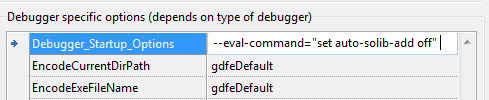 | |
| 547 | 555 | ||
| 548 | 556 | ### internal-error: clear_dangling_display_expressions | |
| 549 | 557 | ||
| 550 | 558 | ||
| 551 | 559 | ||
| 552 | 560 | ||
| 553 | 561 | ||
| 554 | 562 | **Windows, maybe other** | |
| 555 | 563 | ||
| 556 | 564 | At the end of the debug session, the debugger reports: | |
| 557 | 565 | ||
| 558 | - | ||
| 559 | - | ||
| 566 | + | ```text | |
| 567 | + | internal-error: clear_dangling_display_expressions: | |
| 568 | + | Assertion `objfile->pspace == solib->pspace' failed. | |
| 569 | + | ``` | |
| 560 | 570 | ||
| 561 | 571 | This is an error in gdb, and sometimes solved by | |
| 562 | 572 | ||
| 563 | 573 | Lazarus 1.2.2 and before | |
| 564 | 574 | go to the debugger options and in the field "debugger_startup_options" enter:\ | |
| 565 | 575 | --eval-command="set auto-solib-add off" | |
| 566 | 576 | ||
| 567 | 577 | Lazarus 1.2.4 and higher | |
| 568 | 578 | go to the debugger options and set the field "DisableLoadSymbolsForLibraries" to "True" | |
| 569 | 579 | ||
| 570 | 580 | This can only be used, if you do not debug within libraries (if you have not written your own lib) | |
| 571 | 581 | ||
| 572 | 582 | ### "PC register is not available" ("SuspendThread failed. (winerr 5)") | |
| 573 | 583 | ||
| 574 | 584 | ||
| 575 | 585 | ||
| 576 | 586 | ||
| 577 | 587 | ||
| 578 | 588 | **Windows** | |
| 579 | 589 | ||
| 580 | 590 | GDB may fail with this message. This is due to [<http://sourceware.org/bugzilla/show_bug.cgi?id=14018>](http://sourceware.org/bugzilla/show_bug.cgi?id=14018) If you get this issue you may want to downgrade to GDB 7.2 | |
| 581 | 591 | ||
| 582 | 592 | ### Cannot insert breakpoint | |
| 583 | 593 | ||
| 584 | 594 | ||
| 585 | 595 | ||
| 586 | 596 | ||
| 587 | 597 | ||
| 588 | 598 | **All** | |
| 589 | 599 | ||
| 590 | 600 | For breakpoints with negative numbers Please see: <http://forum.lazarus.freepascal.org/index.php/topic,10317.msg121818.html#msg121818> | |
| 591 | 601 | ||
| 592 | 602 | You may also want to try: | |
| 593 | 603 | ||
| 594 | 604 | Lazarus 1.2.2 and before | |
| 595 | 605 | go to the debugger options and in the field "debugger_startup_options" enter:\ | |
| 596 | 606 | --eval-command="set auto-solib-add off" | |
| 597 | 607 | ||
| 598 | 608 | Lazarus 1.2.4 and higher | |
| 599 | 609 | go to the debugger options and set the field "DisableLoadSymbolsForLibraries" to "True" | |
| 600 | 610 | ||
| 601 | 611 | This can only be used, if you do not debug within libraries (if you have not written your own lib) | |
| 602 | 612 | ||
| 603 | 613 | For breakpoints with positive numbers This may happen due to incorrect [[Debugger Setup]]. Ensure smart linking is disabled. It usually means that the breakpoint is in a procedure that is not called, and not included in your exe. | |
| 604 | 614 | ||
| 605 | 615 | On Windows, if it happens despite correct setup, then add -Xe (external linker) to the custom options. | |
| 606 | 616 | ||
| 607 | 617 | ## Reporting Bugs | |
| 608 | 618 | ||
| 609 | 619 | - Did you verify your [[Debugger Setup]]? | |
| 610 | 620 | - Did you try Dwarf and Stabs | |
| 611 | 621 | ||
| 612 | 622 | ### Check existing Reports | |
| 613 | 623 | ||
| 614 | 624 | Please check each of the following links | |
| 615 | 625 | ||
| 616 | 626 | - [Search Mantis for category "debugger"](http://bugs.freepascal.org/search.php?project_id=0&category=Debugger&status_id%5B%5D=10&status_id%5B%5D=20&status_id%5B%5D=30&status_id%5B%5D=40&status_id%5B%5D=50&status_id%5B%5D=80&sticky_issues=on&sortby=last_updated&dir=DESC&per_page=250&hide_status_id=-2) | |
| 617 | 627 | - [Search Mantis for text "debugger"](http://bugs.freepascal.org/search.php?project_id=1&search=debugger&category%5B%5D=-&category%5B%5D=Compiler&category%5B%5D=Converter&category%5B%5D=Custom+Drawn&category%5B%5D=Database&category%5B%5D=Database+Components&category%5B%5D=Documentation&category%5B%5D=FCL&category%5B%5D=FPSpreadsheet&category%5B%5D=FV&category%5B%5D=Free+Vision&category%5B%5D=IDE&category%5B%5D=Installer&category%5B%5D=LCL&category%5B%5D=LazDataDesktop&category%5B%5D=LazReport&category%5B%5D=Misc&category%5B%5D=OnGuard&category%5B%5D=Other&category%5B%5D=Packages&category%5B%5D=Patch&category%5B%5D=Printer&category%5B%5D=RTL&category%5B%5D=TAChart&category%5B%5D=Utilities&category%5B%5D=Virtual+Treeview&category%5B%5D=Web+site&category%5B%5D=Website&category%5B%5D=Widgetset&category%5B%5D=glscene&category%5B%5D=lNet&category%5B%5D=rx&status_id%5B%5D=10&status_id%5B%5D=20&status_id%5B%5D=30&status_id%5B%5D=40&status_id%5B%5D=50&status_id%5B%5D=80&sticky_issues=on&sortby=last_updated&dir=DESC&per_page=250&hide_status_id=-2) | |
| 618 | 628 | - [Search Mantis for text "gdb"](http://bugs.freepascal.org/search.php?project_id=1&search=gdb&category%5B%5D=-&category%5B%5D=Compiler&category%5B%5D=Converter&category%5B%5D=Custom+Drawn&category%5B%5D=Database&category%5B%5D=Database+Components&category%5B%5D=Documentation&category%5B%5D=FCL&category%5B%5D=FPSpreadsheet&category%5B%5D=FV&category%5B%5D=Free+Vision&category%5B%5D=IDE&category%5B%5D=Installer&category%5B%5D=LCL&category%5B%5D=LazDataDesktop&category%5B%5D=LazReport&category%5B%5D=Misc&category%5B%5D=OnGuard&category%5B%5D=Other&category%5B%5D=Packages&category%5B%5D=Patch&category%5B%5D=Printer&category%5B%5D=RTL&category%5B%5D=TAChart&category%5B%5D=Utilities&category%5B%5D=Virtual+Treeview&category%5B%5D=Web+site&category%5B%5D=Website&category%5B%5D=Widgetset&category%5B%5D=glscene&category%5B%5D=lNet&category%5B%5D=rx&status_id%5B%5D=10&status_id%5B%5D=20&status_id%5B%5D=30&status_id%5B%5D=40&status_id%5B%5D=50&status_id%5B%5D=80&sticky_issues=on&sortby=last_updated&dir=DESC&per_page=250&hide_status_id=-2) | |
| 619 | 629 | - [Search Mantis for text "dwarf"](http://bugs.freepascal.org/search.php?project_id=0&search=dwarf&category%5B%5D=-&category%5B%5D=Compiler&category%5B%5D=Converter&category%5B%5D=Custom+Drawn&category%5B%5D=Database&category%5B%5D=Database+Components&category%5B%5D=Documentation&category%5B%5D=FCL&category%5B%5D=FPSpreadsheet&category%5B%5D=FV&category%5B%5D=Free+Vision&category%5B%5D=IDE&category%5B%5D=Installer&category%5B%5D=LCL&category%5B%5D=LazDataDesktop&category%5B%5D=LazReport&category%5B%5D=Misc&category%5B%5D=OnGuard&category%5B%5D=Other&category%5B%5D=Packages&category%5B%5D=Patch&category%5B%5D=Printer&category%5B%5D=RTL&category%5B%5D=TAChart&category%5B%5D=Utilities&category%5B%5D=Virtual+Treeview&category%5B%5D=Web+site&category%5B%5D=Website&category%5B%5D=Widgetset&category%5B%5D=glscene&category%5B%5D=lNet&category%5B%5D=rx&status_id%5B%5D=10&status_id%5B%5D=20&status_id%5B%5D=30&status_id%5B%5D=40&status_id%5B%5D=50&status_id%5B%5D=80&sticky_issues=on&sortby=last_updated&dir=DESC&per_page=250&hide_status_id=-2) | |
| 620 | 630 | - [Search Mantis for text "stabs"](http://bugs.freepascal.org/search.php?project_id=0&search=stabs&category%5B%5D=-&category%5B%5D=Compiler&category%5B%5D=Converter&category%5B%5D=Custom+Drawn&category%5B%5D=Database&category%5B%5D=Database+Components&category%5B%5D=Documentation&category%5B%5D=FCL&category%5B%5D=FPSpreadsheet&category%5B%5D=FV&category%5B%5D=Free+Vision&category%5B%5D=IDE&category%5B%5D=Installer&category%5B%5D=LCL&category%5B%5D=LazDataDesktop&category%5B%5D=LazReport&category%5B%5D=Misc&category%5B%5D=OnGuard&category%5B%5D=Other&category%5B%5D=Packages&category%5B%5D=Patch&category%5B%5D=Printer&category%5B%5D=RTL&category%5B%5D=TAChart&category%5B%5D=Utilities&category%5B%5D=Virtual+Treeview&category%5B%5D=Web+site&category%5B%5D=Website&category%5B%5D=Widgetset&category%5B%5D=glscene&category%5B%5D=lNet&category%5B%5D=rx&status_id%5B%5D=10&status_id%5B%5D=20&status_id%5B%5D=30&status_id%5B%5D=40&status_id%5B%5D=50&status_id%5B%5D=80&sticky_issues=on&sortby=last_updated&dir=DESC&per_page=250&hide_status_id=-2) | |
| 621 | 631 | ||
| 622 | 632 | ### Bugs in GDB | |
| 623 | 633 | ||
| 624 | 634 | Description | |
| 625 | 635 | ||
| 626 | 636 | OS | |
| 627 | 637 | ||
| 628 | 638 | GDB Version(s) | |
| 629 | 639 | ||
| 630 | 640 | Reference | |
| 631 | 641 | ||
| 632 | 642 | win64 crash with bad dwarf2 symbols | |
| 633 | 643 | ||
| 634 | 644 | win64 | |
| 635 | 645 | ||
| 636 | 646 | GDB 7.4 (maybe higher) | |
| 637 | 647 | ||
| 638 | 648 | <http://sourceware.org/bugzilla/show_bug.cgi?id=14014> | |
| 639 | 649 | ||
| 640 | 650 | Debuggee doesn't see environment variables set with set environment | |
| 641 | 651 | ||
| 642 | 652 | win | |
| 643 | 653 | ||
| 644 | 654 | Solved in GDB 7.4 | |
| 645 | 655 | ||
| 646 | 656 | <http://sourceware.org/bugzilla/show_bug.cgi?id=10989> | |
| 647 | 657 | ||
| 648 | 658 | Win32 fails to continue with "winerr 5" (pc register not available)\ | |
| 649 | 659 | *apparently* not present in 7.0 to 7.2 | |
| 650 | 660 | ||
| 651 | 661 | win | |
| 652 | 662 | ||
| 653 | 663 | GDB 7.3 and up (maybe 6.x too)\ | |
| 654 | 664 | Appears to be fixed in 7.7.1 | |
| 655 | 665 | ||
| 656 | 666 | <http://sourceware.org/bugzilla/show_bug.cgi?id=14018> | |
| 657 | 667 | ||
| 658 | 668 | Wrong array index with dwarf | |
| 659 | 669 | ||
| 660 | 670 | * | |
| 661 | 671 | ||
| 662 | 672 | GDB 7.3 to 7.5 (maybe 7.6.0)\ | |
| 663 | 673 | fixed in 7.6.1 | |
| 664 | 674 | ||
| 665 | 675 | <http://sourceware.org/bugzilla/show_bug.cgi?id=15102> | |
| 666 | 676 | ||
| 667 | 677 | GDB crashes, if trying to inspect or watch resourcestrings\ | |
| 668 | 678 | only tested on win32, not known for other platforms only, if using dwarf | |
| 669 | 679 | ||
| 670 | 680 | * | |
| 671 | 681 | ||
| 672 | 682 | GDB 7.0 to 7.2.xx | |
| 673 | 683 | ||
| 674 | 684 | Records (especially: pointer to record) may be mistaken for classes/objects\ | |
| 675 | 685 | The data/values appear to be displayed correct / further tests pending\ | |
| 676 | 686 | This also affect the ability to inspect shortstring\ | |
| 677 | 687 | You can workaround this by manually typecasting. | |
| 678 | 688 | ||
| 679 | 689 | * | |
| 680 | 690 | ||
| 681 | 691 | GDB 7.6.1 and up (tested and failing up to GDB 8.1) | |
| 682 | 692 | ||
| 683 | 693 | <https://sourceware.org/bugzilla/show_bug.cgi?id=16016> | |
| 684 | 694 | ||
| 685 | 695 | Object variables (Members) of the current methods class (self.xxx) cannot be watched/inspected\ | |
| 686 | 696 | To work around use upper case or prefix with self. | |
| 687 | 697 | ||
| 688 | 698 | * | |
| 689 | 699 | ||
| 690 | 700 | GDB 7.7 up to 7.9.0 (incl)\ | |
| 691 | 701 | Workaround present in Lazarus 1.4 and up | |
| 692 | 702 | ||
| 693 | 703 | <https://sourceware.org/bugzilla/show_bug.cgi?id=17835> | |
| 694 | 704 | ||
| 695 | 705 | gdb cannot continue after SIGFPE or SIGSEGV happen on windows | |
| 696 | 706 | ||
| 697 | 707 | win | |
| 698 | 708 | ||
| 699 | 709 | * | |
| 700 | 710 | ||
| 701 | 711 | <https://sourceware.org/bugzilla/show_bug.cgi?id=10004> | |
| 702 | 712 | ||
| 703 | 713 | GDB truncates values for "const x = qword(...)" | |
| 704 | 714 | ||
| 705 | 715 | Win 64 bit\ | |
| 706 | 716 | maybe others | |
| 707 | 717 | ||
| 708 | 718 | Fixed in GDB 7.7 and up, maybe fibed between 7.3 and 7.7 | |
| 709 | 719 | ||
| 710 | 720 | GDB error for inspecting interfaces (IUnknown etc) | |
| 711 | 721 | ||
| 712 | 722 | DWARF 3 | |
| 713 | 723 | ||
| 714 | 724 | <https://sourceware.org/bugzilla/show_bug.cgi?id=25101> | |
| 715 | 725 | ||
| 716 | 726 | GDB can not display structures (e.g. class) with dyn array inside | |
| 717 | 727 | ||
| 718 | 728 | DWARF 3 | |
| 719 | 729 | ||
| 720 | 730 | <https://sourceware.org/bugzilla/show_bug.cgi?id=25102> | |
| 721 | 731 | ||
| 722 | 732 | GDB crash on ^AnsiString | |
| 723 | 733 | ||
| 724 | 734 | DWARF 3 | |
| 725 | 735 | ||
| 726 | 736 | <https://sourceware.org/bugzilla/show_bug.cgi?id=25103> | |
| 727 | 737 | ||
| 728 | 738 | ### Issues with GDB 7.5.9 or 7.6 | |
| 729 | 739 | ||
| 730 | 740 | There are various reports (not confirmed) for different platforms about crashes in gdb 7.5.9 or 7.6. | |
| 731 | 741 | ||
| 732 | 742 | It is highly recommended not to use those versions. | |
| 733 | 743 | ||
| 734 | 744 | - <http://bugs.freepascal.org/view.php?id=24401> | |
| 735 | 745 | - <http://forum.lazarus.freepascal.org/index.php/topic,20756.msg120842.html#msg120842> | |
| 736 | 746 | - <http://sourceware.org/bugzilla/show_bug.cgi?id=15453> | |
| 737 | 747 | ||
| 738 | 748 | ### Create a new Report (GDB and LLDB) | |
| 739 | 749 | ||
| 740 | 750 | If you have at any time in the past updated, changed, reinstalled your Lazarus then please check the "Options" dialog ("Environment" or "Tools" Menu) for the version of GDB and FPC used. They may still point to old settings. | |
| 741 | 751 | ||
| 742 | 752 | #### Basic Information | |
| 743 | 753 | ||
| 744 | 754 | - Your Operating system and Version | |
| 745 | 755 | - Your CPU (Intel, Power, ...) 32 or 64 bit | |
| 746 | 756 | - Version of | |
| 747 | 757 | - Lazarus (Latest Release or SVN revision) (Include setting used to recompile LCL, packages or IDE (if a custom compile Lazarus is used)) | |
| 748 | 758 | - FPC, if different from default. Please check the "Options" dialog ("Environment" or "Tools" Menu) | |
| 749 | 759 | - GDB, please check the "Options" dialog ("Environment" or "Tools" Menu) | |
| 750 | 760 | - Compiler Settings: (Menu: "Project", "Project Options", indicate all settings you used ) | |
| 751 | 761 | - Page "Code generation" | |
| 752 | 762 | ||
| 753 | 763 | ||
| 754 | 764 | ||
| 755 | 765 | Optimization settings (-O???): Level (-O1 / ...) Other (-OR -Ou -Os) (Please always test with all optimizations disabled, and -O1) | |
| 756 | 766 | ||
| 757 | 767 | #### Log info for debug session | |
| 758 | 768 | ||
| 759 | 769 | ||
| 760 | 770 | Start Lazarus with the following options: | |
| 761 | 771 | ||
| 762 | - | ||
| 772 | + | ```text | |
| 773 | + | --debug-log=LOG_FILE --debug-enable=DBG_CMD_ECHO,DBG_STATE,DBG_DATA_MONITORS,DBGMI_QUEUE_DEBUG,DBGMI_TYPE_INFO,DBG_ERRORS | |
| 774 | + | ``` | |
| 763 | 775 | ||
| 764 | 776 | :;On Windows: you need to create a shortcut to the Lazarus exe (like the one on Desktop) and edit it's properties. Add " --debug-log=C:\laz.log --debug-enable=..." to the command line. | |
| 765 | 777 | ||
| 766 | 778 | :;On Linux: start Lazarus from a shell and append " --debug-log=/home/yourname/laz.log --debug-enable=..." to the command line | |
| 767 | 779 | ||
| 768 | 780 | :;On Mac/OSX:start Lazarus from a shell /path/to/lazarus/lazarus.app/Contents/MacOS/lazarus --debug-log=/path/to/yourfiles/laz.log --debug-enable=... | |
| 769 | 781 | ||
| 770 | 782 | Attach the log file after reproducing the error. | |
| 771 | 783 | ||
| 772 | 784 | If you cannot generate a log file, you may try to open the "Debug output" window (from menu "View" -\> "Ide Internals").You must open this before you run your app (F9). And then run your app. Once the error occurs, copy, zip, and attach the content of the "debug output" window. | |
| 773 | 785 | ||
| 774 | 786 | ## Running the test-case | |
| 775 | 787 | ||
| 776 | 788 | If you run a different version of GDB you may want to run the test case. Please note, that not all tests have yet the correct expectations for each possible setup. Therefore some tests may fail on some systems. | |
| 777 | 789 | ||
| 778 | 790 | The debugger test are in the directory: | |
| 779 | 791 | ||
| 780 | 792 | - Lazarus 1.2.x: debugger\test\Gdbmi\\ | |
| 781 | 793 | - Lazarus 1.3 and up: components\lazdebuggergdbmi\test\\ | |
| 782 | 794 | ||
| 783 | 795 | In the below the 1.3 path is used. If using 1.2.x substitute as appropriate. | |
| 784 | 796 | ||
| 785 | 797 | One time setup | |
| 786 | 798 | ||
| 787 | 799 | Create directory components\lazdebuggergdbmi\test\Logs: Optional, but helps keeping test result in one place | |
| 788 | 800 | ||
| 789 | 801 | Create config files: in components\lazdebuggergdbmi\test\\ | |
| 790 | 802 | ||
| 791 | 803 | ||
| 792 | 804 | copy fpclist.txt.sample to fpclist.txt | |
| 793 | 805 | ||
| 794 | 806 | copy gdblist.txt.sample to gdblist.txt | |
| 795 | 807 | ||
| 796 | 808 | open the 2 txt files and edit the path to fpc/gdb, also edit the version (the test may run different test, for different versions). It is possible to specify more than one gdb/fpc | |
| 797 | 809 | ||
| 798 | 810 | Running the test | |
| 799 | 811 | ||
| 800 | 812 | - Open project: components\lazdebuggergdbmi\test\TestGdbmi.lpi | |
| 801 | 813 | - Lazarus 1.2.x only: Rebuild the IDE with option "Clean" (Menu Tools: "Configure build IDE" / Restart is not needed). If this is skipped, compilation of the project may fail. Once compilation failed, ALL *.ppu/*.o files in debugger\test must be deleted by hand. | |
| 802 | 814 | - Run the project (If a test failed, you may have to delete *.exe files in components\lazdebuggergdbmi\test\TestApps | |
| 803 | 815 | ||
| 804 | 816 | See also [[Lazarus Debugger Implementation|Lazarus Debugger Implementation#Testcases (Backend)]] | |
| 805 | 817 | ||
| 806 | 818 | ## Links | |
| 807 | 819 | ||
| 808 | 820 | ### External Links | |
| 809 | 821 | ||
| 810 | 822 | - [Official GDB site](https://www.gnu.org/software/gdb/) | |
| 811 | 823 | ||
| 812 | 824 | ### Experimental Debuggers in Pascal | |
| 813 | 825 | ||
| 814 | 826 | Those are work in progress: | |
| 815 | 827 | ||
| 816 | 828 | - <http://sourceforge.net/projects/duby/> | |
| 817 | 829 | - <https://github.com/graemeg/fpdebug> | |
| 818 | 830 | - [[FpDebug]] in Lazarus/components/fpdebug and debugger/components/fpgdbmidebugger [blog](http://lazarus-dev.blogspot.co.uk/2014/05/de-bug-wars-new-hope.html) [[FpGdbmiDebugger]], LazDebuggerFpLldb and LazDebuggerFP | |
| 819 | 831 | ||
| 820 | 832 | - <http://forum.lazarus.freepascal.org/index.php/topic,22252.0.html> | |
| 821 | 833 | ||
| 822 | 834 | ### Related forum topics | |
| 823 | 835 | ||
| 824 | 836 | - [Issues (crash) with gdb 7.6.2 on arch linux](http://forum.lazarus.freepascal.org/index.php/topic,23221.0.html) | |
| 825 | 837 | - [About the LLDB based debugger](https://forum.lazarus.freepascal.org/index.php/topic,42869.0.html) | |
| 826 | 838 | ||
| 827 | 839 | --- | |
| 828 | 840 | *From the Free Pascal wiki, page "GDB Debugger Tips", as it stood on 2022-05-28 after a change by Trev, out of the wiki's dump of 2024-05-26. Copyright stays with the author who wrote it, according to the old wiki's [[Licensing]] page. If you have concerns about this material, [message the admin](/wiki-contact).* | |
| 829 | 841 | Category: Debugging |