

Free Pascal Window Manager: what changed
Revision 1 to 2. Removed lines have a minus sign; added lines have a plus sign.
| Old | New | Line | |
|---|---|---|---|
| 1 | 1 | ## History | |
| 2 | 2 | ||
| 3 | 3 | 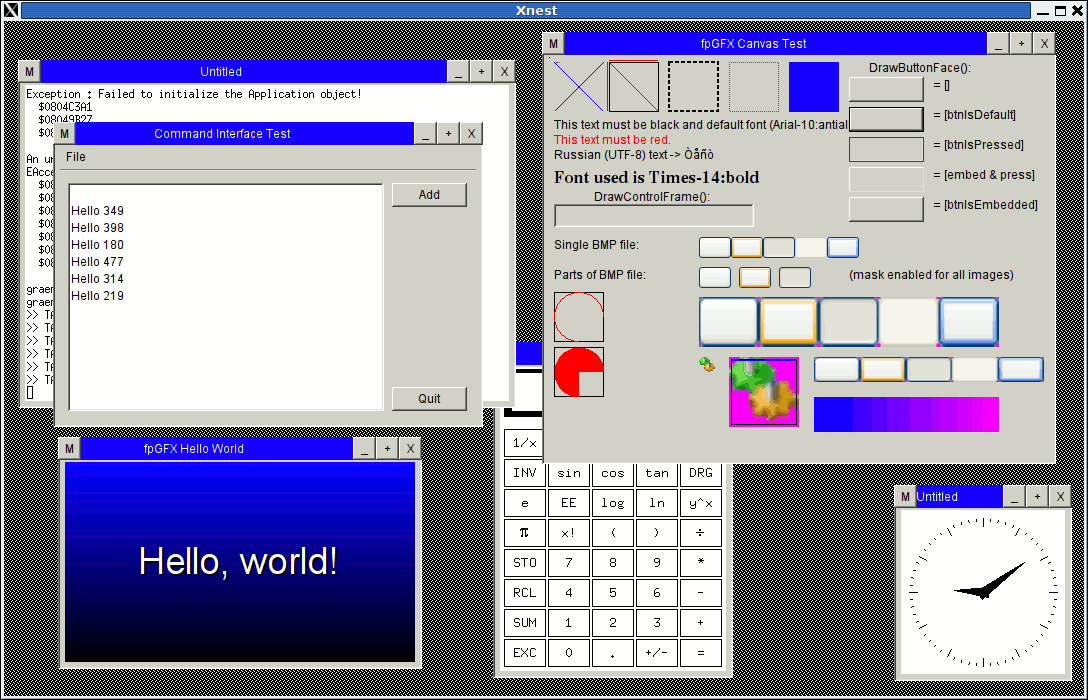 The Free Pascal Window Manager was started in 2006 by Andrew Haines, Daniel Franzini and Felipe Monteiro de Carvalho. The main motivation for this project was to give a greater visibility for applications written in Free Pascal, which face difficulties to find adequate deployment in Linux because the Linux distributions prefer to deploy the standard programs which are packaged by each Window Manager, such as KDE or Gnome. FPWM should come as a simple, but easy to use Window Manager which also deploys a full set of useful applications. This set of applications is developed in the [[Free Pascal Application Suite]] project. Unfortunately, due to the lack of free time, lack of enough knowledge of X11 and the general difficulties in finding information about how to write a window manager, the project soon stalled. | |
| 4 | 4 | ||
| 5 | 5 | In the second half of 2010 the University of São Paulo through Prof. Dr. Pedro Luiz Pizzigatti Corrêa has given its support for the project by making a team of 4 students available to help in its development for 1 semester as part of the engineering course in the university. This counts as executing a subject with 2 credits. In this project, with most of the code and fixes coming from Felipe, it was achieved the total conversion of the wm2 window manager to Pascal, making it fully functional by the beginning of 2011. | |
| 6 | 6 | ||
| 7 | 7 | The next step after achieving a functional window manager is modifying the windows to have a more normal layout. | |
| 8 | 8 | ||
| 9 | 9 | ## Guidelines | |
| 10 | 10 | ||
| 11 | 11 | FPWM should be simples, light-weight and easy to use. It should be usable for both tablets / touch-screen devices and for normal desktop computers with a mouse. It should provide a taskbar similar to Windows, as well as icons in the desktop. It should have larger borders and larger icons in its tablet mode, and a more common appearance in its desktop mode. It should provide a system tray icon area and respect the Free Desktop specifications for Window Managers. | |
| 12 | 12 | ||
| 13 | 13 | ## Subversion | |
| 14 | 14 | ||
| 15 | - | ||
| 15 | + | ```text | |
| 16 | + | svn co https://fpwm.svn.sourceforge.net/svnroot/fpwm fpwm | |
| 17 | + | ``` | |
| 16 | 18 | ||
| 17 | 19 | ## Tutorials | |
| 18 | 20 | ||
| 19 | 21 | ### Installing Linux in a virtual machine inside Windows | |
| 20 | 22 | ||
| 21 | 23 | - First download Virtual PC: [Download the full version of Microsoft Virtual PC 2007](http://www.microsoft.com/downloads/details.aspx?FamilyID=04d26402-3199-48a3-afa2-2dc0b40a73b6&DisplayLang=en) | |
| 22 | 24 | ||
| 23 | 25 | - Tutorial to install Linux in Virtual PC: [Run Linux in Windows](http://www.pcreview.co.uk/articles/Windows/Run_Linux_in_Windows/) | |
| 24 | 26 | ||
| 25 | 27 | ### Configuring the login screen in Linux | |
| 26 | 28 | ||
| 27 | 29 | #### Adding XTerm as an option in the login screen | |
| 28 | 30 | ||
| 29 | 31 | For debugging purposes one can add the XTerm as a Window Manager in the Linux login screen. | |
| 30 | 32 | ||
| 31 | 33 | Then when logging in choose XTerm from the list of window managers. This will open an empty X11 with a single XTerm instance running which you can use to open a real Window Manager, fpwm for example. | |
| 32 | 34 | ||
| 33 | 35 | The following terminal commands can be utilized to to start fpwm: | |
| 34 | 36 | ||
| 35 | 37 | cd /path/to/fpwm | |
| 36 | 38 | ./fpwm | |
| 37 | 39 | ||
| 38 | 40 | To add XTerm in the list of choices, one should add the file 99xterm.desktop to a folder which contains one .desktop file per window manager. This file can be obtained from: <http://fpwm.svn.sourceforge.net/viewvc/fpwm/resources/99XTERM.desktop?revision=107&view=markup> | |
| 39 | 41 | ||
| 40 | 42 | And should be similar to this: | |
| 41 | 43 | ||
| 42 | 44 | [Desktop Entry] | |
| 43 | 45 | Encoding=UTF-8 | |
| 44 | 46 | Name=XTerm | |
| 45 | 47 | Comment=XTerm | |
| 46 | 48 | TryExec=xterm | |
| 47 | 49 | Exec=/usr/share/X11/xdm/Xsession xterm | |
| 48 | 50 | Icon= | |
| 49 | 51 | Type=Application | |
| 50 | 52 | ||
| 51 | 53 | In Mandriva Linux with GDM (Gnome login manager) the folder to place this file is: /etc/X11/dm/Sessions/ In Mandriva Linux with KDM (KDE login manager) the folder to place this file is: /usr/share/apps/kdm/sessions/ | |
| 52 | 54 | ||
| 53 | 55 | ## Issues | |
| 54 | 56 | ||
| 55 | 57 | \<\<\< March 2017 \>\>\> | |
| 56 | 58 | ||
| 57 | 59 | When compiling (latest snapshot from sourceforge) with Lazarus 1.6 and FPC 3.0.0 it show this error: | |
| 58 | 60 | ||
| 59 | 61 | **Compile Proyect, Target: fpwm: Output Code 256, errors: 1 hints:** 4 | |
| 60 | 62 | ||
| 61 | 63 | fpwmrotated.pas(406,34) Error: Illegal type conversion: "ShortString" to "Pchar" | |
| 62 | 64 | ||
| 63 | 65 | The other hints are: | |
| 64 | 66 | ||
| 65 | 67 | fpwmgeneral.pas(65,17) Hint: Local variable "sAct" does not seem to be initialized | |
| 66 | 68 | ||
| 67 | 69 | fpwmgeneral.pas(21,6) Hint: Unit "xlib" not used in fpwmgeneral | |
| 68 | 70 | ||
| 69 | 71 | xproto.pas(74,6) Hint: Unit "x" not used in xproto | |
| 70 | 72 | ||
| 71 | 73 | xproto.pas(74,9) Hint: Unit "xmd" not used in xproto | |
| 72 | 74 | ||
| 73 | 75 | ## Lap-Tupniquim project | |
| 74 | 76 | ||
| 75 | 77 | This Window Manager might be utilized in the brazilian digital school desks if it proves to be good enough for it: | |
| 76 | 78 | ||
| 77 | 79 | - Project Lap-Tupniquim: <http://www.youtube.com/watch?v=GvEv0aWo94Q> | |
| 78 | 80 | ||
| 79 | 81 | ## External links | |
| 80 | 82 | ||
| 81 | 83 | - [X11 Book: Xlib Programming Manual](http://www.niksula.hut.fi/~jkirma/books/xlib.pdf) | |
| 82 | 84 | - [Inter-Client Communication Conventions Manual](http://tronche.com/gui/x/icccm/) | |
| 83 | 85 | ||
| 84 | 86 | --- | |
| 85 | 87 | *From the Free Pascal wiki, page "Free Pascal Window Manager", as it stood on 2017-03-23 after a change by Jma sp, out of the wiki's dump of 2024-05-26. Copyright stays with the author who wrote it, according to the old wiki's [[Licensing]] page. If you have concerns about this material, [message the admin](/wiki-contact).* | |
| 86 | 88 | Category: FPC | |
| 87 | 89 | Category: GUI |