

Frames: what changed
Revision 2 to 3. Removed lines have a minus sign; added lines have a plus sign.
| Old | New | Line | |
|---|---|---|---|
| 1 | - | ||
| 2 | - | ||
| 3 | - | ||
| 4 | - | ||
| 5 | - | ||
| 6 | - | ||
| 7 | - | ||
| 8 | - | ||
| 9 | - | ||
| 10 | - | ||
| 11 | - | ||
| 12 | - | ||
| 13 | - | ||
| 1 | + | **[[TFrame|TFrames]]** are named containers for components and very similar to [[TForm|forms]]. Their unique ability is that they can be embedded into forms or other frames in the designer. As forms they are stored in two files: the code is stored in .pas file and the design in the .lfm file. | |
| 14 | 2 | ||
| 15 | 3 | ## What can they be used for? | |
| 16 | 4 | ||
| 17 | - | ||
| 5 | + | They are needed when you have a group of components that you want to reuse on multiple forms. The group should have the same set of controls and logic between them at different windows (forms) of your application. You can group that repeated controls and logic into one frame and use that frame in different places. Therefore you don't need to repeat the work of control layouting and writing their logic. | |
| 18 | 6 | ||
| 19 | - | ||
| 7 | + | For example, you have two listboxes and buttons to move items between them. So you can create a frame with two listboxes and needed buttons, write the logic for items moving and then use your frame on all forms where needed. Moreover, if you find an error in the frame code then you can fix it once in the frame code instead of fixing it n-times among all forms. | |
| 20 | 8 | ||
| 21 | - | ||
| 9 | + | a frame in designer: | |
| 22 | 10 | ||
| 23 | - | ||
| 11 | + | [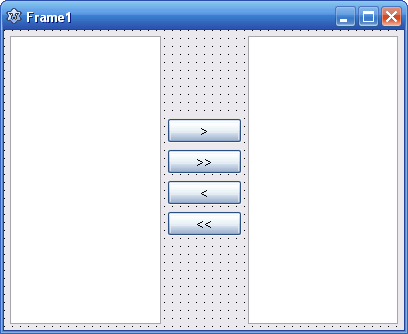](</File:Frame_example.PNG>) | |
| 24 | 12 | ||
| 25 | - | ||
| 13 | + | ||
| 14 | + | the frame placed on a form: | |
| 26 | 15 | ||
| 27 | - | ||
| 16 | + | [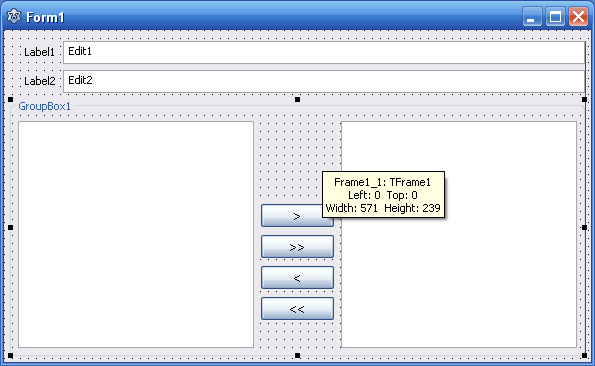](</File:Frame_embedded.PNG>) | |
| 28 | 17 | ||
| 29 | - | ||
| 18 | + | the same frame placed on another form: | |
| 30 | 19 | ||
| 31 | - | ||
| 20 | + | [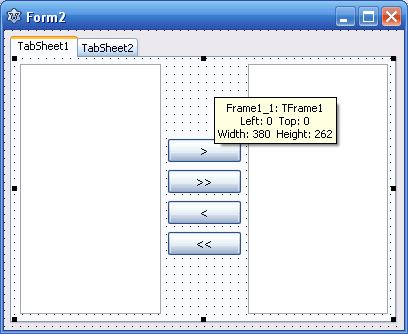](</File:Frame_embedded2.PNG>) | |
| 32 | 21 | ||
| 33 | 22 | ## Initialising private variables | |
| 34 | 23 | ||
| 35 | - | ||
| 36 | - | ||
| 37 | - | ||
| 24 | + | TFrame does not have OnCreate or OnDestroy events in which private variables can be initialised and released. [[Override]] the default [[Constructor|constructor]] and [[Destructor|destructor]] to do this. | |
| 25 | + | ``` | |
| 38 | 26 | TFrame1 = class(TFrame) | |
| 39 | - | ||
| 40 | - | ||
| 41 | - | ||
| 42 | - | ||
| 43 | - | ||
| 44 | - | ||
| 45 | - | ||
| 46 | - | ||
| 47 | - | ||
| 48 | - | ||
| 49 | - | ||
| 50 | - | ||
| 51 | - | ||
| 52 | - | ||
| 53 | - | ||
| 54 | - | ||
| 55 | - | ||
| 56 | - | ||
| 27 | + | private | |
| 28 | + | MyObj: TObject; | |
| 29 | + | public | |
| 30 | + | constructor Create(TheOwner: TComponent); override; | |
| 31 | + | destructor Destroy; override; | |
| 32 | + | end; | |
| 33 | + | ||
| 34 | + | constructor TFrame1.Create(TheOwner: TComponent); | |
| 35 | + | begin | |
| 36 | + | inherited Create(TheOwner); | |
| 37 | + | MyObj := TObject.Create; | |
| 38 | + | end; | |
| 39 | + | ||
| 40 | + | destructor TFrame1.Destroy; | |
| 41 | + | begin | |
| 42 | + | MyObj.Free | |
| 43 | + | inherited Destroy; | |
| 44 | + | end; | |
| 57 | 45 | ``` | |
| 58 | 46 | ||
| 59 | 47 | ## Sample of dynamic creation | |
| 60 | 48 | ||
| 61 | - | ||
| 62 | - | ||
| 63 | - | ||
| 49 | + | More easy. Because TFrame component in component palette is not required. And you can make a page change type application(like a smart phone application) with save resource. | |
| 50 | + | ``` | |
| 64 | 51 | unit Unit1; | |
| 65 | - | ||
| 66 | - | ||
| 67 | - | ||
| 68 | - | ||
| 69 | - | ||
| 70 | - | ||
| 71 | - | ||
| 72 | - | ||
| 73 | - | ||
| 74 | - | ||
| 75 | - | ||
| 76 | - | ||
| 77 | - | ||
| 78 | - | ||
| 79 | - | ||
| 80 | - | ||
| 81 | - | ||
| 82 | - | ||
| 83 | - | ||
| 84 | - | ||
| 85 | - | ||
| 86 | - | ||
| 87 | - | ||
| 88 | - | ||
| 89 | - | ||
| 90 | - | ||
| 91 | - | ||
| 92 | - | ||
| 93 | - | ||
| 94 | - | ||
| 95 | - | ||
| 96 | - | ||
| 97 | - | ||
| 98 | - | ||
| 99 | - | ||
| 100 | - | ||
| 101 | - | ||
| 102 | - | ||
| 103 | - | ||
| 104 | - | ||
| 105 | - | ||
| 106 | - | ||
| 107 | - | ||
| 108 | - | ||
| 109 | - | ||
| 110 | - | ||
| 111 | - | ||
| 112 | - | ||
| 113 | - | ||
| 114 | - | ||
| 115 | - | ||
| 116 | - | ||
| 117 | - | ||
| 118 | - | ||
| 119 | - | ||
| 120 | - | ||
| 121 | - | ||
| 122 | - | ||
| 123 | - | ||
| 124 | - | ||
| 125 | - | ||
| 52 | + | ||
| 53 | + | {$mode objfpc}{$H+} | |
| 54 | + | ||
| 55 | + | interface | |
| 56 | + | ||
| 57 | + | uses | |
| 58 | + | Classes, SysUtils, FileUtil, Forms, Controls, Graphics, Dialogs, StdCtrls; | |
| 59 | + | ||
| 60 | + | type | |
| 61 | + | ||
| 62 | + | { TForm1 } | |
| 63 | + | ||
| 64 | + | TForm1 = class(TForm) | |
| 65 | + | Button1: TButton; | |
| 66 | + | GroupBox1: TGroupBox; | |
| 67 | + | procedure Button1Click(Sender: TObject); | |
| 68 | + | procedure FormCreate(Sender: TObject); | |
| 69 | + | private | |
| 70 | + | { private declarations } | |
| 71 | + | Frame: TFrame; | |
| 72 | + | public | |
| 73 | + | { public declarations } | |
| 74 | + | end; | |
| 75 | + | ||
| 76 | + | var | |
| 77 | + | Form1: TForm1; | |
| 78 | + | ||
| 79 | + | implementation | |
| 80 | + | uses | |
| 81 | + | Unit2{TFrame1}, Unit3{TFrame2}, Unit4{TFrame3}; | |
| 82 | + | ||
| 83 | + | {$R *.lfm} | |
| 84 | + | ||
| 85 | + | { TForm1 } | |
| 86 | + | ||
| 87 | + | procedure TForm1.FormCreate(Sender: TObject); | |
| 88 | + | begin | |
| 89 | + | Frame := TFrame1.Create(GroupBox1); | |
| 90 | + | Frame.Parent := GroupBox1; | |
| 91 | + | end; | |
| 92 | + | ||
| 93 | + | procedure TForm1.Button1Click(Sender: TObject); | |
| 94 | + | begin | |
| 95 | + | if not Assigned(Frame) then | |
| 96 | + | begin | |
| 97 | + | Frame := TFrame1.Create(GroupBox1); | |
| 98 | + | Frame.Parent := GroupBox1; | |
| 99 | + | end else if Frame is TFrame1 then begin | |
| 100 | + | Frame.Free; | |
| 101 | + | Frame := TFrame2.Create(GroupBox1); | |
| 102 | + | Frame.Parent := GroupBox1; | |
| 103 | + | end else if Frame is TFrame2 then begin | |
| 104 | + | Frame.Free; | |
| 105 | + | Frame := TFrame3.Create(GroupBox1); | |
| 106 | + | Frame.Parent := GroupBox1; | |
| 107 | + | end else begin | |
| 108 | + | FreeAndNil(Frame); | |
| 109 | + | end; | |
| 110 | + | end; | |
| 111 | + | ||
| 112 | + | end. | |
| 126 | 113 | ``` | |
| 127 | 114 | ||
| 128 | 115 | ## See also | |
| 129 | 116 | ||
| 130 | - | ||
| 117 | + | * [[TFrame]] | |
| 131 | 118 | ||
| 132 | 119 | --- | |
| 133 | - | ||
| 120 | + | *From the Free Pascal wiki, page "Frames", as the Internet Archive kept it on 2024-12-07, last changed on 2024-11-18. Copyright stays with the author who wrote it, according to the old wiki's [[Licensing]] page. If you have concerns about this material, [message the admin](/wiki-contact).* |