

Frames/de: what changed
Revision 2 to 3. Removed lines have a minus sign; added lines have a plus sign.
| Old | New | Line | |
|---|---|---|---|
| 1 | - | ||
| 1 | + | **[[TFrame|TFrames]]** sind benannte Container für Komponenten und sind [[TForm|Formularen]] sehr ähnlich. Ihre einzigartige Fähigkeit besteht darin, dass sie in Formulare oder andere Frames eingebettet werden können. Als Formulare werden sie in zwei Dateien gespeichert: Der Code wird in einer .pas-Datei gespeichert, das Design in einer .lfm-Datei. | |
| 2 | 2 | ||
| 3 | 3 | ## Wie kann ich ein neues Frame erstellen? | |
| 4 | 4 | ||
| 5 | - | ||
| 5 | + | Wählen Sie den Menüpunkt **Datei** und klicken Sie den Unterpunkt **Neu...** an. Wählen Sie im sich öffnenden Dialog "Frame". | |
| 6 | 6 | ||
| 7 | - | ||
| 7 | + | [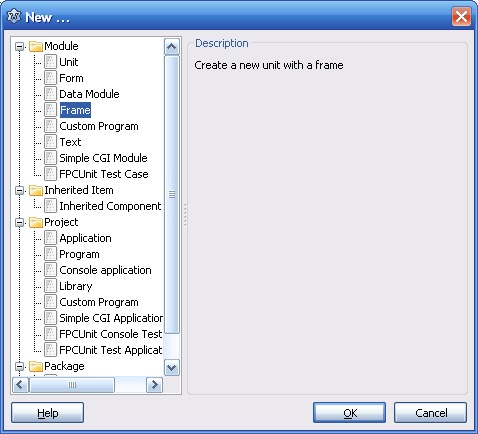](</File:Frame_new.PNG>) | |
| 8 | 8 | ||
| 9 | 9 | ## Wie platziere ich ein Frame auf einem Formular oder einem anderen Frame? | |
| 10 | 10 | ||
| 11 | - | ||
| 11 | + | Die Registerkarte [[Standard tab|Standard]] der [[Component Palette|Komponentenpalette]] enthält die Komponente "[[TFrame]]". Wenn Sie sie auf dem Formular oder einem anderen Frame ablegen, werden Sie von der IDE dazu aufgefordert, einen der Projektframes auszuwählen (Der Auswahldialog wird erst erscheinen, wenn die TFrame-Komponente auf der Form platziert wurde, nicht wenn man einfach auf das Icon in der Toolbar klickt). Frames in Packages können noch nicht angegeben werden, jedoch können Sie auch Frames im Code erstellen, die auch in Packages sein können. Sie können keine Frame Circles erstellen - die IDE wird es verbieten, d. h. Sie können FrameA nicht in FrameA platzieren, ebenso wenig ein Frame, das FrameA in FrameA enthält. | |
| 12 | 12 | ||
| 13 | - | ||
| 13 | + | [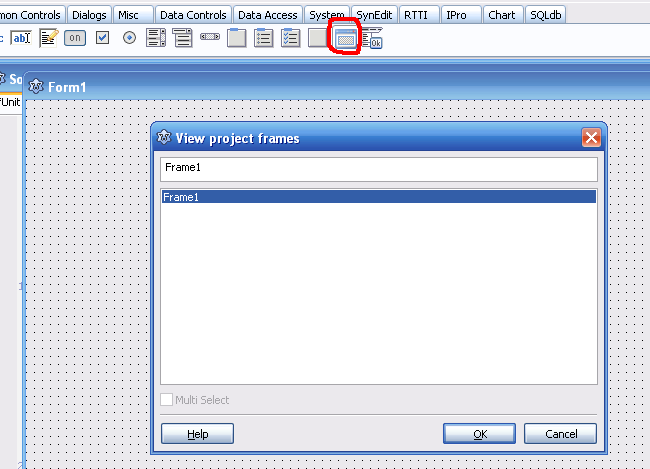](</File:Frame_add.PNG>) | |
| 14 | 14 | ||
| 15 | 15 | ## Wofür können Frames benutzt werden? | |
| 16 | 16 | ||
| 17 | - | ||
| 17 | + | Sie werden benötigt, wenn Sie eine Gruppe von Komponenten haben, die Sie in mehreren Formularen wiederverwenden möchten. Die Gruppe sollte in verschiedenen Fenstern (Formularen) Ihrer Anwendung über dieselben Steuerelemente und dieselbe Logik verfügen. Sie können diese sich wiederholenden Komponenten und Logik in einem Frame gruppieren und diesen Frame an verschiedenen Stellen verwenden. Dafür müssen Sie die Arbeit der Anordnung der Komponenten und des Schreibens ihrer Logik nicht wiederholen. | |
| 18 | 18 | ||
| 19 | - | ||
| 19 | + | Sie haben beispielsweise zwei ListBoxes und Buttons, um Elemente zwischen ihnen zu verschieben. Sie können also ein Frame mit zwei ListBoxes und den notwendigen Buttons erstellen, die Logik für die sich bewegenden Elemente schreiben und Ihr Frame bei Bedarf für alle Formulare verwenden. Wenn Sie außerdem einen Fehler im Frame-Code finden, können Sie ihn einmal im Code beheben, anstatt ihn x-mal in allen Formularen zu beheben. | |
| 20 | 20 | ||
| 21 | - | ||
| 21 | + | Ein Frame im Designer: | |
| 22 | 22 | ||
| 23 | - | ||
| 23 | + | [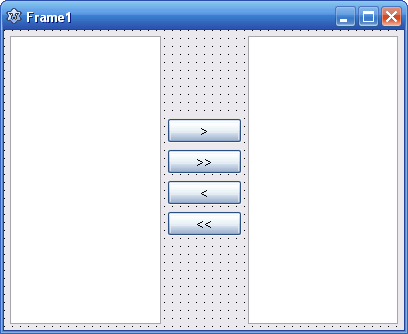](</File:Frame_example.PNG>) | |
| 24 | 24 | ||
| 25 | - | ||
| 25 | + | Das Frame, auf einem Formular platziert: | |
| 26 | 26 | ||
| 27 | - | ||
| 27 | + | [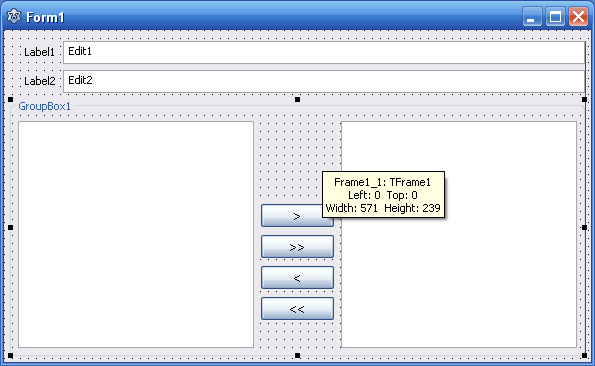](</File:Frame_embedded.PNG>) | |
| 28 | 28 | ||
| 29 | - | ||
| 29 | + | Das selbe Frame, auf einem anderen Formular platziert: | |
| 30 | 30 | ||
| 31 | - | ||
| 31 | + | [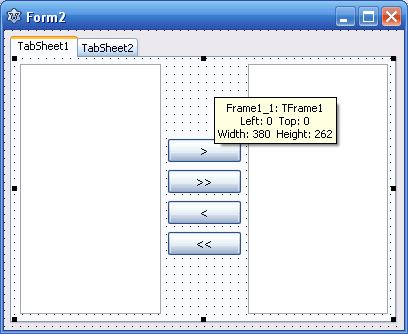](</File:Frame_embedded2.PNG>) | |
| 32 | 32 | ||
| 33 | 33 | ## Private Variablen initialisieren | |
| 34 | 34 | ||
| 35 | - | ||
| 36 | - | ||
| 37 | - | ||
| 35 | + | TFrame verfügt nicht über OnCreate- oder OnDestroy-Ereignisse, in denen private Variablen initialisiert und freigegeben werden können. Überschreiben Sie dazu den Standardkonstruktor und den Destruktor. | |
| 36 | + | ``` | |
| 38 | 37 | TFrame1 = class(TFrame) | |
| 39 | - | ||
| 40 | - | ||
| 41 | - | ||
| 42 | - | ||
| 43 | - | ||
| 44 | - | ||
| 45 | - | ||
| 46 | - | ||
| 47 | - | ||
| 48 | - | ||
| 49 | - | ||
| 50 | - | ||
| 51 | - | ||
| 52 | - | ||
| 53 | - | ||
| 54 | - | ||
| 55 | - | ||
| 56 | - | ||
| 38 | + | private | |
| 39 | + | MyObj: TObject; | |
| 40 | + | public | |
| 41 | + | constructor Create(TheOwner: TComponent); override; | |
| 42 | + | destructor Destroy; override; | |
| 43 | + | end; | |
| 44 | + | ||
| 45 | + | constructor TFrame1.Create(TheOwner: TComponent); | |
| 46 | + | begin | |
| 47 | + | inherited Create(TheOwner); | |
| 48 | + | MyObj := TObject.Create; | |
| 49 | + | end; | |
| 50 | + | ||
| 51 | + | destructor TFrame1.Destroy; | |
| 52 | + | begin | |
| 53 | + | MyObj.Free | |
| 54 | + | inherited Destroy; | |
| 55 | + | end; | |
| 57 | 56 | ``` | |
| 58 | 57 | ||
| 59 | 58 | ## Beispiel für eine dynamische Erstellung | |
| 60 | 59 | ||
| 61 | - | ||
| 62 | - | ||
| 63 | - | ||
| 60 | + | Leichter, da eine TFrame-Komponente in der Komponentenpalette nicht erforderlich ist. Sie können außerdem eine Seitenwechsel-Anwendung (wie eine Smartphone-Anwendung) mit sicheren Ressourcen erstellen. | |
| 61 | + | ``` | |
| 64 | 62 | unit Unit1; | |
| 65 | - | ||
| 66 | - | ||
| 67 | - | ||
| 68 | - | ||
| 69 | - | ||
| 70 | - | ||
| 71 | - | ||
| 72 | - | ||
| 73 | - | ||
| 74 | - | ||
| 75 | - | ||
| 76 | - | ||
| 77 | - | ||
| 78 | - | ||
| 79 | - | ||
| 80 | - | ||
| 81 | - | ||
| 82 | - | ||
| 83 | - | ||
| 84 | - | ||
| 85 | - | ||
| 86 | - | ||
| 87 | - | ||
| 88 | - | ||
| 89 | - | ||
| 90 | - | ||
| 91 | - | ||
| 92 | - | ||
| 93 | - | ||
| 94 | - | ||
| 95 | - | ||
| 96 | - | ||
| 97 | - | ||
| 98 | - | ||
| 99 | - | ||
| 100 | - | ||
| 101 | - | ||
| 102 | - | ||
| 103 | - | ||
| 104 | - | ||
| 105 | - | ||
| 106 | - | ||
| 107 | - | ||
| 108 | - | ||
| 109 | - | ||
| 110 | - | ||
| 111 | - | ||
| 112 | - | ||
| 113 | - | ||
| 114 | - | ||
| 115 | - | ||
| 116 | - | ||
| 117 | - | ||
| 118 | - | ||
| 119 | - | ||
| 120 | - | ||
| 121 | - | ||
| 122 | - | ||
| 123 | - | ||
| 124 | - | ||
| 125 | - | ||
| 63 | + | ||
| 64 | + | {$mode objfpc}{$H+} | |
| 65 | + | ||
| 66 | + | interface | |
| 67 | + | ||
| 68 | + | uses | |
| 69 | + | Classes, SysUtils, FileUtil, Forms, Controls, Graphics, Dialogs, StdCtrls; | |
| 70 | + | ||
| 71 | + | type | |
| 72 | + | ||
| 73 | + | { TForm1 } | |
| 74 | + | ||
| 75 | + | TForm1 = class(TForm) | |
| 76 | + | Button1: TButton; | |
| 77 | + | GroupBox1: TGroupBox; | |
| 78 | + | procedure Button1Click(Sender: TObject); | |
| 79 | + | procedure FormCreate(Sender: TObject); | |
| 80 | + | private | |
| 81 | + | { private declarations } | |
| 82 | + | Frame: TFrame; | |
| 83 | + | public | |
| 84 | + | { public declarations } | |
| 85 | + | end; | |
| 86 | + | ||
| 87 | + | var | |
| 88 | + | Form1: TForm1; | |
| 89 | + | ||
| 90 | + | implementation | |
| 91 | + | uses | |
| 92 | + | Unit2{TFrame1}, Unit3{TFrame2}, Unit4{TFrame3}; | |
| 93 | + | ||
| 94 | + | {$R *.lfm} | |
| 95 | + | ||
| 96 | + | { TForm1 } | |
| 97 | + | ||
| 98 | + | procedure TForm1.FormCreate(Sender: TObject); | |
| 99 | + | begin | |
| 100 | + | Frame := TFrame1.Create(GroupBox1); | |
| 101 | + | Frame.Parent := GroupBox1; | |
| 102 | + | end; | |
| 103 | + | ||
| 104 | + | procedure TForm1.Button1Click(Sender: TObject); | |
| 105 | + | begin | |
| 106 | + | if not Assigned(Frame) then | |
| 107 | + | begin | |
| 108 | + | Frame := TFrame1.Create(GroupBox1); | |
| 109 | + | Frame.Parent := GroupBox1; | |
| 110 | + | end else if Frame is TFrame1 then begin | |
| 111 | + | Frame.Free; | |
| 112 | + | Frame := TFrame2.Create(GroupBox1); | |
| 113 | + | Frame.Parent := GroupBox1; | |
| 114 | + | end else if Frame is TFrame2 then begin | |
| 115 | + | Frame.Free; | |
| 116 | + | Frame := TFrame3.Create(GroupBox1); | |
| 117 | + | Frame.Parent := GroupBox1; | |
| 118 | + | end else begin | |
| 119 | + | FreeAndNil(Frame); | |
| 120 | + | end; | |
| 121 | + | end; | |
| 122 | + | ||
| 123 | + | end. | |
| 126 | 124 | ``` | |
| 127 | 125 | ||
| 128 | 126 | ## Siehe auch | |
| 129 | 127 | ||
| 130 | - | ||
| 128 | + | * [[TFrame]] | |
| 131 | 129 | ||
| 132 | 130 | --- | |
| 133 | - | ||
| 131 | + | *From the Free Pascal wiki, page "Frames/de", as the Internet Archive kept it on 2025-03-23, last changed on 2024-11-09. Copyright stays with the author who wrote it, according to the old wiki's [[Licensing]] page. If you have concerns about this material, [message the admin](/wiki-contact).* |