

fpcupdeluxe: what changed
Revision 1 to 2. Removed lines have a minus sign; added lines have a plus sign.
| Old | New | Line | |
|---|---|---|---|
| 1 | 1 | ## Overview | |
| 2 | 2 | ||
| 3 | - | ||
| 3 | + | 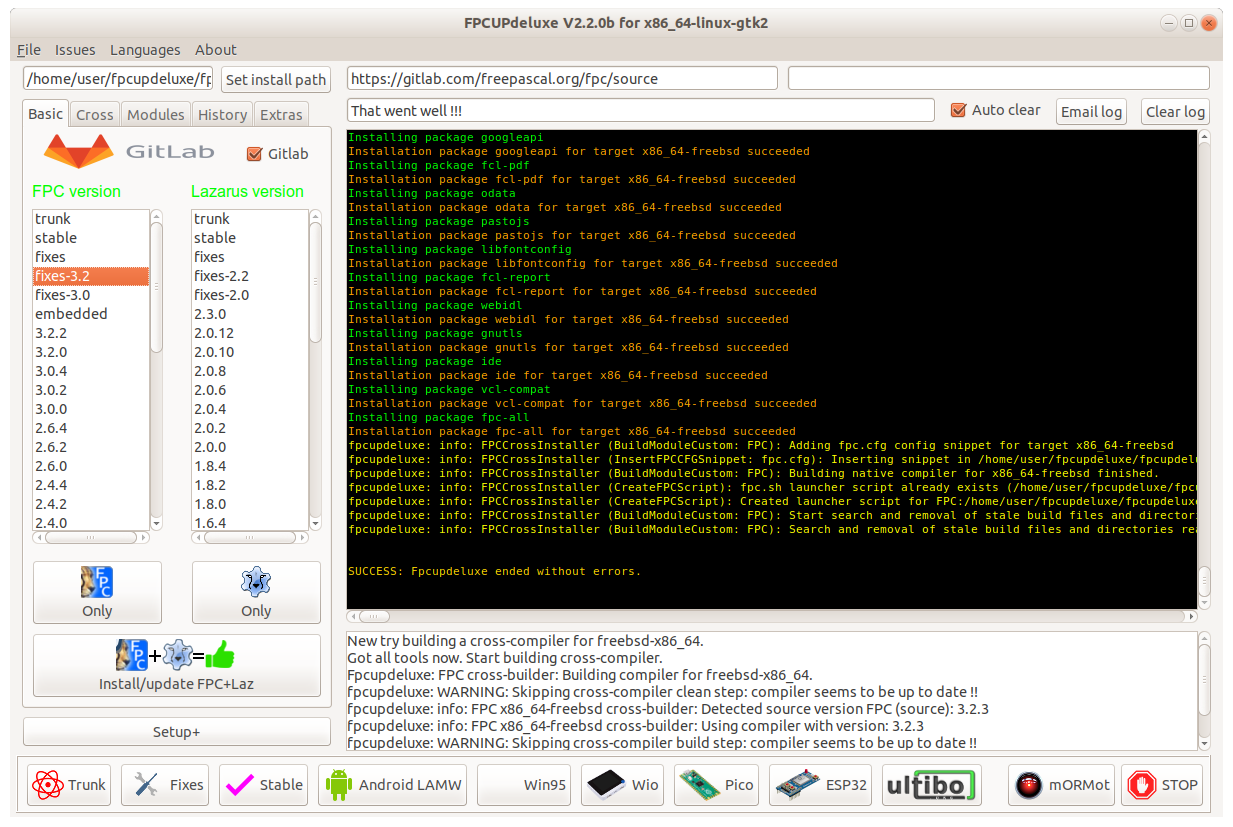 | |
| 4 | 4 | ||
| 5 | 5 | **FPCUPdeluxe** is a GUI installer for FPC and Lazarus. It's based on [[fpcup]]. | |
| 6 | 6 | ||
| 7 | 7 | - [GitHub repository](https://github.com/LongDirtyAnimAlf/fpcupdeluxe) | |
| 8 | 8 | - [Latest releases on GitHub](https://github.com/LongDirtyAnimAlf/fpcupdeluxe/releases/latest) | |
| 9 | 9 | - [Lazarus Forum Topic](https://forum.lazarus.freepascal.org/index.php/topic,34645.0.html) | |
| 10 | 10 | ||
| 11 | 11 | ## Installation of FPC and Lazarus | |
| 12 | 12 | ||
| 13 | 13 | The main purpose of fpcdeluxe is to provide a means for installing and updating multiple versions of FPC and Lazarus in a self-contained manner. Self-contained meaning that an install by fpcupdeluxe will have no influence on (interference with) your system: Hence you can install multiple versions of FPC and Lazarus. | |
| 14 | 14 | ||
| 15 | 15 | In order to have the installation working **you MUST use the generated link to start the install** ! | |
| 16 | 16 | ||
| 17 | 17 | That launcher link contains a line like: | |
| 18 | 18 | ||
| 19 | 19 | `Exec=/P/s/lazarus/lazarus --pcp="/P/s/config_lazarus"` | |
| 20 | 20 | ||
| 21 | 21 | directing Lazarus to use the [[pcp]] , i.e. **primary configuration** setting **path** of "/P/s/config_lazarus" or a similar subdir under /home/ depending on you choice made from the GUI. No fpc or anything is required in the searchpath. | |
| 22 | 22 | ||
| 23 | 23 | ### Prerequisites | |
| 24 | 24 | ||
| 25 | 25 | #### Debian, Raspbian, Mint gtk2 | |
| 26 | 26 | ||
| 27 | 27 | actual working with Debian Buster and Raspbian Buster | |
| 28 | 28 | ||
| 29 | 29 | ``` bash | |
| 30 | 30 | #!/bin/bash | |
| 31 | 31 | sudo apt-get update | |
| 32 | 32 | sudo apt-get upgrade | |
| 33 | 33 | ||
| 34 | 34 | # Missing Packages | |
| 35 | 35 | sudo apt-get install libx11-dev | |
| 36 | 36 | sudo apt-get install libgdk-pixbuf2.0-dev | |
| 37 | 37 | sudo apt-get install libpango1.0-dev | |
| 38 | 38 | sudo apt-get install libgtk2.0-dev | |
| 39 | 39 | ||
| 40 | 40 | # if gdb is not installed (eg. Lubuntu) | |
| 41 | 41 | sudo apt-get install gdb | |
| 42 | 42 | ||
| 43 | 43 | # GIT is the new SVN | |
| 44 | 44 | sudo apt-get install git | |
| 45 | 45 | ``` | |
| 46 | 46 | ||
| 47 | 47 | #### Debian qt5 | |
| 48 | 48 | ||
| 49 | 49 | ``` bash | |
| 50 | 50 | #!/bin/bash | |
| 51 | 51 | sudo apt-get update | |
| 52 | 52 | sudo apt-get upgrade | |
| 53 | 53 | ||
| 54 | 54 | # Missing Packages | |
| 55 | 55 | sudo apt install libqt5pas-dev | |
| 56 | 56 | ||
| 57 | 57 | # GIT is the new SVN | |
| 58 | 58 | sudo apt-get install git | |
| 59 | 59 | ``` | |
| 60 | 60 | ||
| 61 | 61 | See [[Qt5 Interface|Qt5_Interface#Linux]] | |
| 62 | 62 | ||
| 63 | 63 | #### Raspbian on RPi2 | |
| 64 | 64 | ||
| 65 | 65 | You need to extend the swap see [[Lazarus on Raspberry Pi]] | |
| 66 | 66 | ||
| 67 | 67 | ## Advanced settings | |
| 68 | 68 | ||
| 69 | - | ||
| 69 | + | 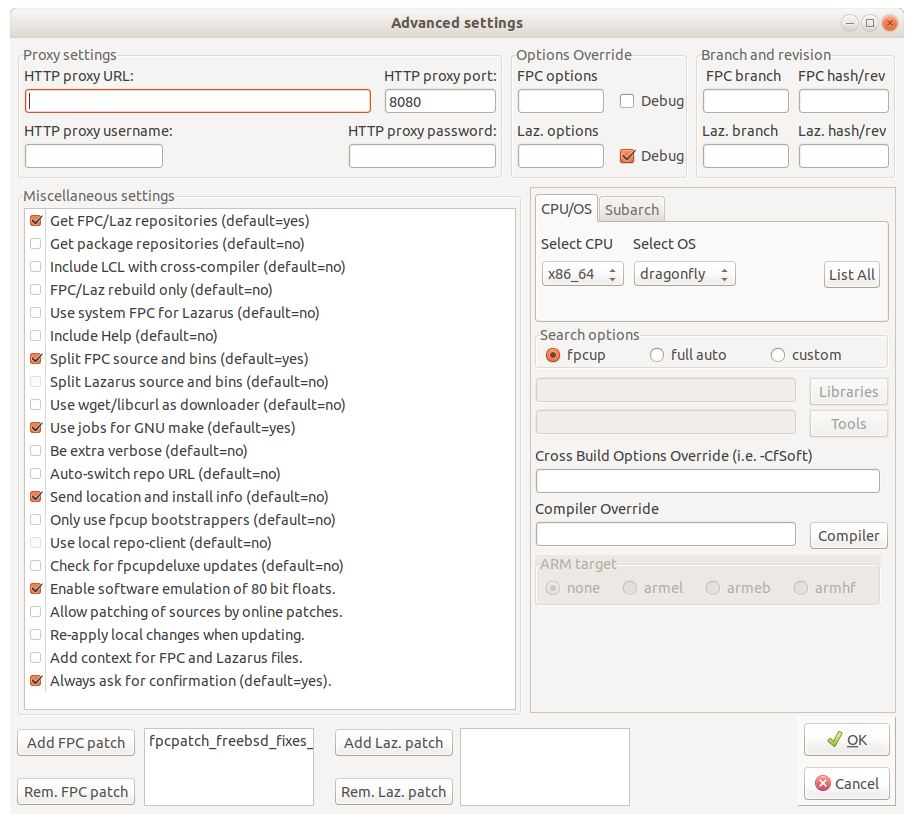 | |
| 70 | 70 | ||
| 71 | 71 | The above screenshot (click Setup+ on mainscreen) shows the advanced settings of FPCUPdeluxe. | |
| 72 | 72 | ||
| 73 | 73 | Some examples of advanced settings: | |
| 74 | 74 | ||
| 75 | 75 | - for debugging FPC itself, add "-g -gl -O-" into the "FPC options" field. | |
| 76 | 76 | - to apply a fix for FreeBSD x64 cross-compiler (which fixes FileExists/DirectoryExists functions on FreeBSD 12), press "Add FPC patch" and browse for relevant patch file. | |
| 77 | 77 | ||
| 78 | 78 | ## Cross-compiling | |
| 79 | 79 | ||
| 80 | 80 | FPCUPdeluxe makes cross-compiling easy: activate "cross" UI tab, select a CPU and an OS, and press "Install compiler". If libraries and/or binary tools are needed, fpcupdeluxe will try to get them online. | |
| 81 | 81 | ||
| 82 | 82 | Use the link to see what is available at the moment: | |
| 83 | 83 | ||
| 84 | 84 | - [Linux 64bit binary toolchains](https://github.com/newpascal/fpcupdeluxe/releases/tag/linuxx64crossbins_v1.0) | |
| 85 | 85 | - [Linux 32bit binary toolchains](https://github.com/newpascal/fpcupdeluxe/releases/tag/linuxi386crossbins_v1.0) | |
| 86 | 86 | - [Windows binary toolchains](https://github.com/newpascal/fpcupdeluxe/releases/tag/wincrossbins_v1.0) | |
| 87 | 87 | - [System libraries](https://github.com/newpascal/fpcupdeluxe/releases/tag/crosslibs_v1.0) | |
| 88 | 88 | ||
| 89 | 89 | ### Cross-compiling from Windows and Linux towards Darwin: the hard way | |
| 90 | 90 | ||
| 91 | 91 | With the help of fpcupdeluxe, NewPascal or FPC trunk, and a toolset called osxcross/cctools-port, you can crosscompile towards Darwin. This help will concentrate on manually setting up crossing from Windows/Linux towards Darwin (fpcupdeluxe can also do all the auto-magic for you for crossing towards Darwin; see above). | |
| 92 | 92 | ||
| 93 | 93 | First, you will need to get osxcross/cctools-port, and compile it yourself. | |
| 94 | 94 | ||
| 95 | 95 | - [osxcross original](https://github.com/tpoechtrager/osxcross)\ | |
| 96 | 96 | [osxcross for FPC](https://github.com/LongDirtyAnimAlf/osxcross) | |
| 97 | 97 | - [cctools-port original](https://github.com/tpoechtrager/cctools-port)\ | |
| 98 | 98 | [cctools-port for FPC](https://github.com/LongDirtyAnimAlf/cctools-port) | |
| 99 | 99 | ||
| 100 | 100 | For macOS, you will need the [osxcross for FPC](https://github.com/LongDirtyAnimAlf/osxcross) that has been adapted for use by FPC. | |
| 101 | 101 | ||
| 102 | 102 | For iOS/iPhone, you will need the [cctools-port for FPC](https://github.com/LongDirtyAnimAlf/cctools-port) that has been adapted for use by FPC. | |
| 103 | 103 | ||
| 104 | 104 | Get yourself a SDK, either from your own Mac, or from online sources: [Various Mac SDK's](https://github.com/phracker/MacOSX-SDKs/releases) | |
| 105 | 105 | ||
| 106 | 106 | SDKs for iPhone can also be obtained from online sources: [Various iPhone SDK's](https://github.com/theos/sdks) | |
| 107 | 107 | ||
| 108 | 108 | Build osxcross/cctools-port according to the instructions. For example, on Windows with Cygwin. | |
| 109 | 109 | ||
| 110 | 110 | > **Note:** Please note: to be able to cross from Windows towards Darwin, you need to have NewPascal or FPC trunk installed ! | |
| 111 | 111 | ||
| 112 | 112 | Use fpcupdeluxe to install NewPascal or FPC trunk. | |
| 113 | 113 | ||
| 114 | 114 | Before building the cross-compiler, you need to inform fpcupdeluxe where to find the Darwin libs (SDK) and the binary tools (build by osxcross/cctools-port). The two screenshot below show how to proceed: | |
| 115 | 115 | ||
| 116 | 116 | - Choose a CPU-type and an OS (Darwin). Select custom. You should now be able to use the buttons and point fpcupdeluxe to the right locations. | |
| 117 | 117 | ||
| 118 | - | ||
| 118 | + | 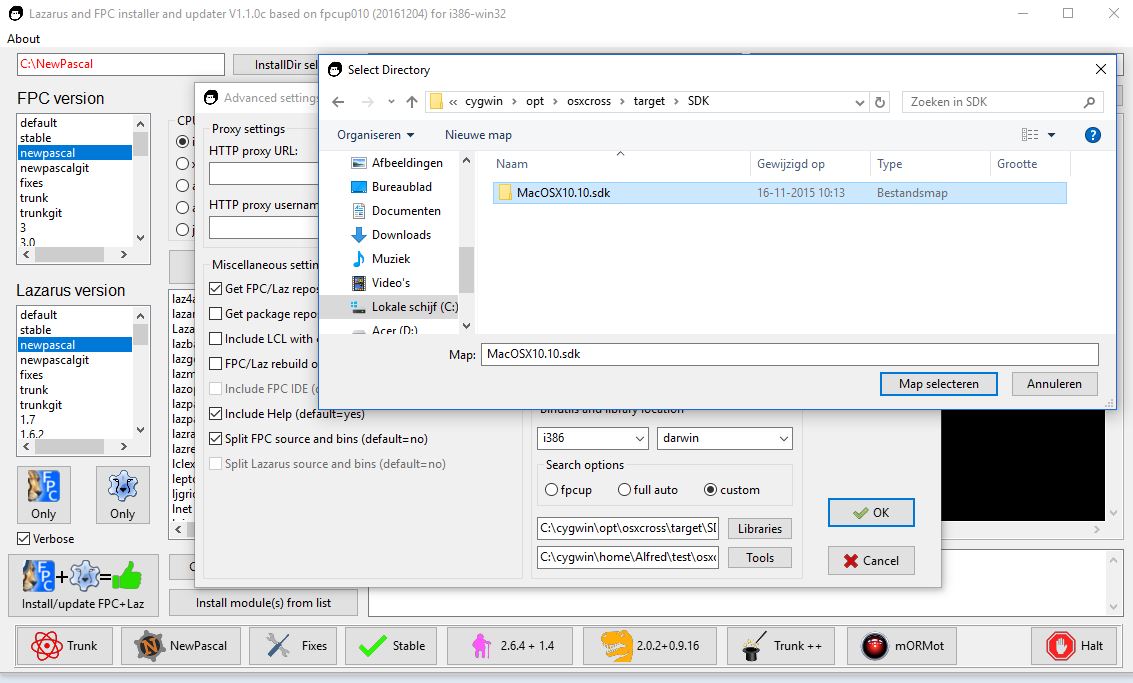 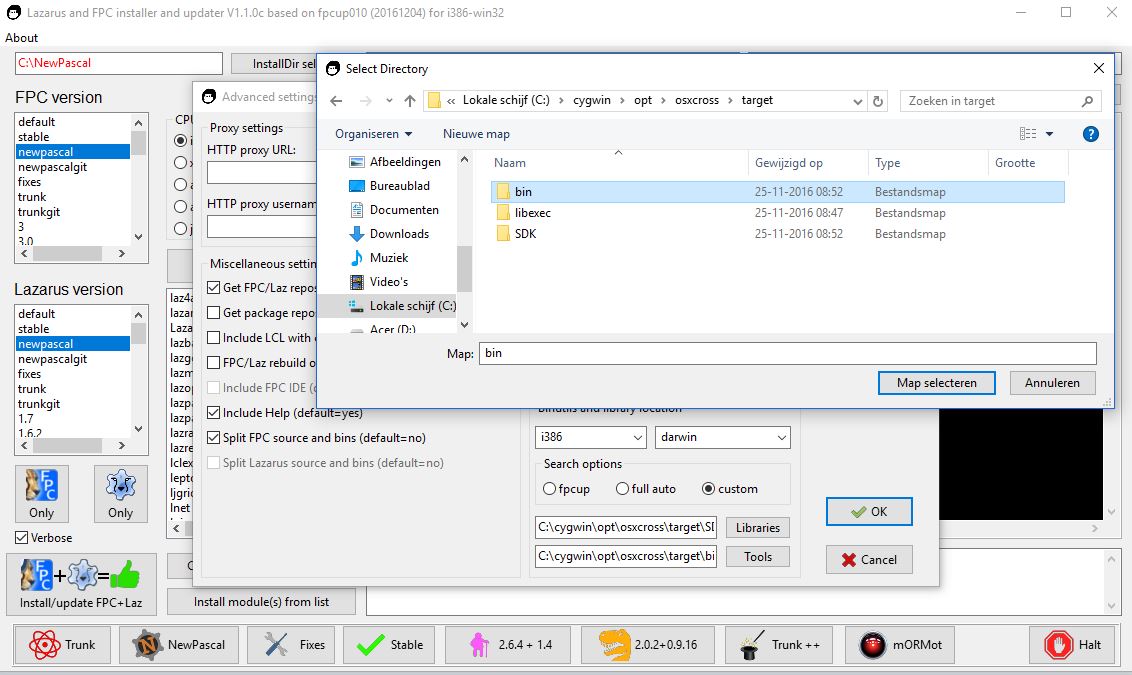 | |
| 119 | 119 | ||
| 120 | 120 | - Now, on the mainscreen, you can select your CPU and OS (Darwin) and build the cross-compiler ! | |
| 121 | 121 | - **Again, fpcupdeluxe also has pre-built tools for crossing towards Darwin: using the fpcupdeluxe-auto-magic will be the easiest !!!** | |
| 122 | 122 | ||
| 123 | 123 | ### Caveats, observations, troubleshooting | |
| 124 | 124 | ||
| 125 | 125 | - It was observed, that **f.** often times works on first run on an empty install dir, but subsequents runs, i.e. in order to add controls to the pallette, add the .chm [[help]] system asf., often times fail. In case of failure to recompile / [[make]] the IDE, the Lazarus binary may be gone, so unless you made a file backup earlier, you cannot start Lazarus anymore. | |
| 126 | 126 | - copy and save the logfile for reference / troubleshoot. | |
| 127 | 127 | - adding the [[help]] system is easy: just tag it under "advanced settings", saving some manual labour. | |
| 128 | 128 | - it takes about 10 minutes to make a full new install of fpc + Laz. | |
| 129 | 129 | - try out new --pcp settings to get a feeling for it, you can always delete the config and start anew (save the pristine fresh content of the --pcp dir right after install). | |
| 130 | 130 | - Sometimes, fpcupdeluxe hangs when it cannot download OpenSSL library. It's chicken-egg problem - OpenSSL is needed to download from https, so fpcupdeluxe cannot download OpenSSL without OpenSSL. Fpcupdeluxe has its strategy to overcome this, but sometimes it fails. Then, try this workaround - in fpcupdeluxe go to "Extras" tab and click on "get OpenSSL by browser", then unpack the downloaded file to fpcupdeluxe folder (where fpcupdeluxe.exe is located). Now, try again. | |
| 131 | 131 | ||
| 132 | 132 | ## Launching an installed Lazarus and fpc instance | |
| 133 | 133 | ||
| 134 | 134 | For launching the Lazarus GUI, a script is created (in the users home directory) and a launcher (on the desktop) which opens Lazarus with the correct config path & environment. Example, on Linux if installing to a folder named "/home/user/trunk", fpcupdeluxe creates: | |
| 135 | 135 | ||
| 136 | 136 | ` /home/user/Desktop/Lazarus_trunk.desktop (launcher)`\ | |
| 137 | 137 | ` /home/user/Lazarus_trunk (shell script)` | |
| 138 | 138 | ||
| 139 | 139 | For Linux FPC/lazbuild command line work the following shell script can be used (assumes a bash shell and using example install dir of "/home/user/trunk"): | |
| 140 | 140 | ||
| 141 | 141 | ``` bash | |
| 142 | 142 | #!/bin/sh | |
| 143 | 143 | # fpcupdeluxe: FPC home startlink script | |
| 144 | 144 | export PATH="/home/user/trunk/fpc/bin/x86_64-linux:/home/user/trunk/lazarus:${PATH}" | |
| 145 | 145 | export PPC_CONFIG_PATH="/home/user/trunk/fpc/bin/x86_64-linux" | |
| 146 | 146 | exec /bin/bash | |
| 147 | 147 | ``` | |
| 148 | 148 | ||
| 149 | 149 | Windows equivalent batch file for setting up environment for working from command line (using example install dir of "f:\trunk"): | |
| 150 | 150 | ||
| 151 | 151 | ```batch | |
| 152 | 152 | REM fpcupdeluxe: FPC home startlink script | |
| 153 | 153 | SET PATH=F:\trunk\fpc\bin\x86_64-win64;F:\trunk\lazarus;%PATH% | |
| 154 | 154 | SET PPC_CONFIG_PATH=F:\trunk\fpc\bin\x86_64-win64 | |
| 155 | 155 | cmd.exe | |
| 156 | 156 | ``` | |
| 157 | 157 | ||
| 158 | 158 | > **Note:** Setting the paths this way is not global and only effects the current terminal shell and child shells. | |
| 159 | 159 | ||
| 160 | 160 | ## clang compilation error | |
| 161 | 161 | ||
| 162 | 162 | On compiling for macOS target on Linux, you can see this error: | |
| 163 | 163 | ||
| 164 | 164 | `clang: error: invalid version number in '-target arm64-apple-macosx11.0.0'` | |
| 165 | 165 | ||
| 166 | 166 | Usually it happens on old systems, e.g. Ubuntu 20.04. This is fixable. | |
| 167 | 167 | ||
| 168 | 168 | - Install package "clang-12" in package manager | |
| 169 | 169 | - Go to /usr/bin and see all clang* symlinks. "clang" is symlink to Clang-10, and "clang-12" is symlink to Clang-12. Adjust symlinks so that "clang" points to Clang-12. | |
| 170 | 170 | ||
| 171 | 171 | user@PC:~$ ls -l /usr/bin/clang* | |
| 172 | 172 | lrwxrwxrwx 1 root root 24 ноя 7 22:00 /usr/bin/clang -> ../lib/llvm-12/bin/clang | |
| 173 | 173 | lrwxrwxrwx 1 root root 26 мар 20 2020 /usr/bin/clang++ -> ../lib/llvm-10/bin/clang++ | |
| 174 | 174 | lrwxrwxrwx 1 root root 26 апр 20 2020 /usr/bin/clang++-10 -> ../lib/llvm-10/bin/clang++ | |
| 175 | 175 | lrwxrwxrwx 1 root root 24 апр 20 2020 /usr/bin/clang-10 -> ../lib/llvm-10/bin/clang | |
| 176 | 176 | lrwxrwxrwx 1 root root 26 мар 8 2022 /usr/bin/clang++-12 -> ../lib/llvm-12/bin/clang++ | |
| 177 | 177 | lrwxrwxrwx 1 root root 24 мар 8 2022 /usr/bin/clang-12 -> ../lib/llvm-12/bin/clang | |
| 178 | 178 | lrwxrwxrwx 1 root root 28 апр 20 2020 /usr/bin/clang-cpp-10 -> ../lib/llvm-10/bin/clang-cpp | |
| 179 | 179 | lrwxrwxrwx 1 root root 28 мар 8 2022 /usr/bin/clang-cpp-12 -> ../lib/llvm-12/bin/clang-cpp | |
| 180 | 180 | ||
| 181 | 181 | ## External links | |
| 182 | 182 | ||
| 183 | 183 | - See in depth guide for *BUILD / MAKE*: [Build FAQ](http://www.stack.nl/~marcov/buildfaq.pdf) | |
| 184 | 184 | - [Fpcup by Reinier](http://wiki.lazarus.freepascal.org/fpcup) | |
| 185 | 185 | - [Fpcupdeluxe source](https://github.com/newpascal/fpcupdeluxe) | |
| 186 | 186 | - [Latest release](https://github.com/newpascal/fpcupdeluxe/releases/latest) | |
| 187 | 187 | - [NewPascal](http://newpascal.org) | |
| 188 | 188 | ||
| 189 | 189 | --- | |
| 190 | 190 | *From the Free Pascal wiki, page "fpcupdeluxe", as it stood on 2023-11-08 after a change by Alextpp, out of the wiki's dump of 2024-05-26. Copyright stays with the author who wrote it, according to the old wiki's [[Licensing]] page. If you have concerns about this material, [message the admin](/wiki-contact).* |