

fpcup: what changed
Revision 0 to 1. Removed lines have a minus sign; added lines have a plus sign.
Title: fpcup
| Old | New | Line | |
|---|---|---|---|
| 1 | + | ## About | |
| 2 | + | ||
| 3 | + | fpcup is a tool that automates running a subversion client to build FPC and/or Lazarus in a self-contained directory structure. It is meant as a thin wrapper around the regular manual svn up/make/make install build process. | |
| 4 | + | ||
| 5 | + | It was made by and maintained by the late Reinier Olislagers (BigChimp). His version can still be found at [fpcup](<https://bitbucket.org/reiniero/fpcup>) | |
| 6 | + | ||
| 7 | + | Current maintained version can be found at [new fpcup](<https://github.com/LongDirtyAnimAlf/Reiniero-fpcup>) | |
| 8 | + | ||
| 9 | + | Lazarus 1.st time users will probably | |
| 10 | + | ||
| 11 | + | * run the downloaded fpcup binary (e.g. **fpcup_linux_x64** on a Linux 64 bit). Once that installed a working Lazarus IDE, one could | |
| 12 | + | * download the fpcup Pascal project (i.e. the sources, in addition to the above binary) and | |
| 13 | + | * compile those to be able to run the native fpcup GUI that comes with that fpcup Pascal project. | |
| 14 | + | * Later, one may want to switch to one's favourite SVN GUI (possibly kdesvn), using 'Apache Subversion' with the SVN URL: **http://svn.freepascal.org/svn/fpc/trunk** | |
| 15 | + | * in the Linux app kdesvn you can _OPEN_ the URL **https://svn.code.sf.net/p/lazarus-ccr/svn** and once loaded, bookmark it. Then _CHECKOUT_ stuff you need to your local hard drive. | |
| 16 | + | ||
| 17 | + | ||
| 18 | + | On Windows, it can also serve as a "bare metal" installer: it can download a subversion client, binutils (make.exe etc). | |
| 19 | + | ||
| 20 | + | Think of it as a batch file on steroids that does the boring svn work for you. | |
| 21 | + | ||
| 22 | + | fpcup allows maintaining multiple different FPC/Lazarus combinations. | |
| 23 | + | ||
| 24 | + | It is a third party tool, not part of FPC or Lazarus. | |
| 25 | + | ||
| 26 | + | The fpcup GUI which is provided with the source code: [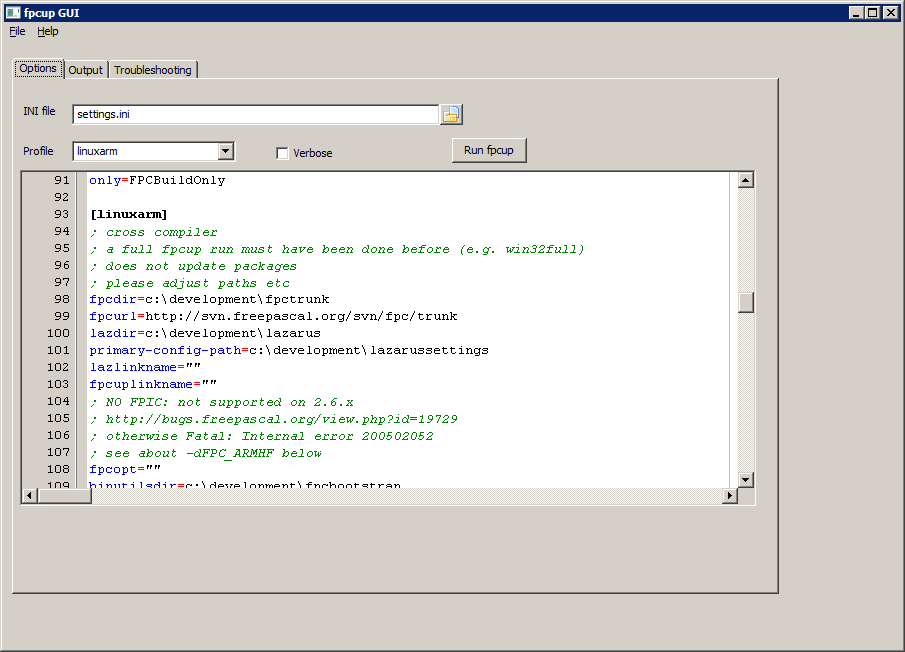](</File:fpcupgui.png>) | |
| 27 | + | ||
| 28 | + |  **Note:** Here is a confortable successor to fpcup | |
| 29 | + | ||
| 30 | + | * [[fpcupdeluxe]] | |
| 31 | + | ||
| 32 | + | ## Ready to run | |
| 33 | + | ||
| 34 | + | fpcup is ready to run out of the box. It will download and install FPC and Lazarus. On Windows, this directory layout is used: | |
| 35 | + | ``` | |
| 36 | + | C:\development\config_lazarus # Default primary-config-path directory | |
| 37 | + | # (contains Lazarus settings) | |
| 38 | + | C:\development\cross # Place to store cross compiling binutils and libs if wanted | |
| 39 | + | C:\development\extras # Third party modules (see fpcup.ini) such as fpcdocs | |
| 40 | + | C:\development\fpcbootstrap # Binutils (make.exe etc) and bootstrap compiler | |
| 41 | + | C:\development\fpc # FPC fixes 2.6 by default | |
| 42 | + | C:\development\lazarus # Lazarus trunk by default | |
| 43 | + | ``` | |
| 44 | + | ||
| 45 | + | On Linux/macOS/BSD, a similar layout is used under ~ (the user's home directory). | |
| 46 | + | ||
| 47 | + | fpcup will create a shortcut to the installed Lazarus on your desktop. | |
| 48 | + | ||
| 49 | + | Just run fpcup, e.g. on Windows: | |
| 50 | + | ``` | |
| 51 | + | fpcup | |
| 52 | + | ``` | |
| 53 | + | ||
| 54 | + | On UNIX: | |
| 55 | + | ``` | |
| 56 | + | #replace fpcup_linux_x86 with your actual fpcup filename of course if not on linux x86, e.g. 64-bit Linux or other variant | |
| 57 | + | ||
| 58 | + | chmod u+rx fpcup_linux_x86 | |
| 59 | + | #make executable (one time only action) | |
| 60 | + | ||
| 61 | + | ./fpcup_linux_x86 | |
| 62 | + | #run | |
| 63 | + | ``` | |
| 64 | + | ||
| 65 | + | Next time, you can either run the exact same command, or run the fpcup_update desktop shortcut or home directory shell script/batch file. | |
| 66 | + | ||
| 67 | + |  **Note:** fpcup is set up to compile FPC 3.0 fixes and Lazarus 1.4 fixes by default | |
| 68 | + | ||
| 69 | + | ## Documentation | |
| 70 | + | ||
| 71 | + | fpcup has | |
| 72 | + | ||
| 73 | + | * a -h option | |
| 74 | + | * a [readme.txt](<https://raw.githubusercontent.com/LongDirtyAnimAlf/Reiniero-fpcup/master/Readme.TXT>) | |
| 75 | + | ||
| 76 | + | See the [source code repository](<https://github.com/LongDirtyAnimAlf/Reiniero-fpcup>) for the latest readme.txt. | |
| 77 | + | ||
| 78 | + | To make it easier to get user contributions for documentation/tips, this wiki page has been created. Please feel free to add your own examples etc. | |
| 79 | + | ||
| 80 | + | ## Tips | |
| 81 | + | ||
| 82 | + | ### Anchordocking | |
| 83 | + | ||
| 84 | + | One way to enable anchordocking is by using settings.ini: open your settings file or add a new file `settings.ini` | |
| 85 | + | ``` | |
| 86 | + | [anchordocking] | |
| 87 | + | ; Just a plain install except enable anchordocking package | |
| 88 | + | anchordocking=1 | |
| 89 | + | ``` | |
| 90 | + | ||
| 91 | + | This will use default settings but also enable the anchordocking package in the IDE. | |
| 92 | + | ||
| 93 | + | Of course, you can use the anchordocking=1 module setting in any .ini section. | |
| 94 | + | ||
| 95 | + | You can also just run fpcup with just a single module: fpcup --only="anchordocking". | |
| 96 | + | ||
| 97 | + | ### Building only FPC | |
| 98 | + | ||
| 99 | + | You can build FPC without Lazarus if you want (or the other way round). The example below builds FPC from the fixes 2.6 SVN branch. | |
| 100 | + | ||
| 101 | + | #### Settings | |
| 102 | + | ||
| 103 | + | Open your settings file or add a new file, `settings.ini`: | |
| 104 | + | ``` | |
| 105 | + | [fixes26] | |
| 106 | + | ; FPC 2.6 fixes (no Lazarus): | |
| 107 | + | fpcdir=c:\development\fpcfixes26 | |
| 108 | + | ; replace e.g. with | |
| 109 | + | ; http://svn.freepascal.org/svn/fpc/trunk | |
| 110 | + | ; for FPC trunk | |
| 111 | + | fpcurl=http://svn.freepascal.org/svn/fpc/branches/fixes_2_6 | |
| 112 | + | ; Let's specify Lazarus info in case we ever want to add Lazarus | |
| 113 | + | lazdir=c:\development\lazarus12_fixes26 | |
| 114 | + | ; Just an example: build Lazarus 1.2 - if we're building Lazarus | |
| 115 | + | lazurl=http://svn.freepascal.org/svn/lazarus/tags/lazarus_1_2 | |
| 116 | + | primary-config-path=c:\development\configlazarus12_fixes26 | |
| 117 | + | ; If we ever build Lazarus, do create a link/shortcut: | |
| 118 | + | lazlinkname=lazarus12_fixes26 | |
| 119 | + | ; Do not create a batch file with shortcut | |
| 120 | + | fpcuplinkname="" | |
| 121 | + | ; We can use the binutils/bootstrap dirs that we usually use: | |
| 122 | + | binutilsdir=c:\development\fpcbootstrap | |
| 123 | + | fpcbootstrapdir=c:\development\fpcbootstrap | |
| 124 | + | ; Just install/update, no questions asked: | |
| 125 | + | noconfirm=true | |
| 126 | + | ; In case you want to submit patches, it's nice to be able to update | |
| 127 | + | ; without overwriting your fixes: | |
| 128 | + | keeplocalchanges=true | |
| 129 | + | ; Specify we only want FPC, not Lazarus | |
| 130 | + | ; in case of fpc patches FPCBuildOnly | |
| 131 | + | only=FPC,FPCCrossWin32-64 | |
| 132 | + | skip=helplazarus,lazarus,lazbuild,bigide,useride | |
| 133 | + | ``` | |
| 134 | + | ||
| 135 | + | Then get FPC and build it with: | |
| 136 | + | ``` | |
| 137 | + | fpcup --inifile=settings.ini --inisection=fixes26 | |
| 138 | + | ``` | |
| 139 | + | ||
| 140 | + | Now you can run your compiler: | |
| 141 | + | ``` | |
| 142 | + | c:\development\fpcfixes26\bin\i386-win32\fpc.exe -h | |
| 143 | + | ``` | |
| 144 | + | ||
| 145 | + | Cross-compile for win64, e.g.: | |
| 146 | + | ``` | |
| 147 | + | c:\development\fpcfixes26\bin\i386-win32\fpc.exe -Px86_64 yourfile.pas | |
| 148 | + | ``` | |
| 149 | + | ||
| 150 | + | ### Avoid lengthy lcl.chm documentation generation | |
| 151 | + | ||
| 152 | + | By default, fpcup tries to compile the `$(lazarusdir)\docs\chm\lcl.chm` Lazarus help file every day or so. This can take a long time due to the fpdoc tool being quite slow. | |
| 153 | + | ||
| 154 | + | You can avoid compiling lcl.chm by generating it one time (or copying over an existing file) and making the file read-only. | |
| 155 | + | ||
| 156 | + | ## OS-specific notes | |
| 157 | + | ||
| 158 | + | Specific notes for operating systems are given below if they are different from the general instructions. | |
| 159 | + | ||
| 160 | + | ### Running on Raspberry Pi Raspbian | |
| 161 | + | ||
| 162 | + | Open your settings file (e.g. `settings.ini` and include _at least_ these lines | |
| 163 | + | ``` | |
| 164 | + | ; ARMHF needs FPC >= 3.0; 2.6.x does not work (unless it is a patched version) | |
| 165 | + | fpcurl=http://svn.freepascal.org/svn/fpc/trunk | |
| 166 | + | ; if using armhf, you MUST specify -dFPC_ARMHF in the FPC options | |
| 167 | + | fpcopt="-dFPC_ARMHF -CaEABIHF -CpARMV6 -CfVFPV2" | |
| 168 | + | ``` | |
| 169 | + | ||
| 170 | + | ### Running on Windows 2000 | |
| 171 | + | ||
| 172 | + | Normally, fpcup tries to download an svn client if it cannot find an existing client. This client will not work on Windows 2000 due to missing libraries, so please download and install an svn command line client - such as SlikSVN 1.6.16. | |
| 173 | + | ||
| 174 | + | ## Cross compilers | |
| 175 | + | ||
| 176 | + | fpcup not only lets you install native FPC/Lazarus, but will also build cross compilers for you. | |
| 177 | + | ||
| 178 | + | First, you should have set up your normal FPC (and optionally Lazarus) using fpcup. Then you let fpcup generate the cross compiler. | |
| 179 | + | ||
| 180 | + | For most cross compilers, you do need to have the relevant binutils that are specific for the host<>target system (so not the normal binutils but cross binutils). | |
| 181 | + | ||
| 182 | + | Often, you will also need libraries in target system format if you want to compile programs (e.g. Linux Qt or Gtk libraries for the relevant CPU if you're crosscompiling for Linux). | |
| 183 | + | ||
| 184 | + | When you run a crosscompiler, fpcup briefly checks if it can find required binutils and libraries and will warn you if they can't be found. | |
| 185 | + | ||
| 186 | + | ### Status | |
| 187 | + | ||
| 188 | + | * Built in means no additional files are needed | |
| 189 | + | * Needs binutils/libs: means that you need to supply those (see above) | |
| 190 | + | * N/A: means non-applicable/impossible | |
| 191 | + | * No: means no plans to implement this. However, contributions are welcome, as always | |
| 192 | + | ||
| 193 | + | From\To | DOS | GO32v2 | Windows x86 | Windows x64 | Linux x64 | Linux x86 | Linux mipsel | Linux arm | Android ARM | FreeBSD x64 | FreeBSD x86 | macOS | AIX powerpc32 | |
| 194 | + | ---|---|---|---|---|---|---|---|---|---|---|---|---|--- | |
| 195 | + | Any | | | | | | needs binutils,libs | needs binutils,libs | needs binutils,libs | needs binutils,libs | | | | needs binutils,libs | |
| 196 | + | Windows x86 | needs FPC trunk, binutils | yes, built in | N/A | yes | needs binutils,libs | needs binutils,libs | see Any | see Any | | | | | See Any | |
| 197 | + | Windows x64 | no | no due to FPC limitations | needs FPC trunk | N/A | needs binutils,libs | needs binutils,libs | see Any | see Any | | | | | See Any | |
| 198 | + | Linux x64 | no | | yes, built in | yes, built in | N/A | | see Any | see Any | | no plans | no plans | | See Any | |
| 199 | + | Linux x86 | | | yes, built in | yes, built in | | N/A | see Any | see Any | | no plans | no plans | | See Any | |
| 200 | + | Linux mipsel | | | | | | | N/A | see Any | | | | | See Any | |
| 201 | + | Linux arm | | | | | | | see Any | N/A | | | | | See Any | |
| 202 | + | Android ARM | | | | | | | see Any | see Any | N/A | | | | See Any | |
| 203 | + | FreeBSD x64 | no | no plans | yes, built in | | | | see Any | see Any | | N/A | | | See Any | |
| 204 | + | FreeBSD x86 | | no plans | yes, built in | | | | see Any | see Any | | | N/A | | See Any | |
| 205 | + | macOS | | | verify | | | | see Any | see Any | | | | N/A | See Any | |
| 206 | + | ||
| 207 | + | (With thanks to [[FPSpreadsheet]]'s spreadsheet to wikitable conversion tool, see e.g. examples\fpsgrid) | |
| 208 | + | ||
| 209 | + | ### AIX PowerPC crosscompiler | |
| 210 | + | ||
| 211 | + | Once you have set up a regular FPC trunk/2.7.1 compiler, you can add an [[FPC AIX Port]] cross compiler. | |
| 212 | + | ||
| 213 | + | Limitations: | |
| 214 | + | ||
| 215 | + | * FPC trunk/2.7.1+ only | |
| 216 | + | * untested; don't have target platform libs (or access to target platform). Test reports welcome. | |
| 217 | + | ||
| 218 | + | #### Required files | |
| 219 | + | ||
| 220 | + | * Crossbinutils: see wiki article mentioned earlier. Win32 cross binutils are provided; for *nix, you have to compile your own. | |
| 221 | + | * Libs: copy over from target device; see wiki article as well. | |
| 222 | + | ||
| 223 | + | #### Settings | |
| 224 | + | ||
| 225 | + | Open your settings file or add a new file, settings.ini: | |
| 226 | + | ``` | |
| 227 | + | [aix] | |
| 228 | + | ; AIX on powerpc32 cross compiler. Also runs on 64 bit powerpc | |
| 229 | + | ; a full fpcup run must have been done before | |
| 230 | + | ; please adjust paths etc | |
| 231 | + | fpcdir=c:\development\fpctrunk | |
| 232 | + | fpcurl=http://svn.freepascal.org/svn/fpc/trunk | |
| 233 | + | fpcopt="" | |
| 234 | + | fpcuplinkname="" | |
| 235 | + | lazlinkname="" | |
| 236 | + | binutilsdir=c:\development\fpcbootstrap | |
| 237 | + | fpcbootstrapdir=c:\development\fpcbootstrap | |
| 238 | + | noconfirm=true | |
| 239 | + | keeplocalchanges=true | |
| 240 | + | cputarget=powerpc | |
| 241 | + | fpcopt="" | |
| 242 | + | crossopt="" | |
| 243 | + | ostarget=aix | |
| 244 | + | ; Perhaps best to always clean... can be removed for speed | |
| 245 | + | only=FPCCleanOnly,FPCBuildOnly | |
| 246 | + | skip=FPCGetOnly,lazbuild,bigide,useride | |
| 247 | + | ``` | |
| 248 | + | ||
| 249 | + | See also: | |
| 250 | + | ||
| 251 | + | * any (cross compiler) page about your device | |
| 252 | + | * your AIX documentation | |
| 253 | + | ||
| 254 | + | #### Creating and using the cross compiler | |
| 255 | + | ||
| 256 | + | Then generate the cross compiler with | |
| 257 | + | ``` | |
| 258 | + | fpcup --inifile=settings.ini --inisection=aix | |
| 259 | + | ``` | |
| 260 | + | ||
| 261 | + | If, like me, you don't have the libs from the target platform and run with `--verbose`, you'll see something like: | |
| 262 | + | ``` | |
| 263 | + | C:\development\cross\bin\powerpc-aix\powerpc-aix-ld.exe: cannot find \lib\crt0.o | |
| 264 | + | C:\development\cross\bin\powerpc-aix\powerpc-aix-ld.exe: cannot find -lm | |
| 265 | + | C:\development\cross\bin\powerpc-aix\powerpc-aix-ld.exe: cannot find -lc | |
| 266 | + | C:\development\cross\bin\powerpc-aix\powerpc-aix-ld.exe: cannot find -lbsd | |
| 267 | + | ``` | |
| 268 | + | ||
| 269 | + | If the compiler generation went ok, you can run a test compile, compiling a file test.pas with | |
| 270 | + | ||
| 271 | + | * option -CN: avoid reading for null pointers on AIX; see wiki article | |
| 272 | + | ||
| 273 | + | ``` | |
| 274 | + | fpc -Ppowerpc -Taix -CN test.pas | |
| 275 | + | ``` | |
| 276 | + | ||
| 277 | + | (your fpc.cfg will have been modified to add some settings when cross-compiling to Android ARM) | |
| 278 | + | ||
| 279 | + | ||
| 280 | + | ||
| 281 | + | ### Android ARM crosscompiler | |
| 282 | + | ||
| 283 | + | Once you have set up a regular FPC trunk/2.7.1 compiler, you can add an [[Android]] cross compiler. | |
| 284 | + | ||
| 285 | + | Limitations: | |
| 286 | + | ||
| 287 | + | * only tested on FPC trunk | |
| 288 | + | * only builds FPC cross compiler, Android does not have "regular" LCL support so not enabled | |
| 289 | + | * patches for getting customdrawn support going are welcome | |
| 290 | + | ||
| 291 | + | #### Required files | |
| 292 | + | ||
| 293 | + | Download the Android NDK (e.g. a file like android-sdk_r22.3-windows.zip) for your platform and extract the crossbinutils, e.g. from a path like | |
| 294 | + | ``` | |
| 295 | + | android-ndk-r9c\toolchains\arm-linux-androideabi-4.8\prebuilt\windows-x86_64\bin | |
| 296 | + | ``` | |
| 297 | + | ||
| 298 | + | The result is something _like_ these files (adjust for your platform etc): | |
| 299 | + | ``` | |
| 300 | + | arm-linux-androideabi-addr2line.exe | |
| 301 | + | arm-linux-androideabi-ar.exe | |
| 302 | + | arm-linux-androideabi-as.exe | |
| 303 | + | arm-linux-androideabi-c++.exe | |
| 304 | + | arm-linux-androideabi-c++filt.exe | |
| 305 | + | arm-linux-androideabi-cpp.exe | |
| 306 | + | arm-linux-androideabi-elfedit.exe | |
| 307 | + | arm-linux-androideabi-g++.exe | |
| 308 | + | arm-linux-androideabi-gcc-4.8.exe | |
| 309 | + | arm-linux-androideabi-gcc-ar.exe | |
| 310 | + | arm-linux-androideabi-gcc-nm.exe | |
| 311 | + | arm-linux-androideabi-gcc-ranlib.exe | |
| 312 | + | arm-linux-androideabi-gcc.exe | |
| 313 | + | arm-linux-androideabi-gcov.exe | |
| 314 | + | arm-linux-androideabi-gdb-orig.exe | |
| 315 | + | arm-linux-androideabi-gdb.exe | |
| 316 | + | arm-linux-androideabi-gprof.exe | |
| 317 | + | arm-linux-androideabi-ld.bfd.exe | |
| 318 | + | arm-linux-androideabi-ld.exe | |
| 319 | + | arm-linux-androideabi-ld.gold.exe | |
| 320 | + | arm-linux-androideabi-ld.mcld.exe | |
| 321 | + | arm-linux-androideabi-nm.exe | |
| 322 | + | arm-linux-androideabi-objcopy.exe | |
| 323 | + | arm-linux-androideabi-objdump.exe | |
| 324 | + | arm-linux-androideabi-ranlib.exe | |
| 325 | + | arm-linux-androideabi-readelf.exe | |
| 326 | + | arm-linux-androideabi-size.exe | |
| 327 | + | arm-linux-androideabi-strings.exe | |
| 328 | + | arm-linux-androideabi-strip.exe | |
| 329 | + | ``` | |
| 330 | + | ||
| 331 | + | Put these files in your cross binutils directory for the right platform - e.g. on a standard Windows fpcup install: | |
| 332 | + | ``` | |
| 333 | + | C:\development\cross\bin\arm-android | |
| 334 | + | ``` | |
| 335 | + | ||
| 336 | + | Libs: extract the libs from a path like | |
| 337 | + | ``` | |
| 338 | + | android-ndk-r9c\platforms\android-19\arch-arm\usr\lib | |
| 339 | + | ``` | |
| 340 | + | ||
| 341 | + | into | |
| 342 | + | ``` | |
| 343 | + | C:\development\cross\lib\arm-android | |
| 344 | + | ``` | |
| 345 | + | ||
| 346 | + | The libs in question can be _like_ this list: | |
| 347 | + | ``` | |
| 348 | + | crtbegin_dynamic.o | |
| 349 | + | crtbegin_so.o | |
| 350 | + | crtbegin_static.o | |
| 351 | + | crtend_android.o | |
| 352 | + | crtend_so.o | |
| 353 | + | libandroid.so | |
| 354 | + | libc.a | |
| 355 | + | libc.so | |
| 356 | + | libdl.so | |
| 357 | + | libEGL.so | |
| 358 | + | libGLESv1_CM.so | |
| 359 | + | libGLESv2.so | |
| 360 | + | libGLESv3.so | |
| 361 | + | libjnigraphics.so | |
| 362 | + | liblog.so | |
| 363 | + | libm.a | |
| 364 | + | libm.so | |
| 365 | + | libm_hard.a | |
| 366 | + | libOpenMAXAL.so | |
| 367 | + | libOpenSLES.so | |
| 368 | + | libstdc++.a | |
| 369 | + | libstdc++.so | |
| 370 | + | libthread_db.so | |
| 371 | + | libz.so | |
| 372 | + | rs | |
| 373 | + | ``` | |
| 374 | + | ||
| 375 | + | #### Settings | |
| 376 | + | ||
| 377 | + | Open your settings file or add a new file, settings.ini: | |
| 378 | + | ``` | |
| 379 | + | [android] | |
| 380 | + | ; Android ARM cross compiler | |
| 381 | + | ; a full fpcup run must have been done before | |
| 382 | + | ; please adjust paths etc | |
| 383 | + | fpcdir=c:\development\fpctrunk | |
| 384 | + | fpcurl=http://svn.freepascal.org/svn/fpc/trunk | |
| 385 | + | fpcopt="" | |
| 386 | + | fpcuplinkname="" | |
| 387 | + | lazlinkname="" | |
| 388 | + | binutilsdir=c:\development\fpcbootstrap | |
| 389 | + | fpcbootstrapdir=c:\development\fpcbootstrap | |
| 390 | + | cputarget=arm | |
| 391 | + | ostarget=android | |
| 392 | + | ; You can specify exact instruction set and floating point support etc: | |
| 393 | + | crossopt="-CpARMV7 -CfVFPV3" | |
| 394 | + | ; ... or something more conservative/compatible: | |
| 395 | + | ;crossopt="-CpARMV6" | |
| 396 | + | verbose=0 | |
| 397 | + | ; We only need an FPC here; assume FPC has been updated by regular update | |
| 398 | + | only=FPCBuildOnly | |
| 399 | + | ; No LCL support on Android yet | |
| 400 | + | ``` | |
| 401 | + | ||
| 402 | + | See also: | |
| 403 | + | ||
| 404 | + | * [[ARM compiler options]] | |
| 405 | + | * any (cross compiler) page about your device | |
| 406 | + | * your ARM device documentation | |
| 407 | + | ||
| 408 | + | #### Creating and using the cross compiler | |
| 409 | + | ||
| 410 | + | Then generate the cross compiler with | |
| 411 | + | ``` | |
| 412 | + | fpcup --inifile=settings.ini --inisection=android | |
| 413 | + | ``` | |
| 414 | + | ||
| 415 | + | Now you can run a test compile, compiling a file test.pas with | |
| 416 | + | ``` | |
| 417 | + | fpc -Parm -Tandroid test.pas | |
| 418 | + | ``` | |
| 419 | + | ||
| 420 | + | (your fpc.cfg will have been modified to add some settings when cross-compiling to Android ARM) | |
| 421 | + | ||
| 422 | + | ### Linux ARM cross compiler | |
| 423 | + | ||
| 424 | + | Once you have set up a regular FPC compiler, you can add a Linux on ARM cross compiler (e.g. for a Raspbian/Raspberry Pi). | |
| 425 | + | ||
| 426 | + | #### Required files | |
| 427 | + | ||
| 428 | + | * Linux/Unix build or install the relevant crossbinutils (Linux, unix) | |
| 429 | + | * Windows: download the binutils from <http://svn2.freepascal.org/svn/fpcbuild/binaries/i386-win32> (the files starting with arm-linux-) Put them into | |
| 430 | + | ``` | |
| 431 | + | C:\development\cross\bin\arm-linux | |
| 432 | + | ``` | |
| 433 | + | ||
| 434 | + | On Windows, the result is something _like_ these files (adjust for your platform etc): | |
| 435 | + | ``` | |
| 436 | + | arm-linux-addr2line.exe | |
| 437 | + | arm-linux-ar.exe | |
| 438 | + | arm-linux-as.exe | |
| 439 | + | arm-linux-ld.exe | |
| 440 | + | arm-linux-objcopy.exe | |
| 441 | + | arm-linux-objdump.exe | |
| 442 | + | arm-linux-strip.exe | |
| 443 | + | ``` | |
| 444 | + | ||
| 445 | + | Libs: extract the libs from your device - e.g. this on Raspbian: | |
| 446 | + | ||
| 447 | + | * all .so files in /lib | |
| 448 | + | * all .so files in /usr/lib | |
| 449 | + | * all .so files in /usr/lib/arm-linux-gnueabihf | |
| 450 | + | ||
| 451 | + | Note: some .so files are actually scripts; check | |
| 452 | + | ``` | |
| 453 | + | grep -i "ld script" * | |
| 454 | + | ``` | |
| 455 | + | ||
| 456 | + | Remove those .so and copy over (or symlink) the files the script point to (e.g. .so.x files) to .so so that the linker can find them | |
| 457 | + | ||
| 458 | + | Examples: | |
| 459 | + | ||
| 460 | + | * libpthread.so | |
| 461 | + | * libc.so | |
| 462 | + | * libgcc_s.so | |
| 463 | + | ||
| 464 | + | Put the libs into your cross lib path, e.g. on Windows | |
| 465 | + | ``` | |
| 466 | + | C:\development\cross\lib\arm-linux | |
| 467 | + | ``` | |
| 468 | + | ||
| 469 | + | #### Settings | |
| 470 | + | ||
| 471 | + | Open your settings file or add a new file, settings.ini. | |
| 472 | + | ||
| 473 | + | As you can see in the comments below, you can build an ARMHF cross-compiler which works on e.g. Raspbian, requires an FPU and requires ARMHF libraries, but only on FPC 2.7+. | |
| 474 | + | ``` | |
| 475 | + | [linuxarm] | |
| 476 | + | ; a full fpcup run must have been done before (e.g. win32full) | |
| 477 | + | ; does not update packages | |
| 478 | + | ; please adjust paths etc | |
| 479 | + | fpcdir=c:\development\fpctrunk | |
| 480 | + | fpcurl=http://svn.freepascal.org/svn/fpc/trunk | |
| 481 | + | lazdir=lazdir=c:\development\lazarus | |
| 482 | + | primary-config-path=c:\development\lazarussettings | |
| 483 | + | lazlinkname="" | |
| 484 | + | fpcuplinkname="" | |
| 485 | + | ; NO FPIC: not supported on 2.6.x | |
| 486 | + | ; http://bugs.freepascal.org/view.php?id=19729 | |
| 487 | + | ; otherwise Fatal: Internal error 200502052 | |
| 488 | + | ; If using -CaEABIHF in crossopt, specify -dFPC_ARMHF here (only works on 2.7.x) | |
| 489 | + | ; more info see below | |
| 490 | + | fpcopt="" | |
| 491 | + | binutilsdir=c:\development\fpcbootstrap | |
| 492 | + | fpcbootstrapdir=c:\development\fpcbootstrap | |
| 493 | + | noconfirm=true | |
| 494 | + | keeplocalchanges=true | |
| 495 | + | cputarget=arm | |
| 496 | + | ; if using armhf, you MUST specify -dFPC_ARMHF in the FPC options; | |
| 497 | + | ; specifying in crossopt is not enough. | |
| 498 | + | ; -fPIC not supported on FPC 2.6.x, only on 2.7.x; | |
| 499 | + | fpcopt="-dFPC_ARMHF" | |
| 500 | + | ||
| 501 | + | ; safe default but slow: | |
| 502 | + | ;crossopt="-CpARMV6 -CaEABI -CfSOFT" | |
| 503 | + | ||
| 504 | + | ; Raspbian for Raspberry Pi safe | |
| 505 | + | ; ARMv6 instruction set | |
| 506 | + | ; if using arm hf (hard float/floating point), please specify -dFPC_ARMHF | |
| 507 | + | ; copy over /lib, /usr/lib | |
| 508 | + | ; /usr/lib/arm-linux-gnueabihf (Raspbian) => note: | |
| 509 | + | ; some .so files are actually scripts; check | |
| 510 | + | ; grep -i "ld script" * | |
| 511 | + | ; Remove those .so and copy over (or symlink) the .so.x to .so in order for the linker to find them | |
| 512 | + | ; Examples: | |
| 513 | + | ; libpthread.so | |
| 514 | + | ; libc.so | |
| 515 | + | ; libgcc_s.so | |
| 516 | + | ; to cross lib dir (try compiling and keep copying until no errors left) | |
| 517 | + | ; Note: -CpARMV6Z parameter not supported on 2.6.x, only on 2.7.x | |
| 518 | + | ; Note: -CaEABIHF parameter not supported on 2.6.x, only on 2.7.x | |
| 519 | + | ; Note: don't use -fPIC; will give segmentation fault | |
| 520 | + | crossopt="-CaEABIHF -CpARMV6 -CfVFPV2" | |
| 521 | + | ||
| 522 | + | ; beagleboard black with hardfloat: | |
| 523 | + | ; if using armhf, also specify -dFPC_ARMHF (in fpcopt) to avoid gtk scrollbar errors | |
| 524 | + | ; Note: -CaEABIHF not supported on 2.6.x, only on 2.7.x | |
| 525 | + | ;crossopt="-CaEABIHF -Cparmv7 -CfVFPv3" | |
| 526 | + | ostarget=linux | |
| 527 | + | ; Only build FPC | |
| 528 | + | only=FPCCleanOnly,FPCBuildOnly | |
| 529 | + | skip=FPCGetOnly,lazbuild,bigide,useride | |
| 530 | + | ``` | |
| 531 | + | ||
| 532 | + | See also: | |
| 533 | + | ||
| 534 | + | * [[ARM compiler options]] | |
| 535 | + | * any (cross compiler) page about your device | |
| 536 | + | * your ARM device documentation | |
| 537 | + | ||
| 538 | + | #### Creating and using the cross compiler | |
| 539 | + | ||
| 540 | + | Then generate the cross compiler with | |
| 541 | + | ``` | |
| 542 | + | fpcup --inifile=settings.ini --inisection=linuxarm | |
| 543 | + | ``` | |
| 544 | + | ||
| 545 | + | Now you can run a test compile, compiling a file test.pas with | |
| 546 | + | ``` | |
| 547 | + | fpc -Parm -Tlinux test.pas | |
| 548 | + | ``` | |
| 549 | + | ||
| 550 | + | (your fpc.cfg will have been modified to add some settings when cross-compiling to Android ARM) | |
| 551 | + | ||
| 552 | + | ### Linux i386 cross | |
| 553 | + | ||
| 554 | + | On an x64 Linux system (or any system with support for i386 Linux libraries/cross binutils), once you have set up a regular FPC compiler, you can add a Linux i386 cross compiler. | |
| 555 | + | ||
| 556 | + | #### Required files | |
| 557 | + | ||
| 558 | + | * Linux | |
| 559 | + | * build or install the relevant crossbinutils | |
| 560 | + | * build or install the relevant i386 libraries for your code (e.g. libc) | |
| 561 | + | * other systems: not tested yet | |
| 562 | + | ||
| 563 | + | #### Settings | |
| 564 | + | ||
| 565 | + | Open your settings file or add a new file, settings.ini. | |
| 566 | + | ``` | |
| 567 | + | [linuxi386] | |
| 568 | + | ; a full fpcup run must have been done before | |
| 569 | + | ; does not update packages | |
| 570 | + | ; please adjust paths etc | |
| 571 | + | fpcdir=~/development/fpctrunk | |
| 572 | + | fpcopt="" | |
| 573 | + | fpcurl=http://svn.freepascal.org/svn/fpc/trunk | |
| 574 | + | lazdir=lazdir=~/development/lazarus | |
| 575 | + | primary-config-path=~/development/lazarussettings | |
| 576 | + | lazlinkname="" | |
| 577 | + | fpcuplinkname="" | |
| 578 | + | fpcbootstrapdir=~/development/fpcbootstrap | |
| 579 | + | noconfirm=true | |
| 580 | + | keeplocalchanges=true | |
| 581 | + | cputarget=i386 | |
| 582 | + | ostarget=linux | |
| 583 | + | only=FPCCleanOnly,FPCBuildOnly | |
| 584 | + | skip=FPCGetOnly,lazbuild,bigide,useride | |
| 585 | + | ``` | |
| 586 | + | ||
| 587 | + | ||
| 588 | + | ||
| 589 | + | #### Creating and using the cross compiler | |
| 590 | + | ||
| 591 | + | Then generate the cross compiler with | |
| 592 | + | ``` | |
| 593 | + | fpcup --inifile=settings.ini --inisection=linuxi386 | |
| 594 | + | ``` | |
| 595 | + | ||
| 596 | + | Now you can run a test compile, compiling a file test.pas with | |
| 597 | + | ``` | |
| 598 | + | fpc -Pi386 -Tlinux test.pas | |
| 599 | + | ``` | |
| 600 | + | ||
| 601 | + | (your fpc.cfg will have been modified to add some settings when cross-compiling to Android ARM) | |
| 602 | + | ||
| 603 | + | ### DOS crosscompiler | |
| 604 | + | ||
| 605 | + | Using 32 bit fpcup.exe on Windows, once you have set up a regular FPC trunk/2.7.1 compiler, you can add a [[DOS]] cross compiler. | |
| 606 | + | ||
| 607 | + | #### Required files | |
| 608 | + | ||
| 609 | + | Download the required binaries as mentioned in [[DOS]], currently: | |
| 610 | + | ``` | |
| 611 | + | msdos-nasm.exe | |
| 612 | + | msdos-wlib.exe | |
| 613 | + | msdos-wlink.exe | |
| 614 | + | nasm.exe | |
| 615 | + | wlibd.dll | |
| 616 | + | wlinkd.dll | |
| 617 | + | wlsystem.lnk | |
| 618 | + | ``` | |
| 619 | + | ||
| 620 | + | and put them in your cross binutils directory for the right platform - e.g. on a standard Windows fpcup install: | |
| 621 | + | ``` | |
| 622 | + | c:\development\cross\bin\i8086-msdos | |
| 623 | + | ``` | |
| 624 | + | ||
| 625 | + | There are no files needed in the corresponding library directory, | |
| 626 | + | ``` | |
| 627 | + | C:\development\cross\lib\i8086-msdos | |
| 628 | + | ``` | |
| 629 | + | ||
| 630 | + | #### Settings | |
| 631 | + | ||
| 632 | + | Open your settings file or add a new file, settings.ini: | |
| 633 | + | ``` | |
| 634 | + | [dos] | |
| 635 | + | ; dos cross compiler | |
| 636 | + | ; a full fpcup run must have been done before | |
| 637 | + | ; please adjust paths etc | |
| 638 | + | fpcdir=c:\development\fpctrunk | |
| 639 | + | fpcurl=http://svn.freepascal.org/svn/fpc/trunk | |
| 640 | + | fpcopt="" | |
| 641 | + | fpcuplinkname="" | |
| 642 | + | lazlinkname="" | |
| 643 | + | binutilsdir=c:\development\fpcbootstrap | |
| 644 | + | fpcbootstrapdir=c:\development\fpcbootstrap | |
| 645 | + | cputarget=i8086 | |
| 646 | + | ostarget=msdos | |
| 647 | + | verbose=0 | |
| 648 | + | ; We only need an FPC here; assume FPC has been updated by regular update | |
| 649 | + | only=FPCBuildOnly | |
| 650 | + | ``` | |
| 651 | + | ||
| 652 | + | #### Creating and using the cross compiler | |
| 653 | + | ||
| 654 | + | Then generate the cross compiler with | |
| 655 | + | ``` | |
| 656 | + | fpcup --inifile=settings.ini --inisection=dos | |
| 657 | + | ``` | |
| 658 | + | ||
| 659 | + | Now you can run a test compile, compiling a file test.pas with | |
| 660 | + | ``` | |
| 661 | + | fpc -Pi8086 -TMSDOS test.pas | |
| 662 | + | ``` | |
| 663 | + | ||
| 664 | + | (your fpc.cfg will have been modified to use DOS medium memory model, smartlinking etc) | |
| 665 | + | ||
| 666 | + | ## Download | |
| 667 | + | ||
| 668 | + | The current maintained version can be found at: <https://github.com/LongDirtyAnimAlf/Reiniero-fpcup> | |
| 669 | + | ||
| 670 | + | The original site is at: <https://bitbucket.org/reiniero/fpcup/downloads> (not maintained at the moment) | |
| 671 | + | ||
| 672 | + | [](</File:Warning-icon.png>) | |
| 673 | + | ||
| 674 | + | **Warning:** Windows users, please download the 32 bit fpcup version even if you are on 64 bit Windows unless you know what you are doing. See [[Windows Programming Tips|this warning about FPC 2.6.x x64.]] | |
| 675 | + | ||
| 676 | + | ## License | |
| 677 | + | ||
| 678 | + | fpcup is open source software released under the LGPL with linking exception (same as FreePascal/LCL). | |
| 679 | + | ||
| 680 | + | ## Troubleshooting | |
| 681 | + | ||
| 682 | + | When you hit errors with fpcup: | |
| 683 | + | ||
| 684 | + | * RTFM (read the fine manual) | |
| 685 | + | * If compiling Lazarus, make sure lazarus and lhelp are not running. | |
| 686 | + | * If you have a working Lazarus, run Tools > Rescan FPC Source Directory | |
| 687 | + | * Try running fpcup with `--verbose` (look for fpcup: error etc) to see what's going on exactly. | |
| 688 | + | * Look into the error message fpcup generates; it also shows some troubleshooting steps you may perform. | |
| 689 | + | * Sometimes, the FPC or Lazarus build process leaves incorrect files; you can (e.g. with fpcupgui) delete all .ppu files from your FPC and Lazarus directories (including subdirectories) and run fpcup again. | |
| 690 | + | * Try removing all intermediate files by running fpcup with the `--clean` option | |
| 691 | + | * fpcup is a wrapper around svn/make/lazbuild etc. It cannot fix errors in those underlying systems. The svn information/database in your (fpc, lazarus, external modules) directory may be corrupted. Try a manual `svn up` to update and fix any error messages first (e.g. running `svn cleanup`). | |
| 692 | + | * Try running | |
| 693 | + | ``` | |
| 694 | + | svn revert THEDIRECTORY --recursive | |
| 695 | + | ``` | |
| 696 | + | ||
| 697 | + | followed by | |
| 698 | + | ``` | |
| 699 | + | svn update THEDIRECTORY | |
| 700 | + | ``` | |
| 701 | + | ||
| 702 | + | for your Lazarus and FPC directories to remove local modifications, if any. | |
| 703 | + | * Remove possible stale files: | |
| 704 | + | * the bootstrap compiler and any binutils: remove all files and directories in the fpcbootstrap directory | |
| 705 | + | * if you haven't modified fpcup.ini, remove it and let fpcup regenerate it | |
| 706 | + | * same for settings.ini | |
| 707 | + | * same for fpc.cfg in $(fpcdir)\bin\<architecture> | |
| 708 | + | * same for your Lazarus primary config path/configuration directory | |
| 709 | + | * See if there's a newer fpcup version available that may have fixed your problem | |
| 710 | + | ||
| 711 | + | If the steps before do not work: you can use the `--uninstall` option to remove all files including your FPC and Lazarus directories, then run fpcup with the same commands. | |
| 712 | + | ||
| 713 | + |  **Note:** Of course, errors introduced in FPC and Lazarus source code/repository may also influence builds. There's nothing fpcup can do to fix incorrect code breaking the build. However, some of the steps mentioned above (deleting .ppu files, fpc.cfg, Lazarus config) may fix Lazarus/FPC build problems.. | |
| 714 | + | ||
| 715 | + | ## Known issues | |
| 716 | + | ||
| 717 | + | Known issues can be found in the issue tracker: [https://bitbucket.org/reiniero/fpcup/issues?status=new&status=open](<https://bitbucket.org/reiniero/fpcup/issues?status=new&status=open>) | |
| 718 | + | ||
| 719 | + | ### No rule to make target ... | |
| 720 | + | ||
| 721 | + | If you see errrors like `make.exe: *** No rule to make target `all'. Stop.` on Windows, this may be caused by an invalid make version. Make sure you're using the right make.exe version. | |
| 722 | + | ||
| 723 | + | FPC 2.6.x needs make 3.80 (distributed with FPC 2.6.x) | |
| 724 | + | ||
| 725 | + | FPC 2.7.1+ needs at least make 3.82 (packet name "remake" at the debian repo) (distributed with e.g. Lazarus 1.2.4) | |
| 726 | + | ||
| 727 | + | ### Strange errors running clean/distclean | |
| 728 | + | ||
| 729 | + | This is a symptom of issues with the FPC build system (not fpcup). | |
| 730 | + | ||
| 731 | + | On Windows, make 3.80 which is distributed with FPC 2.6.x has problems when there are spaces in your path. This may lead to strange error messages when cleaning. | |
| 732 | + | ||
| 733 | + | FPC 2.6.x needs make 3.80 (distributed with FPC 2.6.x) | |
| 734 | + | ||
| 735 | + | FPC 2.7.1+ needs at least make 3.82 (distributed with e.g. Lazarus 1.2.4) | |
| 736 | + | ||
| 737 | + | ### Info: Error running fpcup. Technical details: error executing sequence helplazarus; line: 4, param: helplazarus | |
| 738 | + | ||
| 739 | + | HelpLazarus is often the first module that will be built after building lazbuild and the other core IDE units. However, the actual problem may be that lazbuild itself was not generated due to an error. Try running with `--verbose` to pinpoint where the problem is and follow the troubleshooting steps above. | |
| 740 | + | ||
| 741 | + | ### Error finding (e.g.) system.ppu when compiling with FPC/Lazarus | |
| 742 | + | ||
| 743 | + | First try running Tools > Rescan FPC Source Directory. Normally, Lazarus does this automatically, in the background but if you are too fast it won't have finished in time. | |
| 744 | + | ||
| 745 | + | Errors like this may also be caused by an fpc.cfg from an older/different version of FPC that remains in your fpc/bin/<platform> directory. Because you can customise fpc.cfg, fpcup will not just replace it. | |
| 746 | + | ||
| 747 | + | If you have not customised fpc.cfg, you can remove it and let fpcup regenerate it when rebuilding FPC. | |
| 748 | + | ||
| 749 | + | ## Support and bug reporting | |
| 750 | + | ||
| 751 | + | Please post support requests on the forum so other users can help you. | |
| 752 | + | ||
| 753 | + | Please report fpcup bugs on the bug tracker <https://bitbucket.org/reiniero/fpcup/issues> | |
| 754 | + | ||
| 755 | + | If you report bugs, **after** running the troubleshooting steps above, please be sure to mention: | |
| 756 | + | ||
| 757 | + | 1. operating system | |
| 758 | + | 2. fpcup version (as printed in its output) | |
| 759 | + | 3. description of what went wrong/error message | |
| 760 | + | 4. run fpcup with the `--verbose --noconfirm` arguments (or the equivalents in settings.ini) as well as the other arguments you used, redirect the output to file, and attach the file, e.g.: | |
| 761 | + | ``` | |
| 762 | + | fpcup --verbose --noconfirm > fpcupverbose.txt | |
| 763 | + | ``` | |
| 764 | + | ||
| 765 | + | . | |
| 766 | + | ||
| 767 | + | ## Supported platforms | |
| 768 | + | ||
| 769 | + | * Support for Windows 2000-7 (Windows 8: untested, probably works). Bare metal install currently needs Windows XP or later for the subversion client. On Windows 2000, manually installing a subversion client (e.g. SlikSVN 1.6.16) in advance will work. | |
| 770 | + | * Linux x86: works | |
| 771 | + | * Linux x64: works | |
| 772 | + | * Linux ARMHF: lightly tested; seems to work | |
| 773 | + | * macOS 10.?: lightly tested; seems to work | |
| 774 | + | * FreeBSD 9: lightly tested; seems to work | |
| 775 | + | ||
| 776 | + | fpcup can be compiled on all platforms that support Lazarus+[[Synapse]] | |
| 777 | + | ||
| 778 | + | ## Changelog | |
| 779 | + | ||
| 780 | + | This log tracks fpcup development. Note that not all binaries on the download page may be updated at the same time; fpcup prints a version string at the beginning which you can check. | |
| 781 | + | ||
| 782 | + | The commit log is located at <https://github.com/LongDirtyAnimAlf/Reiniero-fpcup/commits/master> | |
| 783 | + | ||
| 784 | + | ## External links | |
| 785 | + | ||
| 786 | + | * [Original project page - No longer available](<https://bitbucket.org/reiniero/fpcup>) | |
| 787 | + | * [Updated Repository](<https://github.com/LongDirtyAnimAlf/Reiniero-fpcup>) | |
| 788 | + | * [Binary downloads for several platforms](<https://github.com/LongDirtyAnimAlf/Reiniero-fpcup/tree/master/bin>) | |
| 789 | + | * [Additional install scripts](<https://github.com/LongDirtyAnimAlf/Reiniero-fpcup/tree/master/bin/i386-win32>) | |
| 790 | + | * [BlackDuck OpenHub/Ohloh code statistics](<https://www.openhub.net/p/fpcup>) | |
| 791 | + | ||
| 792 | + | ## See also | |
| 793 | + | ||
| 794 | + | * [[Installing Lazarus]] Official way to install Lazarus | |
| 795 | + | * [[Lazarus Manager]] Another installer for Lazarus/FPC | |
| 796 | + | * [[Small Virtual Machines]] See fpcup used in two virtual machines | |
| 797 | + | ||
| 798 | + | --- | |
| 799 | + | *From the Free Pascal wiki, page "fpcup", as the Internet Archive kept it on 2025-06-16, last changed on 2023-11-07. Copyright stays with the author who wrote it, according to the old wiki's [[Licensing]] page. If you have concerns about this material, [message the admin](/wiki-contact).* |