

fpCEF3: what changed
Revision 1 to 2. Removed lines have a minus sign; added lines have a plus sign.
| Old | New | Line | |
|---|---|---|---|
| 1 | 1 | ## Description | |
| 2 | 2 | ||
| 3 | - | ||
| 3 | + | 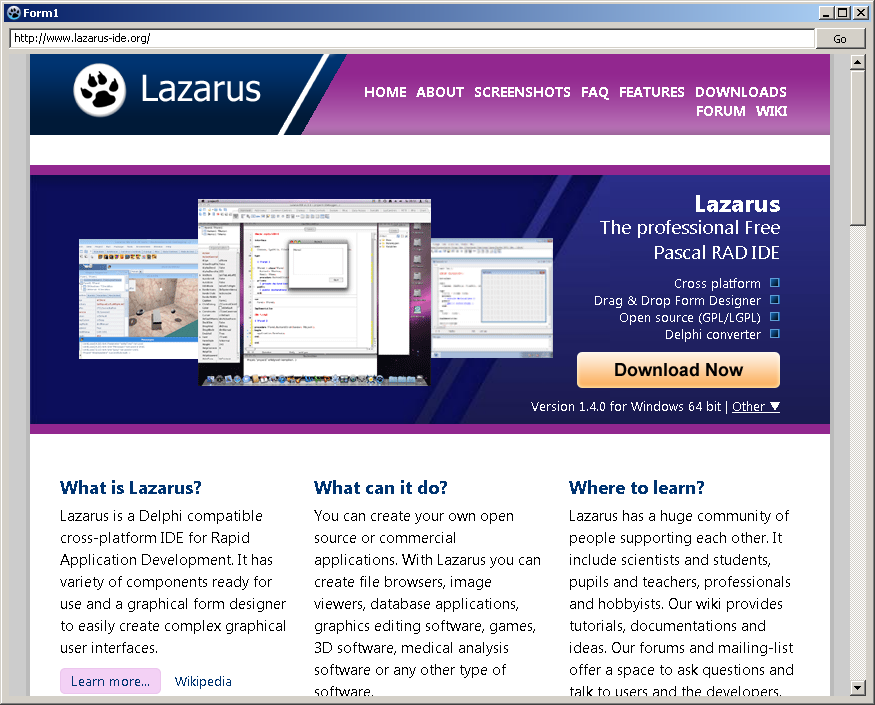 | |
| 4 | 4 | ||
| 5 | 5 | Chromium is an open source project (from Google) to create a browser for different platforms. Among other things the browser Chrome is based on it. | |
| 6 | 6 | ||
| 7 | 7 | The Chromium Embedded Framework (CEF) is an open source framework for embedding Chromium into user applications. It can be used on Linux, macOS and Windows in 32 and 64 bit versions. Originally there were two versions of CEF, CEF1 and CEF3, but CEF1 is no longer maintained. | |
| 8 | 8 | ||
| 9 | 9 | CEF can be used in Delphi via the Delphi Chromium Embedded Framework (DCEF3). For Lazarus/Free Pascal there is the equivalent framework [fpCEF3](https://github.com/dliw/fpCEF3) (or alternative [CEF4Delphi](https://github.com/salvadordf/CEF4Delphi) with examples for Lazarus including newest versions of Chromium Embedded Framework). | |
| 10 | 10 | ||
| 11 | 11 | ## Installation | |
| 12 | 12 | ||
| 13 | 13 | Besides the Lazarus package, the CEF framework itself is needed. It is important to use the correct version of the CEF framework for the fpCEF release used. Further specific installation instructions can be found on Github: [<https://github.com/dliw/fpCEF3>](https://github.com/dliw/fpCEF3) | |
| 14 | 14 | ||
| 15 | 15 | The latest release and its corresponding CEF version can be found on [1](https://github.com/dliw/fpCEF3/releases/latest) | |
| 16 | 16 | ||
| 17 | 17 | CEF releases can be found on <https://cef-builds.spotifycdn.com/index.html> (use the version filter or click "Show more builds" to find the release) | |
| 18 | 18 | ||
| 19 | 19 | ### Download Package | |
| 20 | 20 | ||
| 21 | 21 | fpCEF3 with [Git](http://git-scm.com/) | |
| 22 | 22 | ||
| 23 | 23 | [`git://github.com/dliw/fpCEF3.git`](git://github.com/dliw/fpCEF3.git) | |
| 24 | 24 | ||
| 25 | 25 | You can also download a zipped package: | |
| 26 | 26 | ||
| 27 | 27 | [`master.zip`](https://github.com/dliw/fpCEF3/archive/master.zip) | |
| 28 | 28 | ||
| 29 | 29 | ### Package Installation | |
| 30 | 30 | ||
| 31 | 31 | 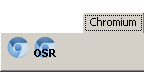 | |
| 32 | 32 | ||
| 33 | 33 | After downloading of package fpCEF3, it can be installed in Lazarus: | |
| 34 | 34 | ||
| 35 | 35 | - Start Lazarus and open main menu *Package* -\> *Open package file (.lpk)...* | |
| 36 | 36 | - Select the file *cef3.lpk* in the fpCEF3 subdirectory *Component* | |
| 37 | 37 | - The package editing window will open | |
| 38 | 38 | - Click on *Compile*, the package will be compiled | |
| 39 | 39 | - Click on *Use...*-\> *Install* and confirm the dialog window with *Yes* | |
| 40 | 40 | - Lazarus is now compiling and create a new tab *Chromium* in the component palette | |
| 41 | 41 | ||
| 42 | 42 | ### Download Framework CEF3 | |
| 43 | 43 | ||
| 44 | 44 | You can now download the framework and made the libraries available for a particular project. You can download it from the following pages:\ | |
| 45 | 45 | [<https://cefbuilds.com>](https://cefbuilds.com)\ | |
| 46 | 46 | [<http://www.magpcss.net/cef_downloads>](http://www.magpcss.net/cef_downloads) (or a older version from [here](http://www.magpcss.net/cef_downloads/index.php?query=label%3ADeprecated#list)) | |
| 47 | 47 | ||
| 48 | 48 | > **Note:** Make sure to use the correct framework version for the fpCEF version! See Installation | |
| 49 | 49 | ||
| 50 | 50 | ## Usage | |
| 51 | 51 | ||
| 52 | 52 | ### Minimal example | |
| 53 | 53 | ||
| 54 | 54 | A minimal example with a simple browser is created. | |
| 55 | 55 | ||
| 56 | 56 | #### Windows | |
| 57 | 57 | ||
| 58 | 58 | The CEF libraries are needed for loading, so it makes sense to create a new project folder, to save the project and the libraries in it together. | |
| 59 | 59 | ||
| 60 | 60 | - Create a new directory for the project to a location of your choice such as *C:\SimpleBrowser* | |
| 61 | 61 | - Copy the complete CEF3 directory *Resources* to *C:\SimpleBrowser* | |
| 62 | 62 | - Copy the contents of the CEF3 directory *Release* in the directory *C:\SimpleBrowser* | |
| 63 | 63 | ||
| 64 | 64 | The files (*libcef.dll*, *natives_blob.bin*, *icudtl.dat* etc.) are in the same directory as the project and the directory *locales* in *C:\SimpleBrowser\locales*.\ | |
| 65 | 65 | To prevent misunderstands, here is a picture how the file and directory structure of the Simplebrowser should look:\ | |
| 66 | 66 | ||
| 67 | 67 | 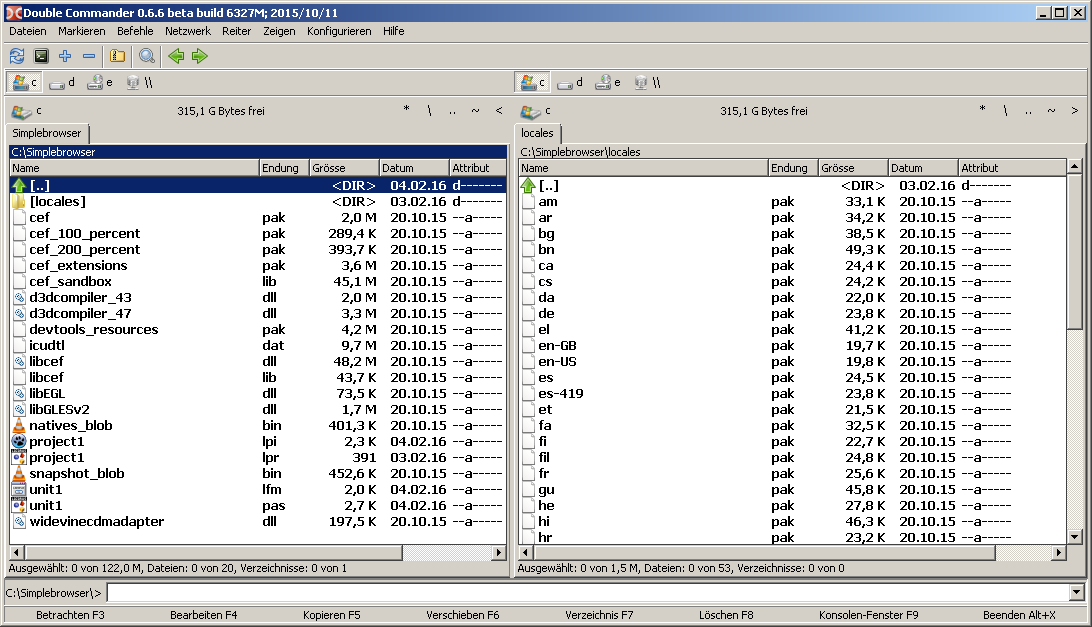\ | |
| 68 | 68 | ||
| 69 | 69 | Now build the project with Lazarus | |
| 70 | 70 | ||
| 71 | 71 | - Create a new empty [[Form Tutorial|GUI application]] | |
| 72 | 72 | - Save the project in the directory you specify for Windows (e.g. under *C:\SimpleBrowser*) | |
| 73 | 73 | - Drop a `TEditButton` on the form | |
| 74 | 74 | - With Object Inspector set the `Name` to `edtURL`, `Align` on `alTop` and `ButtonCaption` to `go` | |
| 75 | 75 | - Put a `TChromium` on the form and set the `Name` to `Chromium` and its `Align` to `alClient` | |
| 76 | 76 | - Create the `OnButtonClick` event handler for the TEditButton `edtURL`. Select the `OnButtonClick` in the Object Inspector tab `events` and click on the button \[...\] | |
| 77 | 77 | - Write following code (chromium should open at each click the URL in the text box): | |
| 78 | 78 | ||
| 79 | 79 | ``` pascal | |
| 80 | 80 | procedure TForm1.edtURLClick(Sender: TObject); | |
| 81 | 81 | begin | |
| 82 | 82 | Chromium.Load(UTF8Decode(edtURL.Text)); | |
| 83 | 83 | end; | |
| 84 | 84 | ``` | |
| 85 | 85 | ||
| 86 | 86 | - `Chromium` must be initialized at the start of the program, you can do this with the `OnCreate` event handler of the form: | |
| 87 | 87 | ||
| 88 | 88 | ``` pascal | |
| 89 | 89 | procedure TForm1.FormCreate(Sender: TObject); | |
| 90 | 90 | var | |
| 91 | 91 | PrjPath: ustring; | |
| 92 | 92 | Lang, FallbackLang: string; | |
| 93 | 93 | begin | |
| 94 | 94 | PrjPath := UTF8Decode(GetCurrentDir + PathDelim); | |
| 95 | 95 | CefLocalesDirPath := PrjPath + 'locales'; | |
| 96 | 96 | GetLanguageIDs(Lang, FallbackLang); | |
| 97 | 97 | CefLocale := UTF8Decode(FallbackLang); | |
| 98 | 98 | edtURL.Text:='http://www.lazarus-ide.org/'; | |
| 99 | 99 | end; | |
| 100 | 100 | ``` | |
| 101 | 101 | ||
| 102 | 102 | - If a identifier wouldn't be found, you have to put some units to the uses clause. These units should be in there: | |
| 103 | 103 | ||
| 104 | 104 | ``` pascal | |
| 105 | 105 | uses | |
| 106 | 106 | sysutils, Forms, EditBtn, cef3lcl, cef3intf, cef3types, cef3lib, gettext; | |
| 107 | 107 | ``` | |
| 108 | 108 | ||
| 109 | 109 | - Run your program, if all goes well it might look like: | |
| 110 | 110 | ||
| 111 | 111 | \ | |
| 112 | 112 | ||
| 113 | 113 | ### Show URL of loaded page | |
| 114 | 114 | ||
| 115 | 115 | Based on Minimal example | |
| 116 | 116 | ||
| 117 | 117 | - Create the `OnLoadEnd` event handler for `Chromium` | |
| 118 | 118 | - Write following code (URL should be updated after any browsing): | |
| 119 | 119 | ||
| 120 | 120 | ``` pascal | |
| 121 | 121 | procedure TForm1.ChromiumLoadEnd(Sender: TObject; const Browser: ICefBrowser; | |
| 122 | 122 | const Frame: ICefFrame; httpStatusCode: Integer); | |
| 123 | 123 | begin | |
| 124 | 124 | edtURL.Text:=UTF8Encode(Browser.MainFrame.Url); | |
| 125 | 125 | end; | |
| 126 | 126 | ``` | |
| 127 | 127 | ||
| 128 | 128 | ### Allow downloading of files | |
| 129 | 129 | ||
| 130 | 130 | - Create the `OnBeforeDownload` event handler for `Chromium` and write in it: | |
| 131 | 131 | ||
| 132 | 132 | ``` pascal | |
| 133 | 133 | procedure TForm1.ChromiumBeforeDownload(Sender: TObject; | |
| 134 | 134 | const Browser: ICefBrowser; const downloadItem: ICefDownloadItem; | |
| 135 | 135 | const suggestedName: ustring; const callback: ICefBeforeDownloadCallback); | |
| 136 | 136 | begin | |
| 137 | 137 | callback.Cont(suggestedName, True); | |
| 138 | 138 | end; | |
| 139 | 139 | ``` | |
| 140 | 140 | ||
| 141 | 141 | ### Printing per code | |
| 142 | 142 | ||
| 143 | 143 | - Add a `TButton` on your form and write in its `OnClick` event handler: | |
| 144 | 144 | ||
| 145 | 145 | ``` pascal | |
| 146 | 146 | procedure TForm1.Button1Click(Sender: TObject); | |
| 147 | 147 | begin | |
| 148 | 148 | Chromium.Browser.Host.Print; | |
| 149 | 149 | end; | |
| 150 | 150 | ``` | |
| 151 | 151 | ||
| 152 | 152 | ### Creating a pdf | |
| 153 | 153 | ||
| 154 | 154 | - Add a `TSaveDialog` on your form | |
| 155 | 155 | - Add a `TButton` on your form and write in its `OnClick` event handler: | |
| 156 | 156 | ||
| 157 | 157 | ``` pascal | |
| 158 | 158 | procedure TForm1.Button1Click(Sender: TObject); | |
| 159 | 159 | var | |
| 160 | 160 | CefPdfPrintSettings: TCefPdfPrintSettings; | |
| 161 | 161 | EmptyCefStringUtf16: TCefStringUtf16; | |
| 162 | 162 | begin | |
| 163 | 163 | SaveDialog1.DefaultExt := 'pdf'; | |
| 164 | 164 | SaveDialog1.Filter := 'Portable Document Format (pdf)|*.pdf'; | |
| 165 | 165 | if SaveDialog1.Execute then | |
| 166 | 166 | begin | |
| 167 | 167 | FillByte(EmptyCefStringUtf16, SizeOf(EmptyCefStringUtf16), 0); | |
| 168 | 168 | ||
| 169 | 169 | CefPdfPrintSettings.backgrounds_enabled := 1; | |
| 170 | 170 | CefPdfPrintSettings.header_footer_enabled := 0; | |
| 171 | 171 | CefPdfPrintSettings.header_footer_title := EmptyCefStringUtf16; | |
| 172 | 172 | CefPdfPrintSettings.header_footer_url := EmptyCefStringUtf16; | |
| 173 | 173 | CefPdfPrintSettings.landscape := 0; | |
| 174 | 174 | CefPdfPrintSettings.margin_bottom := 0; | |
| 175 | 175 | CefPdfPrintSettings.margin_left := 0; | |
| 176 | 176 | CefPdfPrintSettings.margin_right := 0; | |
| 177 | 177 | CefPdfPrintSettings.margin_top := 0; | |
| 178 | 178 | CefPdfPrintSettings.margin_type := PDF_PRINT_MARGIN_DEFAULT; | |
| 179 | 179 | CefPdfPrintSettings.page_height := 0; | |
| 180 | 180 | CefPdfPrintSettings.page_width := 0; | |
| 181 | 181 | CefPdfPrintSettings.selection_only := 0; | |
| 182 | 182 | ||
| 183 | 183 | Chromium.Browser.Host.PrintToPdf(UTF8Decode(SaveDialog1.FileName), CefPdfPrintSettings, Nil); | |
| 184 | 184 | end; | |
| 185 | 185 | end; | |
| 186 | 186 | ``` | |
| 187 | 187 | ||
| 188 | 188 | The description of the `TCefPdfPrintSettings` you will find by the declaration of the `TCefPdfPrintSettings` | |
| 189 | 189 | ||
| 190 | 190 | ## Known Problems | |
| 191 | 191 | ||
| 192 | 192 | - If your program doesn't start, maybe a Antivirus program prevent this. | |
| 193 | 193 | - If your program start but your TChromium window keeps empty, maybe a firewall block it (see [Chromium Embedded Framework for Free Pascal (fpCEF3) BRUNCH 2556](http://forum.lazarus.freepascal.org/index.php/topic,31361.0.html)). | |
| 194 | 194 | - If your file structure isn't correct (see Minimal example) and therefore some libraries wouldn't be found, you can get optical errors (see [Fpcef red borders in the browser](http://forum.lazarus.freepascal.org/index.php/topic,30763.0.html)). | |
| 195 | 195 | ||
| 196 | 196 | ## Further Information | |
| 197 | 197 | ||
| 198 | 198 | - [Thread in the German Lazarusforum](http://www.lazarusforum.de/viewtopic.php?f=18&t=7676) | |
| 199 | 199 | - [[Webbrowser]] | |
| 200 | 200 | ||
| 201 | 201 | --- | |
| 202 | 202 | *From the Free Pascal wiki, page "fpCEF3", as it stood on 2021-01-15 after a change by Michael.vanham, out of the wiki's dump of 2024-05-26. Copyright stays with the author who wrote it, according to the old wiki's [[Licensing]] page. If you have concerns about this material, [message the admin](/wiki-contact).* | |
| 203 | 203 | Category: Components | |
| 204 | 204 | Category: LCL |