

Forum: what changed
Revision 1 to 2. Removed lines have a minus sign; added lines have a plus sign.
| Old | New | Line | |
|---|---|---|---|
| 1 | 1 | The [Lazarus and Free Pascal forum](https://forum.lazarus.freepascal.org), which acted for a while as the welcome page for the Lazarus project, is a common place to ask questions and the best place for discussions. It's a more user friendly way of communication and might be preferred by beginning users than the mailing lists. | |
| 2 | 2 | ||
| 3 | 3 | Its web address is: [<https://forum.lazarus.freepascal.org>](https://forum.lazarus.freepascal.org) | |
| 4 | 4 | ||
| 5 | 5 | While the forum is usually a rather friendly place, you'll have a better experience if you follow the following guidelines, incomplete as they are. | |
| 6 | 6 | ||
| 7 | 7 | ## How to ask for help effectively | |
| 8 | 8 | ||
| 9 | 9 | These are just a few tips on how to ask for help in a way which will help others to help you in the most effective way. These tips should save you, and the other forum users who try to help you, time in arriving at an answer to your question or solution to your problem. | |
| 10 | 10 | ||
| 11 | 11 | - Please **do not** add your unrelated question or unrelated problem to someone else's existing forum thread. Instead, start your own new topic thread with a new post. This will help both you with your question or problem *and* the original topic poster with their question or problem. | |
| 12 | 12 | ||
| 13 | 13 | - Please try to put your question or problem in the forum that is most relevant to your question or problem. While this may appear obvious, anyone who has used forums knows that a lot of questions end up in the wrong place. As a result, users with expertise or knowledge of the particular topic may never see the post and will therefore not be able to help you. | |
| 14 | 14 | ||
| 15 | 15 | - Please think carefully when choosing a title for your forum post. It should briefly and accurately describes your problem. A title like "Question ?!!!!", "Can you help me" or "Need a little help please" (these are actual forum post titles) may be ignored. Almost any problem can be given a relevant title with a few key words that will attract the interest of somebody who is familiar with the subject. A corollary to this is to avoid using ALL CAPITAL LETTERS or a lot of exclamation points. A forum post title of "HELP!!!" is not likely to get you any help. | |
| 16 | 16 | ||
| 17 | 17 | - In your forum post, please briefly describe your question or the problem you have in a paragraph or two. Try to leave out any unnecessary details. Save everybody time by mentioning any solutions that you may have tried but which did not work. | |
| 18 | 18 | ||
| 19 | 19 | - In your forum post, please describe the relevant system details. For example, it is essential to provide: | |
| 20 | 20 | - the name of your operating system | |
| 21 | 21 | - the version of your operating system | |
| 22 | 22 | - the version of your Free Pascal Compiler | |
| 23 | 23 | - the version of your Lazarus IDE | |
| 24 | 24 | - the version of any Lazarus IDE add-on components or libraries | |
| 25 | 25 | - all error messages that were displayed | |
| 26 | 26 | - any additional details that you may be asked to provide. | |
| 27 | 27 | ||
| 28 | 28 | - Please describe what you were doing when you encountered the problem. If the problem is reproducible, please list the steps that another forum user can follow to reproduce the problem. | |
| 29 | 29 | ||
| 30 | 30 | - Please be courteous and thank those who help you whether or not you get a solution. Somebody is giving you their time and expertise for free. You may want to return to the forum again, so it pays to be friendly and courteous to those who help you or try to help you. | |
| 31 | 31 | ||
| 32 | 32 | - If a suggested solution works, please return to the forum and report your success (see share the outcome below). This is the least you can do in exchange for the help you have received. It is also likely to make you welcome in the forum the next time you go there for help. | |
| 33 | 33 | ||
| 34 | 34 | ## Use code tags | |
| 35 | 35 | ||
| 36 | 36 | When asking for help it is particularly important to format your code so it is clearly shown as code. Most programmers are used to see code formated "as code" and resent (even if mildly) having to deal with it badly- or un-formated, which may naturally reflect both in their willingness to answer your question and the tone of their answers. | |
| 37 | 37 | ||
| 38 | 38 | The forum treats any code you paste (whether a big or small chunk) as normal text. Default text formatting will be proportionally spaced (not fixed-width) and indentation and alignment of successive lines will be unreliable, making the code hard to read. 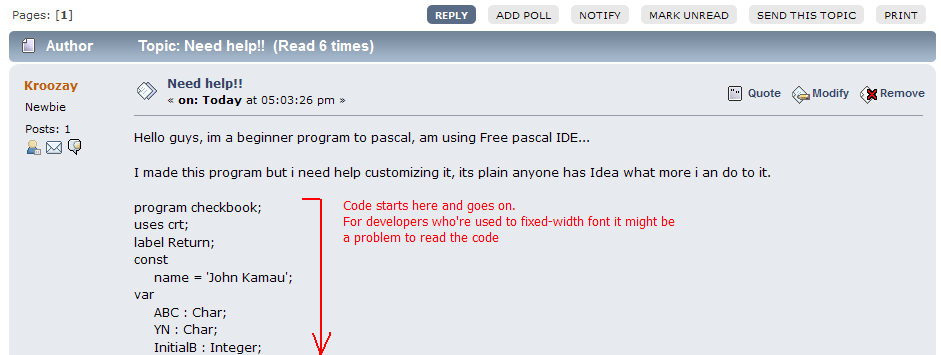 | |
| 39 | 39 | ||
| 40 | 40 | Also, parts of your pasted code might be considered as mark up by the forum engine, causing an undesirable look. | |
| 41 | 41 | ||
| 42 | 42 | A code snippet such as this: | |
| 43 | 43 | ||
| 44 | - | ||
| 45 | - | ||
| 46 | - | ||
| 47 | - | ||
| 44 | + | 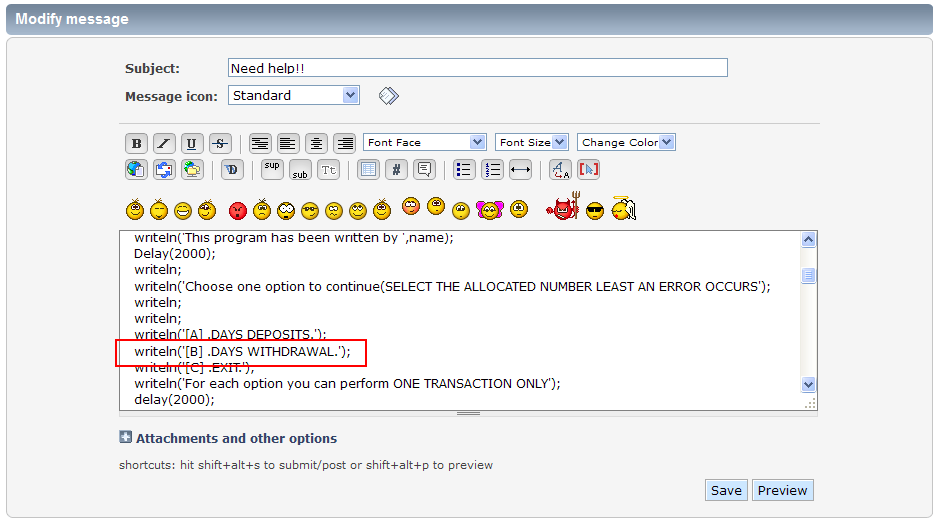 | |
| 48 | 45 | ||
| 49 | 46 | ...ends up looking like this: | |
| 50 | 47 | ||
| 51 | - | ||
| 52 | - | ||
| 53 | - | ||
| 54 | - | ||
| 48 | + | 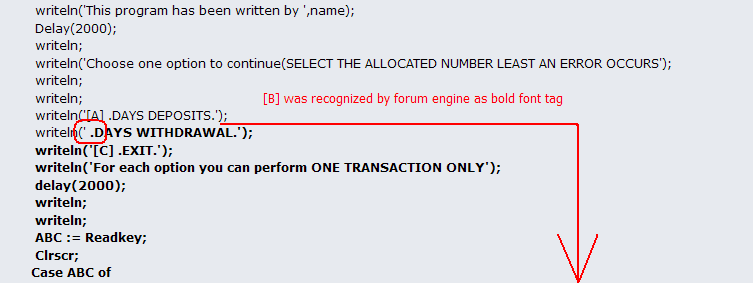 | |
| 55 | 49 | ||
| 56 | 50 | As a result, instead of actually getting help, you might only get "use code tags!" responses. Using code tags is easy. All you need to do is add | |
| 57 | 51 | ||
| 58 | 52 | `[code=pascal]` | |
| 59 | 53 | ||
| 60 | 54 | at the start of your code and add | |
| 61 | 55 | ||
| 62 | 56 | `[/code]` | |
| 63 | 57 | ||
| 64 | 58 | at the end of your code. | |
| 65 | 59 | ||
| 66 | 60 | A shortcut for this is to click the \# (code) button when writing your thread text: | |
| 67 | 61 | ||
| 68 | - | ||
| 69 | - | ||
| 70 | - | ||
| 71 | - | ||
| 62 | + | 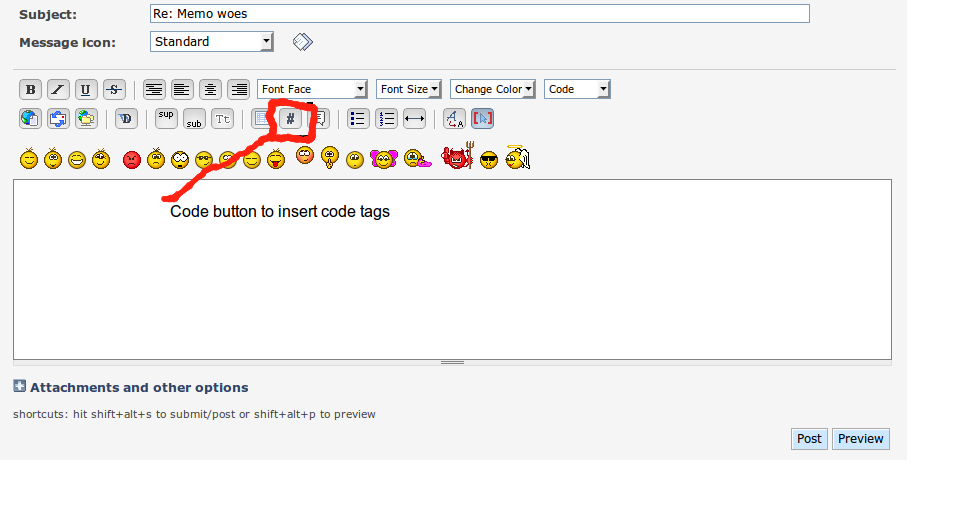 | |
| 72 | 63 | ||
| 73 | 64 | If you have already made a post without remembering to insert \[code=pascal\] and \[/code\] tags, you can "MODIFY" your post and add them later. Just like this: | |
| 74 | 65 | ||
| 75 | - | ||
| 76 | - | ||
| 77 | - | ||
| 78 | - | ||
| 66 | + | 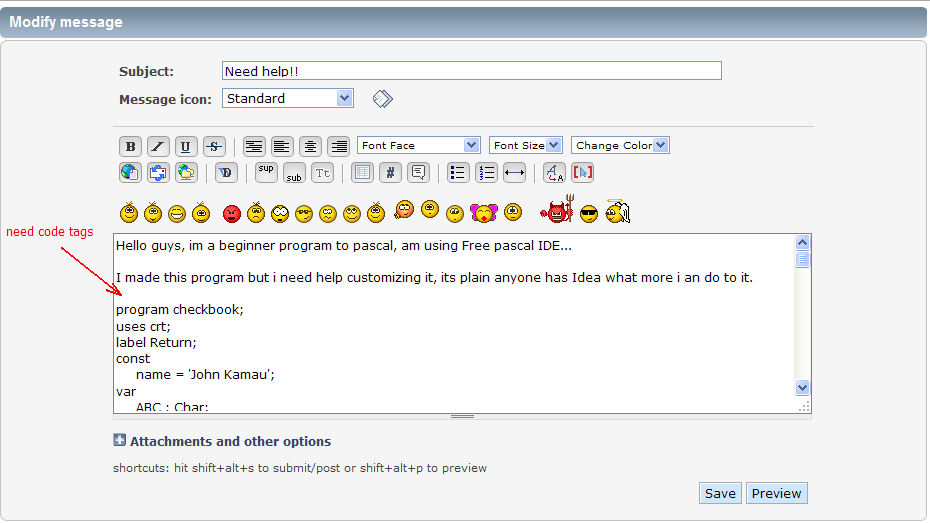 | |
| 79 | 67 | ||
| 80 | - | ||
| 81 | - | ||
| 82 | - | ||
| 83 | - | ||
| 68 | + | 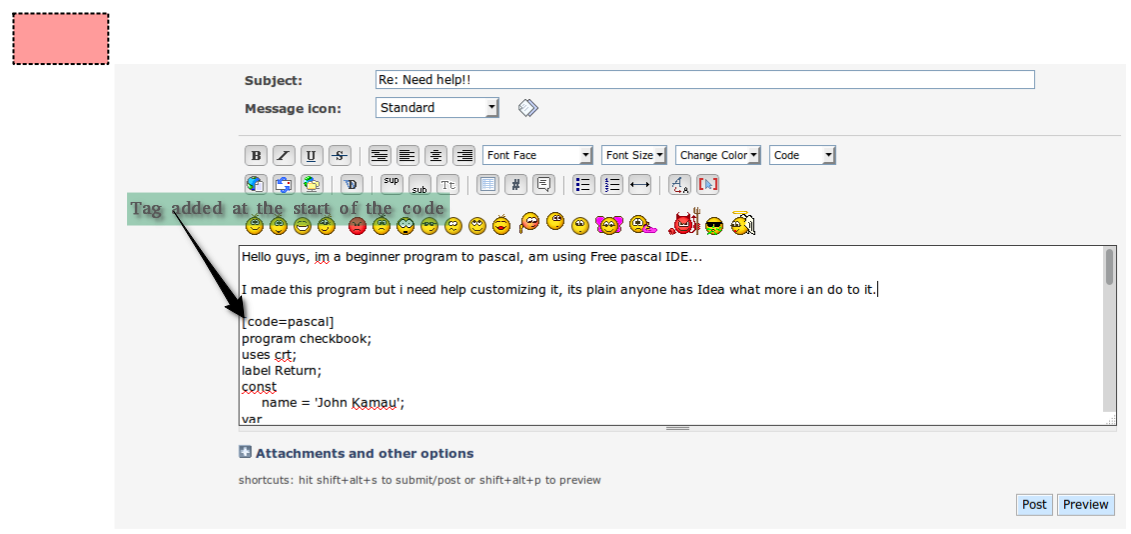 | |
| 84 | 69 | ||
| 85 | - | ||
| 86 | - | ||
| 87 | - | ||
| 88 | - | ||
| 70 | + | 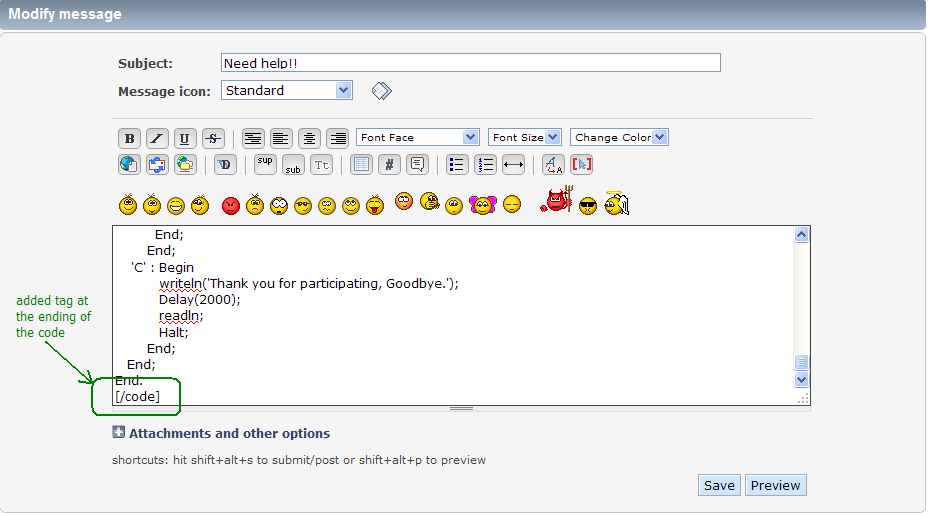 | |
| 89 | 71 | ||
| 90 | 72 | Once the changes are made and you hit "Save", you should see a nice Code section appearing in your post. The code section shows your code using a fixed-width font. This is placed within a smaller box with a "Select" button that allows you to select just that code section quickly. Your code will not then be misinterpreted as forum markup. It will as will be displayed as the code it is. | |
| 91 | 73 | ||
| 92 | - | ||
| 93 | - | ||
| 94 | - | ||
| 95 | - | ||
| 74 | + | 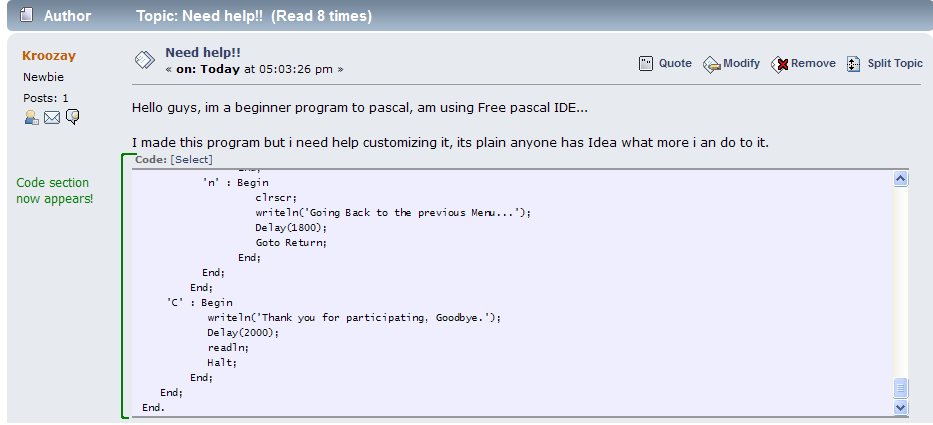 | |
| 96 | 75 | ||
| 97 | 76 | Additionally, you can HIGHLIGHT particular lines of code by using an opening code tag like **\[code=pascal,2,4\]** which will highlight lines 2 and 4 as below: | |
| 98 | 77 | ||
| 99 | - | ||
| 100 | - | ||
| 101 | - | ||
| 102 | - | ||
| 78 | + | 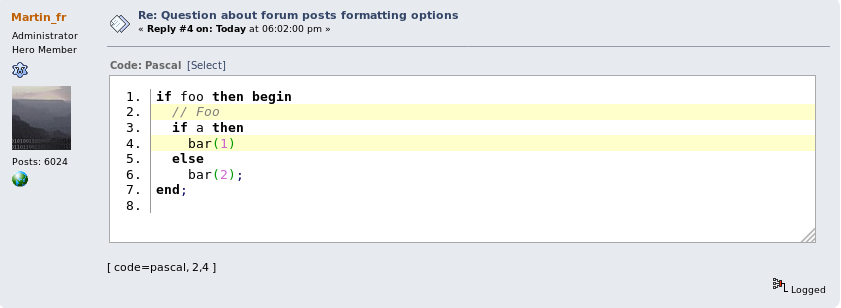 | |
| 103 | 79 | ||
| 104 | 80 | Most importantly, taking the trouble to use code tags is one way to support on-line politeness. | |
| 105 | 81 | ||
| 106 | 82 | Note that the code tag supports more than just Pascal, in case you need to add snippets in other languages (C, C++, Java, Assembler, etc). | |
| 107 | 83 | ||
| 108 | 84 | You can find a list of supported languages in [this page at MediaWiki](https://www.mediawiki.org/wiki/Extension:SyntaxHighlight#Supported_languages). You'll have to scroll down a little and expand the list of "Previously supported lexers" (with GeSHi), which is what the forum software supports. | |
| 109 | 85 | ||
| 110 | 86 | ## Sharing large pieces of code | |
| 111 | 87 | ||
| 112 | 88 | While short snippets of code can be inserted on your post as explained above (by using the \[code\] tag), sometimes you'll need to share more of your code, up to a complete example project, if you want to get meaningful help. | |
| 113 | 89 | ||
| 114 | 90 | As is easy to see, dumping all this code into a single post is a bad idea and you might run afoul of a post text limits (around 20K characters). What you should do instead is zip it and add it to your post as an attachment. | |
| 115 | 91 | ||
| 116 | 92 | ### What to zip | |
| 117 | 93 | ||
| 118 | 94 | Don't simply zip all the files in your project's directory: If you do that you'll add lots of files, some of them very large, which add nothing to the comprehension of your code. | |
| 119 | 95 | ||
| 120 | 96 | The rule of thumb is: add the source files and, if any, essential data files. | |
| 121 | 97 | ||
| 122 | 98 | "Source" files for a normal project are: *.LPI, *.LPR, *.LFM, *.PAS (or *.PP) and *.INC; i.e. what we can term "real" source, the project info file and the forms. A simple way to prepare these files is to use "Publish project", in the "Project" menu of Lazarus; if you check the option "Compress" in the "Publish project" dialog you'll end up with a nice .zip file, ideal to attach to your post. | |
| 123 | 99 | ||
| 124 | 100 | Add data files only if they are essential either for the question asked at the forum or to be able to run your program at all. Most times these files will be database files, test documents in some specific format, configuration files of some kind or icons/graphics loaded at run-time by your program. Try to make them as small as possible consistent with the use for which they are intended. | |
| 125 | 101 | ||
| 126 | 102 | Don't try to add a multi-megabyte database, because the forum limits attachments to 250K. If a huge file is really needed, use a "locker" service like Google Drive or similar. | |
| 127 | 103 | ||
| 128 | 104 | ## Share the Outcome | |
| 129 | 105 | ||
| 130 | 106 | The Forum is a good place to get help with Object Pascal and Lazarus. If you run into trouble and cannot figure out a solution by yourself even after Googling for answers to similar problems, the forum is the best place to ask. | |
| 131 | 107 | ||
| 132 | 108 | You will usually find there are many experienced people reading the Forum who will help you. | |
| 133 | 109 | ||
| 134 | 110 | But, as soon as you get an answer which you find resolves your problem, please let everyone else know that the proposed solution worked for you. | |
| 135 | 111 | ||
| 136 | 112 | It's very easy to get overexcited, once things start working again, and you might omit to tell everyone else. Please DON'T forget, because we'd like to know, and anyone else who later runs into the same issue, would also like to know that the solution proposed is a good one. | |
| 137 | 113 | ||
| 138 | 114 | The same applies, if you've created a thread, where a working solution has not yet been given and you find a solution (by yourself, or somewhere else). Please DO NOT LEAVE the thread you've started orphaned. Just return to the thread and briefly indicate the solution you found. | |
| 139 | 115 | ||
| 140 | 116 | ## Mark a thread as resolved | |
| 141 | 117 | ||
| 142 | 118 | The easiest way to indicate that your problem is solved is to add "\[SOLVED\]" to the thread subject. Provided you're the original thread's author it is easy to do. | |
| 143 | 119 | ||
| 144 | 120 | - Go to the very first post of the thread | |
| 145 | 121 | - Modify the first message | |
| 146 | 122 | - You should see the "Subject" of the message. The subject defines the subject of the thread. | |
| 147 | 123 | - Simply add \[SOLVED\] to the beginning of the subject (leave the rest of the subject as it is). | |
| 148 | 124 | - Hit Save. | |
| 149 | 125 | ||
| 150 | 126 | This procedure can also be used to fix typos in the thread subject if you later notice it has spelling mistakes. | |
| 151 | 127 | ||
| 152 | 128 | --- | |
| 153 | 129 | *From the Free Pascal wiki, page "Forum", as it stood on 2022-07-24 after a change by Bart, out of the wiki's dump of 2024-05-26. Copyright stays with the author who wrote it, according to the old wiki's [[Licensing]] page. If you have concerns about this material, [message the admin](/wiki-contact).* |