

Revision 1 of 2, by Minesadorada on 8-30-2019. The page as it is now.
Foobot
Lazarus and the Foobot air quality monitor
- Foobot(http://foobot.io// is an InternetOfThings gadget that monitors indoor air quality
- Unfortunately, the company currently only supplies mobile phone apps to access the Foobot
- They do however publish an API which returns JSON data when queried, so I decided to port it to the PC using Lazarus and FPC
- The API page is here: https://api.foobot.io/apidoc/index.html
Screenshots
- Foobot Monitor
<figure> <img src="foobotmonitorscreenshot.jpg" title="foobotmonitorscreenshot.jpg" /> <figcaption>foobotmonitorscreenshot.jpg</figcaption> </figure>
- Foobot monitor configuration window
<figure> <img src="foobotmonitorscreenshot1.jpg" title="foobotmonitorscreenshot1.jpg" /> <figcaption>foobotmonitorscreenshot1.jpg</figcaption> </figure>
- Foobot Interrogator
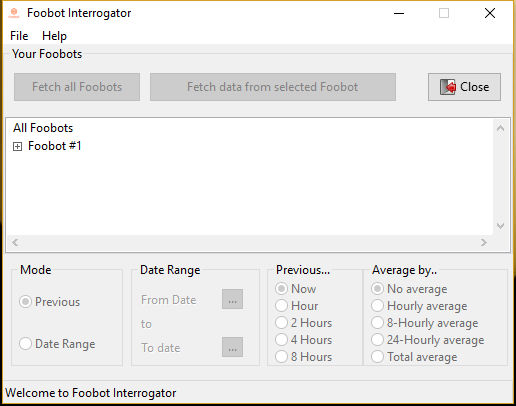
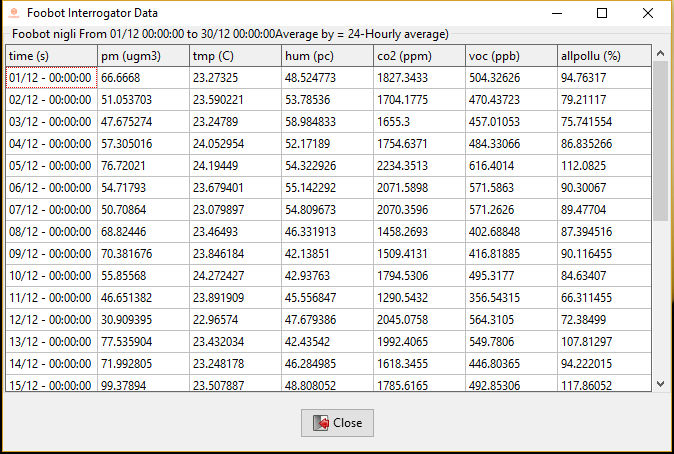
What you will need
1. A Foobot
2. A Foobot account
3. A free API Key (get one from the API page: https://api.foobot.io/apidoc/index.html)
Binary Downloads: Foobot Monitor
Windows 32/64 binaries:
https://svn.code.sf.net/p/lazarus-ccr/svn/applications/foobot/monitor/innosetup/setup_foobotmonitor.exe
Linux 32/64 binaries:
https://svn.code.sf.net/p/lazarus-ccr/svn/applications/foobot/monitor/linuxbinaries/foobotmonitor.zip
Binary Downloads: Foobot Interrogator
Windows 32/64 binaries:
https://svn.code.sf.net/p/lazarus-ccr/svn/applications/foobot/innosetup/foobotinterrogator_setup.exe
Linux 32/64 binaries:
https://svn.code.sf.net/p/lazarus-ccr/svn/applications/foobot/compiled/linuxbinaries.zip)
Source
Source code is in Lazarus CCR here: https://svn.code.sf.net/p/lazarus-ccr/svn/applications/foobot/
Functions
There are two main functions in foobot_utility.pas for you to use. Both will populate TObjects in foobot_objects.pas which you can read.
// Populates FoobotIdentityObject.TFoobotIdentityList collection
function FetchFoobotIdentity(aUsername, aSecretKey: string): boolean;

// Populates FoobotDataObject
function FetchFoobotData(DataFetchType: TDataFetchType = dfLast;
  iCurrentFoobot: integer = 0; iLastIntervalSeconds: integer = 3600;
  iLastAverageBySeconds: integer = 0; iStartTimeSeconds: int64 = 0;
  iEndTimeSeconds: int64 = 0; aSecretKey: string = 'unknown'): boolean;

// Populates datapoint arrays from FoobotIdentityObject for easy access
// - also populates HighLow arrays
function FoobotDataObjectToArrays: boolean;
Security
- When first run Foobot Monitor will prompt you to enter your Foobot Username and an API Key.
- These values are then stored in an encrypted configuration file so that they will load automatically in future
- The configurarion file is located:
- Windows: %APPDATA%\username\Local\foobotmonitor\
- Linux /home/.config
- You can alter/update the stored login data in the following way:
1. Open the foobotmonitor.cfg file
2. Make a new entry thus, then save the file. (using your values instead of the example <..> ones)
[Config]
Foobot User=<username>
Secret Key=<Secret API Key>- Next time Foobot Monitor is run, these values are read, then encrypted and the plaintext is deleted
- You can do this as many times as you like
Licence
License is GPLV2 (https://en.wikipedia.org/wiki/GNU_General_Public_Licensee
Updates
- From V0.1.1.0 you can configure the colours, Max and Min values for all the sensor displays.
- The configurarion file is located:
- Windows: %APPDATA%\username\Local\foobotmonitor\
- Linux /home/.config
- You can alter/update the colors and Max/Min values in the following way:
1. Open the foobotmonitor.cfg file
2. Edit the [Config] section
[Config]
pmColour=clGreen
tmpColour=clRed
humColour=clMaroon
co2Colour=clLime
vocColour=clBlue
allpolluColour=clFuchsia
pmMinValue=0
pmMaxValue=1000
tmpMinValue=0
tmpMaxValue=40
humMinValue=10
humMaxValue=100
co2MinValue=450
co2MaxValue=3000
vocMinValue=125
vocMaxValue=1000
allpolluMinValue=0
allpolluMaxValue=700
DisplayYellowLines=0
DisplayRedLines=1
Minesadorada
From the Free Pascal wiki, page "Foobot", as it stood on 2019-08-30 after a change by Minesadorada, out of the wiki's dump of 2024-05-26. Copyright stays with the author who wrote it, according to the old wiki's Licensing page. If you have concerns about this material, message the admin.