

Font: what changed
Revision 2 to 3. Removed lines have a minus sign; added lines have a plus sign.
| Old | New | Line | |
|---|---|---|---|
| 1 | 1 | TFont class describes a typographic font information. The [[LCL]] defines the following [[Property|properties]]: | |
| 2 | 2 | ||
| 3 | 3 | ### Color | |
| 4 | 4 | ||
| 5 | 5 | Sets the [[Colors|colour]] of the text to be displayed. | |
| 6 | 6 | ||
| 7 | 7 | ### Height | |
| 8 | 8 | ||
| 9 | 9 | The height property specifies the font height in Pixels. | |
| 10 | 10 | ||
| 11 | 11 | However, due to Windows and Delphi compatibility, height might be described in 2 values, negative and positive. | |
| 12 | 12 | ||
| 13 | 13 | 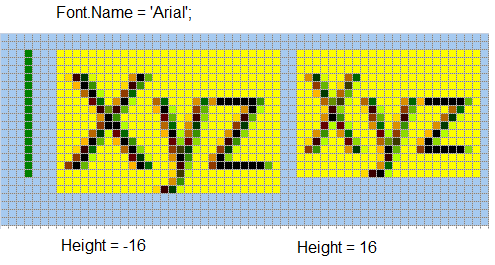 | |
| 14 | 14 | ||
| 15 | 15 | Negative value takes into account only the height of font characters. | |
| 16 | 16 | ||
| 17 | 17 | Positive value takes into account height of font characters plus additional space on top of the font. (So, it would be possible to write a line of the text right after another, without adding any extra space, and the font would not look too densed). | |
| 18 | 18 | ||
| 19 | 19 | Normally, you want to use Negative font height. | |
| 20 | 20 | ||
| 21 | 21 | ### Name | |
| 22 | 22 | ||
| 23 | 23 | The name property defines the name of the font to be used. | |
| 24 | 24 | ||
| 25 | 25 | ### Pitch | |
| 26 | 26 | ||
| 27 | 27 | This property determines the spacing between the letters. It may have one of the following values: | |
| 28 | 28 | ||
| 29 | 29 | - *fpDefault* | |
| 30 | 30 | - *fpFixed* | |
| 31 | 31 | - *fxVariable* | |
| 32 | 32 | ||
| 33 | 33 | ### Size | |
| 34 | 34 | ||
| 35 | 35 | Is the size of the font in Typographic points. | |
| 36 | 36 | ||
| 37 | 37 | In order to convert from Typographic points to Pixels one should use a device (Screen or Printer) dots per point value (DPI) | |
| 38 | 38 | ||
| 39 | 39 | The size is also using Positive and Negative values, but in reverse order. | |
| 40 | 40 | ||
| 41 | 41 | Positive value takes into account only the height of font characters. (it's a typographic standard) | |
| 42 | 42 | ||
| 43 | 43 | Negative value takes into account height of font characters plus additional space on top of the font. (So, it would be possible to write a line of the text right after another, without adding any extra space, and the font would not look too dense). | |
| 44 | 44 | ||
| 45 | 45 | Normally, you want to use Positive font size values. | |
| 46 | 46 | ||
| 47 | 47 | It might be useful to note, that User Interface is typically presenting the size in typographs points. | |
| 48 | 48 | ||
| 49 | 49 | 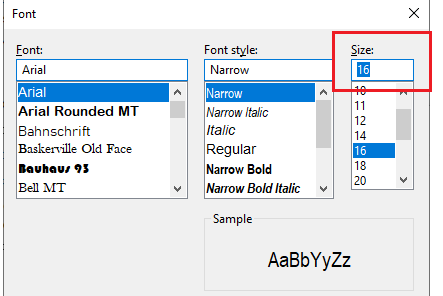 | |
| 50 | 50 | ||
| 51 | 51 | In this example, the selected font would have Font.Size=16 | |
| 52 | 52 | ||
| 53 | 53 | #### Size to Height | |
| 54 | 54 | ||
| 55 | 55 | Once should use the following formal to convert from Size to height | |
| 56 | 56 | ||
| 57 | - | ||
| 57 | + | ``` pascal | |
| 58 | + | Font.Height := -Font.Size * DPI / 72 | |
| 59 | + | ``` | |
| 58 | 60 | ||
| 59 | 61 | and from Height to Size | |
| 60 | 62 | ||
| 61 | - | ||
| 63 | + | ``` pascal | |
| 64 | + | Font.Size := -Font.Height / DPI * 72 | |
| 65 | + | ``` | |
| 62 | 66 | ||
| 63 | 67 | Note, the use of negative , due to reverse logic. | |
| 64 | 68 | ||
| 65 | 69 | ### Style | |
| 66 | 70 | ||
| 67 | 71 | Defines the style of the text to be displayed or printed. | |
| 68 | 72 | ||
| 69 | 73 | --- | |
| 70 | 74 | *From the Free Pascal wiki, page "Font", as it stood on 2020-03-29 after a change by Jwdietrich, out of the wiki's dump of 2024-05-26. Copyright stays with the author who wrote it, according to the old wiki's [[Licensing]] page. If you have concerns about this material, [message the admin](/wiki-contact).* | |
| 71 | 75 | Category: GUI | |
| 72 | 76 | Category: LCL |