

fcl-web: what changed
Revision 1 to 2. Removed lines have a minus sign; added lines have a plus sign.
| Old | New | Line | |
|---|---|---|---|
| 1 | 1 | ## What is fpWeb | |
| 2 | 2 | ||
| 3 | 3 | fpWeb can be used to build web server applications. A web server application can be one of the following | |
| 4 | 4 | ||
| 5 | 5 | - CGI application | |
| 6 | 6 | - FastCGI application | |
| 7 | 7 | - Apache module | |
| 8 | 8 | - A standalone HTTP(s) server using Free Pascal HTTP server components. | |
| 9 | 9 | - A standalone HTTP(s) server using GNU libmicrohttp | |
| 10 | 10 | - A windows SysHTTP application. | |
| 11 | 11 | ||
| 12 | 12 | In all cases, the development model is the same: you register handlers for a set of URLS (called routes) that your application will support. | |
| 13 | 13 | ||
| 14 | 14 | Then you embed these routes in one of the above environments: This means you choose the application object that you will be using. | |
| 15 | 15 | ||
| 16 | 16 | The lazarus IDE you have the choice of applications when you start a new project. It's possible to change the application type once the application was started, this usually just means changing the name of a unit in the project's uses clause. | |
| 17 | 17 | ||
| 18 | 18 | It is possible to support multiple environments within a single binary, although this takes some extra work. | |
| 19 | 19 | ||
| 20 | 20 | fpWeb also offers some out-of-the box support for a database REST server or for JSON RPC 2.0 mechanisms. These are built on top of the above structure. The Brook framework is also built on top of the basic architecture outlined above. | |
| 21 | 21 | ||
| 22 | 22 | More about this can be found in the [[fpWeb Tutorial]] | |
| 23 | 23 | ||
| 24 | 24 | The [[simpleserver]] example is a small stand alone server application that showcases many of the possibilities of fcl-web. | |
| 25 | 25 | ||
| 26 | 26 | ## Using fpWeb together with Lazarus | |
| 27 | 27 | ||
| 28 | 28 | ### Installing the weblaz fpWeb Lazarus Package | |
| 29 | 29 | ||
| 30 | 30 | The first step to do is installing the package which comes in the path lazarus/components/fpweb/weblaz.lpk. As usual with design-time packages, you'll have to rebuild Lazarus. | |
| 31 | 31 | ||
| 32 | 32 | ### Creating a CGI application | |
| 33 | 33 | ||
| 34 | 34 | After the weblaz package is installed, a very simple CGI web application which displays an HTML page can be created by going to the Lazarus menu "File-\>New...". From the list of possible applications select "CGI Application" as in the image below, which will create a main CGI project file and a fpweb web module. | |
| 35 | 35 | ||
| 36 | 36 | 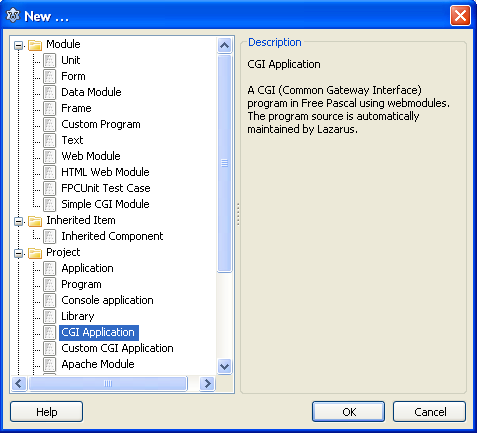 | |
| 37 | 37 | ||
| 38 | 38 | The TFPWebModule allows you to manipulate properties and events using the Object Inspector. | |
| 39 | 39 | ||
| 40 | 40 | To add code to show the page, a request handler should be added. To do this, double click the OnRequest property in the object inspector, as in the image below: | |
| 41 | 41 | ||
| 42 | 42 | 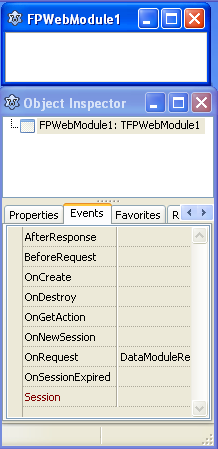 | |
| 43 | 43 | ||
| 44 | 44 | In the event handler one should write the HTML code which will be displayed by the browser. To avoid mixing Pascal and HTML, this page can be loaded from the directory the CGI executable is in by using AResponse.Contents.LoadFromFile(). | |
| 45 | 45 | ||
| 46 | 46 | The type of the response should be set in AResponse.ContentType. For HTML pages this should have the value 'text/html;charset=utf-8'. | |
| 47 | 47 | ||
| 48 | 48 | Finally, Handled should be set to True to indicate that the request was successfully handled (and return a 200 OK status code to the browser). After adding this code, the web module should look like this: | |
| 49 | 49 | ||
| 50 | 50 | ``` pascal | |
| 51 | 51 | unit mainpage; | |
| 52 | 52 | ||
| 53 | 53 | {$mode objfpc}{$H+} | |
| 54 | 54 | ||
| 55 | 55 | interface | |
| 56 | 56 | ||
| 57 | 57 | uses | |
| 58 | 58 | Classes, SysUtils, FileUtil, HTTPDefs, websession, fpHTTP, fpWeb; | |
| 59 | 59 | ||
| 60 | 60 | type | |
| 61 | 61 | ||
| 62 | 62 | { TFPWebModule1 } | |
| 63 | 63 | ||
| 64 | 64 | TFPWebModule1 = class(TFPWebModule) | |
| 65 | 65 | procedure DataModuleRequest(Sender: TObject; ARequest: TRequest; | |
| 66 | 66 | AResponse: TResponse; var Handled: Boolean); | |
| 67 | 67 | private | |
| 68 | 68 | { private declarations } | |
| 69 | 69 | public | |
| 70 | 70 | { public declarations } | |
| 71 | 71 | end; | |
| 72 | 72 | ||
| 73 | 73 | var | |
| 74 | 74 | FPWebModule1: TFPWebModule1; | |
| 75 | 75 | ||
| 76 | 76 | implementation | |
| 77 | 77 | ||
| 78 | 78 | {$R *.lfm} | |
| 79 | 79 | ||
| 80 | 80 | { TFPWebModule1 } | |
| 81 | 81 | ||
| 82 | 82 | procedure TFPWebModule1.DataModuleRequest(Sender: TObject; ARequest: TRequest; | |
| 83 | 83 | AResponse: TResponse; var Handled: Boolean); | |
| 84 | 84 | begin | |
| 85 | 85 | AResponse.ContentType := 'text/html;charset=utf-8'; | |
| 86 | 86 | AResponse.Contents.LoadFromFile(ExtractFilePath(ParamStr(0)) + 'mainpage.html'); | |
| 87 | 87 | Handled := True; | |
| 88 | 88 | end; | |
| 89 | 89 | ||
| 90 | 90 | begin | |
| 91 | 91 | RegisterHTTPModule('TFPWebModule1', TFPWebModule1); | |
| 92 | 92 | end. | |
| 93 | 93 | ``` | |
| 94 | 94 | ||
| 95 | 95 | ### Deploying the CGI application | |
| 96 | 96 | ||
| 97 | 97 | This section assumes the Apache web server is used. Of course, other web servers that support CGI (nginx, cherokee) can be used, too. | |
| 98 | 98 | ||
| 99 | 99 | Apache can be downloaded here: <http://httpd.apache.org/download.cgi> or installed using your distribution's package manager. | |
| 100 | 100 | ||
| 101 | 101 | The default installation of Apache will treat all files located in its cgi-bin directory as CGI programs, so the user won't be able to access plain HTML files placed there. This directory can be set in the file httpd.conf in the following section: | |
| 102 | 102 | ||
| 103 | 103 | # | |
| 104 | 104 | # ScriptAlias: This controls which directories contain server scripts. | |
| 105 | 105 | # ScriptAliases are essentially the same as Aliases, except that | |
| 106 | 106 | # documents in the target directory are treated as applications and | |
| 107 | 107 | # run by the server when requested rather than as documents sent to the | |
| 108 | 108 | # client. The same rules about trailing "/" apply to ScriptAlias | |
| 109 | 109 | # directives as to Alias. | |
| 110 | 110 | # | |
| 111 | 111 | ScriptAlias /cgi-bin/ "C:/Program Files/Apache Software Foundation/Apache2.2/cgi-bin/" | |
| 112 | 112 | ||
| 113 | 113 | If you place an executable called "mywebpage.cgi" in this directory, then the page can be accessed as <http://localhost/cgi-bin/mywebpage.cgi> (or remotely with the corresponding IP address or domain name). | |
| 114 | 114 | ||
| 115 | 115 | fcl-web with Lazarus on Windows produces .exe files. For Apache to serve these files you have to add this: | |
| 116 | 116 | ||
| 117 | 117 | AddHandler cgi-script .exe | |
| 118 | 118 | ||
| 119 | 119 | And to serve your executables from another directory, you add this: | |
| 120 | 120 | ||
| 121 | 121 | ``` xml | |
| 122 | 122 | ScriptAlias /bin/ "C:/lazarus_projects/test-fclweb/bin/" | |
| 123 | 123 | <Directory "C:/lazarus_projects/test-fclweb/bin/"> | |
| 124 | 124 | AllowOverride None | |
| 125 | 125 | Options None | |
| 126 | 126 | Order allow,deny | |
| 127 | 127 | Allow from all | |
| 128 | 128 | </Directory> | |
| 129 | 129 | ``` | |
| 130 | 130 | ||
| 131 | 131 | ### Formatting the HTML and Reading Query fields | |
| 132 | 132 | ||
| 133 | 133 | The previous example just showed a plain HTML page. One might wish to e.g. | |
| 134 | 134 | ||
| 135 | 135 | - dynamically change the HTML page output, and | |
| 136 | 136 | - as read the variables the browser passed to the webpage in Query fields (in e.g. HTTP GET and HTTP POST actions). | |
| 137 | 137 | ||
| 138 | 138 | A simple solution for the first problem is simply using the standard Pascal routine Format and adding %s or %d in the HTML file in the appropriate places which will receive a custom value. | |
| 139 | 139 | ||
| 140 | 140 | ### Reading GET data | |
| 141 | 141 | ||
| 142 | 142 | To read the GET variables one can use ARequest.QueryFields, which is a TStrings descendent. Each variable will be in a separate line in the TStrings in the format variablename=value, similarly to how they are shown in the browser page address. To search for a specific variable one can use ARequest.QueryFields.Values\[\], passing the variable name in the brackets to receive its value back, instead of parsing the string manually. | |
| 143 | 143 | ||
| 144 | 144 | The resulting code: | |
| 145 | 145 | ||
| 146 | 146 | ``` pascal | |
| 147 | 147 | procedure TFPWebModule1.DataModuleRequest(Sender: TObject; ARequest: TRequest; | |
| 148 | 148 | AResponse: TResponse; var Handled: Boolean); | |
| 149 | 149 | var | |
| 150 | 150 | HexText, AsciiText: string; | |
| 151 | 151 | begin | |
| 152 | 152 | HexText := ARequest.QueryFields.Values['hex']; | |
| 153 | 153 | AsciiText := HexToAnsii(HexText); | |
| 154 | 154 | ||
| 155 | 155 | AResponse.ContentType := 'text/html;charset=utf-8'; | |
| 156 | 156 | AResponse.Contents.LoadFromFile(ExtractFilePath(ParamStr(0)) + 'mainpage.html'); | |
| 157 | 157 | AResponse.Contents.Text := Format(AResponse.Contents.Text, | |
| 158 | 158 | [HexText, AsciiText]); | |
| 159 | 159 | Handled := True; | |
| 160 | 160 | end; | |
| 161 | 161 | ``` | |
| 162 | 162 | ||
| 163 | 163 | ### Reading POST data | |
| 164 | 164 | ||
| 165 | 165 | Data submitted by POST requests can be obtained from `TRequest.Content`. It will come without the request headers - in other words it contains the body of the request. | |
| 166 | 166 | ||
| 167 | 167 | Submitted form data can also be accessed using `TRequest.ContentFields` which is the content parsed as fields separated by & and decoded. For example, the following set of form values: | |
| 168 | 168 | ||
| 169 | - | ||
| 170 | - | ||
| 171 | - | ||
| 169 | + | ```text | |
| 170 | + | login: dfg 345&& | |
| 171 | + | login_senha: ==== | |
| 172 | + | email: dfg | |
| 173 | + | ``` | |
| 172 | 174 | ||
| 173 | 175 | Will be encoded in 'APPLICATION/X-WWW-FORM-URLENCODED' like this (see [wikipedia POST (HTTP)](http://en.wikipedia.org/wiki/POST_%28HTTP%29)): | |
| 174 | 176 | ||
| 175 | - | ||
| 177 | + | ```text | |
| 178 | + | login=dfg+345%26%26&login_senha=%3D%3D%3D%3D&email=dfg | |
| 179 | + | ``` | |
| 176 | 180 | ||
| 177 | 181 | And will be available in TRequest.ContentFields via the line index or using the Values property, which is more convenient: | |
| 178 | 182 | ||
| 179 | - | ||
| 180 | - | ||
| 181 | - | ||
| 182 | - | ||
| 183 | + | ```text | |
| 184 | + | TRequest.ContentFields[0]: login=dfg 345&& | |
| 185 | + | TRequest.ContentFields[1]: login_senha===== | |
| 186 | + | TRequest.ContentFields[2]: email=dfg | |
| 187 | + | TRequest.ContentFields.Values['email']: dfg | |
| 188 | + | ``` | |
| 183 | 189 | ||
| 184 | 190 | If using other mime-types than 'MULTIPART/FORM-DATA' and 'APPLICATION/X-WWW-FORM-URLENCODED' (the types supported by HTML forms): | |
| 185 | 191 | ||
| 186 | 192 | - content is only available in TRequest.Content, not TRequest.ContentFields | |
| 187 | 193 | - use of these mime-types raises an exception for FPC 2.4.2 (fixed in FPC 2.5+). | |
| 188 | 194 | ||
| 189 | 195 | Note that HTTP POST can also send Query fields (in the URL), e.g. <http://server/bla?question=how>, and those are accessed by TRequest.QueryFields as explained in the previous section. | |
| 190 | 196 | ||
| 191 | 197 | ``` pascal | |
| 192 | 198 | procedure TFPWebModule1.DataModuleRequest(Sender: TObject; ARequest: TRequest; | |
| 193 | 199 | AResponse: TResponse; var Handled: Boolean); | |
| 194 | 200 | var | |
| 195 | 201 | lData: String; | |
| 196 | 202 | begin | |
| 197 | 203 | lData := ARequest.Content; | |
| 198 | 204 | ``` | |
| 199 | 205 | ||
| 200 | 206 | ### Reading POST binary data | |
| 201 | 207 | ||
| 202 | 208 | Uploaded files are saved to a temporary location with a temporary filename, to retain the file you should move it to a permanent location. | |
| 203 | 209 | ||
| 204 | 210 | To receive data on the server that has been POSTed e.g. as multipart/form-data, use something like this: | |
| 205 | 211 | ||
| 206 | 212 | ``` pascal | |
| 207 | 213 | procedure TMainWebModule.TFPWebActions2Request(Sender: TObject; | |
| 208 | 214 | ARequest: TRequest; AResponse: TResponse; var Handled: Boolean); | |
| 209 | 215 | var | |
| 210 | 216 | i: Integer; | |
| 211 | 217 | begin | |
| 212 | 218 | // Process all received files | |
| 213 | 219 | for i := 0 to ARequest.Files.Count - 1 do | |
| 214 | 220 | begin | |
| 215 | 221 | // Doing something else than writeln is highly recommended ;) | |
| 216 | 222 | writeln ('Received Filename: '+ARequest.Files[i].LocalFileName); | |
| 217 | 223 | end; | |
| 218 | 224 | ||
| 219 | 225 | Handled := true; | |
| 220 | 226 | end; | |
| 221 | 227 | ``` | |
| 222 | 228 | ||
| 223 | 229 | The client can send data using e.g. FileFormPost. | |
| 224 | 230 | ||
| 225 | 231 | ## Specialized modules | |
| 226 | 232 | ||
| 227 | 233 | The *TFPWebModule* class (used below) is a simple example of a WEb module that can be used for all kinds of HTTP requests. | |
| 228 | 234 | ||
| 229 | 235 | However, fpweb comes with some specialized modules, that have extra support for specialized tasks: | |
| 230 | 236 | ||
| 231 | 237 | - The **TSimpleFileModule** class in unit [[fpwebfile]] can be used to send files. You point it to a directory, and it does the rest. | |
| 232 | 238 | - The **TFPHTMLModule** class in unit *fphtml.pp* can be used to produce HTML. | |
| 233 | 239 | - The **TProxyWebModule** class in unit *fpwebproxy.pp* is a ready-made forwarding proxy. | |
| 234 | 240 | - The **TFPWebProviderDataModule** class in unit *fpwebdata.pp* serves data in JSON format that can be consumed by ExtJS stores. | |
| 235 | 241 | - The **TSQLDBRestModule** class in unit *sqldbrestmodule.pp* implements a full REST server backed by SQLDB. See more info in [[SQLDBRestBridge]]. | |
| 236 | 242 | - The **TJSONRPCModule** class in unit *webjsonrpc.pp* implements a JSON-RPC service. | |
| 237 | 243 | - The **TExtDirectModule** class in unit *fpextdirect.pp* implements a Ext.Direct variant of a JSON-RPC service. | |
| 238 | 244 | ||
| 239 | 245 | ## Using multiple modules | |
| 240 | 246 | ||
| 241 | 247 | If there is only one module in the web application, all requests will be directed to this module. | |
| 242 | 248 | ||
| 243 | 249 | As your web application grows, multiple modules can be used. A new module can be added by choosing 'File - New' and then one of 'Web module' or 'HTML Web Module'. | |
| 244 | 250 | ||
| 245 | 251 | FCL-web uses the URL to determine how a HTTP request should be handled. It must therefore know which web-modules exist in the application. To achieve this, each module must be registered. | |
| 246 | 252 | ||
| 247 | 253 | Each module is registered with fcl-web in the initialization section of the unit it is defined in: | |
| 248 | 254 | ||
| 249 | 255 | ``` pascal | |
| 250 | 256 | RegisterHTTPModule('location', TMyModule); | |
| 251 | 257 | ``` | |
| 252 | 258 | ||
| 253 | 259 | The module will then be invoked if an URL of the form | |
| 254 | 260 | ||
| 255 | - | ||
| 261 | + | ```text | |
| 262 | + | http://www.mysite.org/mycgi.cgi/location | |
| 263 | + | ``` | |
| 256 | 264 | ||
| 257 | 265 | or | |
| 258 | 266 | ||
| 259 | - | ||
| 267 | + | ```text | |
| 268 | + | http://www.mysite.org/mycgi.cgi?module=location | |
| 269 | + | ``` | |
| 260 | 270 | ||
| 261 | 271 | is used. | |
| 262 | 272 | ||
| 263 | 273 | If multiple modules are present, the name of the module must appear in the URL, or an error will be raised. | |
| 264 | 274 | ||
| 265 | 275 | This behaviour can also be forced for applications that have only a single module by setting the Application's property AllowDefaultModule to false: | |
| 266 | 276 | ||
| 267 | 277 | ``` pascal | |
| 268 | 278 | Application.AllowDefaultModule := False; | |
| 269 | 279 | ``` | |
| 270 | 280 | ||
| 271 | 281 | In that case, the fcl-web application will always require the name of the module in the URL. | |
| 272 | 282 | ||
| 273 | 283 | The name of the request variable that determines the module name (by default, this is 'module') can be set in the Application.ModuleVariable property. The following code | |
| 274 | 284 | ||
| 275 | 285 | ``` pascal | |
| 276 | 286 | Application.ModuleVariable := 'm'; | |
| 277 | 287 | ``` | |
| 278 | 288 | ||
| 279 | 289 | ensures that the following URL is directed to TMyModule: | |
| 280 | 290 | ||
| 281 | - | ||
| 291 | + | ```text | |
| 292 | + | http://www.mysite.org/mycgi.cgi?m=location | |
| 293 | + | ``` | |
| 282 | 294 | ||
| 283 | 295 | If all this is not enough to determine the module to which the request should be passed, the Application.OnGetModule event can be used. It is of type TGetModuleEvent: | |
| 284 | 296 | ||
| 285 | 297 | ``` pascal | |
| 286 | 298 | type | |
| 287 | 299 | TGetModuleEvent = Procedure (Sender : TObject; ARequest : TRequest; | |
| 288 | 300 | Var ModuleClass : TCustomHTTPModuleClass) of object; | |
| 289 | 301 | ``` | |
| 290 | 302 | ||
| 291 | 303 | Creating an event handler for this event allows fine control over the module that is created to handle the request: the request (passed in ARequest) can be examined, and the 'ModuleClass' variable must be set to the class of the module that should handle the request. | |
| 292 | 304 | ||
| 293 | 305 | If 'ModuleClass' is 'Nil' on return, an error will be sent to the browser. | |
| 294 | 306 | ||
| 295 | 307 | ## Using Actions | |
| 296 | 308 | ||
| 297 | 309 | A module can be used to group certain kinds of actions that logically belong together. Imagine a module TUserModule that is used to handle user management in the webpages. There can be multiple actions associated with a user: | |
| 298 | 310 | ||
| 299 | 311 | - Creating | |
| 300 | 312 | - Deleting | |
| 301 | 313 | - Editing | |
| 302 | 314 | - Displaying | |
| 303 | 315 | ||
| 304 | 316 | These different actions can be handled by the same module. One can determine the action from the URL manually, as in: | |
| 305 | 317 | ||
| 306 | - | ||
| 318 | + | ```text | |
| 319 | + | http://mysite/mycgi.cgi/user?action=delete&id=12 | |
| 320 | + | ``` | |
| 307 | 321 | ||
| 308 | 322 | This can be automated. | |
| 309 | 323 | ||
| 310 | 324 | In order to make it easier to distinguish between various actions, the module has a property actions: this is a collection, in which each item is associated with a different response to the request. The actions have various properties: | |
| 311 | 325 | ||
| 312 | 326 | Name | |
| 313 | 327 | The name of the action. The URL will be examined to determine the name of the action. | |
| 314 | 328 | ||
| 315 | 329 | Content | |
| 316 | 330 | A string. If set, this is sent to the browser. | |
| 317 | 331 | ||
| 318 | 332 | Contents | |
| 319 | 333 | A stringlist. If set, this is sent to the browser. | |
| 320 | 334 | ||
| 321 | 335 | ContentProducer | |
| 322 | 336 | If set, the contentproducer will handle the request. | |
| 323 | 337 | ||
| 324 | 338 | Default | |
| 325 | 339 | if set to 'True', then this action is the default action. That means that if FCL-Web cannot determine the action name, this action will be executed. | |
| 326 | 340 | ||
| 327 | 341 | Template | |
| 328 | 342 | If set, this template will be processed, and the results sent to the browser. | |
| 329 | 343 | ||
| 330 | 344 | There are also some events: | |
| 331 | 345 | ||
| 332 | 346 | BeforeRequest | |
| 333 | 347 | executed before the request is processed. Can be used to set the 'Content' or other properties. | |
| 334 | 348 | ||
| 335 | 349 | AfterRequest | |
| 336 | 350 | executed after the request is processed. | |
| 337 | 351 | ||
| 338 | 352 | OnRequest | |
| 339 | 353 | an event handler to handle the request. If set, the handler is used to handle the request. | |
| 340 | 354 | ||
| 341 | 355 | Again, as in the case of multiple modules, the URL is used to determine which action to execute. The part right after the module part ("user" in this example) is used: | |
| 342 | 356 | ||
| 343 | - | ||
| 357 | + | ```text | |
| 358 | + | http://mysite/mycgi.cgi/user/delete&id=12 | |
| 359 | + | ``` | |
| 344 | 360 | ||
| 345 | 361 | would execute the action named 'delete'. | |
| 346 | 362 | ||
| 347 | 363 | The 'ActionVar' property of the module can be used to set the name of the request variable to use. Setting | |
| 348 | 364 | ||
| 349 | 365 | ``` pascal | |
| 350 | 366 | UserModule.ActionVar := 'a'; | |
| 351 | 367 | ``` | |
| 352 | 368 | ||
| 353 | 369 | may be used to change the above URL to | |
| 354 | 370 | ||
| 355 | - | ||
| 371 | + | ```text | |
| 372 | + | http://mysite/mycgi.cgi/user?a=delete&id=12 | |
| 373 | + | ``` | |
| 356 | 374 | ||
| 357 | 375 | If there is only one module in the application, the URL can be shortened to | |
| 358 | 376 | ||
| 359 | - | ||
| 377 | + | ```text | |
| 378 | + | http://mysite/mycgi.cgi/delete&id=12 | |
| 379 | + | ``` | |
| 360 | 380 | ||
| 361 | 381 | ## Using HTML Templates | |
| 362 | 382 | ||
| 363 | 383 | For information about using templates, template tags and template tag parameters to generate response pages, please refer to the fptemplate.txt file under your FPC directory in /packages/fcl-base/texts/. | |
| 364 | 384 | ||
| 365 | 385 | Example projects that demonstrate using templates can be found under your FPC directory in /packages/fcl-web/examples/fptemplate/ (see the README.txt in there for more). (In earlier versions, these examples were in the Lazarus directory in /components/fpweb/demo/fptemplate/) | |
| 366 | 386 | ||
| 367 | 387 | ## Tips & troubleshooting | |
| 368 | 388 | ||
| 369 | 389 | ### Sending result codes | |
| 370 | 390 | ||
| 371 | 391 | To send a different HTTP response than 200 OK, use **AResponse.Code** and **AResponse.CodeText**, e.g. | |
| 372 | 392 | ||
| 373 | 393 | ``` pascal | |
| 374 | 394 | AResponse.Code := 404; | |
| 375 | 395 | AResponse.CodeText := 'Document not found'; | |
| 376 | 396 | ``` | |
| 377 | 397 | ||
| 378 | 398 | As of FPC 3.3.1 you can use the **SetStatus** method: | |
| 379 | 399 | ||
| 380 | 400 | ``` pascal | |
| 381 | 401 | AResponse.SetStatus(404); | |
| 382 | 402 | ``` | |
| 383 | 403 | ||
| 384 | 404 | it will use the *GetHTTPStatusText* routine of the *httpprotocol* unit to look up standard status texts. | |
| 385 | 405 | ||
| 386 | 406 | You can also tell **SetStatus** to send the response at once: | |
| 387 | 407 | ||
| 388 | 408 | ``` pascal | |
| 389 | 409 | AResponse.SetStatus(404,true); | |
| 390 | 410 | ``` | |
| 391 | 411 | ||
| 392 | 412 | This will set the status and call *SendResponse* to send the response. Any headers or content you have set will be sent as well. | |
| 393 | 413 | ||
| 394 | 414 | ### Sending binary data | |
| 395 | 415 | ||
| 396 | 416 | An approach that seems to work to send e.g. a tiff file from the web server to the client - adapted from \$(fpcdirectory)\packages\fcl-web\examples\jsonrpc\demo1\wmdemo.pp - something like: | |
| 397 | 417 | ||
| 398 | 418 | ``` pascal | |
| 399 | 419 | AResponse.ContentStream := TMemoryStream.Create; | |
| 400 | 420 | ||
| 401 | 421 | try | |
| 402 | 422 | AResponse.ContentStream.LoadFromFile('/tmp/sample.tiff'); | |
| 403 | 423 | AResponse.ContentType := 'image/tiff'; //or whatever MIME type you want to send | |
| 404 | 424 | // to do: there is an fpweb example that gets the mime type from the file extension... | |
| 405 | 425 | AResponse.ContentLength:=AResponse.ContentStream.Size; //apparently doesn't happen automatically? | |
| 406 | 426 | AResponse.SendContent; | |
| 407 | 427 | finally | |
| 408 | 428 | AResponse.ContentStream.Free; | |
| 409 | 429 | end; | |
| 410 | 430 | ||
| 411 | 431 | Handled := true; | |
| 412 | 432 | ``` | |
| 413 | 433 | ||
| 414 | 434 | ### Error: Could not determine HTTP module for request | |
| 415 | 435 | ||
| 416 | 436 | You may have multiple modules and multiple actions. If you specify an URL with only 1 item, like: | |
| 417 | 437 | ||
| 418 | 438 | ```html4strict | |
| 419 | 439 | http://localhost/cgi-bin/somemodule | |
| 420 | 440 | ``` | |
| 421 | 441 | ||
| 422 | 442 | then fpweb assumes you're specifying an action. If you don't have a default module set, you will get a 500 internal server error (Could not determine HTTP module for request) | |
| 423 | 443 | ||
| 424 | 444 | You can modify this behaviour to let fpweb map to a module name instead by setting the application's **PreferModuleName** property to true. | |
| 425 | 445 | ||
| 426 | 446 | ### Error: response code 500 Internal Server error when trying to handle DELETE method | |
| 427 | 447 | ||
| 428 | 448 | In FPC 2.6.2 and lower, fcl-web does not accept the DELETE method and generates an error. | |
| 429 | 449 | ||
| 430 | 450 | ### fpWeb/FCGI and Apache 2.4 (mod_proxy_fcgi mode) | |
| 431 | 451 | ||
| 432 | 452 | When you want to deploy FCGI application behind Apache 2.4+ reverse proxy, you need PATH_INFO variable in headers that are sent via socket to FCGI daemon. | |
| 433 | 453 | ||
| 434 | 454 | 1, Enable following modules: setenvif_module, proxy_module and proxy_fcgi_module\ | |
| 435 | 455 | (on CentOS 7 modules are defined in file /etc/httpd/conf.modules.d/00-base.conf and /etc/httpd/conf.modules.d/00-proxy.conf). | |
| 436 | 456 | ||
| 437 | 457 | LoadModule setenvif_module modules/mod_setenvif.so | |
| 438 | 458 | LoadModule proxy_module modules/mod_proxy.so | |
| 439 | 459 | LoadModule proxy_fcgi_module modules/mod_proxy_fcgi.so | |
| 440 | 460 | ||
| 441 | 461 | 2, Reverse proxy configuration for fpWeb/FCGI listening on port 9000.\ | |
| 442 | 462 | \$1 = module name\ | |
| 443 | 463 | \$2 = action name | |
| 444 | 464 | ||
| 445 | 465 | SetEnvIf Request_URI . proxy-fcgi-pathinfo=full | |
| 446 | 466 | ProxyPassMatch "/fcgi/(.*)/(.*)" "fcgi://127.0.0.1:9000/$1/$2" | |
| 447 | 467 | ||
| 448 | 468 | ### fpWeb/FCGI and nginx | |
| 449 | 469 | ||
| 450 | 470 | For correct routing, fcl-web requires the PATH_INFO variable in headers sent from nginx. For this you have to split the whole URL into FastCGI application name and the path info part whith the configuration statement *fastcgi_split_path_info*. The statement accepts a regular expression and puts the second match into *\$fastcgi_path_info* configuration variable. This variable can be passed to your application with *fastcgi_param* statement. | |
| 451 | 471 | ||
| 452 | 472 | The following configuration example includes a full virtual host for nginx which passes everything from *<http://myserver:8080/mycgiapp/>* to an external FastCGI application. | |
| 453 | 473 | ||
| 454 | 474 | server { | |
| 455 | 475 | ||
| 456 | 476 | listen 8080; | |
| 457 | 477 | listen [::]:8080; | |
| 458 | 478 | ||
| 459 | 479 | server_name _; | |
| 460 | 480 | ||
| 461 | 481 | root "/var/www"; | |
| 462 | 482 | ||
| 463 | 483 | location /mycgiap/ { | |
| 464 | 484 | # setting up PATH_INFO | |
| 465 | 485 | fastcgi_split_path_info ^(/mycgiapp/)(.*)$; | |
| 466 | 486 | fastcgi_param PATH_INFO $fastcgi_path_info; | |
| 467 | 487 | ||
| 468 | 488 | # other parameters | |
| 469 | 489 | fastcgi_param SCRIPT_FILENAME $document_root$fastcgi_script_name; | |
| 470 | 490 | fastcgi_param QUERY_STRING $query_string; | |
| 471 | 491 | fastcgi_param REQUEST_METHOD $request_method; | |
| 472 | 492 | fastcgi_param CONTENT_TYPE $content_type; | |
| 473 | 493 | fastcgi_param CONTENT_LENGTH $content_length; | |
| 474 | 494 | fastcgi_param SCRIPT_NAME $fastcgi_script_name; | |
| 475 | 495 | fastcgi_param REQUEST_URI $request_uri; | |
| 476 | 496 | fastcgi_param DOCUMENT_URI $document_uri; | |
| 477 | 497 | fastcgi_param DOCUMENT_ROOT $document_root; | |
| 478 | 498 | fastcgi_param SERVER_PROTOCOL $server_protocol; | |
| 479 | 499 | fastcgi_param REQUEST_SCHEME $scheme; | |
| 480 | 500 | fastcgi_param HTTPS $https if_not_empty; | |
| 481 | 501 | fastcgi_param GATEWAY_INTERFACE CGI/1.1; | |
| 482 | 502 | fastcgi_param SERVER_SOFTWARE nginx/$nginx_version; | |
| 483 | 503 | fastcgi_param REMOTE_ADDR $remote_addr; | |
| 484 | 504 | fastcgi_param REMOTE_PORT $remote_port; | |
| 485 | 505 | fastcgi_param SERVER_ADDR $server_addr; | |
| 486 | 506 | fastcgi_param SERVER_PORT $server_port; | |
| 487 | 507 | fastcgi_param SERVER_NAME $server_name; | |
| 488 | 508 | ||
| 489 | 509 | # pass requests to your FastCGI application | |
| 490 | 510 | fastcgi_pass 127.0.0.1:9000; | |
| 491 | 511 | } | |
| 492 | 512 | } | |
| 493 | 513 | ||
| 494 | 514 | ## Notes | |
| 495 | 515 | ||
| 496 | 516 | - The cgiapp unit is deprecated, please use fpcgi as much as possible. | |
| 497 | 517 | ||
| 498 | 518 | - The fastcgi, custfcgi, and fpfcgi units are not supported on Darwin at this time, because it uses a different mechanism than the MSG_NOSIGNAL option for recv() to indicate that no SIGPIPE should be raised in case the connection breaks. See <http://lists.apple.com/archives/macnetworkprog/2002/Dec/msg00091.html> for how this should be fixed. | |
| 499 | 519 | ||
| 500 | 520 | - If you deploy your CGI application and get errors like "Error: No action name and no default action", you should make sure there's an action assigned to the URL, or catch non-supported actions with an action marked Default. In both cases, an OnRequest event handler for the action that sets Handled:=true should be used. | |
| 501 | 521 | ||
| 502 | 522 | ## See also | |
| 503 | 523 | ||
| 504 | 524 | - [[fpWeb Tutorial]] | |
| 505 | 525 | - [[fphttpclient]] Part of fcl-web that can be used stand-alone in client applications | |
| 506 | 526 | - [[fphttpserver]] Small stand alone Object Pascal web server component. Can be used to serve fcl-web applications. | |
| 507 | 527 | - [[simpleserver]] Small stand alone server application. | |
| 508 | 528 | - [[CGI Web Programming|CGI_Web_Programming#Debugging_CGI]] Information about debugging CGI applications | |
| 509 | 529 | - [Part of a tutorial by Leonardo Ramé that shows how to program an fcl-web CGI application; includes example of generating JSON content](https://github.com/leonardorame/Ext4-MVC-Tutorial/wiki/Lazarus-Server) | |
| 510 | 530 | - [[WCHTTPServer]] HTTP/2+HTTP1.1 server based on fcl-web | |
| 511 | 531 | ||
| 512 | 532 | --- | |
| 513 | 533 | *From the Free Pascal wiki, page "fcl-web", as it stood on 2021-09-04 after a change by Michael, out of the wiki's dump of 2024-05-26. Copyright stays with the author who wrote it, according to the old wiki's [[Licensing]] page. If you have concerns about this material, [message the admin](/wiki-contact).* |