

Favorites: what changed
Revision 1 to 2. Removed lines have a minus sign; added lines have a plus sign.
| Old | New | Line | |
|---|---|---|---|
| 1 | 1 | # Install | |
| 2 | 2 | ||
| 3 | 3 | The package is available since Lazarus 1.5. | |
| 4 | 4 | ||
| 5 | 5 | - Go to Package \> Install/Uninstall Packages. | |
| 6 | 6 | - Search in **Available for installation** for *favorites*. | |
| 7 | 7 | - Select it. | |
| 8 | 8 | - Click on **Install selection**. | |
| 9 | 9 | - Save and rebuild IDE. The IDE will ask for confirmation, then it build the package, links it in and restarts itself. | |
| 10 | 10 | ||
| 11 | 11 | # Features | |
| 12 | 12 | ||
| 13 | 13 | When installed, this package creates a third section (on the top) in the Open tool button drop-down menu where you can register your favorite projects. | |
| 14 | 14 | ||
| 15 | 15 | # Screenshot | |
| 16 | 16 | ||
| 17 | - | ||
| 18 | - | ||
| 19 | - | ||
| 20 | - | ||
| 17 | + | 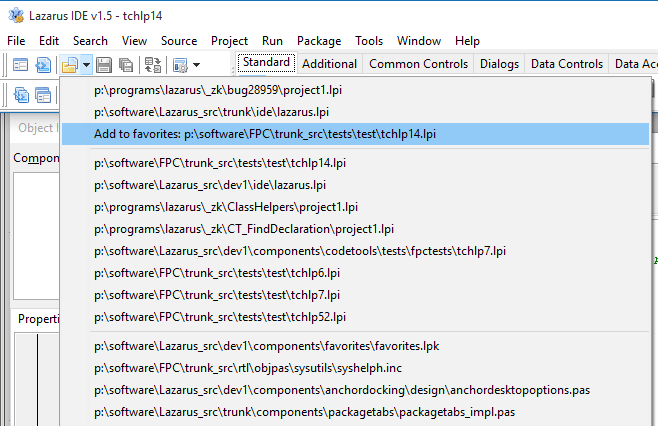 | |
| 21 | 18 | ||
| 22 | 19 | --- | |
| 23 | 20 | *From the Free Pascal wiki, page "Favorites", as it stood on 2016-01-20 after a change by FTurtle, out of the wiki's dump of 2024-05-26. Copyright stays with the author who wrote it, according to the old wiki's [[Licensing]] page. If you have concerns about this material, [message the admin](/wiki-contact).* | |
| 24 | 21 | Category: Lazarus | |
| 25 | 22 | Category: Lazarus IDE plugins | |
| 26 | 23 | Category: Packages |