

FPC Version Switcher
About
The FPC version switcher package integrates with the Lazarus IDE in order to allow easy switching of fpc versions.
Background
Actual compiler naming convention
The actual FPC compiler / cross-compiler is usually ppcxxx or ppcrossxxx where xxx denotes the cpu target.
For an i386 (32 bit) system:
- ppc386 is the actual compiler
- ppcrossx64 is the actual x86_64 cross compiler (produces 64 bit binaries)
- ppcrossarm is the actual arm cross compiler (produces arm binaries)
etc...
For an x86_64 (64 bit) system:
- ppcx64 is the actual compiler
- ppcross386 is the actual i386 cross compiler (produces 32 bit binaries)
- ppcrossarm is the actual arm cross compiler (produces arm binaries)
etc...
The fpc frontend executable
Rather than letting one guess the actual compiler name for a certain target cpu and call it directly, FPC provides the fpc front end executable, which takes care of calling the right actual compiler for the required target cpu. To do that, 3 things are needed:
- The OS should be able to locate the fpc executable by either:
- adding the fpc executable path to the environment PATH variable (eg export PATH=/usr/bin;$PATH) and just calling "fpc".
- providing a fully qualified path (eg /usr/bin/fpc).
- The fpc executable should be told what the target cpu is by using the -P<target_cpu> switch so that it can deduce by itself the actual compiler name.
- The fpc executable should be able to locate the actual compiler by either:
- adding the actual compiler (ppcxxx) path to the environment PATH variable (eg export PATH=/usr/lib/fpc;$PATH)
- calling fpc with the -Xp<ppcxxx_path> switch to inform it about the location of the actual compiler (eg: fpc -Xp/usr/lib/fpc)
Some users opt to create in one folder symlinks with the fpc version suffixed (eg ppc386-3.1.1), and pointing to the actual compilers. The -V<version> switch lets the fpc executable append <version> to the actual compiler name (eg fpc -V3.1.1 on a 386 system will look for ppc386-3.1.1).
To sum up, calling fpc can take different forms:
- fpc -P<cpu_target>
- /usr/bin/fpc -Xp/usr/lib/fpc -P<cpu_target>
- /usr/bin/fpc -Xp/usr/lib/fpc -V3.1.1 -P<cpu_target>
etc...
Checking fpc's mechanism
Processor name
The -PP switch just displays the processor name.
- On an i386 system (32 bit), the output of fpc -PP is i386
- On an x86_64 system (64 bit), the output of fpc -PP is x86_64
Actual compiler name name
The -PB switch will make fpc just display the actual compiler name for a target cpu.
On an i386 system (32 bit):
- fpc -PB will output ppc386 (default cpu target)
- fpc -Pi386 -PB will output ppc386
- fpc -Px86_64 -PB will output ppcrossx64
- fpc -Parm -PB will output ppcrossarm
etc...
On an x86_64 system (64 bit):
- fpc -PB will output ppcx64 (default cpu target)
- fpc -Px86_64 -PB will output ppcx64
- fpc -Pi386 -PB will output ppcross386
- fpc -Parm -PB will output ppcrossarm
etc...
One can even use it as follows:
<path_to_fpc_bin>/fpc -Xp<<path_to_fpc_lib> -V<fpc_version> -P<cpu_target> -PB
Compiler utilities
The actual compiler, once called, may need to locate some utilities. The path can be specified by either:
- Adding the compiler utilities path to the environment PATH variable (eg export PATH=/usr/local/bin/compiler_utilities;$PATH)
- Adding the -FD<compiler_utilities_path> switch to fpc.cfg (eg: -FD/usr/local/bin/compiler_utilities)
- Calling fpc with the -FD<compiler_utilities_path> switch (eg: fpc -FD/usr/local/bin/compiler_utilities)
Cross binutils
For cross compiling, the cross binutils (cross assembler, cross linker, ...) folder should be in the environment PATH variable.
FPC Version Switcher
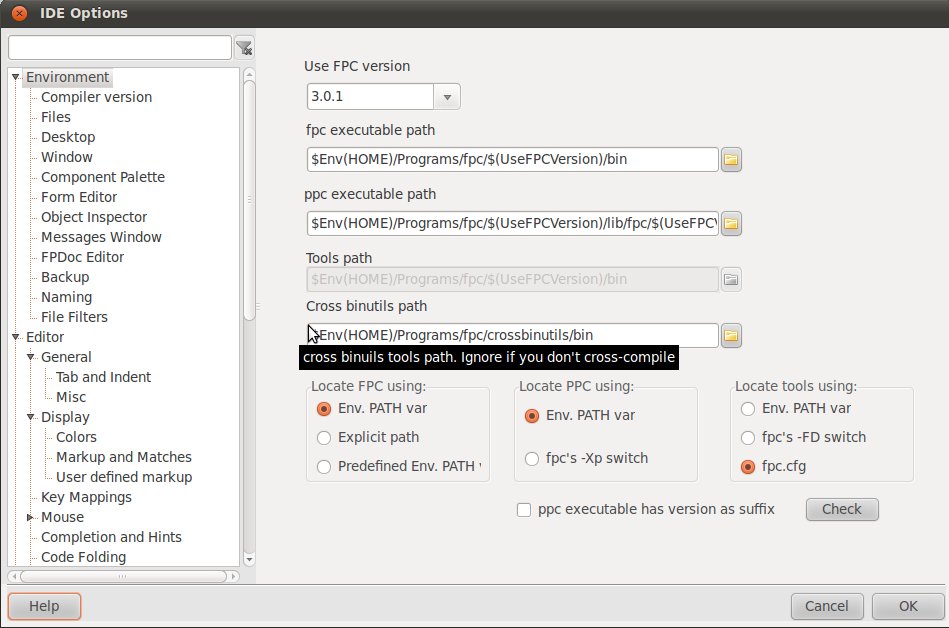
The FPC version switcher package allows tweaking all the above options and even providing a dropdown list in the IDE Tools/Options/Compiler Version in order to select the required fpc version, and set the $(UseFPCVersion) macro accordingly.
Now, if the installations of the different fpc versions differ only by the version number (eg /usr/lib/fpc/2.6.4 and /usr/lib/fpc/3.1.1), then one can specify paths based on that macro (eg /usr/lib/fpc/$(UseFPCVersion)). Moreover, any IDE macro other than $(FPCVER) and that doesn't depend on it can be used in the paths (eg $Env(HOME)/fpc/lib/$(UseFPCVersion)).
Pre-requisites
- Having multiple fpc versions installed
- Having a homogeneous directory structure (paths for different fpc versions should differ only by version number)
- Modifying all paths in fpc.cfg to depend on FPC's $FPCVERSION macro (where applicable)
- Not having fpc related paths in the environment PATH variable (except as outlined in #Setting the fpc frontend executable path)
- Having "fpc" as compiler executable in the IDE's Tools/Options/Files
Installation
Open fpcversionswitcher.lpk in the lazarus/components/fpcversionswitcher folder, compile and install it and restart the IDE. A new frame will be available in Tools/Options/Compiler Version.
FPC version selection
Enter or select the required FPC version using the dropdown list. This will set the $(UseFPCVersion) macro accordingly. Note that this macro is different from the IDE's $(FPCVER) macro.
Setting the fpc frontend executable path
Enter or locate the absolute path of the fpc frontend executable. You can use $(UseFPCVersion) and/or any IDE macro other than and doesn't depend on $(FPCVER).
Select how the IDE should locate the fpc frontend:
- By adding the path to the environment PATH variable
- By calling the fpc executable with a fully qualified path
- By doing nothing and assuming that the path has been predefined in the environment PATH variable
Setting the actual compiler executable path
Enter or locate the absolute path of the actual compiler executable. You can use $(UseFPCVersion) and/or any IDE macro other than and doesn't depend on $(FPCVER).
Select how the IDE should locate the actual compiler:
- By adding the path to the environment PATH variable
- By calling the fpc executable with the Xp switch and a fully qualified path
Setting the compiler utilities path
Enter or locate the absolute path of the compiler utilities. You can use $(UseFPCVersion) and any IDE macro other than and/or doesn't depend on $(FPCVER).
Select how the IDE should locate the actual compiler:
- By adding the path to the environment PATH variable
- By calling the fpc executable with the FD switch and a fully qualified path
- By doing nothing and assuming that the FD switch is used in fpc.cfg
Enabling the version suffix for the actual compiler
Check "ppc executable has suffix" if the actual compilers or symlinks pointing to them have the fpc version suffixed (eg ppc386-3.1.1)
Mechanism
- FPC Version Switcher modifies the environment PATH variable for settings that require it to do so
- FPC Version Switcher passes to the IDE a prefix (the fpc frontend path or empty) which the IDE should prepend to "fpc"
- FPC Version Switcher passes to the IDE a suffix (the -Xp, -FD, and -V switches if any) which the IDE should append to "fpc"
Verifying the settings
The check button will display:
- If the fpc frontend path should exist in the environment PATH variable before launching the IDE
- Which paths will be added to the environment PATH variable
- How the IDE should call the fpc frontend
Usage
To change the fpc version, it is enough to go to Tools/Options/Compiler version and select the required FPC version. You can then compile your projects or the IDE with that version.
Use cases with different fpc and ppc folders setups
For the sake of brevity, the fpc frontend executable folder and the actual compiler folder will be denoted as the bin and lib folders respectively,
Common bin folder and separate lib folders
- fpc executable path: /usr/local/bin
- ppcxxx executable path: /usr/local/lib/fpc/$(UseFPCVersion)
Separate bin folders and separate lib folders
- fpc executable path: $Env(HOME)/fpc/$(UseFPCVersion)/bin
- ppcxxx executable path: $Env(HOME)/fpc/$(UseFPCVersion)/lib/fpc/$(UseFPCVersion)
Common bin folder (fpc executable + ppcxxx-XYZ symlinks) and separate lib folders using symlinks /usr/local/bin/ppcxxx-$(UseFPCVersion) -> /usr/local/lib/fpc/$(UseFPCVersion)/ppcxxx
- fpc executable path: /usr/local/bin
- ppcxxx executable path: /usr/local/bin
- ppc executable has suffix: Yes
Known issues
This is a work in progress and therefore not all options are functional. What needs to be completed is the prefix/suffix link between FPC Version Switcher and the IDE. Therefore options that pass paths or switches to the IDE should not be used for now.
Wishlist
- To have a dropdown button next to the Run button so that switching FPC versions is done without even going into Tools/Options
- To have separate FPC versions for projects and the IDE
From the Free Pascal wiki, page "FPC Version Switcher", as it stood on 2015-02-27 after a change by Stephano, out of the wiki's dump of 2024-05-26. Copyright stays with the author who wrote it, according to the old wiki's Licensing page. If you have concerns about this material, message the admin.
Talk about this page
Nobody has opened a bench for this page yet. Sign in to open one.