

Edit context help for the IDE windows
- Open an IDE dialog (in the running IDE, not in the designer)
- Focus a control that should get help. To setup the context help of a groupbox, frame, focus one of its childs.
- Press
Ctrl+Shift+F1
Example
- open the options dialog
- select the frame Editor / Mouse
- focus the tree on the frame
- press
Ctrl+Shift+F1to open the dialog:
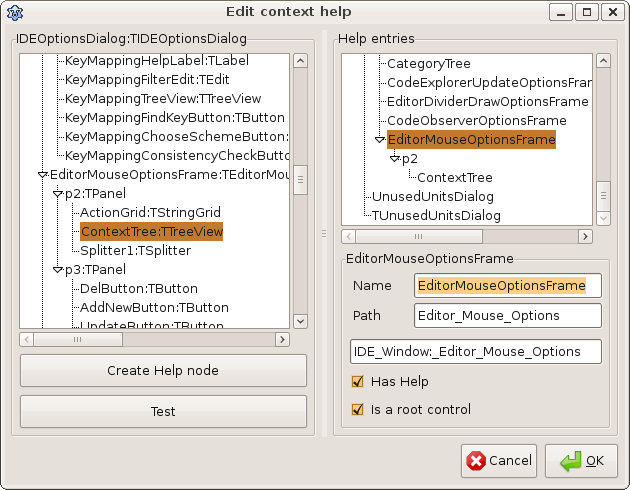
The left tree shows all components of the current dialog. They are just for orientation. The right tree shows all existing help nodes. You will notice that they have the same names as the dialog or some controls on a dialog
The deepest help node wins.
The focused control - in this example the ContextTree is selected on both tree.
- to create the help for the whole frame, select on the right tree the EditorMouseOptionsFrame as shown in the screen shot above.
- check Has Help
- because EditorMouseOptionsFrame has a wiki page of its own, check 'Is a root control'. This will shorten the text in the third field.
- change the Path to Editor_Mouse_Options as shown in the screen shot above.
- focus the Name. You will notice that the text field has changed to IDE_Window:_Editor_Mouse_Options
- Now click on the Test button on the left side.
- the IDE will open the URL: http://wiki.lazarus.freepascal.org/IDE_Window:_Editor_Mouse_Options
- click Ok to save the changes. This will alter the file docs/IDEWindowHelpTree.xml.
- commit your changes
From the Free Pascal wiki, page "Edit context help for the IDE windows", as it stood on 2020-08-22 after a change by Trev, out of the wiki's dump of 2024-05-26. Copyright stays with the author who wrote it, according to the old wiki's Licensing page. If you have concerns about this material, message the admin.
Edited on wiki.freepascal.org by 4 people, 2009–2020
From the official wiki's backup of 26 May 2024: who edited this page there, and when. Edits made there after that date were not recorded, and the earlier versions are not shown here; the main page says why.
| When | Who | What changed |
|---|---|---|
| Mattias2 | New page: *Open a IDE dialog *Focus a control that should get help. To setup the context help of a groupbox, frame, focus one of its childs. *Press Ctrl+Shift+F1 | |
| Mattias2 | ||
| Mattias2 | ||
| Mattias2 | ||
| Chronos | ||
| FTurtle | ||
| Trev | Add categories (minor) |
Talk about this page
Nobody has opened a bench for this page yet. Sign in to open one.