

DualLaz: what changed
Revision 3 to 4. Removed lines have a minus sign; added lines have a plus sign.
| Old | New | Line | |
|---|---|---|---|
| 1 | 1 | ## long story short | |
| 2 | 2 | ||
| 3 | 3 | fpcUP*deluxe* = [[fpcupdeluxe]] is the newest alternative among GUI installers and pretty convenient, fpcGUI is older and less powerful. | |
| 4 | 4 | ||
| 5 | 5 | setup fpcGUI like in pic below (possibly make your alterations) and hit run button. Should all work like a charm. | |
| 6 | 6 | ||
| 7 | 7 | ## Two simultaneous Lazarus copies operational in Linux 64 bit | |
| 8 | 8 | ||
| 9 | 9 | Typically, you have a primary install via fpcUP in ~/development.\ | |
| 10 | 10 | But you also want a secondary test version in /workdir/LazCC or somewhere independently, possibly for release testing of Lazarus ver. 1.4\ | |
| 11 | 11 | Windows users, see [[Multiple Lazarus]] install info. | |
| 12 | 12 | ||
| 13 | 13 | Here is a run-through to achieve that. Let's assume: | |
| 14 | 14 | ||
| 15 | 15 | - We use the Linux distro: mint 17.1 KDE 64 bit of 2015 (Kubuntu should work too, I guess) | |
| 16 | 16 | - **primary** Lazarus resides in **/home/you/development** installed via fpcUP | |
| 17 | 17 | - **secondary** Lazarus will reside at **/workDIR/LazCC** | |
| 18 | 18 | - no other Lazarus installed via a debian-package installer or whatever, which could interfere somehow (e.g. /usr/local/lib/fpc - so we delete it ) | |
| 19 | 19 | - /home/you below refers to your ~ aka home-directory aka \$HOME aka /home/michael or whatever name you chose. | |
| 20 | 20 | ||
| 21 | 21 | By default, Lazarus uses *~/development/config_lazarus/* as the **primary-config-path**\ | |
| 22 | 22 | We will override that in the second script: | |
| 23 | 23 | ||
| 24 | 24 | In ~ create two shell scripts : runL1.sh and runL2.sh containing | |
| 25 | 25 | ||
| 26 | - | ||
| 27 | - | ||
| 26 | + | ```text | |
| 27 | + | #!/bin/sh | |
| 28 | + | /home/you/development/lazarus/startlazarus --primary-config-path=/home/you/development/config_lazarus | |
| 29 | + | ``` | |
| 28 | 30 | ||
| 29 | 31 | and | |
| 30 | 32 | ||
| 31 | - | ||
| 32 | - | ||
| 33 | + | ```text | |
| 34 | + | #!/bin/sh | |
| 35 | + | /workDIR/LazCC/laz/startlazarus --primary-config-path=/workDIR/LazCC/pcp4fup | |
| 36 | + | ``` | |
| 33 | 37 | ||
| 34 | 38 | respectively. Use an explorer like dolphin etc. or type sth. like sudo mkdir /workDIR/LazB and chown to make it accessible to you as a non-root user. | |
| 35 | 39 | ||
| 36 | 40 | Upon executing **runL1.sh** the "Configure Lazarus IDE" screen (pic below) pops up in case that your pcp-dir is new or emptied (i.e. for alternative settings set). In such case we choose | |
| 37 | 41 | ||
| 38 | - | ||
| 42 | + | ```text | |
| 43 | + | /home/you/development/fpc/bin/x86_64-linux/fpc.sh | |
| 44 | + | ``` | |
| 39 | 45 | ||
| 40 | 46 | as the **compiler**. Do not choose | |
| 41 | 47 | ||
| 42 | - | ||
| 48 | + | ```text | |
| 49 | + | /home/you/development/fpc/bin/x86_64-linux/fpc | |
| 50 | + | ``` | |
| 43 | 51 | ||
| 44 | 52 | because it will give you run time errors aplenty (system.ppu not found etc.). | |
| 45 | 53 | ||
| 46 | 54 | fpc.sh contains | |
| 47 | 55 | ||
| 48 | - | ||
| 49 | - | ||
| 50 | - | ||
| 51 | - | ||
| 52 | - | ||
| 56 | + | ```text | |
| 57 | + | #!/bin/sh | |
| 58 | + | # This script starts the fpc compiler installed by fpcup | |
| 59 | + | # and ignores any system-wide fpc.cfg files | |
| 60 | + | # Note: maintained by fpcup; do not edit directly, your edits will be lost. | |
| 61 | + | /home/you/development/fpc/bin/x86_64-linux/fpc -n @/home/you/development/fpc/bin/x86_64-linux/fpc.cfg "$@" | |
| 62 | + | ``` | |
| 53 | 63 | ||
| 54 | 64 | and will obviously be path-adapted for the secondary Lazarus. This is done automatically by fpcUP. We'll run it via fpcupGUI, which is contained in the source zip-archive of fpcUP. Compile and run it with a prior Lazarus install you made. The settings below will keep fpcUP from using undesired fallback-paths and instruct it to put it where we want, i.e. the subdirectory **/workDIR/LazCC** which takes 7 minutes roundabout | |
| 55 | 65 | ||
| 56 | 66 | 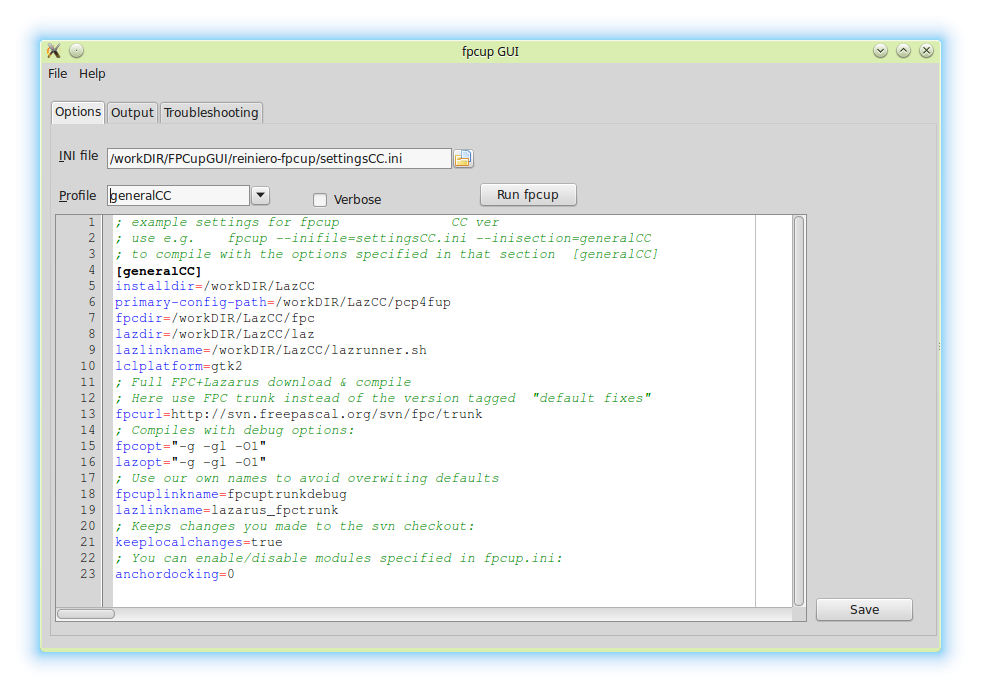 | |
| 57 | 67 | ||
| 58 | 68 | upon running abovementioned **runL2.sh** we should complete the path setup\ | |
| 59 | 69 | in the popup window 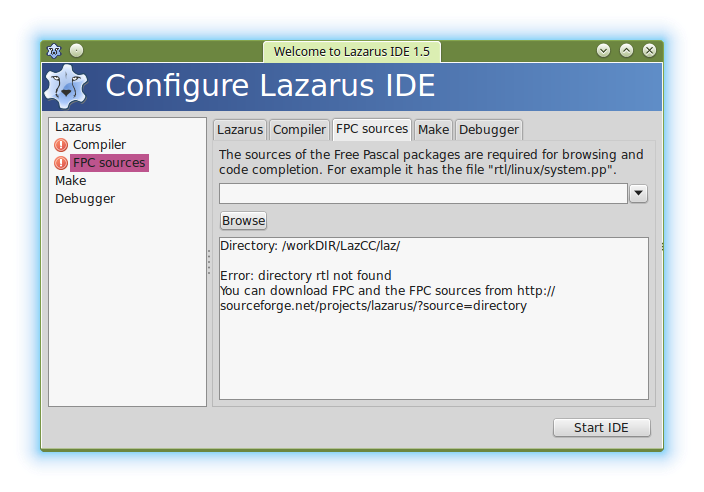 | |
| 60 | 70 | ||
| 61 | 71 | according to this pic: 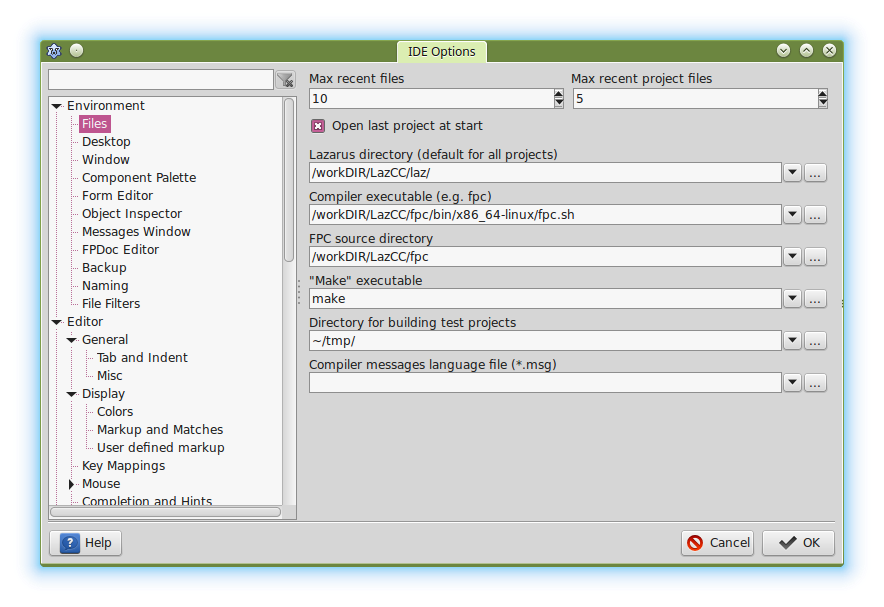 | |
| 62 | 72 | ||
| 63 | 73 | ... and we're done. We have 2 independent Lazarusses on disk ! Now you can repeat the routine n times with new paths, if you so desire. | |
| 64 | 74 | ||
| 65 | 75 | The option **lazlinkname=lazarus_fpctrunk** actually produced a link on the desktop named | |
| 66 | 76 | ||
| 67 | - | ||
| 77 | + | ```text | |
| 78 | + | /home/you/Desktop/fpcup-lazarus_fpctrunk.desktop (i.e. not in /workDIR because the option was used twice, the latter being effective) executing | |
| 79 | + | ``` | |
| 68 | 80 | ||
| 69 | - | ||
| 81 | + | ```text | |
| 82 | + | /workDIR/LazCC/laz/lazarus --pcp="/workDIR/LazCC/pcp4fup" | |
| 83 | + | ``` | |
| 70 | 84 | ||
| 71 | 85 | which is OK. We don't necessarily need our above runL2.sh and can use the desktop link instead. | |
| 72 | 86 | ||
| 73 | 87 | ------------------------------------------------------------------------ | |
| 74 | 88 | ||
| 75 | 89 | for copying, here is the settingsCC.ini: | |
| 76 | 90 | ||
| 77 | - | ||
| 78 | - | ||
| 79 | - | ||
| 80 | - | ||
| 81 | - | ||
| 82 | - | ||
| 83 | - | ||
| 84 | - | ||
| 85 | - | ||
| 86 | - | ||
| 87 | - | ||
| 88 | - | ||
| 89 | - | ||
| 90 | - | ||
| 91 | - | ||
| 92 | - | ||
| 93 | - | ||
| 94 | - | ||
| 95 | - | ||
| 96 | - | ||
| 97 | - | ||
| 98 | - | ||
| 99 | - | ||
| 100 | - | ||
| 91 | + | ```text | |
| 92 | + | ; settings for fpcup CC ver | |
| 93 | + | ; use e.g. fpcup --inifile=settingsCC.ini --inisection=generalCC | |
| 94 | + | ; to compile with the options specified in that section [generalCC] | |
| 95 | + | [generalCC] | |
| 96 | + | installdir=/workDIR/LazCC | |
| 97 | + | primary-config-path=/workDIR/LazCC/pcp4fup | |
| 98 | + | fpcdir=/workDIR/LazCC/fpc | |
| 99 | + | lazdir=/workDIR/LazCC/laz | |
| 100 | + | lazlinkname=run-lazCC | |
| 101 | + | ;lazlinkname=lazarus_fpctrunk - just the name of the Desktop link | |
| 102 | + | ;lazlinkname=/workDIR/LazCC/lazrunner.sh | |
| 103 | + | lclplatform=gtk2 | |
| 104 | + | ; Full FPC+Lazarus download & compile | |
| 105 | + | ; Here use FPC trunk instead of the version tagged "default fixes" | |
| 106 | + | fpcurl=http://svn.freepascal.org/svn/fpc/trunk | |
| 107 | + | ; Compiles with debug options: | |
| 108 | + | fpcopt="-g -gl -O1" | |
| 109 | + | lazopt="-g -gl -O1" | |
| 110 | + | ; Use our own names to avoid the default values | |
| 111 | + | fpcuplinkname=fpcuptrunkdebug | |
| 112 | + | ; Keeps changes you made to the svn checkout: | |
| 113 | + | keeplocalchanges=true | |
| 114 | + | ; You can enable/disable modules specified in fpcup.ini: | |
| 115 | + | anchordocking=0 | |
| 116 | + | ``` | |
| 101 | 117 | ||
| 102 | 118 | --- | |
| 103 | 119 | *From the Free Pascal wiki, page "DualLaz", as it stood on 2017-10-17 after a change by Mai, out of the wiki's dump of 2024-05-26. Copyright stays with the author who wrote it, according to the old wiki's [[Licensing]] page. If you have concerns about this material, [message the admin](/wiki-contact).* | |
| 104 | 120 | Category: Install | |
| 105 | 121 | Category: Lazarus |